
Best Amazon Listing Audit Tool: See 5 Specific Fixes in 60 Seconds

Many Amazon sellers find their products stuck beyond page one, uncertain why customers are not converting. According to Jungle Scout’s State of the Seller Report, 68% of all clicks on Amazon happen on the first page, making visibility paramount. Without a clear, data-driven path to optimization, even a high-quality product can fail to gain the necessary traction to succeed in a crowded marketplace.
TL;DR: What This Amazon Listing Audit Tool Delivers
- Most audit tools provide vague scores (e.g., 67/100) without clear, actionable steps.
- Effective audits must analyze keyword coverage, policy compliance, and readability.
- Specific recommendations (“Add ‘stainless steel’ to title”) are more valuable than generic advice.
- The TFSD Framework (Title, Features, Search Terms, Description) helps optimize all critical listing elements.
- Keywords.am provides a detailed fix-list in under 60 seconds across 21 Amazon marketplaces.
- Auditing competitor ASINs can uncover their keyword strategies and weaknesses.
- AI integration can explain the “why” behind audit recommendations.
Why Are Vague Listing Scores a Problem?
Vague listing scores are a problem because they identify an issue without providing a solution, leaving sellers to guess at the required changes. An alert that a title “needs improvement” isn’t actionable, wasting time as sellers experiment with changes. Research shows that 73% of optimization efforts fail when sellers lack specific guidance on what to fix.
This guesswork is particularly damaging because Amazon’s A10 algorithm prioritizes relevance and buyer intent. If a listing is missing critical keywords or fails to address customer needs, its visibility suffers. Generic audit tools often miss these nuanced issues, leaving deeper problems like keyword gaps, compliance violations, and poor readability unaddressed. For more on this, see our Amazon Listing Optimization guide.
What Does a Keywords.am Listing Audit Reveal?
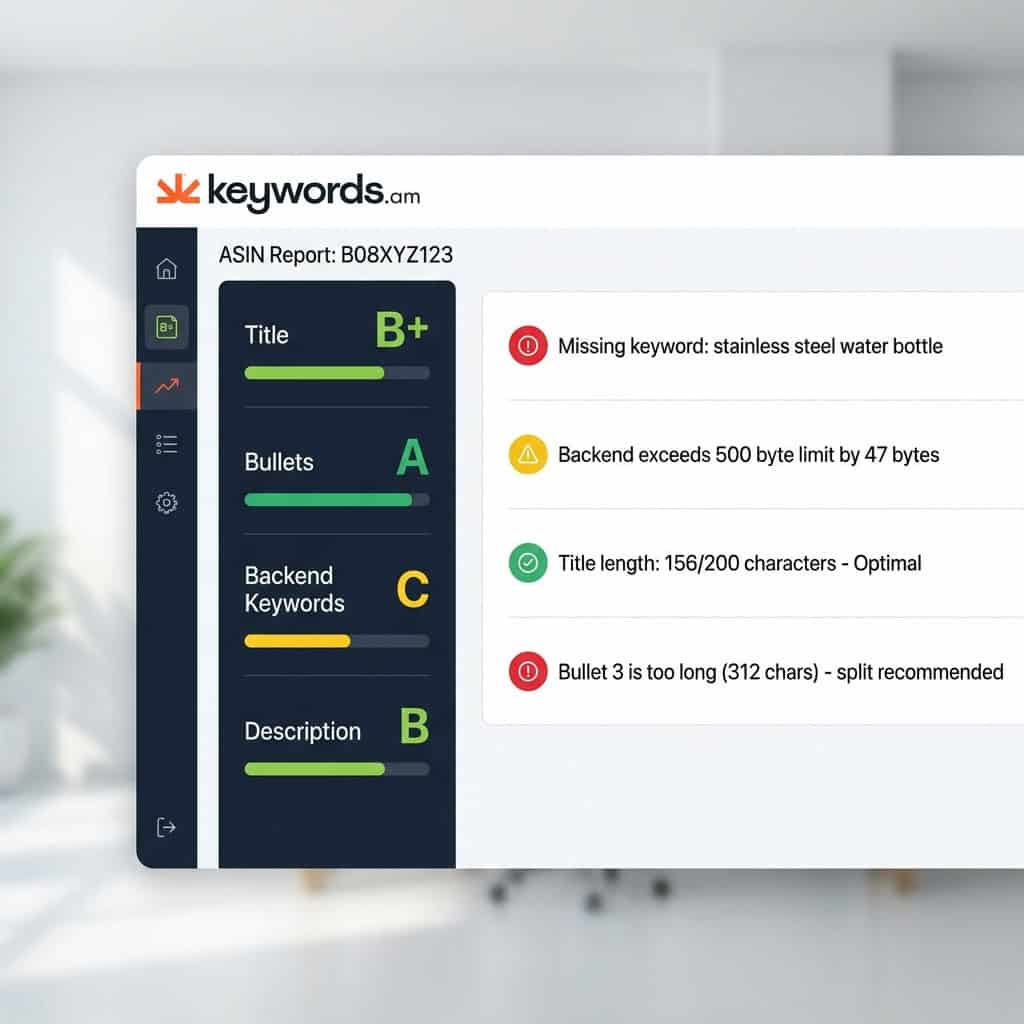
A Keywords.am listing audit reveals a prioritized list of specific, actionable fixes for a product’s title, bullet points, backend keywords, and images. It moves beyond generic grades to provide concrete recommendations that sellers can implement immediately.
The audit focuses on four key areas:
1. Keyword Coverage Analysis: Identifies high-intent keywords that competitors rank for but are missing from the listing. It also flags poorly positioned or duplicate keywords.
2. Compliance & Policy Checks: Includes automated checks for common issues like title length violations (character and byte limits), restricted phrases, and backend search terms exceeding limits.
3. Readability & Conversion Scoring: Assesses the copy’s effectiveness based on bullet point length, benefit-driven language, description structure, and image count.
4. Specific Fix Recommendations: Provides concrete steps instead of vague advice. Examples include:
– “Add ‘stainless steel’ to your title – competitors ranking for this term.”
– “Your backend search terms exceed the JP marketplace byte limit by 47 bytes.”
– “Bullet point 3 is 312 characters; consider splitting it for readability.”
This empowers sellers to move directly from analysis to optimization.
How Does This Tool Compare to Other Amazon Analyzers?
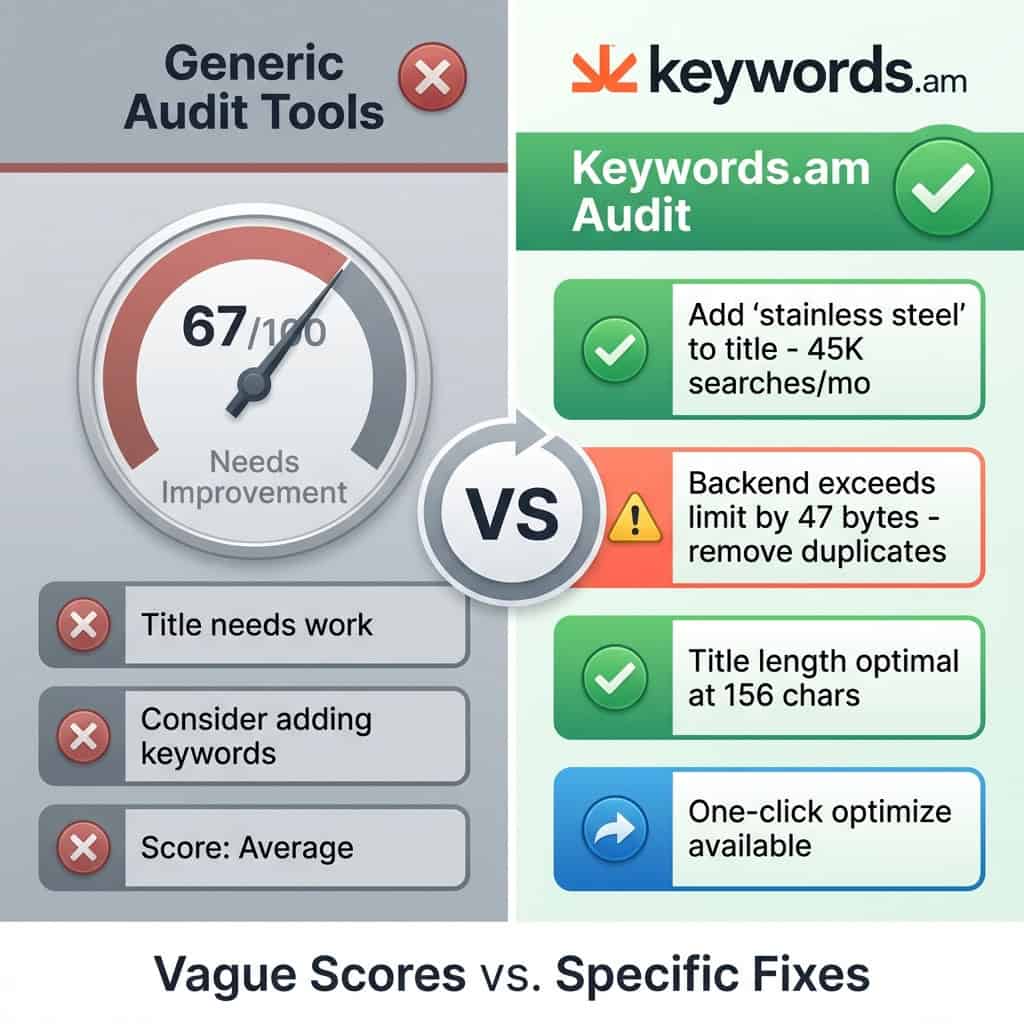
This tool compares favorably by focusing on actionable recommendations, not just performance scores. While many platforms offer a dashboard with grades, the Keywords.am audit generates a specific list of fixes, bridging the gap between data and action.
Many tools offer a “visibility score” that fails to guide a seller’s next steps. The key differentiator is the ability to translate a score into a concrete action plan.
Feature |
Keywords.am |
Common Alternatives (e.g., SellerApp, Trellis) |
|---|---|---|
Primary Output |
Actionable “fix-list” |
Vague quality score (e.g., 67/100) |
Keyword Analysis |
Surfaces specific, missing keywords |
General keyword performance metrics |
Recommendations |
Concrete instructions (e.g., “Add ‘X’ to title”) |
Generic advice (e.g., “Improve title”) |
Workflow |
One-click path from audit to optimized draft |
Requires manual interpretation and tools |
Focus |
Specificity and immediate action |
Dashboard monitoring and general insights |
This makes it a powerful Amazon listing checker for sellers who want to spend less time guessing and more time implementing proven strategies.
How to Get Your Amazon Listing Audit in 60 Seconds
Get a complete Amazon listing audit in four simple steps in under a minute. The process is designed to be fast and frictionless, allowing sellers to move from evaluation to optimization without needing an account for a basic report.
- Enter ASIN: Paste any Amazon product ASIN into the tool. This can be one of your own products for a direct evaluation or a competitor’s listing to analyze their strategy. The tool fetches the listing data directly from Amazon.
- Get Instant Report: The system’s algorithm analyzes the listing in real-time. It cross-references the content against millions of data points, including top-ranking keywords, category-specific compliance rules, and competitor benchmarks, generating a full report in about 60 seconds.
- Review Recommendations: The report presents a prioritized list of fixes. It highlights critical errors that could lead to suppression first, followed by high-impact keyword opportunities and smaller conversion-focused tweaks, allowing you to focus on what matters most.
- One-Click Optimize: For subscribers, the audit tool integrates directly with a listing optimizer. This allows you to turn the audit findings into a newly optimized listing draft automatically, streamlining the entire content update workflow.
Can AI Help Explain Your Listing Audit?
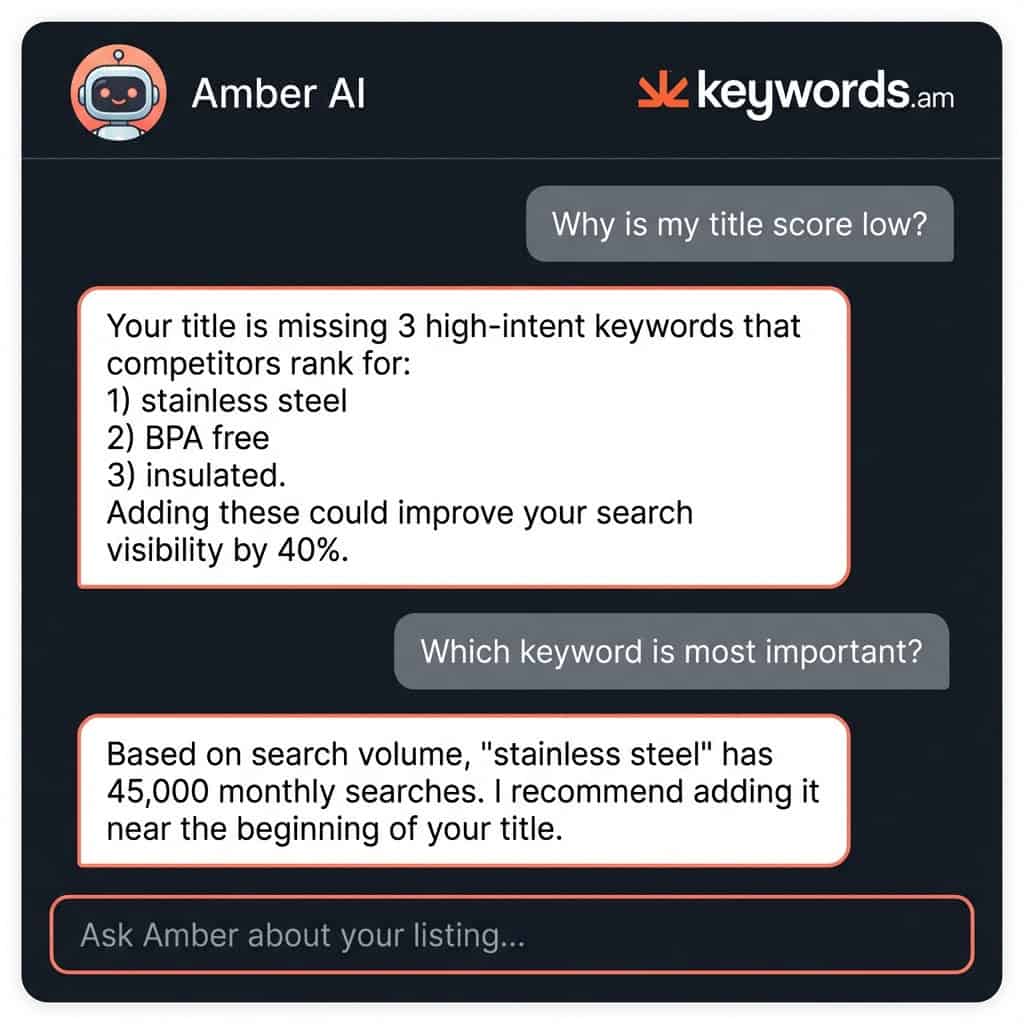
Yes, AI can provide contextual explanations for every recommendation, helping you understand the reasoning behind each fix. Keywords.am integrates an AI assistant, Amber, directly into every audit report, allowing sellers to ask questions tailored to their specific listing.
Instead of relying on generic documentation, sellers can ask Amber questions like:
– “Why is my title score low?”
– “What are the most important keywords I am missing?”
– “How do I fix my backend search terms?”
Amber AI provides answers based on your listing’s data, transforming the audit from a static report into an interactive learning experience.
What is the TFSD Framework?
The TFSD Framework is a systematic methodology for Amazon listing optimization. The acronym TFSD stands for Title, Features (Bullet Points), Search Terms, and Description, ensuring all critical components are structured for maximum visibility and conversion. Each part has a specific role in how Amazon’s algorithm and customers see your product.
- T (Title): This is the most heavily weighted field for keyword relevance in Amazon’s A10 algorithm. It must contain your most important, high-volume keywords while also being readable and compelling to encourage clicks from the search results page.
- F (Features): The five bullet points are critical for both keyword indexing and conversion. This section should be written as benefit-driven copy that answers common customer questions and organically incorporates secondary keywords that didn’t fit in the title.
- S (Search Terms): This backend field is invisible to customers but is indexed by Amazon. It’s the ideal place to put keyword variations, synonyms, and long-tail phrases that you couldn’t fit naturally into your frontend copy.
- D (Description): For sellers with access to A+ Content, the product description is a key conversion tool. While its impact on keyword indexing is less than the title or bullets, it provides an opportunity to use rich media and branded storytelling to convince a shopper to buy.
Every Keywords.am audit grades a listing against TFSD best practices. Learn more in the complete guide to the TFSD Framework.
How Reliable is the Listing Quality Checker?
The listing quality checker is highly reliable, with analysis grounded in data from over 21 million ASINs across 21 Amazon marketplaces. Its recommendations are based on Amazon’s guidelines and extensive real-world performance data.
The trust signals for the tool are clear:
– 21M+ ASINs Analyzed: A deep dataset provides the foundation for accurate recommendations.
– 21 Marketplaces Supported: The tool understands unique compliance rules for each international marketplace.
– 60-Second Analysis: Complete audit reports generated in under a minute.
– A+ to F Grading Scale: An intuitive grading system provides an instant understanding of a listing’s health.
As one seller noted, “Keywords.am’s audit told me exactly what was wrong… Other tools just gave me a score. This one gave me a fix list.”
Get Your Free, Actionable Audit Report
Stop guessing why your listings are underperforming. Vague scores lead to wasted time and missed opportunities. An effective Amazon presence requires a clear understanding of what’s broken and exactly how to fix it.
– Audit Your Listing Free →
– See exactly what’s wrong in 60 seconds. No credit card required.
– Audit Multiple ASINs →
– For agencies and brands: Run audits on your entire catalog.




