

📑 Table of Contents
- What Is Amazon Listing Suppression and Why Does It Happen?
- What Are the Most Common Causes of Amazon Listing Suppression?
- How Do You Find Suppressed Listings in Seller Central?
- How Do You Fix a Suppressed Amazon Listing Step by Step?
- How Can You Prevent Amazon Listing Suppression Before It Happens?
- When Should You Contact Seller Support About a Suppressed Listing?
- Frequently Asked Questions About Amazon Listing Suppression
- Conclusion
One Amazon seller recently reported a staggering discovery on the Seller Forums: over 800 of their listings had been suppressed, resulting in an estimated loss of $50,000 to $55,000 in annual sales. Perhaps the most alarming part of this revelation was not the financial loss itself, but the fact that the suppression had gone unnoticed for weeks. This incident highlights a pervasive reality in the marketplace: listings can disappear silently, and the revenue impact is often realized only after substantial damage has been done.
In 2026, Amazon’s automated enforcement mechanisms have evolved significantly. The platform now employs advanced AI to scan every listing continuously, meaning that even minor compliance gaps can trigger immediate suppression without warning. The days of “set it and forget it” are effectively over; a listing that was compliant yesterday may be flagged today due to a shift in algorithmic enforcement or a subtle policy update.
This guide provides a comprehensive roadmap for navigating these challenges. It covers every specific type of suppression, details the exact navigation paths within Seller Central to identify suppressed listings, and offers step-by-step instructions for resolving the most common violations. Beyond immediate fixes, the discussion explores a prevention-first methodology designed to eliminate suppression risks before they manifest. While many resources focus on reactive troubleshooting, this article demonstrates how structured listing optimization ensures permanent compliance from the start.
What Is Amazon Listing Suppression and Why Does It Happen?
Amazon listing suppression occurs when Amazon hides a product from search results due to policy violations, missing information, or compliance failures.
The listing still exists in your inventory but is invisible to shoppers.
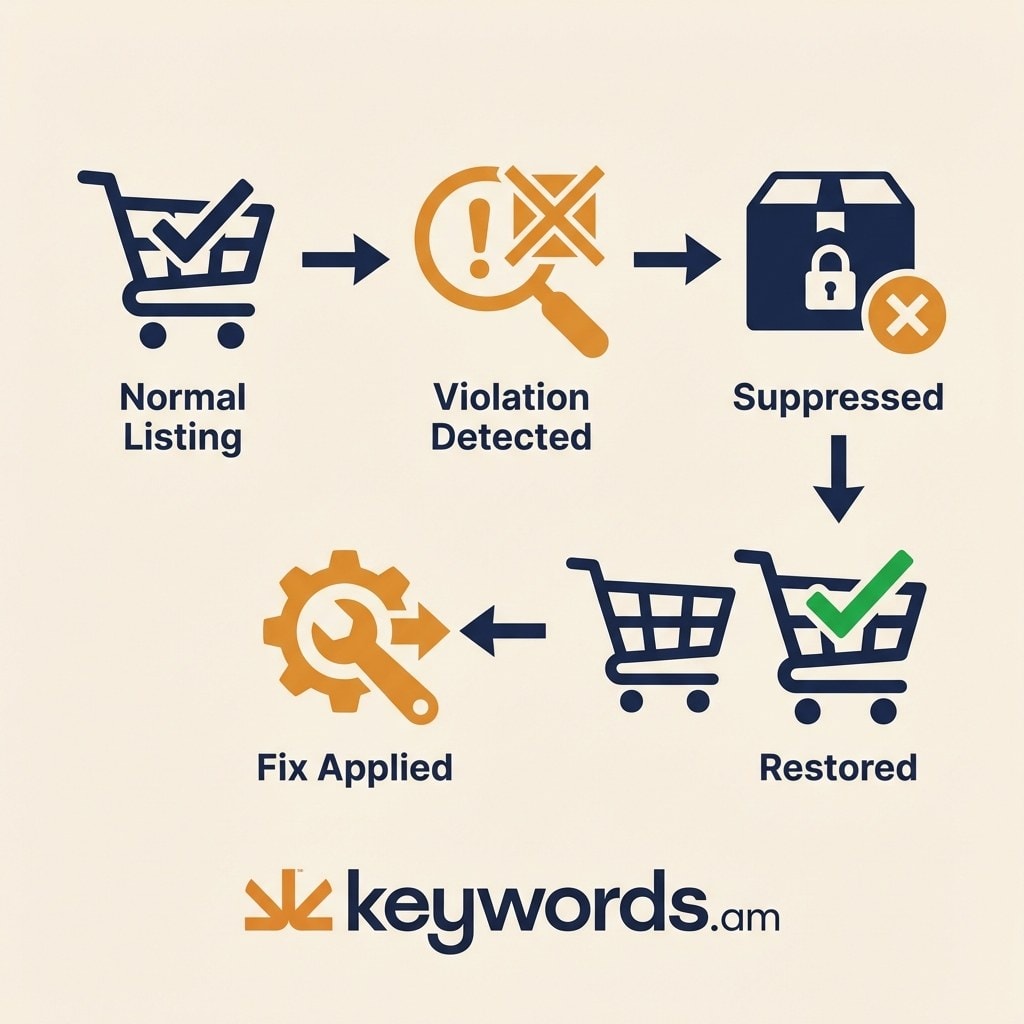
Suppression creates a situation where a product is technically available for purchase if a customer has the direct link, but it is effectively dead to the marketplace because it cannot be discovered through search or category browsing. Sellers often confuse suppression with other forms of enforcement, such as deactivation or “yanking,” but the distinctions are critical for determining the correct resolution path.
Understanding the specific status of a problem listing is the first step toward recovery. There are four primary status types that sellers encounter, each carrying different implications for the account and the inventory.
Table 1: Suppression Status Types
|
Status |
What Happens |
Severity |
Resolution Path |
|---|---|---|---|
|
Search Suppressed |
Hidden from search, accessible via direct URL |
Moderate |
Edit listing to fix flagged issues |
|
Inactive (Blocked) |
Fully deactivated, product restricted or unauthorized |
High |
May require category approval or appeal |
|
Inactive (Out of Stock) |
Not a policy issue, inventory depleted |
Low |
Restock inventory |
|
Yanked |
Completely removed, serious policy violation |
Severe |
Formal appeal with Plan of Action |
The scale of this issue is significant. Research indicates that 53% of Amazon sellers have faced listing compliance problems at some point in their selling journey. Industry estimates suggest that at any given time, between 1% and 5% of a typical seller’s catalog may be suppressed. For a seller with thousands of ASINs, this percentage represents a substantial volume of silent revenue loss.
The reason suppression has become more frequent lies in Amazon’s shift toward continuous automated monitoring. In 2025 and continuing into 2026, the platform moved away from periodic checks to a model of constant AI scanning. Listings are no longer reviewed only upon creation or update; they are monitored in real-time against an ever-expanding set of compliance rules. This means that legacy listings, which may have been untouched for years, are now subject to the same rigorous standards as new products, often leading to sudden and unexplained suppression.
What Are the Most Common Causes of Amazon Listing Suppression?
The most common causes are image non-compliance, missing required product attributes, title formatting violations, and pricing policy breaches. Image issues alone account for the largest share of suppressions.
When analyzing why listings get suppressed, the data points to a few specific areas where sellers frequently miss the mark. Understanding these common pitfalls allows for more targeted troubleshooting and faster resolution.
Title Violations
Product titles are the most heavily weighted factor for search, but they are also subject to strict formatting rules. A title that exceeds the character limit, typically 80 characters for apparel and 130 to 200 characters for most other categories, is a primary trigger for suppression. Beyond length, Amazon’s algorithms flag titles that use ALL CAPS, include promotional language such as “Best Seller” or “Free Shipping,” or engage in blatant keyword stuffing. These practices, once common tactics for visibility, are now direct pathways to suppression. For detailed specifics on length restrictions, referring to an Amazon character limits guide is essential for compliance.
Image Violations
Images are critical for conversion, and Amazon enforces their quality standards rigorously. The most frequent violation involves the main image. Requirements mandate a minimum size of 1,000 x 1,000 pixels to enable the zoom function, a pure white background (RGB 255, 255, 255), and the product must fill at least 85% of the frame. Violations such as text overlays, watermarks, or non-white backgrounds are detected automatically by image recognition software.
Table 2: Amazon Main Image Requirements
|
Requirement |
Specification |
|---|---|
|
Minimum pixels |
1,000 x 1,000 px (enables zoom) |
|
Recommended |
2,000+ px on longest side |
|
Background |
Pure white (RGB 255, 255, 255) |
|
Product fill |
At least 85% of frame |
|
Format |
JPEG, PNG, TIFF, or GIF |
|
Prohibited |
Text overlays, watermarks, logos, props, colored backgrounds |
Missing Required Attributes
As Amazon attempts to standardize data across its massive catalog, it has introduced numerous category-specific fields that are mandatory for listing visibility. These requirements often catch sellers off guard. For example, jewelry listings may be suppressed for missing “gem type” or “metal type” data. Apparel listings frequently face suppression if they lack a compliant size chart or standardized size attributes. Consumables and grocery items often require “price-per-unit” information. If these fields are left blank, the listing is automatically suppressed until the data is provided.
Pricing Violations
Amazon’s Fair Pricing Policy is another automated trigger. The system flags listings where the price is deemed artificially high compared to recent sales history or external benchmarks. Similarly, misleading reference pricing (setting an inflated “List Price” to show a fake discount) or drastic, sudden price jumps can cause immediate suppression. While Amazon does not publish specific thresholds, the enforcement is based on relative comparisons within the category and the product’s own history.
Other Causes
While less common, other factors can lead to suppression. Duplicate listings created to dominate search results are quickly flagged. Products that are misclassified into incorrect categories to bypass fees or restrictions will also be suppressed. Additionally, valid customer complaints regarding product condition, such as receiving a used item sold as new, can trigger a suppression event while Amazon investigates the inventory.
For formatting other listing elements like bullet points, adhering to an Amazon bullet points guide ensures that descriptive text remains compliant and does not trigger content-based suppression.
How Do You Find Suppressed Listings in Seller Central?
Navigate to Seller Central > Inventory > Manage Inventory and click “Suppressed,” or use the “Fix Your Products” page under Listing Tools to view all suppressed and at-risk listings.
For many sellers, the frustration lies not just in the suppression itself but in locating the affected listings within Amazon’s complex interface. There are specific pathways designed to surface these issues.
The primary method for identifying suppressed inventory is through the “Manage Inventory” dashboard.
1. Log in to Seller Central.
2. Navigate to the Inventory tab and select Manage Inventory.
3. Look for a “Suppressed” button in the top navigation bar, typically located next to “Active” and “Inactive” filters.
4. Note that this “Suppressed” button only appears if you currently have suppressed listings. If the button is missing, it generally means there are no active search suppressions, though other issues may still exist.
A more comprehensive view is available through the “Fix Your Products” page. This tool is found under the Inventory menu (sometimes labeled as “Listing Tools” depending on the account version). This dashboard categorizes listings into groups such as “Completed with Issues” and “Incomplete Listings.”
* Completed with Issues: These are listings that are active but have compliance warnings or missing non-critical data.
* Incomplete Listings: These are often fully suppressed or inactive because critical data is missing.
Checking both tabs provides a full picture of inventory health.
Alternative access points offer different perspectives on listing issues. The Account Health Dashboard (found under Performance > Account Health) highlights serious policy violations that might lead to suppression or account suspension. The Listing Quality Dashboard (found under Inventory > Improve Listing Quality) focuses on optimization opportunities. While the Listing Quality Dashboard often suggests improvements for sales rather than strict compliance fixes, it effectively sorts recommendations by potential pageview impact, helping sellers prioritize which listings to address first.
Amazon’s official Suppressed Listings help page provides additional context on how the platform categorizes and resolves these issues.
To avoid being blindsided by suppression, sellers should utilize Amazon’s automatic alert system. By navigating to Settings > Notification Preferences, sellers can enable “Listing Quality and Suppression” alerts. This feature sends an email notification when a listing is flagged, allowing for a faster response time than manually checking the dashboard.
How Do You Fix a Suppressed Amazon Listing Step by Step?
Fix suppressed listings by identifying the violation in Seller Central, then correct specific issues like non-compliant images, title length errors, or missing product attributes to restore visibility.
Once a suppressed listing has been identified, the resolution process involves specific corrective actions tailored to the violation. Speed is often a factor, but precision is more important to prevent the fix from being rejected.
Step 1: Identify the Violation
Begin by clicking on the suppressed listing within the “Fix Your Products” or “Manage Inventory” page. Amazon will display a specific error message or highlight the field that requires attention. These messages can sometimes be vague; for instance, “Quality Alert” or “Image Non-Compliant.” Interpret these broadly; if an image is flagged, check all aspect ratio, background, and pixel dimension requirements, not just one.
Step 2: Fix Title Violations
If the suppression is due to a title violation, the immediate goal is to bring the text within category guidelines.
* Trim the length: Ensure the character count is below the limit for your specific category (e.g., 200 characters).
* Remove promotional text: Delete phrases like “Best Seller,” “Great Gift,” or “Free Shipping.”
* Correct formatting: Re-type any sections that are in ALL CAPS to standard title case.
* Clean up characters: Remove emojis or non-standard special characters that may trigger the algorithm.
Reference the Amazon character limits guide to ensure the new title adheres to the strict limits for your product type.
Step 3: Fix Image Violations
Image suppression requires replacing the non-compliant asset. If the main image is the issue:
* Ensure the source file is at least 1,000 pixels on the longest side.
* Verify the background is pure white (RGB 255, 255, 255).
* Remove any text, logos, or watermarks that were added to the image.
* Crop the image so the product occupies 85% or more of the frame.
Secondary images have looser restrictions regarding backgrounds and text, but the main image must be strictly compliant.
Step 4: Add Missing Attributes
For suppression caused by missing data, the fix involves populating the empty fields in the “Edit Listing” view. Pay close attention to the “Product Details” or “More Details” tab.
* Jewelry: Ensure “gem type,” “metal stamp,” and “material” are selected from the drop-down menus.
* Apparel: Verify that size chart information and standardized apparel size inputs are complete.
* Consumables: Confirm that “unit count” and “unit count type” (e.g., Ounce, Count) are filled in to generate the price-per-unit display.
Sellers often overlook these fields during initial creation, but they are now mandatory for visibility.
Step 5: Address Pricing
If the suppression is triggered by the Fair Pricing Policy:
* Review the price against your own sales history and the current Buy Box price of competitors.
* If your price is significantly higher, consider lowering it to fall within a reasonable range of the market average.
* Check the “List Price” or “MSRP” field. If this value is inflated to create a deceptive discount, remove or correct it.
After submitting these changes, the timeline for reinstatement varies. Minor attribute fixes often reflect within 15 minutes. However, image and content compliance updates typically take 24 to 72 hours for Amazon’s system to review and reactivate the listing. If the listing was yanked or blocked, an appeal process is required, and the initial response usually arrives within 48 hours.
How Can You Prevent Amazon Listing Suppression Before It Happens?
Prevent suppression by auditing listings for compliance before publishing and using structured optimization frameworks to enforce character limits, image standards, and required attributes during the creation process.
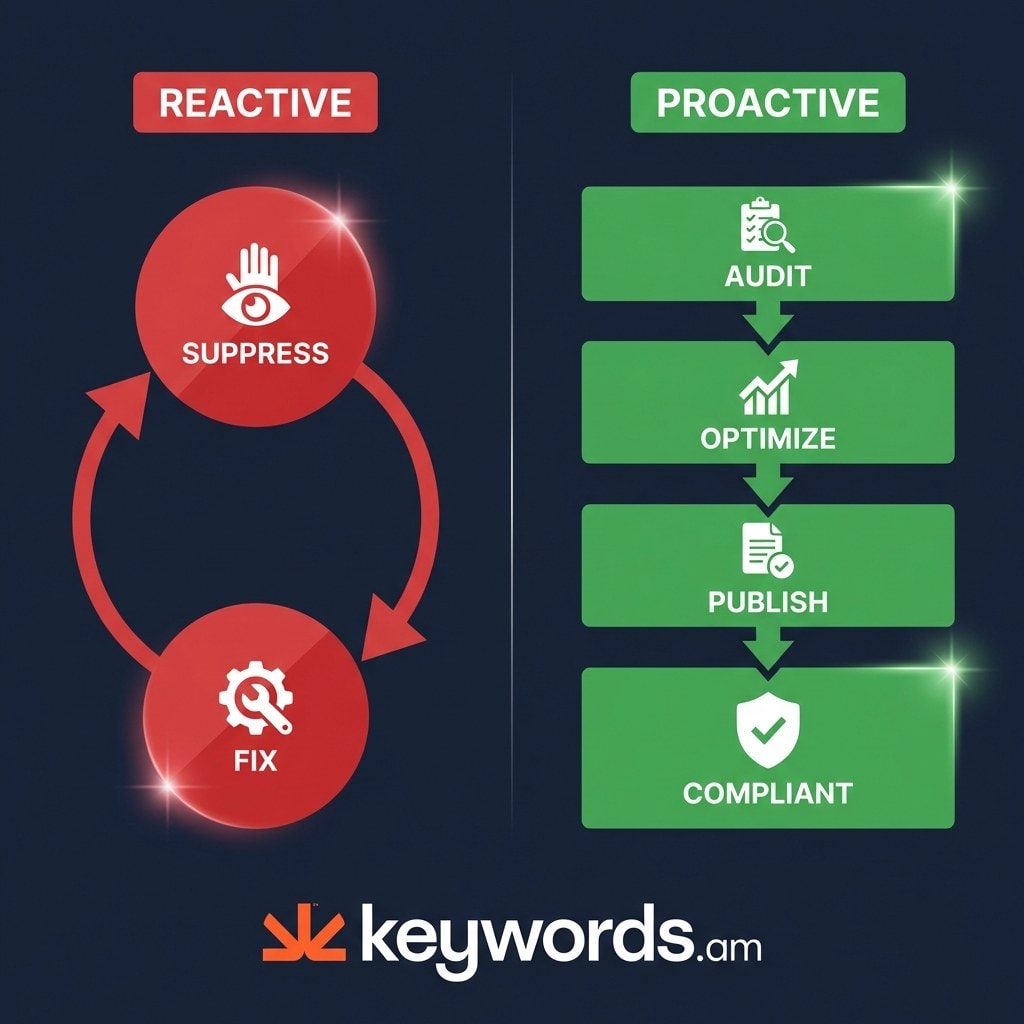
The most effective strategy for managing listing suppression is to move from a reactive posture to a proactive one. Most sellers treat suppression as a repair job; a better approach is to treat compliance as a design requirement.
Audit Before Publishing
The single most impactful change a seller can make is to validate data before it ever reaches Amazon’s catalog. Running compliance checks on title length, image specifications, and required attributes prior to clicking “Save and Finish” eliminates the majority of suppression risks. Data suggests that non-compliant listings, even if not fully suppressed, receive up to 40% less traffic due to algorithmic demotion. Using an Amazon listing audit tool allows sellers to grade their content against Amazon’s standards, flagging potential issues before they go live.
Use Structured Optimization
Adopting a structured framework for listing creation ensures that compliance is baked into the process. The TFSD approach (optimizing Title, Features, Search Terms, and Description in a specific sequence) systematically addresses compliance. By enforcing character limits and formatting rules during the drafting phase, sellers avoid the “whack-a-mole” cycle of fixing errors later. Keywords.am’s TFSD Framework is designed to integrate these compliance checks directly into the optimization workflow. For a deeper dive into this methodology, the Amazon listing optimization guide provides extensive details.
Category-Specific Compliance Checklists
Since requirements vary significantly by category, relying on generic guidelines is insufficient. Sellers should develop or utilize specific checklists for their product types.
* Jewelry: Checklist must include metal type, gem type, pearl type, and ring size standards.
* Apparel: Checklist must verify size chart availability, standardized size inputs, and fabric content disclosure.
* Supplements: Checklist must ensure all FDA disclaimers and ingredient lists are present and accurate.
Knowing these requirements in advance prevents the frantic search for data after a listing has been suppressed.
Regular Bulk Audits
For sellers managing catalogs with 50 or more ASINs, manual checks are impossible to maintain effectively. Implementing a monthly audit routine helps catch “compliance drift,” where older listings fall out of compliance due to new policy enforcement. Automated tools that grade listings on an A+ to F scale provide a quick visual heatmap of the catalog, identifying at-risk products that need attention. The best Amazon listing audit tools are those that can process bulk data and highlight specific violations like missing attributes or image flaws across hundreds of SKUs simultaneously.
Monitor Amazon Policy Updates
Amazon’s enforcement logic is not static. In 2025 and 2026, the acceleration of AI scanning means that rules are enforced more strictly and rapidly than before. Staying informed about policy updates via Seller Central News or industry resources is essential. What was a “loose” rule last year may be a hard suppression trigger today.
Product Integration
Tools like the Keywords.am ASIN Audit Report offer a streamlined way to implement this prevention strategy. By providing a compliance grade and detailed breakdown of violations, it allows sellers to identify weak points in their catalog without manual investigation, effectively automating the prevention process.
When Should You Contact Seller Support About a Suppressed Listing?
Contact Seller Support if self-service fixes fail after 72 hours, the violation reason is incorrect, or the listing is yanked and requires a formal Plan of Action.
While self-service tools resolve the majority of suppression issues, there are scenarios where direct intervention from Seller Support is necessary. Recognizing when to escalate can save days of lost sales.
When to Self-Fix vs. Escalate
A simple decision matrix helps clarify the approach.
* Self-Fix: If the issue is a missing image, a title that is too long, or a missing product attribute, handle it via Seller Central. These are mechanical fixes that support agents cannot speed up.
* Escalate: If a listing is “Inactive (Blocked),” “Yanked,” or if the suppression reason listed is “Unknown” or clearly incorrect (e.g., a toy flagged as a pesticide), open a case. Additionally, if a self-service fix has been applied but the listing remains suppressed after 72 hours, it is time to contact support.
How to Write an Effective Case
Support agents deal with high volumes of requests; clarity is key to getting a resolution. A vague complaint will likely result in a generic auto-response. An effective case should follow a structured format:
* Subject: “Urgent: ASIN [Insert ASIN] Suppressed in Error / Fix Not Reflecting”
* Body:
* ASIN: [Insert ASIN]
* Issue: Clearly state the suppression reason provided by Amazon.
* Action Taken: “I have updated the [Field Name] to comply with policy on [Date].”
* Proof: Attach screenshots of the corrected listing back-end or the image file that was uploaded.
* Request: “Please refresh the listing status as the compliance violation has been resolved.”
Plan of Action for Yanked Listings
If a listing has been yanked due to a serious policy violation (such as safety complaints or IP infringement), a simple support case is insufficient. This requires a formal Plan of Action (POA). A successful POA must concisely address three points:
1. Root Cause: What specifically went wrong? (e.g., “We inadvertently used a trademarked term in the title.”)
2. Corrective Action: What have you done to fix it immediately? (e.g., “We have removed the term from all listing fields and backend keywords.”)
3. Preventive Measures: How will you ensure this never happens again? (e.g., “We have implemented a new pre-listing audit process using updated trademark databases.”)
Expected Timelines
Patience is often required during escalation. For standard support cases, a response usually arrives within 12 to 24 hours. However, for appeals regarding yanked listings, the initial response regarding the Plan of Action typically takes about 48 hours. Complex cases, especially those involving safety claims or intellectual property disputes, can take weeks to fully resolve.
Frequently Asked Questions About Amazon Listing Suppression
These are the most common questions Amazon sellers ask about listing suppression, covering timelines, account health impact, and troubleshooting recurring issues.
How long does it take to unsuppress an Amazon listing?
Minor fixes like adding missing information take approximately 15 minutes to restore. Image and content compliance fixes typically take 24-72 hours for Amazon to review and reactivate. Appeals for blocked or yanked listings can take longer. First responses typically come within 48 hours, but complex cases involving IP or safety issues may take weeks.
Does listing suppression affect my Amazon seller account health?
Search suppression alone doesn’t directly impact your Account Health Rating (AHR). However, the underlying violations that cause suppression, such as customer complaints or policy violations, do affect your AHR score. Amazon scores accounts from 0 to 1,000 on the AHR scale. Repeated suppressions signal compliance issues that can escalate to account-level action.
Can I still sell a suppressed listing through PPC or direct links?
Search-suppressed listings may still be accessible via direct URL but won’t appear in search results or PPC campaigns. Inactive or yanked listings cannot generate any sales. Even if accessible via direct link, a search-suppressed listing loses virtually all organic traffic and advertising eligibility.
Why does my listing keep getting suppressed after I fix it?
Recurring suppression usually means the root cause wasn’t fully addressed. Amazon’s automated systems continuously scan listings, so partial fixes or compliance gaps in related fields trigger new suppressions. Common pattern: seller fixes title length but still has non-compliant images. Or fixes one ASIN but has the same violations across 50 other listings.
How do I check if my listing is suppressed without logging into Seller Central?
Search for your product title or ASIN on Amazon.com. If the listing doesn’t appear in search results but you can still access it via direct URL, it’s likely search-suppressed. For a definitive check, use the “Fix Your Products” page in Seller Central. Third-party tools can also monitor listing status across your catalog.
What’s the difference between a suppressed listing and a stranded listing?
A suppressed listing has a policy or content violation. A stranded listing has available inventory but no active offer, usually due to a listing error or fulfillment issue rather than a compliance problem. Both result in lost sales, but the fix paths are different. Stranded inventory is managed through the Fix Stranded Inventory page, not the suppression dashboard.
Conclusion
Amazon listing suppression is now a constant operational reality driven by automated AI enforcement, making proactive compliance essential for every seller in 2026.
The margin for error is slimmer than ever.
Key takeaways for maintaining a healthy catalog include:
* Suppression is increasingly automated; Amazon’s AI scans every listing continuously, making “set and forget” strategies obsolete.
* Image violations remain the number one cause of suppression, followed closely by title formatting errors and missing category attributes.
* The “Fix Your Products” page in Seller Central is the single best diagnostic tool for identifying the specific reasons behind a listing’s invisibility.
* Prevention through structured optimization, auditing listings before they go live, is far superior and less costly than reactive fixing.
Sellers can take immediate action to protect their revenue. Log in to Seller Central today and enable suppression alerts under Settings > Notification Preferences. Then, identify the top 10 ASINs by revenue and run a manual compliance check against the requirements outlined in this guide.
For a more comprehensive approach, use the Amazon listing audit tool to check your top listings for suppression risk. Identifying these vulnerabilities before Amazon’s algorithms do is the only way to ensure consistent visibility and sales performance.




