
Product research tool or listing optimization tool? They solve different problems.
The keywords.am vs amzscout comparison is not a simple feature shootout. AMZScout is a product research suite built for finding profitable products. Keywords.am is a listing optimization platform built for ranking those products. Most comparison pages miss this detail. The right choice depends on which problem a seller is actually trying to solve.
Quick Verdict
- Keywords.am wins on: Listing optimization workflow, keyword-to-listing mapping (TFSD Framework), AI copilot (Amber AI with brand voice), KPS intent scoring, 21 marketplace coverage, direct Seller Central publish.
- AMZScout wins on: Product research and discovery, Chrome extension for on-page data, beginner-friendly interface, lifetime pricing option ($1,599.99 one-time).
- The catch: AMZScout shows keyword volume. Keywords.am shows which keywords belong in which listing field and why.
Keywords.am vs AMZScout Feature Comparison
Category |
Keywords.am |
AMZScout |
|---|---|---|
Primary Focus |
Listing optimization |
Product research |
Keyword Research |
KPS 0-100 intent scoring |
Volume + trend data |
Listing Builder |
TFSD structured editor with live coverage |
Basic AI Listing Builder |
AI Assistant |
Amber AI contextual copilot (3 writing modes, brand voice) |
AI-generated SWOT analysis |
Reverse ASIN |
All plans with deep analysis |
Available with keyword overlap |
Backend Keywords |
Swiss Army Knife auto-fill, deduped |
Manual entry |
Marketplace Coverage |
21 marketplaces |
12 marketplaces |
Direct Publish |
Seller Central API (Verified Selling Partner) |
Not available (copy-paste) |
Product Research |
Not offered |
Product database + Chrome extension |
Chrome Extension |
Not offered |
PRO Extension for on-page data |
Free Tier |
Explore: 3 projects, 25 AI assists |
7-day free trial |
Why Does AMZScout’s Keyword Research Stop at Volume?
AMZScout provides keyword volume and trend data but stops short of showing sellers how to use those keywords in their listing.
AMZScout’s keyword explorer gives search volume, estimated revenue, and competition scores. It provides solid starting data. The disconnect happens during execution. Sellers export keywords to a spreadsheet, then manually decide which terms belong in titles, bullets, search terms, or descriptions. There is no structured mapping.
AMZScout’s AI Listing Builder generates content but does not connect it back to keyword coverage data. Research and writing workflows operate in separate silos. Multiple review sites characterize AMZScout as a beginner tool sellers outgrow. The keyword-to-listing gap remains the main reason.
How Does Keywords.am Turn Keyword Data Into Ranked Listings?
Keywords.am connects keyword research directly to listing fields through the TFSD Framework, showing live coverage as sellers write.
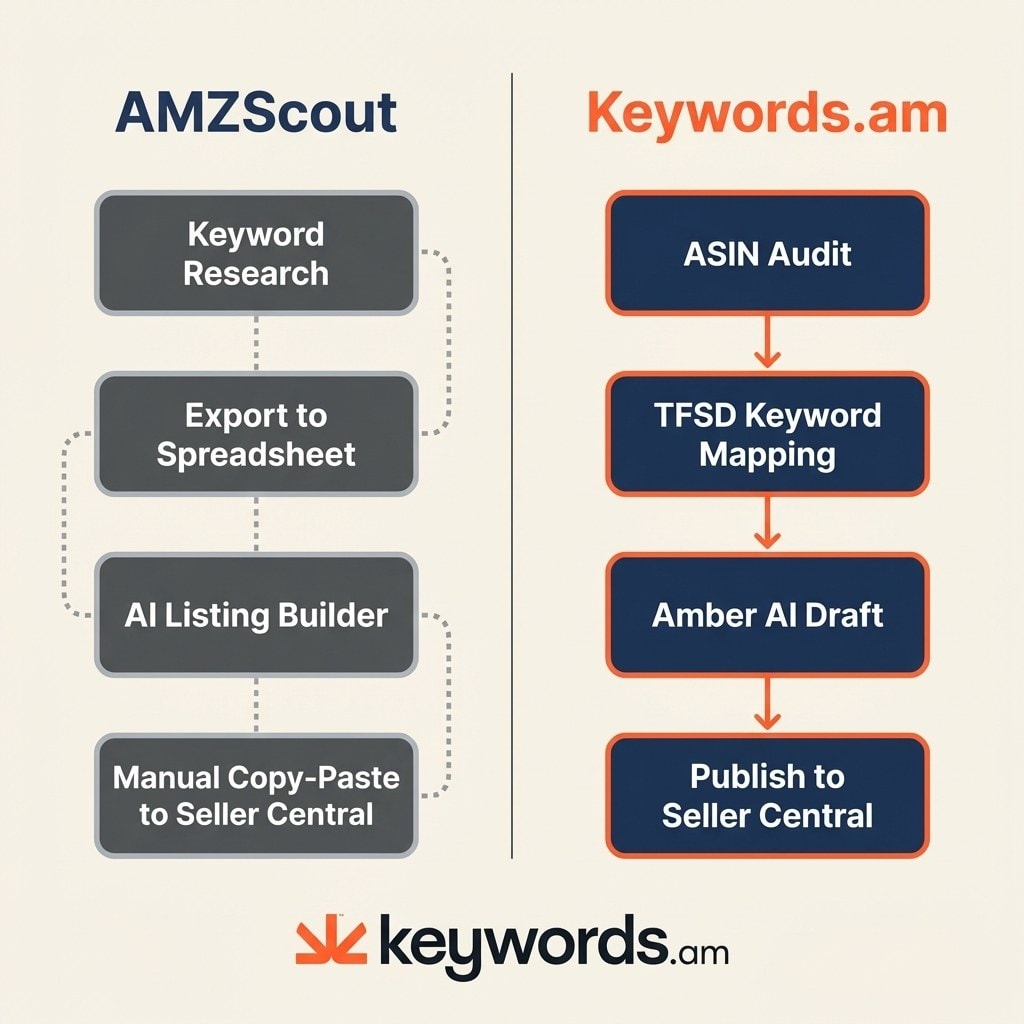
The TFSD Framework maps keywords to Title, Features, Search Terms, and Description with real-time coverage indicators. KPS scoring ranks keywords from 0 to 100 based on listing impact potential so sellers prioritize the right terms first.
Amber AI operates as a contextual copilot inside ASIN reports with three writing modes and brand voice integration. A built-in Swiss Army Knife auto-fills backend search terms with only missing keywords, deduped and ready for Amazon. Sellers can publish directly to Seller Central via API as an Amazon Verified Selling Partner, with a side-by-side diff review before updating.
Why Does Keyword-to-Listing Mapping Matter for Amazon Rankings?
Amazon indexes specific listing fields differently. Placing keywords strategically across Title, Features, Search Terms, and Description maximizes indexing coverage.
Amazon’s A10 algorithm weighs keyword placement by field. Title keywords carry more weight than backend search terms. Random keyword stuffing wastes indexing potential. Structured mapping ensures every high-value keyword appears in the appropriate field. With Amazon Rufus scanning listings for relevance, structured keyword coverage matters more than raw keyword count.
Where Does AMZScout Win?
AMZScout wins on product research, Chrome extension convenience, and beginner accessibility. It covers the early stages of selling better than Keywords.am.
The product database and Chrome extension for quick on-page analysis are genuinely useful during the product research phase. AMZScout remains more beginner-friendly with a clear interface, guided workflows, and a simpler feature set.
A lifetime pricing option at $1,599.99 eliminates ongoing subscription costs for long-term sellers. It also supports 12 Amazon marketplaces with localized data.
How Does Keywords.am vs AMZScout Pricing Compare?
AMZScout starts at $44.99/month with a lifetime option at $1,599.99. Keywords.am Seller plan starts at $49/month ($39 billed annually).
Tier |
Keywords.am |
AMZScout |
|---|---|---|
Free |
Explore: $0 (3 projects, 25 AI assists) |
7-day free trial |
Entry |
Seller: $49/mo ($39/yr) |
Basic: $44.99/mo ($379.99/yr) |
Mid |
Brand: $129/mo ($99/yr) |
Business: $49.99/mo |
Top |
Agency: $299/mo ($249/yr) |
Lifetime: $1,599.99 one-time |
AMZScout bundles product research tools Keywords.am does not offer. Keywords.am includes unlimited AI assists, 21 marketplaces, and direct Seller Central publish at the Seller tier. Each platform delivers different value for different needs.
What Do Amazon Sellers Say About Keywords.am?
Sellers highlight research depth, ease of use, and value. Keywords.am holds a 5.0 average on Trustpilot across 19 reviews.
Kevin Mansoor, a 15-year Amazon Pro Seller, points out the immediate impact. “Better than competitors costing 4-5x more. Makes research and implementation smooth and easy,” he says.
Mike R adds context around industry alternatives. “More affordable alternative to Helium 10. Super easy to use. All needed features for optimizing Amazon listings.”
Trust signals validate these experiences:
- 5.0/5 average rating (Trustpilot, 19 reviews)
- Amazon Verified Selling Partner
- Amazon Ads Verified Partner
- 21M+ ASINs analyzed across 21 marketplaces
- Founded by Ash Metry, 7-figure Amazon seller since 2018
For a detailed look at how Keywords.am compares to other industry leaders, see the Keywords.am vs Helium 10 and Keywords.am vs SellerApp guides.
Try Keywords.am Free and See What AMZScout’s Listing Builder Misses
See the difference between keyword volume and keyword strategy on any ASIN.
Frequently Asked Questions About Keywords.am vs AMZScout
These are the most common questions sellers ask when comparing keywords.am vs amzscout.




