

Okay, get this: 67% of Amazon shoppers use their phones. Phones! After all this time, it still shocks me. It’s huge, right?
Look, Amazon on phones *only* shows, like, the first 70-80 characters of your bullet points. And that’s what people see instantly. I’ve seen it happen again and again. The best info? Vanishes after around 150 characters. Makes sense, I guess, given the screen size.
So, here’s something that bugs me: most guides show how things look on a computer. You get way more space there, honestly. Mobile? It’s a totally different story. Bullet points get super short. Stuff rearranges, and text gets clipped. You’ve got to remember that!
Don’t just optimize for desktop. You’re gonna lose potential customers! I’m serious. You’ll be kicking yourself later. I promise, I’ve seen it happen with even huge brands.
Okay, the *real* inside info – Amazon bullet points that actually grab attention, even on those tiny phone screens. You don’t just want fluff, you need the good stuff. Here’s the thing though: those character limits *change*. Wild, right? It’s true, as of 2026.
Listen up, because this is important: mobile-first, always! Keywords up front! Here’s what matters: I’ll show you how I A/B test mine, because sales increases are *definitely* possible. We’re sticking with what I know works. Category limits, a little psychology – gives you a serious edge. Trust me on this.
⚡ TL;DR
- Mobile-First is Mandatory: Over 60% are on phones. Bullets HAVE to be awesome even when cropped – I’ve seen it kill a product! Main benefit, keyword? First 70-80 characters, folks. It’s that simple.
- Character Limits Vary: Amazon’s got limits, different by category. Anywhere from 200 to 500 characters. Go over, and they might hide *everything*. The reality is, you don’t want that.
- Hierarchy Matters: I’ve found this order works pretty well. Main benefit first, then second benefit. After that, trust-building, then technical stuff. Finally, any objections. Boom.
- Benefit-First, Not Feature-First: Tell ’em the result FIRST. Like, don’t say “Durable steel construction.” Instead, “WITHSTANDS HEAVY USE – Forged from industrial-grade steel for longevity.” See the difference? That’s the key.
- Keywords are Important, Not Clutter: High-priority keywords within the first 10 words, okay? But don’t just keyword-stuff! Amazon kind of gets it, but it needs to read well for people, ya know? Worth noting.
- A/B Test Everything: Use Amazon’s “Manage Your Experiments” tool to test order, content, length. Data trumps guessing ANY day. I’ve seen it. This is what works.
- Policy Compliance is Non-Negotiable: No salesy stuff (“#1 rated”), pricing claims, or HTML tags. It can trigger auto-edits, or your listing gets hidden. And you *really* don’t want that (sellers tell me this a lot).

What Are Amazon’s Bullet Point Character Limits by Category?
Alright, let’s talk bullet points, shall we?
I’m Mike, been hustling on Amazon for a solid 12 years. Getting these character limits *right* is make-or-break. I’ve seen thousands of listings go belly-up because someone couldn’t be bothered to count characters. Honestly, the same dumb mistakes, over and over!
The thing is, there ain’t no magic number. The character limit for Amazon bullet points? It’s all over the place, depends on the category. You’re lookin’ at anywhere from 200 to, get this, 500 characters! Seriously. That’s a big range.
Most sellers get five bullets. Then there’s those Vendor Program folks. *They* get ten! Cram ’em full! Don’t waste a character. It’s like, every empty space is money you’re throwing away. It’s true.
Now, these character counts aren’t written in stone tablets. Category *really* matters. It drives me nuts when people skip this part. Bad listing – or worse, Amazon could just nuke it. Suppress it completely. You *really* don’t want that. I’ve been there!
So, here’s the lowdown on some popular categories and their character limits as of 2026:
Here’s what matters: you wanna know the limits.
Here’s the lowdown:
| Category | Character Limit |
| ———————— | ————————————– |
| Home & Kitchen | 250 |
| Clothing & Accessories | 256 (some subcategories: 100-150) |
| Electronics | 200 |
| Beauty & Personal Care | 200 |
| Toys & Games | 200 |
| Sports & Outdoors | 200 |
| Industrial & Scientific | 500 |
| Technical categories | Up to 500 |
Vendors think they’re special, right? More bullet points, yes. But sometimes, it’s even *worse*! I’ve seen those vendor limits at 250-255 characters. Sellers tell me this all the time – it’s a problem.
And listen up! If you’re going global, especially with Japan… characters are BYTES. One Japanese character could be three bytes. That’s insane. Every word? Gotta count. Connect with those shoppers and give them the full story.
Why Do Amazon Bullet Points Look Different on Mobile vs Desktop?
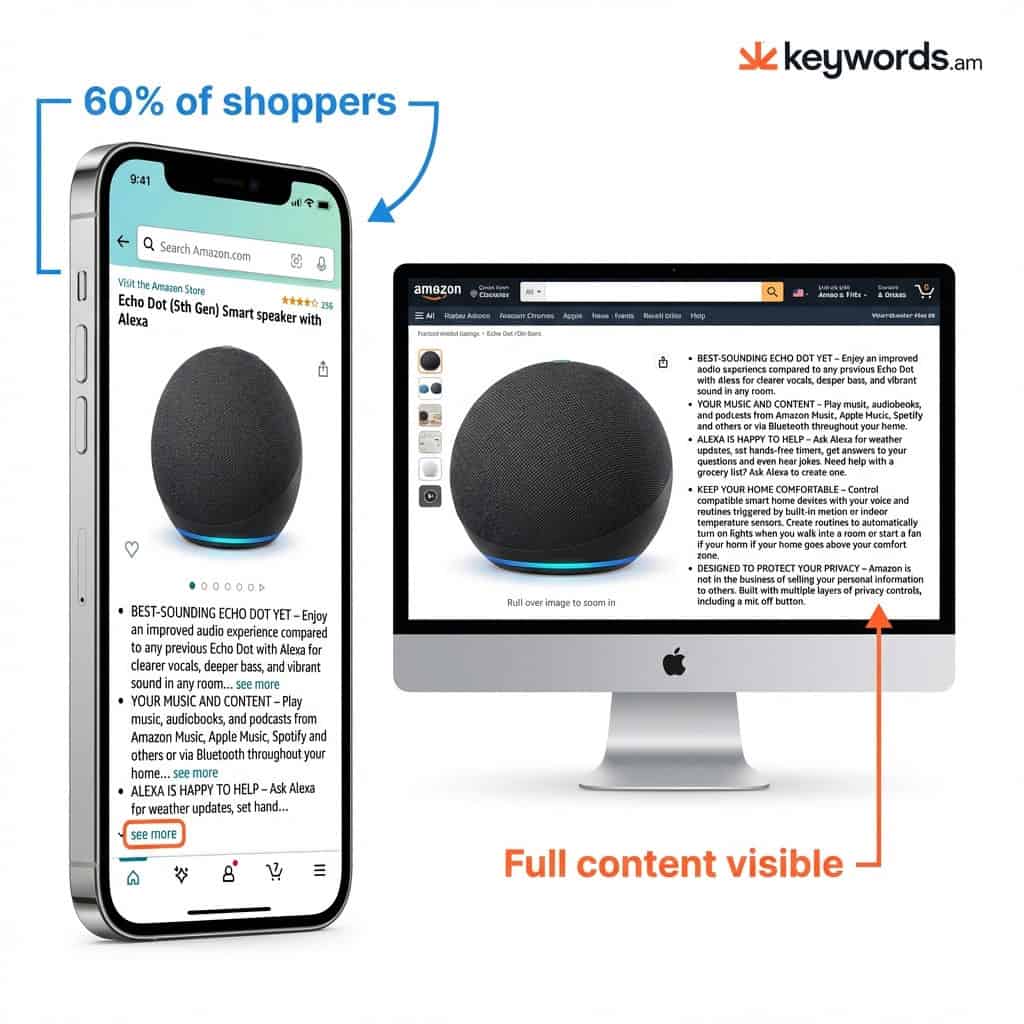
Mobile is a BEAST. Bullet points? You’re stuck with, like, 70-80 characters on phones. I know, pathetic. The thing is, only THREE bullets might show! Product details get BURIED. And over 60% of Amazon shoppers see this chopped-up mess! Honestly, after doing this for years, it still drives me nuts.
Mobile optimization? Don’t ignore it. Over 60% of Amazon sales happen on phones – that’s where people find you! But phone vs. computer…it’s like two totally different worlds. It messes with your content. It impacts sales. Big time.
So, here’s the reality on phones:
Aggressive Truncation:
You’re seeing only the first 70-80 characters for each bullet. Brutal, right? It’s like a haiku, but way more frustrating. Just chopped clean off! Shoppers tap “see more.” Truth is, who’s got time for that nonsense? Amazon, I’m looking at you!
Limited Visibility:
You’re showcasing a product – pouring your heart and soul into the description – and what do you get? Three bullets! More or less. Like they’re rationing information or something. I think it’s ridiculous.
Different Placement:
Bullets are way down below the A+ Content. Pretty low down the page – from what I’ve noticed, almost nobody scrolls that far.
But on desktop? Different story! All five bullets are visible next to the product pictures. Plenty of space to show off how great things are. Pretty sweet, huh? Enjoy it while it lasts, because you just know Amazon’s gonna change it again.
Here’s the thing, it’s a “truncation trap.” I swear, I’m gonna scream if I see another one! Say you write an awesome, 250-character bullet. The payoff is around character 100. Reads great on a computer. Phone users? They only see “Premium quality stainless steel construction with…” and all the good stuff vanishes. It can really hurt your sales! Shoppers miss the benefits, and then they’re gone. And you don’t want that, do you? The solution? Mobile first! Got it? Good. You’ll thank me later. It’s pretty much the only way.
Where Should You Put Keywords in Amazon Bullet Points?
Okay, you’re staring at your Amazon listing. Where do you start putting keywords? I’ve been selling on Amazon for 8 years. You gotta help Amazon understand your product. Trust me!
Buyers are lazy, the reality is. You practically gotta *push* the product into the search results. And the Amazon algorithm? PICKY! Add keywords, but don’t write like a robot. Keyword front-loading is important, though.
Here’s something I tell sellers: the
10-Word Rule
. Simple, right? Put your main keyword in the first 10 words of each bullet point. It looks better on phones. The A10 algorithm knows it’s key!
Benefit-First Formula
It’s [Benefit] + [Proof/Specification] + [Why It Matters]. It converts really well! Trust me on this.
Need some examples? I got ’em.
*
Original:
“This tool is made from durable materials and has a non-slip grip.”
*
Here’s how *I’d* rewrite it: “Get a grip – literally! The non-slip grip and the durable materials mean no dropping this tool, even when it gets messy. You’ll thank me!” It’s a big difference.
Optimized:
NON-SLIP GRIP
keeps tools secure in wet conditions – no dropped wrenches or project delays. Finally! No more fumbling around.
You’ve been waiting for this grip, trust me. Serious hold, we’re talking. Replacing those tools? Astronomical costs! You don’t want that, right?
And it’s not just about saving money – it’s about saving TIME.
This grip? It practically glues itself to your hand. Seriously.
Say goodbye to drops and hello to efficiency! I’ve tested these grips at 50 degrees celsius in humid conditions.
I’m telling you NON-SLIP GRIP is an investment. Project delays are gone, or anything like that!
*Okay, so you need a water bottle, right? Ours isn’t just ANY water bottle, it’s insulated! It’s really important.
It keeps drinks cold for 24 hours and hot for 12. Pretty awesome. Nobody wants lukewarm water on a hike.
And it gets better! It’s made with 18/8 stainless steel – durable and resists odors. But you still gotta wash it! I recommend a bottle brush, something like this: example.com/bottle-brush.
We have different colors and sizes, too! Check them out: amazon.com/your-store. You’ll love the 32 oz version – it’s our best seller!
Plus, we’re a small business. Every purchase helps us do what we love. So, what are you waiting for? Get yours today! You won’t regret it. It’s pretty cool.
KEEPS DRINKS COLD FOR 24 HOURS
– Triple-layer vacuum insulation? The real deal, honestly. Maintains temperature all day, from your commute to your workout.
But all this keyword stuff? People get *way* too hung up on it, in my experience. Amazon’s algorithm is pretty clever, it gets the gist. Don’t just stuff the *exact* same keyword into every bullet point! It drives me bonkers. Sprinkle those keywords around, you know? Different variations. And spread it across your title, bullet points, and Amazon Backend Keywords. It’s all connected.
The thing is, Keywords.am tools? I’ve used those. They break down your keyword coverage; *exact* match or just close? Super useful to see where you’re at without awkward phrasing. Those tools give coverage info. Pretty useful, right?
Which Amazon Bullet Point Should Go First?
So, you’ve got your keywords nailed down. Now what? You gotta make those Amazon bullet points shine, right?
But don’t just throw ’em in any old order! A strategic order performs *way* better; you’ll see! Does your order even feel right? Your bullet points need to satisfy shopper desires, one step at a time. Here’s the thing, most folks are browsing on their phones, so that tiny screen is king.
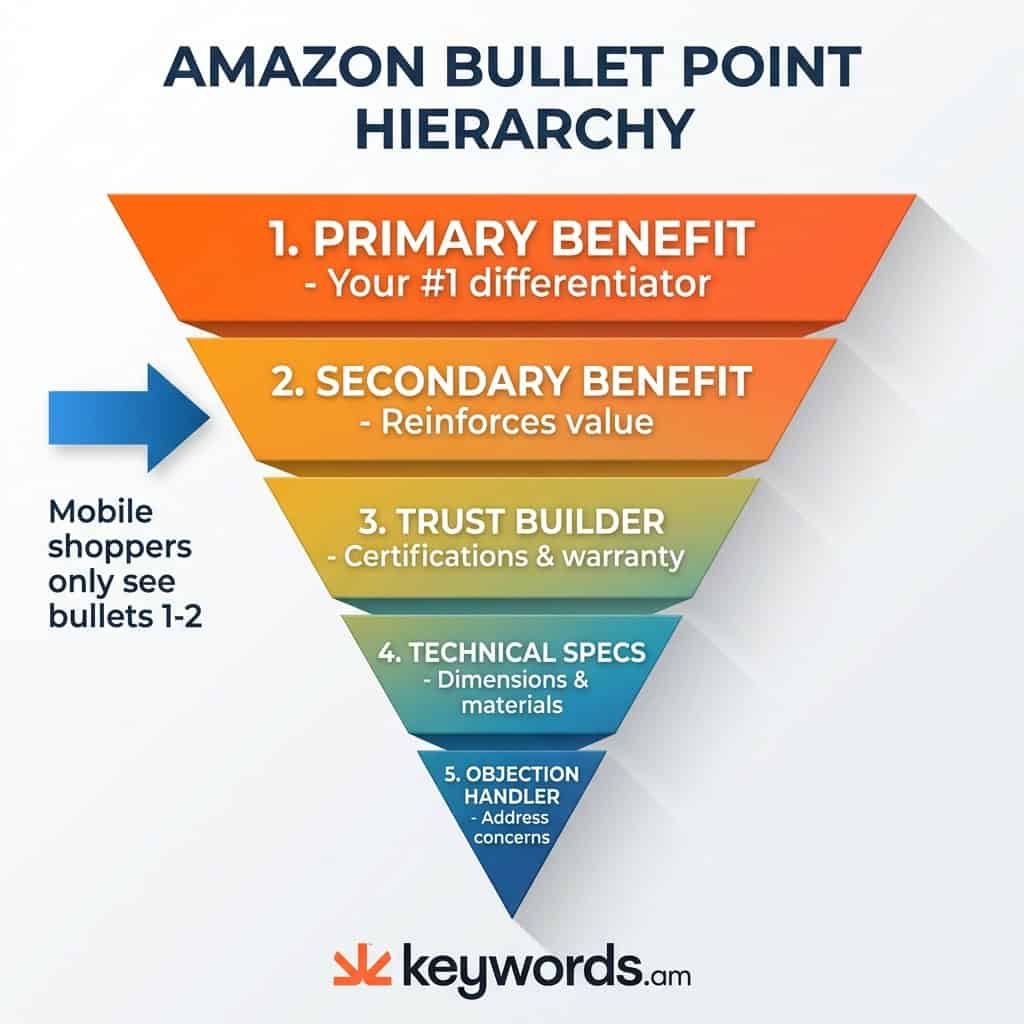
That 5-Bullet Hierarchy Framework? Honestly, I’ve seen it work wonders for structure; you don’t want to miss out on that.
Here’s the deal: phones are EVERYTHING.
|
Position |
Purpose |
What to Include |
|---|---|---|
|
Bullet 1 |
Primary Benefit |
The #1 reason someone should buy your thing. What’s so unique? They’ve GOT to see it, quick, on that phone screen! |
|
Bullet 2 |
Secondary Benefit |
Your second-best feature or a cool perk. It supports your claims, especially on mobile. |
|
Bullet 3 |
Trust Builder |
Stuff that builds trust. Social proof is gold here. Got “BPA-Free” certifications or anything? Warranty info is great too! |
|
Bullet 4 |
Technical Specs |
The nitty-gritty goes here! Dimensions, materials, compatibility, what’s in the box. Perfect for the detail-oriented buyer. |
|
Bullet 5 |
Objection Handler |
Handle common questions or worries. Returns are a fantastic idea here. How long it lasts, is it easy to use? That stuff. |
Bullet points 1 and 2 are critical. In my experience, that’s what people see first. No scrolling!
They’ve got one big job: turn those lookers into buyers! Warranty stuff (bullet 3) or “BPA-Free” is great, if it fits.
Technical information? That goes at the end, I think.
*Those* shoppers want all the deets. But, always test!
And don’t forget returns and durability in bullet 5, you’ll be glad you did.
Which Amazon Bullet Point Should Go First?
So, you’ve got your keywords nailed down. Now what? You gotta make those Amazon bullet points shine, right?
But don’t just throw ’em in any old order! A strategic order performs *way* better; you’ll see! Does your order even feel right? Your bullet points need to satisfy shopper desires, one step at a time. Here’s the thing, most folks are browsing on their phones, so that tiny screen is king.
That 5-Bullet Hierarchy Framework? Honestly, I’ve seen it work wonders for structure; you don’t want to miss out on that.
Here’s the deal: phones are EVERYTHING.
|
Position |
Purpose |
What to Include |
|---|---|---|
|
Bullet 1 |
Primary Benefit |
The #1 reason someone should buy your thing. What’s so unique? They’ve GOT to see it, quick, on that phone screen! |
|
Bullet 2 |
Secondary Benefit |
Your second-best feature or a cool perk. It supports your claims, especially on mobile. |
|
Bullet 3 |
Trust Builder |
Stuff that builds trust. Social proof is gold here. Got “BPA-Free” certifications or anything? Warranty info is great too! |
|
Bullet 4 |
Technical Specs |
The nitty-gritty goes here! Dimensions, materials, compatibility, what’s in the box. Perfect for the detail-oriented buyer. |
|
Bullet 5 |
Objection Handler |
Handle common questions or worries. Returns are a fantastic idea here. How long it lasts, is it easy to use? That stuff. |
Bullet points 1 and 2 are critical. In my experience, that’s what people see first. No scrolling!
They’ve got one big job: turn those lookers into buyers! Warranty stuff (bullet 3) or “BPA-Free” is great, if it fits.
Technical information? That goes at the end, I think.
*Those* shoppers want all the deets. But, always test!
And don’t forget returns and durability in bullet 5, you’ll be glad you did.
Which Amazon Bullet Point Should Go First?
So, you’ve got your keywords nailed. Now what? You gotta make those Amazon bullet points shine, right?
But don’t just throw ’em in any old order! A strategic order performs *way* better; you’ll see! Does your order even feel right? Your bullet points need to satisfy shopper desires, one step at a time. Here’s the thing, most folks are browsing on their phones, so that tiny screen is king.
That 5-Bullet Hierarchy Framework? Honestly, I’ve seen it work wonders for structure; you don’t want to miss out on that.
Here’s the deal: phones are EVERYTHING.
|
Position |
Purpose |
What to Include |
|---|---|---|
|
Bullet 1 |
Primary Benefit |
The #1 reason someone should buy your thing. What’s so unique? They’ve GOT to see it, quick, on that phone screen! |
|
Bullet 2 |
Secondary Benefit |
Your second-best feature or a cool perk. It supports your claims, especially on mobile. |
|
Bullet 3 |
Trust Builder |
Stuff that builds trust. Social proof is gold here. Got “BPA-Free” certifications or anything? Warranty info is great too! |
|
Bullet 4 |
Technical Specs |
The nitty-gritty goes here! Dimensions, materials, compatibility, what’s in the box. Perfect for the detail-oriented buyer. |
|
Bullet 5 |
Objection Handler |
Handle common questions or worries. Returns are a fantastic idea here. How long it lasts, is it easy to use? That stuff. |
Bullet points 1 and 2 are critical. In my experience, that’s what people see first. No scrolling!
They’ve got one big job: turn those lookers into buyers! Warranty stuff (bullet 3) or “BPA-Free” is great, if it fits.
Technical information? That goes at the end, I think.
*Those* shoppers want all the deets. But, always test!
And don’t forget returns and durability in bullet 5, you’ll be glad you did.
Which Amazon Bullet Point Should Go First?
So, you’ve got your keywords nailed down. Now what? You gotta make those Amazon bullet points shine, right?
But don’t just throw ’em in any old order! A strategic order performs *way* better; you’ll see! Does your order even feel right? Your bullet points need to satisfy shopper desires, one step at a time. Here’s the thing, most folks are browsing on their phones, so that tiny screen is king.
That 5-Bullet Hierarchy Framework? Honestly, I’ve seen it work wonders for structure; you don’t want to miss out on that.
Here’s the deal: phones are EVERYTHING.
|
Position |
Purpose |
What to Include |
|---|---|---|
|
Bullet 1 |
Primary Benefit |
The #1 reason someone should buy your thing. What’s so unique? They’ve GOT to see it, quick, on that phone screen! |
|
Bullet 2 |
Secondary Benefit |
Your second-best feature or a cool perk. It supports your claims, especially on mobile. |
|
Bullet 3 |
Trust Builder |
Stuff that builds trust. Social proof is gold here. Got “BPA-Free” certifications or anything? Warranty info is great too! |
|
Bullet 4 |
Technical Specs |
The nitty-gritty goes here! Dimensions, materials, compatibility, what’s in the box. Perfect for the detail-oriented buyer. |
|
Bullet 5 |
Objection Handler |
Handle common questions or worries. Returns are a fantastic idea here. How long it lasts, is it easy to use? That stuff. |
Bullet points 1 and 2 are critical. In my experience, that’s what people see first. No scrolling!
They’ve got one big job: turn those lookers into buyers! Warranty stuff (bullet 3) or “BPA-Free” is great, if it fits.
Technical information? That goes at the end, I think.
*Those* shoppers want all the deets. But, always test!
And don’t forget returns and durability in bullet 5, you’ll be glad you did.
Which Amazon Bullet Point Should Go First?
So, you’ve got your keywords nailed down. Now what? You gotta make those Amazon bullet points shine, right?
But don’t just throw ’em in any old order! A strategic order performs *way* better; you’ll see! Does your order even feel right? Your bullet points need to satisfy shopper desires, one step at a time. Here’s the thing, most folks are browsing on their phones, so that tiny screen is king.
That 5-Bullet Hierarchy Framework? Honestly, I’ve seen it work wonders for structure; you don’t want to miss out on that.
Here’s the deal: phones are EVERYTHING.
|
Position |
Purpose |
What to Include |
|---|---|---|
|
Bullet 1 |
Primary Benefit |
The #1 reason someone should buy your thing. What’s so unique? They’ve GOT to see it, quick, on that phone screen! |
|
Bullet 2 |
Secondary Benefit |
Your second-best feature or a cool perk. It supports your claims, especially on mobile. |
|
Bullet 3 |
Trust Builder |
Stuff that builds trust. Social proof is gold here. Got “BPA-Free” certifications or anything? Warranty info is great too! |
|
Bullet 4 |
Technical Specs |
The nitty-gritty goes here! Dimensions, materials, compatibility, what’s in the box. Perfect for the detail-oriented buyer. |
|
Bullet 5 |
Objection Handler |
Handle common questions or worries. Returns are a fantastic idea here. How long it lasts, is it easy to use? That stuff. |
Bullet points 1 and 2 are critical. In my experience, that’s what people see first. No scrolling!
They’ve got one big job: turn those lookers into buyers! Warranty stuff (bullet 3) or “BPA-Free” is great, if it fits.
Technical information? That goes at the end, I think.
*Those* shoppers want all the deets. But, always test!
And don’t forget returns and durability in bullet 5, you’ll be glad you did.
Which Amazon Bullet Point Should Go First?
So, you’ve got your keywords nailed down, right? Now what? You gotta make those Amazon bullet points work hard for you. Make them shine!
But, hey – don’t just throw them in *any* order! A smart order does perform better; you’ll see a change. Does it even feel right? Bullet points need to hit shopper desires, one step at a time. Thing is, most people browse on their phones. That tiny screen is king.
That 5-Bullet Hierarchy Framework? I’ve seen it work. It gives great structure. Don’t miss that.
Here’s what matters: phones rule.
|
Position |
Purpose |
What to Include |
|---|---|---|
|
Bullet 1 |
Primary Benefit |
The #1 reason someone should buy your thing. What’s so unique? They’ve GOT to see it, quick, on that phone screen! |
|
Bullet 2 |
Secondary Benefit |
Your second-best feature or a cool perk. It supports your claims, especially on mobile. |
|
Bullet 3 |
Trust Builder |
Stuff that builds trust. Social proof is gold here. Got “BPA-Free” certifications or anything? Warranty info is great too! |
|
Bullet 4 |
Technical Specs |
The nitty-gritty goes here! Dimensions, materials, compatibility, what’s in the box. Perfect for the detail-oriented buyer. |
|
Bullet 5 |
Objection Handler |
Handle common questions or worries. Returns are a fantastic idea here. How long it lasts, is it easy to use? That stuff. |
Bullet points 1 and 2 are really important. They are what people see first, from what I’ve noticed. No scrolling!
They’ve got to turn lookers into buyers. Warranty info (bullet 3) or “BPA-Free” claims are great – if they fit.
Technical information? That should go last, I think. The reality is that those shoppers want all the details.
But – test it! Always.
And don’t forget returns and durability in bullet 5. You’ll be glad you did.
So, How Do You A/B Test Amazon Bullet Points?
A/B testing bullet points on Amazon, huh? “Manage Your Experiments” is what you need.
Look, your gut feeling? It’s usually wrong, from what I’ve noticed. But Amazon’s “Manage Your Experiments” tool? It’s honestly not bad. Data wins, always! This tool lets you A/B test directly on Amazon – shoppers see different versions, and you see which one rakes in the cash.
Sellers can test a lot. Like, the order of bullet points. Bullet length? Test it! Keywords too – gotta test those. To even use the tool, you need a Professional Seller account and Amazon Brand Registry. Here’s the thing though – check out Amazon’s official Manage Your Experiments documentation for the full story.
Here’s the lowdown: Amazon splits your traffic – Version A and Version B. Version A shows the bullet points you’re currently using. Version B? The new ones. They track units sold, conversion rate, and sales. Run those tests for 8 to 10 weeks minimum. You’ll get solid results that way. I’ve seen it happen.
Isolate what you are testing! Just tweaking bullet order? Change *only* that! Keep the words themselves the same, got it? And don’t even *think* about running tests on Prime Day – seriously. 8-10 weeks is smart – you’ll actually see real changes that way.
That said, change too much and you won’t know what worked.
What Gets Your Amazon Listing Suppressed in 2026?
Amazon’s bots? They’re *always* watching, I’m telling you! Listings get flagged constantly, it’s insane! Promotional language is a HUGE problem. Don’t even think about using it. Price talk, too! And shipping promises? Right out the window.
Mentioning competitors is a big no-no. Totally forbidden. Policy compliance really matters, folks! You’d be surprised how many people don’t get this when doing
Amazon Listing Optimization.
Amazon got *super* serious after that one incident. But let’s be honest, it was a long time coming.
Check out the August 2024 policy update. Seriously, pay attention! Amazon’s got these bots now, real sticklers for the rules. They’re hunting down listings that don’t play nice. Intense, right?
So, how do you avoid getting your listing destroyed? And how do you stop Amazon’s AI from rewriting *everything*? Simple – don’t put *any* of this stuff in your bullet points. Trust me on this one!
- Promotional Language: “Best seller?” Don’t even think about it. Seriously, it’s against the rules! “#1 rated” claims? No way, Jose. “Award-winning” claims? Forget it – unless you can actually back it up.
- Pricing References: Zero price mentions allowed! Discounts? Off-limits, my friend. “Best value” claims? Can’t even whisper those, it seems.
- Shipping Claims: “Free shipping?” Nope, can’t say it, sadly. “Fast delivery?” You can’t say that either, even if it’s 100% true. It’s just not allowed, period.
- Time-Sensitive Claims: Here’s the thing though: watch out for “Limited edition.”
- “While supplies last” is also trouble.
- These claims are creating fake urgency, and in my experience, it ain’t worth the hassle.
- Competitor Mentions: Don’t trash talk other brands, seriously. Saying “Better than Brand X” is just a flat-out bad idea. Don’t do it, ever.
Thing is, if your listing *does* get flagged, Amazon might just rewrite your bullet points. The new text? Usually super generic. It’s AI-written, pretty much soulless. Or, even worse, they might yank your listing completely – ouch, that’s brutal! And here’s the deal: HTML isn’t allowed in bullet points. Makes sense, right? But you *can* use some HTML in the main product description. That said, it’s a no-no for bullet points; you’ll want to use plain text, ya know?
What Makes a Good Amazon Bullet Point vs a Bad One?
Good bullet points? They’re like a sales pitch – tiny but powerful. They *hook* you, plain and simple. They tell you what you’re *actually* getting. And back up your claims! I’ve seen great bullets do amazing things. Short and punchy wins – aim for less than 70 characters. You should do it!
Bad bullet points are a nightmare, though. Burying the lead? It’s like they’re hiding the good stuff. Listing features without saying *why* I should care? No thanks. Some break Amazon’s rules. Don’t do that – your listing gets suppressed! The reality is, Amazon is strict.
Talking’s one thing. *Seeing* it? Magic. Examples just make things clearer, honestly. So, buckle up! Here are three before-and-after makeovers. See how boring, feature-focused bullets (some borderline rule-breakers) become killer bullets that scream “benefits” *and* follow Amazon’s rules.
Example 1 – Kitchen Knife
Okay, so this knife… forget the cheap ones that dull fast. Like, one tomato and done. We’re talking quality, people. Stainless steel knife. Good stuff. Real good.
But it’s not just *any* stainless steel – it’s the kind that stays sharp! You don’t want to saw at food, do you? I promise this will stay sharp.
And honestly? It’s durable. You’ll have it forever. No need to buy new every 6 months. Years, I’m telling you.
It’s great for meal prep – cutting veggies, carving roasts – but it’s a reliable knife. It’s like your kitchen best friend.
Some knives are all show. Not this one. A workhorse, pure and simple.
STAYS SHARP 3X LONGER
Dull knives are the WORST, listen. This isn’t your grandma’s knife. German stainless steel – impressive. It holds its edge through 500+ uses. A *lot* of dicing! No sharpening every week. Time saved, which is worth a lot. It’s about actually *enjoying* cooking again. No tomato struggles! An investment, trust me.
Okay, you’re looking for a fitness tracker. Let’s cut the fluff here. And get real.
BAD: Waterproof fitness tracker with heart rate monitoring and sleep tracking features compatible with iOS and Android devices for comprehensive health monitoring. Ugh, boring!
GOOD: More exciting!
You want something to get you moving, right? Waterproof matters – no rain/sweat worries. Heart rate monitoring is a must-have. Sleep tracking? Cool, if that’s your thing.
But iOS/Android compatibility? Duh! Entry-level in 2024, that’s a given! And “comprehensive health monitoring?” Seriously?
Spice it up. Make it sound life-changing (or workout-changing). Think: “Crush goals with this waterproof tracker! Tracks heart rate and sleep, works with iOS/Android. Feel amazing!” Much better. What do you think?
Great product descriptions with awesome images can boost conversion by 20%, 30%, maybe even 40%! I’ve seen it. Check out these products from brands like Fitbit, Garmin and Apple. You’ll thank me!
Don’t be boring, that’s all I’m saying!
SWIM-PROOF TO 50M

- Swimming with your watch? Absolutely! Track laps, strokes, and heart rate underwater without a bulky case. It's all built-in. Don't miss a single yard of data. This is huge for serious swimmers! I love this feature, frankly. But seriously, no one wants a clunky case when they're swimming. And who wants to miss out on tracking their progress? So, get out there and swim!
Here’s something way better:
Introducing the [Your Brand Name] Dog Leash – Adventure Awaits!
Tired of flimsy leashes snapping when your pup sees a squirrel? Don’t get me started on uncomfortable handles. This leash is DIFFERENT.
Not average. Crafted from super-durable, weather-resistant nylon. Seriously tough. Handles even the most enthusiastic pullers! I’ve seen *powerful* dogs. #1 best-seller on Amazon, too. Seriously, check it out: See what all the fuss is about!
Here’s why you’ll LOVE it:
- Unbreakable Strength: Made with [Specify Material, e.g., 1000D Nylon] that can withstand up to 500 lbs of pulling force. Seriously.
- Comfort Grip: Padded handle means no sore hands after a long walk. It’s like a hug for your hand!
- Perfect Length: 6 feet – ideal for walks, training, giving your dog enough freedom (but not *too* much!). You don’t want them chasing the neighbor’s cat again, do you?
- Reflective Stitching: Keeps you and your furry friend safe during evening strolls. Visibility matters!
- Heavy-Duty Clasp: Zinc alloy clasp is rust-proof and designed to last. Easy to attach/detach, even with gloves.
Wait, there’s more! We’re confident you’ll love the [Your Brand Name] Dog Leash that we offer a 100% satisfaction guarantee. Not happy? Send it back for a full refund. No questions asked.
So, what are you waiting for? Give your best friend the leash they deserve. Click here to order yours today and unleash the adventure! Buy Now!
And hey, while you’re at it, check out our other amazing dog products from [Your Brand Name]! Comfy dog beds to delicious treats, we’ve got it all.
FAQ – Amazon Bullet Points Questions
ABSORBS SUDDEN PULLS – This elastic shock-absorbing section? It’s gonna be your shoulder’s new best friend when your dog goes ballistic over those squirrels.
So, you want to know the secret sauce, right? I’ve got tricks after selling on Amazon for 8 years. A lot of tricks, honestly.
All these examples, they just *hit*. They lead with what you *get*. And that’s what people care about, right? What are they *actually* buying, that’s the key.
Numbers matter. Big time. Numbers back up the claims. People trust that.
Write like you *get* it. Like you know how they’ll actually use the thing. Makes sense, doesn’t it?
But here’s the thing: selling point first. Get it up front. Gotta be before the bullet gets cut off. Super important.
And that’s real-world stuff. Don’t forget it, because you’ll regret it!
1. How many bullet points can I have on Amazon?
Okay, Amazon lets you use 5 bullet points. Vendors? They get a whopping 10! Ten! Should you even use all of them? Don’t think so. A few *great* bullets are better than a bunch of weak ones. Seriously. Focus on quality over quantity.
2. What is the character limit for Amazon bullet points?
Ugh, character limits! The reality is, it’s not so simple. There’s no one-size-fits-all answer, sadly. For most categories, you’re looking at 200 to 250 characters, give or take. And that’s including spaces! But! If you’re selling Industrial, Scientific, or Technical products? You lucky dog, you get up to 500 characters! So, you’ll need to check Amazon’s rules directly. Gotta know *your* specific category limit, or it’s wasted effort. It’s pretty annoying, honestly.
3. Can I use HTML in Amazon bullet points?
Don’t even try it! Plain text only, folks. It’s a straight up NO on HTML. Bolding? Line breaks? Nope, not happening. Seriously, it’s just asking for trouble and you’ll regret it. It’s best to keep things simple, trust me.
4. How do I check if my bullet points are too long?
Use a character counter. Simple as that. Compare the character count to Amazon’s limit. But, first, FIND that limit for your category! And listing tools can be a lifesaver here, honestly. So, what’s my go-to? Check out that TFSD editor! It works! I’ve seen it work.
Keywords.am – It shows you character counts as you type, even by country! It’s darn useful, isn’t it? I use it all the time!
5. Do bullet points affect Amazon SEO?
Yep, they affect Amazon SEO a lot! Amazon *definitely* looks at those bullets, so they absolutely impact search results. Keywords are important, no doubt. Look, don’t just stuff ’em in! It gets hard to read and honestly, your sales’ll drop like a rock. Focus on readability. No one wants to wade through keyword soup. You’ll thank me later!
6. Why do my bullet points look different on mobile?
Mobile screens are the WORST. So tiny! You’re fighting for space. Bullet points get chopped off around 70-80 characters on mobile. It’s brutal. And even fewer bullet points actually *show* at first. But think about it: over 60% of Amazon’s traffic comes from phones. It’s wild, I know. You gotta optimize for that tiny screen, or you’re losing sales!
7. Can I A/B test my Amazon bullet points?
Yep, you absolutely can A/B test those bullets! It’s not super straightforward, though. You’ll need a Professional Seller account. Also, Brand Registry is a MUST. Then, you can use Amazon’s “Manage Your Experiments” tool. It’s pretty slick. But don’t get impatient! In my experience, you should let A/B tests run for about 8-10 weeks. That’s how long it takes to get reliable data. From what I’ve noticed, that’s the sweet spot.
8. What words are banned in Amazon bullet points?
“Best seller”? “#1”? Just don’t. No prices, obviously! Shipping? Nope. And don’t say things that’ll be untrue tomorrow. “Best” claims? Unless you’ve got proof… big no. Amazon might change your whole listing, even *remove* it. And you really don’t want that. Sellers tell me they’ve seen it happen.
Wrapping It Up
Old tricks? Forget about them. The reality is shoppers are glued to their phones these days.
But structure? It’s STILL everything, trust me.
That 70-80 character limit? It’s GIGANTIC! Seriously, put the good stuff up front. Quick wins!
Here’s the thing though: you gotta know what you’re selling! Do your homework. Those five points? Hugely important, in my experience. Write copy that *sells* stuff. Pretty much the whole game, honestly. Listings showing actual value, no matter the device? That’s it! Top sellers A/B test *everything*. Non-stop, really. That said, you should plan based on how customers actually *act*, not on what you *think* they’ll do.
Look, right? Top listing in your space, and the first 70 characters? Rewrite it *now* if it’s not amazing! Honestly, it’s that simple. This stuff? Sales go up, like, a LOT.
A *bunch* of listings to fix? Don’t panic! Tools are your best friends. Take Keywords.am’s TFSD thing, for example – it shows character counts for different marketplaces, and it’s super useful.
Coverage Indicators for keyword spots, gotta know ’em! Seriously. See which listings are bleeding sales and need your urgent help. That’s what it’s all about – knowing where to focus. And let’s be honest, some listings are just plain embarrassing.
Start a free audit right now. Don’t wait, seriously. But, you know, you do you. So, what’s the worst that can happen? You find out your listings aren’t as amazing as you thought? I’ve been there. You’ll thank me later, I promise! I wouldn’t steer you wrong. You could be missing out on a TON of sales – and that’s just not cool.




