

Okay, indexing problems? Amazon sellers get them a lot. It happens. Industry estimates put keyword de-indexing at 47% without sellers even realizing! Usually? It’s a mix-up with characters and bytes.
Every “Amazon character limit” guide gives a number, sure. But few explain that Amazon enforces BYTES in backend fields. Here’s the thing though: limits vary by category. Exceed it by even one byte, and BAM, silent de-indexing. Ouch. That can really hurt sales, in my experience.
This guide gives you the complete technical reference. Fields, marketplaces, encoding rules that trip people up, and how to actually count what matters. I think it’s pretty thorough, honestly.
Table of Contents
Other guides? They might say “200 characters for the title.” This reference explains why a 180-character title with emojis can exceed limits. But a 250-character ASCII-only title works just fine. It’s all about the bytes, you see.
⚡ TL;DR
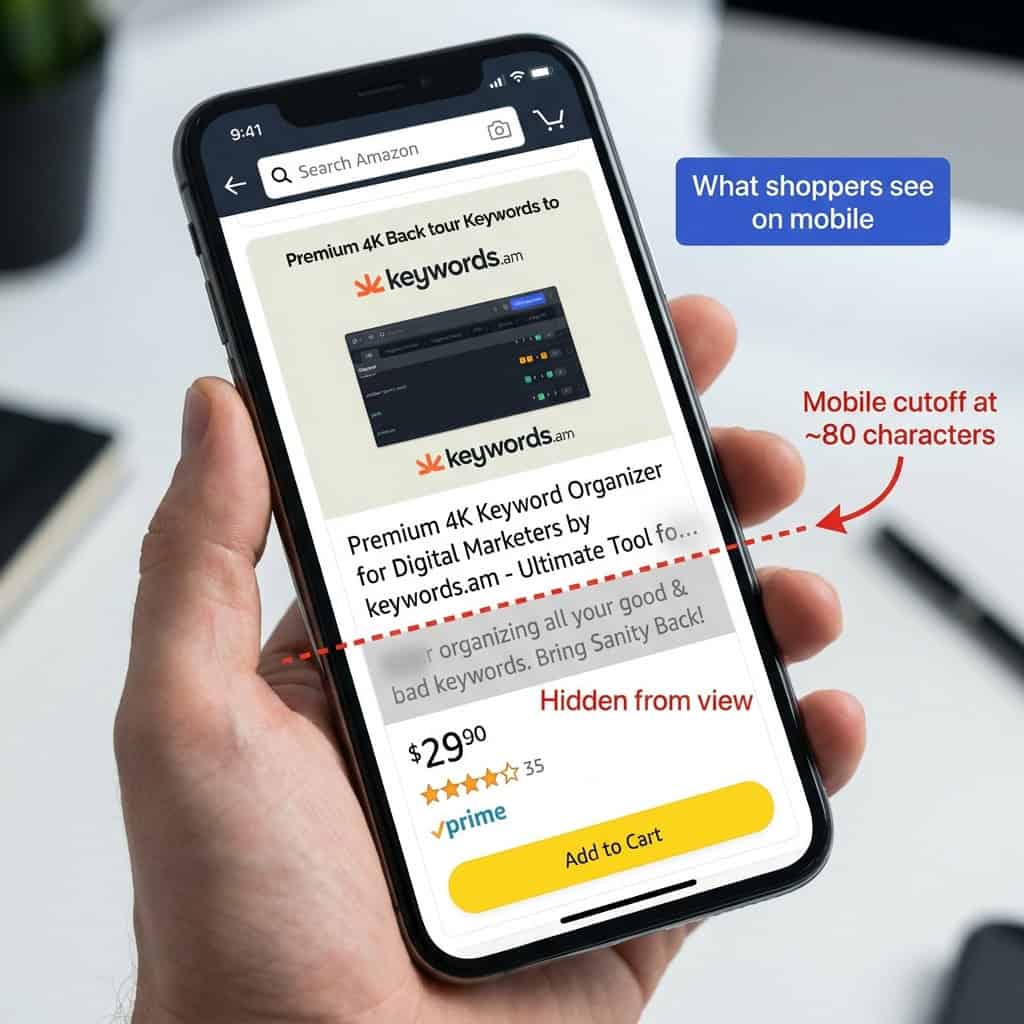
- Title limits: Standard is 200 characters, but it varies by category (80-200). Mobile? Only shows about 70-80 characters.
- Backend keywords: 249 BYTES in US/EU. Not characters. Exceeding by just 1 byte silently de-indexes ALL keywords. This can be a pain, the reality is.
- Bullet points: 500 chars per bullet, but only the first 1,000 bytes total get indexed.
- Bytes vs characters: ASCII = 1 byte, umlauts = 2 bytes, Japanese = 3 bytes, emojis = 4+ bytes.
- Critical mistake: Confusing characters with bytes causes 47% of sellers to lose keyword indexing. Honestly, it’s a pretty common error.
- Safe strategy: Always use 249 bytes as the backend limit. Even if some categories allow 500.
What Are All Amazon’s Character Limits? (Master Reference Table)
Amazon? It has rules. Product titles can be 200 characters. Bullet points? Each one gets 500 characters. And the main description allows a generous 2000 characters. But backend search terms…that 249 BYTES limit? Honestly, it’s a pain.
The table below is a quick guide, and it covers US, UK, and EU marketplaces. Here’s the thing though, you should always double-check what’s allowed for *your* specific product category. Go look inside Seller Central. Things change a lot, I’m telling you.
Field |
US/UK/EU Limit |
Japan Limit |
India Limit |
Mobile Display |
Notes |
|---|---|---|---|---|---|
Product Title |
200 characters |
200 characters |
200 characters |
~70-80 chars visible |
Category variations exist |
Bullet Points |
500 chars/bullet (varies) |
500 chars/bullet |
500 chars/bullet |
Full display |
Only first 1000 bytes indexed |
Product Description |
2000 characters |
2000 characters |
2000 characters |
Full display |
HTML no longer supported |
Backend Search Terms |
249 BYTES |
500 BYTES |
200 BYTES |
N/A |
Exceeding de-indexes ALL terms |
A+ Content Text |
Varies by module |
Same |
Same |
Full display |
150-6000 chars per module |
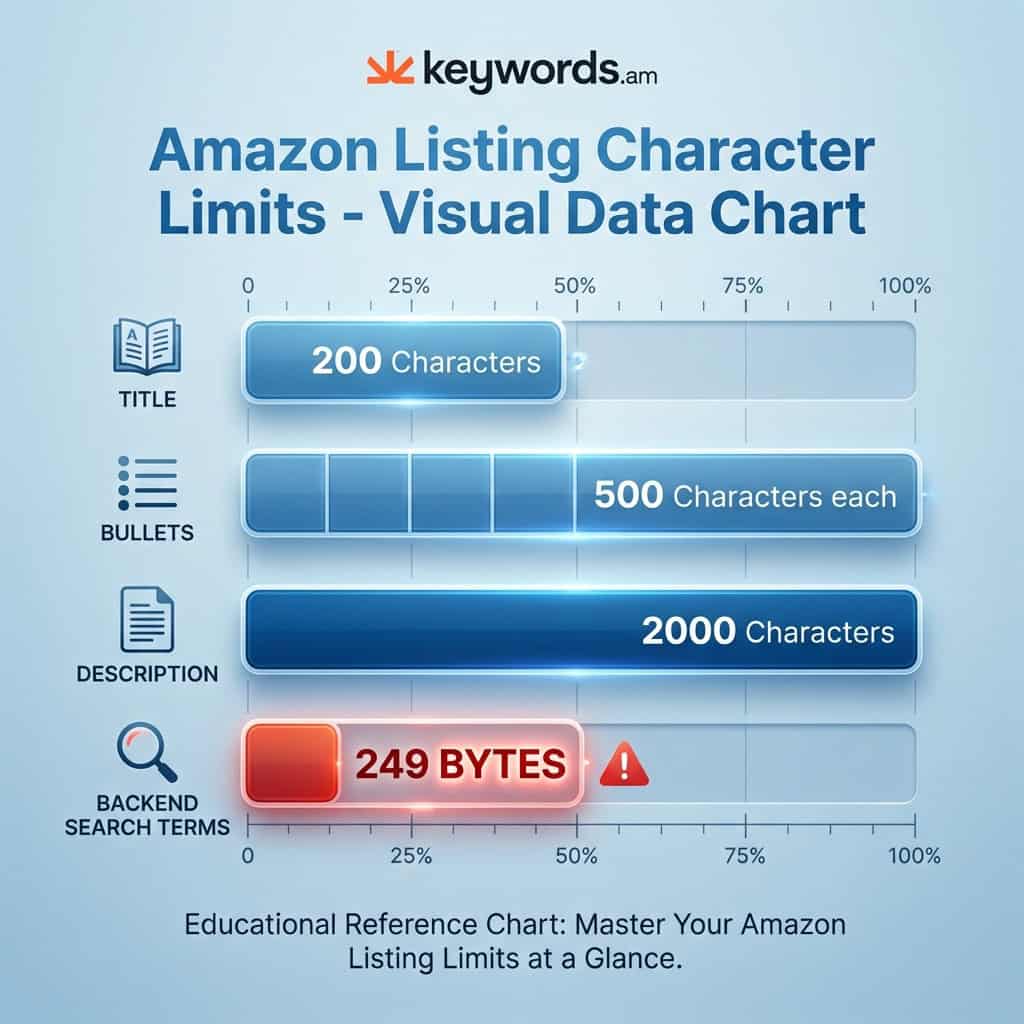
So, the table is helpful. But the reality is, these numbers don’t tell the whole story. Understanding “characters” versus “bytes” is pretty important. And you’ll see why soon enough, in my experience. It can make a lot of difference to how you handle your listings. That said, don’t underestimate those limits.
What Is the Difference Between Bytes and Characters?
A byte? It’s just data storage. Characters are what people see. Honestly, it’s pretty straightforward. Standard English letters use 1 byte each. But it’s not universal!
Umlauts need 2 bytes, for example. Japanese? 3 bytes per character. And emojis? Emojis use 4+ bytes. The reality is this difference causes de-indexing issues, all the time. It’s a bummer, I know.
Here’s a simple breakdown of how character types eat up bytes using UTF-8 encoding:
- ASCII Characters (1 byte each):
- English letters (A-Z, a-z), numbers (0-9), and basic punctuation (
.,!,,) each use one byte. - Example:
keyword= 7 characters = 7 bytes.
- English letters (A-Z, a-z), numbers (0-9), and basic punctuation (
- Extended Latin Characters (2 bytes each):
- European language characters with accents need two bytes each.
- Examples: German umlauts (ä, ö, ü, ß), French accents (é, è, ç), and the Spanish ñ.
- Example:
größe= 5 characters but eats up 6 bytes.
- CJK Characters (3 bytes each):
- Chinese, Japanese, and Korean characters? Those are usually three bytes each.
- Example: 「キーワード」 (the word “keyword” in Japanese) is 5 characters but uses 15 bytes.
- Emojis (4+ bytes each):
- Emojis are kind of sneaky. A basic emoji takes up 4 bytes. Complex emojis that use modifiers, like the family emoji, can need 25 bytes or more.
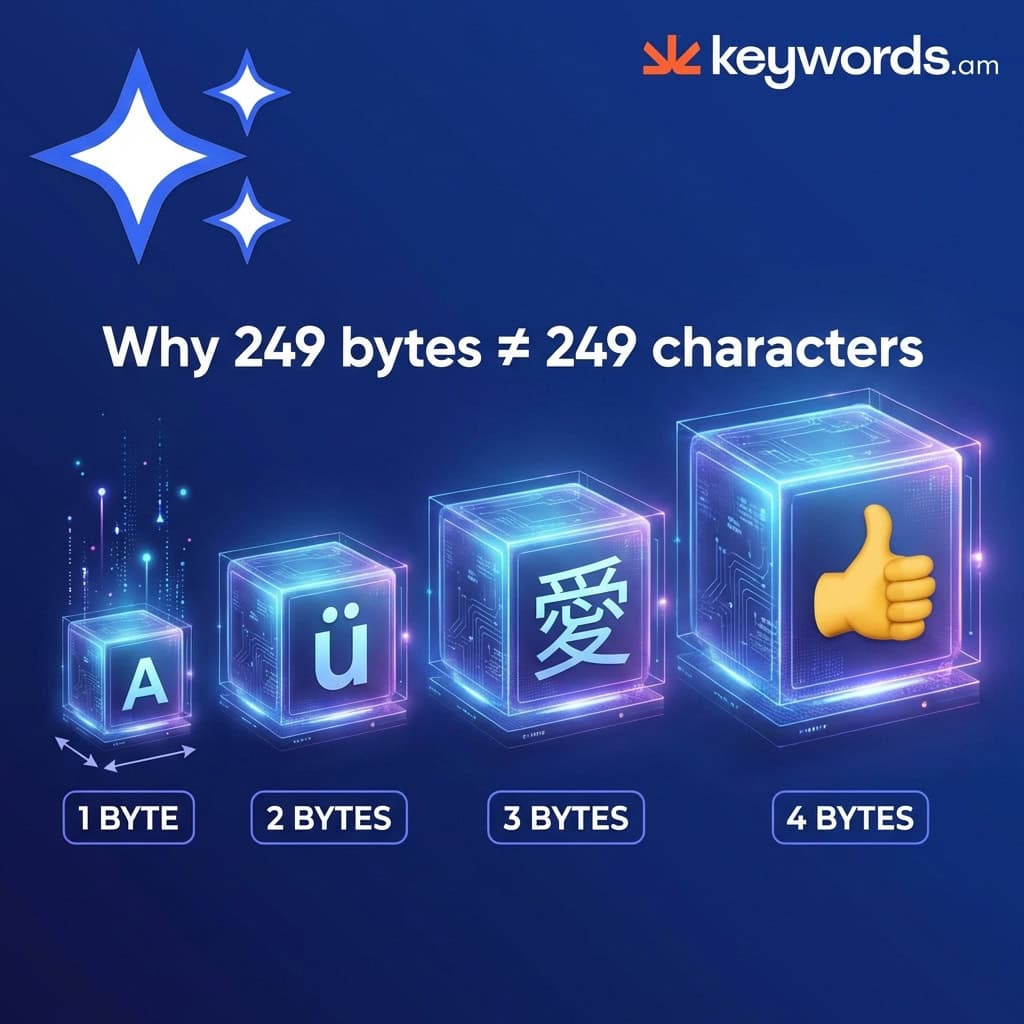
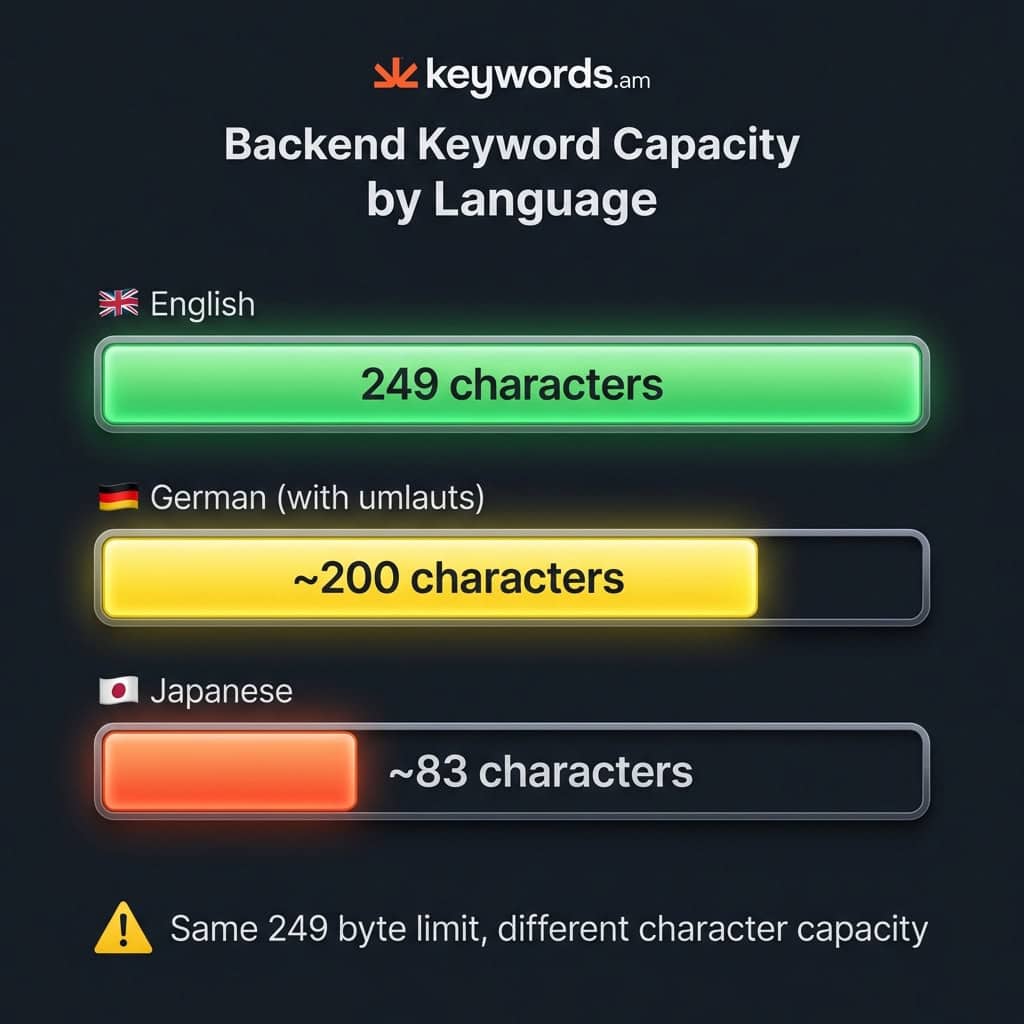
So, it definitely impacts your backend search terms. Here’s the thing though: with a 249-byte limit in the US, you can fit 249 ASCII characters. But, if you sell in Germany and use umlauts, your character limit is closer to 200. For a seller in Japan, the field might only hold around 83 characters. Worth noting! It just depends, I guess.
What Are Amazon’s Title Character Limits by Category?
Amazon restricts title length. And these character limits depend on the category. Most categories allow 200 characters. Electronics titles are shorter: 150. Apparel? Only 125 characters. Pet supplies get just 80 characters.
Here’s the thing though: lots of Amazon shoppers are on mobile. And mobile screens only show 70-80 characters. It doesn’t matter what the category limit is, pretty much.
Standard categories like Home & Kitchen, Sports & Outdoors, and Tools allow 200 characters. Electronics get less.
Electronics (150 characters): Amazon enforces a stricter limit here. Honestly, it keeps things clear. Fashion is even shorter.
Apparel & Fashion (125 characters): A policy update in early 2025 made the limits tighter. I think it was to standardize things. Pet Supplies are super short.
Pet Supplies (80 characters): It’s definitely one of the strictest categories. Sellers are often surprised when longer titles are rejected. But the mobile limit matters most, though.
The Mobile Limit (~70-80 characters): The reality is, most shoppers use phones. In my experience, over 70% of Amazon traffic is mobile. Titles get cut off after 70-80 characters. So, start with the brand, product, and key points.
Best practice? Write for mobile first. And make a keyword-rich title under 80 characters. Then, add details to meet the category limit. That said, don’t exceed the limit!
What Are Amazon Bullet Point Character Limits?
Amazon allows sellers 500 characters per bullet point. Vendors only get 255. But here’s the thing though: the first 1000 bytes across all 5 bullets are the only ones indexed for search.
It’s kind of a two-tiered setup in my experience.
- Display Limit (up to 500 characters/bullet): You get a maximum amount of text visible to shoppers. It varies a lot, honestly. It depends on the product’s category. Sellers often get more than vendors. Apparel is a good example. And sometimes? Amazon recommends only 255 characters for each bullet point.
- Indexing Limit (1,000 bytes total): This affects SEO. It’s the unseen limit, and it’s important. Amazon’s search? It only cares about the first 1,000 bytes. Keywords after that are visible to customers, but the Amazon search engine won’t see them.
So, the reality is, aim for a total character count of 1,000 or fewer across your five bullets. That’s if you’re sticking to standard ASCII. A safe approach? 5 bullet points, 200 characters apiece. It works pretty much every time. That way, you make certain your important keywords get indexed. Listings with well structured bullets can see keyword indexing coverage improve by 15% on average! Worth noting: check out the TFSD Framework for even more advanced techniques.
What Is the 249-Byte Backend Keyword Limit?
Amazon gives you backend search terms. But there’s a catch. There’s a limit. And it’s pretty tight. In the US, UK, and EU? 249 bytes. Japan gets more; they’re allowed 500 bytes. India? Poor India is stuck at 200 bytes.
Here’s the thing though: exceed that limit by just *one single byte,* and Amazon drops all your keywords. Seriously. No mercy.
Honestly, this rule is super technical. It’s also pretty unforgiving. And get this, you don’t even see an error message in Seller Central. Poof! Your keywords just vanish, silently ignored.
Key differences? It varies by marketplace:
* US, UK, EU: 249 bytes
* Japan: 500 bytes
* India: 200 bytes
So, how do you actually *use* that space? Follow these rules. Spaces separate keywords. Don’t use commas. Semicolons? Nope. Don’t repeat keywords! Including plurals is pointless. Amazon’s algorithm? It handles all that stemming automatically.
But if you’re dealing with multiple languages, pay close attention. A German phrase such as “für größe farbe” is 18 characters. That said, it uses 20 bytes. The reality is, you need tools to count bytes if you sell internationally. Or if you use special characters. It can save you a lot of trouble. Check out this guide to Amazon backend keywords for a full workflow. It’s worth a read.
What Are Amazon Description and A+ Content Limits?
Amazon product descriptions have a 2000 character limit. It’s plain text only these days. HTML? It’s a thing of the past.
The limit is 2,000 characters for those descriptions. But the HTML thing is worth noting: it was removed in July 2021. So descriptions *must* be plain text.
A+ Content gives you more visual punch. But there *are* limits, of course. Those limits depend on the module you pick.
Module Type |
Headline Limit |
Body Text Limit |
|---|---|---|
Standard Text |
160 chars |
300-1000 chars |
Image Header with Text |
150 chars |
6000 chars |
Premium Text |
80 chars |
5000 chars |
A standard A+ Content layout lets you use up to five modules. Premium A+? That gives you seven. Worth noting: I’ve seen people try to sidestep these limits by putting text *in* images. But honestly, that text isn’t indexed by Amazon or Google. And it’s not accessible. Don’t do that, seriously. It won’t help.
What Happens When You Exceed Amazon’s Character Limits?
So, what happens if you ignore Amazon’s character limits? It depends, honestly. The consequences? They aren’t the same.
- Titles: Seller Central might let you type a super long title. But search results? It’ll get cut off there. And mobile is even worse, I think. Titles are chopped off around 70-80 characters there.
- Bullet Points: Customers can see it all. Here’s the thing though: keywords after the 1,000-byte indexing limit won’t boost your search ranking.
- Backend Search Terms: This penalty is harsh. One byte over the 249-byte limit, and the whole field is pretty much useless for SEO. Seriously, it’s brutal, the reality is.
- Product Description: You’ll usually see an error if your description is too long, and you can’t save the listing if that happens.
And the severity really varies a lot. Titles are shortened, but at least you still see some of it. Bullet points still display, but SEO after 1000 bytes? Forget about it. But backend keywords, if you exceed 249 bytes, you are done. That said, worth noting, you don’t even get an error! In my experience, it’s best to stay under the limits. Don’t go over.
How Have Amazon Character Limits Changed Over Time?
Amazon’s character limits have changed a lot over time. Backend keywords? They used to have 5000 characters before 2016. Then, in 2017, it dropped to only 250 bytes. It’s a massive change, I think. And honestly, this 2024 change is kind of strange.
The 2024 change meant expansion to 500 bytes. But only in *some* categories. So sticking with 249 bytes? Still the safest bet. You’ll find it’s super important to get this right.
But here’s the thing though: a lot of online advice is probably outdated. And the reality is, a lot of it is just plain wrong. Don’t blindly trust it, honestly.
Year |
Change |
Impact |
|---|---|---|
Pre-2016 |
5000 character backend limit |
The era of “keyword stuffing.” You could cram everything in there. |
Aug 2017 |
250 byte limit enforced |
The modern byte-based limit was established. Major shift. |
July 2021 |
HTML deprecated in descriptions |
All descriptions became plain text only. No more fancy formatting! |
Jan 2025 |
Title policy update |
Stricter category-specific title limits rolled out. Keep titles short and sweet. |
Feb 2024 |
500 byte expansion (some categories) |
An inconsistent rollout means 249 bytes is still the safest bet. Worth noting, though. |
FAQ – Amazon Character Limits Questions
What is the Amazon title character limit?
It’s 200 characters in most categories. But electronics titles? They only get 150 characters max. Apparel? 125 characters. Pet Supplies are even less, just 80 characters. Mobile shoppers? They only see 70-80 characters of your title, honestly.
What is the Amazon bullet points character limit?
You get 500 characters per bullet point. That said, Vendors get less—only 255. Here’s the thing though: Amazon only indexes the first 1000 bytes across all your bullet points. So, in my experience, aim for about 200 characters. It helps with indexing, I think.
What is the Amazon backend keywords limit?
249 BYTES in the US, UK, and EU. Japan gets 500 bytes. But India? Just 200 bytes. And worth noting: go even 1 byte over, and Amazon ignores ALL your backend keywords!
Is Amazon’s limit bytes or characters?
It depends. Titles and bullets have character limits. Backend search terms? BYTE limits. Standard ASCII is 1 byte per character, pretty much. But umlauts use 2 bytes. Japanese characters? 3 bytes. And emojis? Those can be 4+ bytes each.
Why are Amazon keywords not indexing?
Most likely, your backend search terms are over 249 bytes. Amazon just silently stops indexing that field. Use a byte counter tool to check, it’s worth it. Especially if you’re using non-standard characters, you’ll want to check the actual byte count.
What is the Amazon product description character limit?
2000 characters is the limit. But HTML formatting? No longer supported since 2021. So plain text only, I’m afraid, that’s the only option.
How many characters show on Amazon mobile?
Only about 70-80 title characters show on mobile devices. So always put your brand name first. The most important info needs to be in those first 70 characters. The reality is, people won’t see the rest of your title, I think.
Does Amazon count spaces in character limits?
Yes, spaces count toward character limits. And for backend search terms, spaces count toward byte limits, too. But commas between backend keywords aren’t needed. A space is fine. So you don’t need those commas.
Conclusion
Amazon’s rules matter. You have to follow them. Especially those character and byte limits. It’s honestly just basic technical SEO, plain and simple. Here’s the thing though: the important stuff is pretty clear, really. Backend search terms? Limited by bytes. Titles? Mobile view matters most, in my experience. Bullet points? Only the first 1,000 bytes get indexed by Amazon.
The reality is, sellers need to act fast. A great first step is auditing your backend search terms using a byte counter. Like, seriously, now. If you are selling in the US or EU and you’re over 249 bytes, you’re losing search visibility big time! Right now! And if you want more info, read about Amazon listing optimization.
Byte counting can be a lot of work, you know? So, for proper byte counting *and* TFSD-optimized listings, check out how Keywords.am’s listing tools handle it all automatically. Sellers can then focus on keywords that convert like crazy; you won’t be stuck counting bytes all day. That said, this saves a lot of time.




