

Industry estimates suggest that 47% of Amazon sellers have had keywords de-indexed without knowing it—usually because they confused characters with bytes. Every “Amazon character limit” guide gives you a number. Few explain that Amazon enforces BYTES for backend fields, that limits vary by category, and that exceeding the limit by even one byte silently breaks your indexing. This guide provides the complete technical reference: every field, every marketplace, the encoding rules that trip sellers up, and how to actually count what matters. Unlike guides that say “200 characters for title,” this reference explains why a 180-character title with emojis might exceed limits while a 250-character ASCII-only title works fine.
TL;DR: Key Amazon Character Limits
- Title: 200 characters is the standard, but it varies by category (e.g., 80 for Pet Supplies). Mobile view truncates to ~70-80 characters.
- Backend Keywords: 249 BYTES in US/EU. This is not the same as characters. Exceeding this limit de-indexes the entire field.
- Bullet Points: 500 characters per bullet, but only the first 1,000 bytes total across all bullets are indexed for search.
- Bytes vs. Characters: Standard English letters are 1 byte. Special characters like umlauts (ü) are 2 bytes, and emojis can be 4 bytes or more.
- Silent De-indexing: The most critical issue is for backend keywords. If you exceed the 249-byte limit, Amazon won’t warn you; your keywords will just stop working.
- Category Specificity: Always check the category-specific style guide in Seller Central, as it can override the general limits.
- Localization: Limits change by marketplace. Japan, for instance, allows 500 bytes for backend keywords to accommodate multi-byte characters.
What Are All Amazon’s Character Limits? (Master Reference Table)
Amazon enforces different limits for each listing field: 200 characters for titles, 500 per bullet point, 2000 for descriptions, and critically, 249 BYTES for backend search terms.
The table below provides a master reference for the key limits across major marketplaces. However, always verify the specific limits for your product’s category within Seller Central, as these can and do vary.
Field |
US/UK/EU Limit |
Japan Limit |
India Limit |
Mobile Display |
Notes |
|---|---|---|---|---|---|
Product Title |
200 characters |
200 characters |
200 characters |
~70-80 chars visible |
Category variations exist |
Bullet Points |
500 chars/bullet (varies) |
500 chars/bullet |
500 chars/bullet |
Full display |
Only first 1000 bytes indexed |
Product Description |
2000 characters |
2000 characters |
2000 characters |
Full display |
HTML no longer supported |
Backend Search Terms |
249 BYTES |
500 BYTES |
200 BYTES |
N/A |
Exceeding de-indexes ALL terms |
A+ Content Text |
Varies by module |
Same |
Same |
Full display |
150-6000 chars per module |
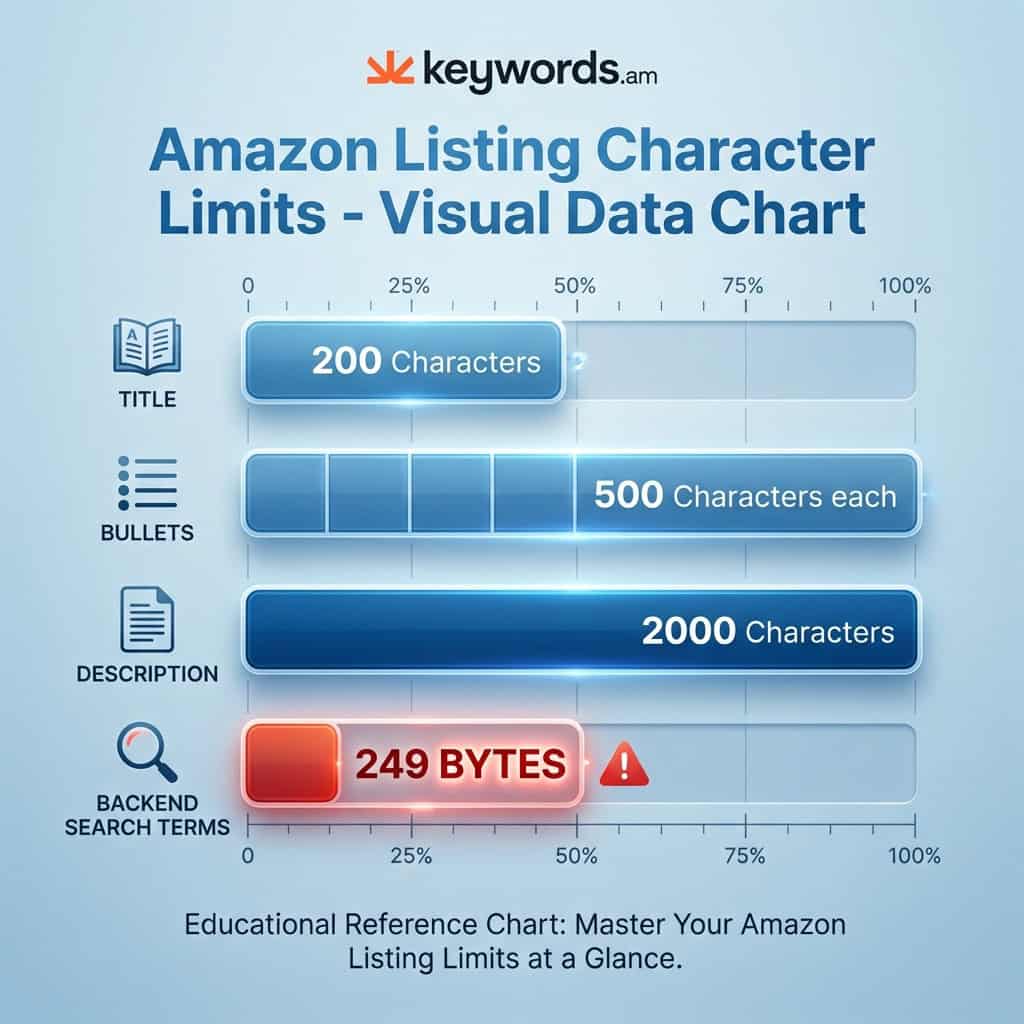
The table above shows the numbers—but the real complexity lies in understanding what those numbers actually mean, especially the distinction between characters and bytes.
What Is the Difference Between Bytes and Characters?
A byte is a unit of data storage, while a character is what you see on screen. Standard English letters equal 1 byte each, but umlauts use 2 bytes, Japanese characters use 3 bytes, and emojis use 4+ bytes. This distinction is the single most common reason sellers unknowingly have their backend keywords de-indexed.
Here’s a simple breakdown of how different character types consume bytes according to UTF-8 encoding:
- ASCII Characters (1 byte each):
- Standard English letters (A-Z, a-z), numbers (0-9), and basic punctuation (
.,!,,) each consume exactly one byte. - Example:
keyword= 7 characters = 7 bytes.
- Standard English letters (A-Z, a-z), numbers (0-9), and basic punctuation (
- Extended Latin Characters (2 bytes each):
- Characters common in European languages with diacritics or accents consume two bytes.
- Examples: German umlauts (ä, ö, ü, ß), French accents (é, è, ç), and the Spanish ñ.
- Example:
größe= 5 characters but consumes 6 bytes.
- CJK Characters (3 bytes each):
- Characters used in Chinese, Japanese, and Korean languages are typically three bytes each.
- Example: 「キーワード」 (the word “keyword” in Japanese) is 5 characters but consumes 15 bytes.
- Emojis (4+ bytes each):
- Emojis are the most deceptive. A simple emoji consumes 4 bytes. Complex emojis that use modifiers, like the family emoji, can consume 25 bytes or more.
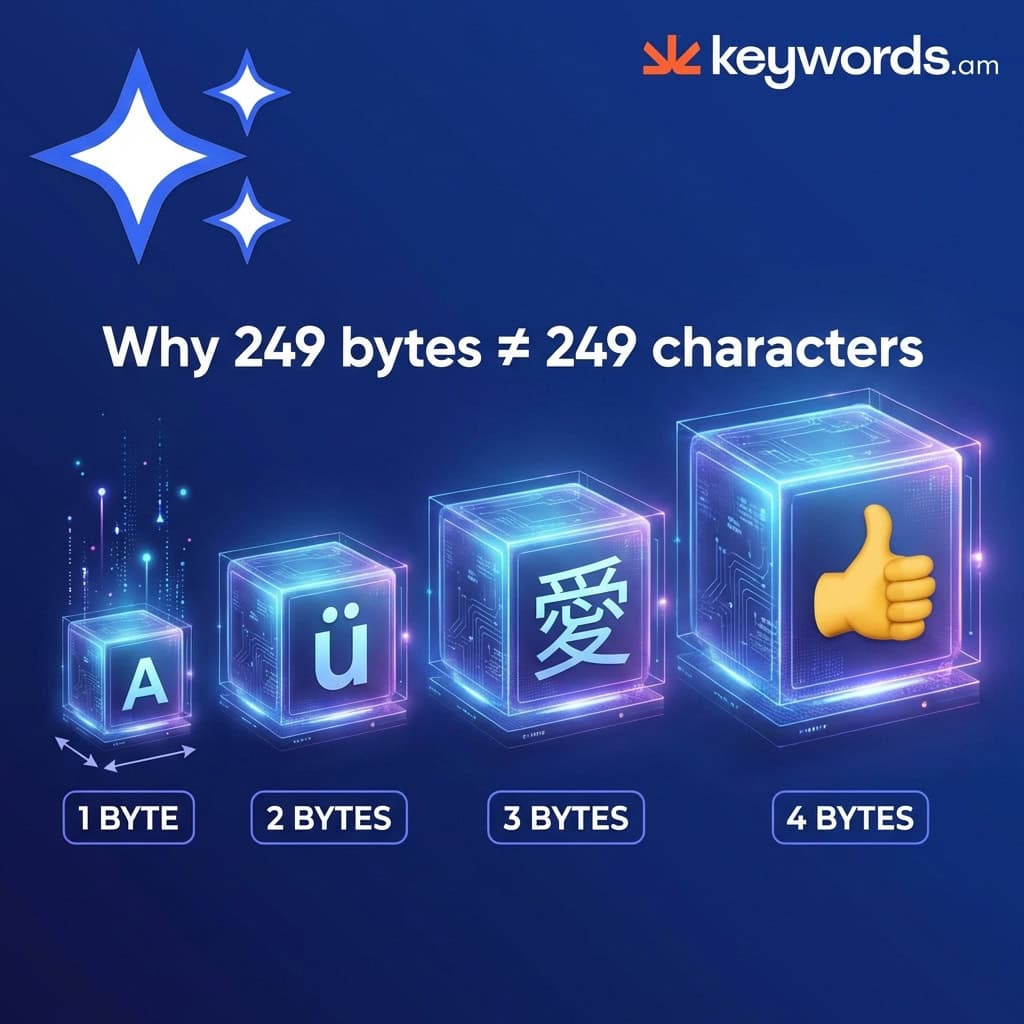
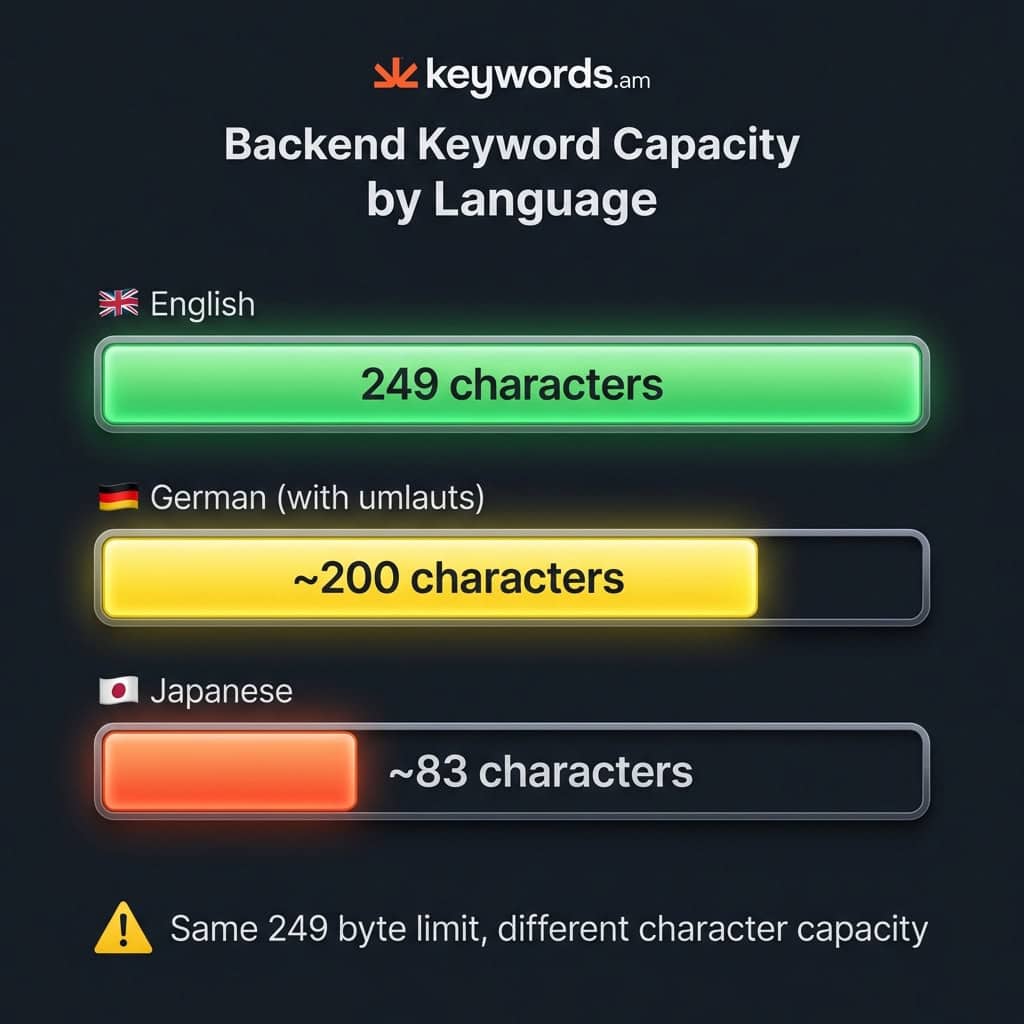
This has a significant practical impact on your backend search terms field. With a 249-byte limit in the US, you can fit 249 ASCII characters. However, if you are selling in Germany and using umlauts, your practical character limit is closer to 200. For a seller in Japan, that same field might only hold around 83 characters.
What Are Amazon’s Title Character Limits by Category?
Amazon title limits vary by category: 200 characters for most products, 150 for electronics, 125 for apparel, and as low as 80 for pet supplies. Mobile displays only show 70-80 characters regardless of limit.
While the general advice is a 200-character limit for titles, adhering to this can lead to truncation or even suppression in certain categories.
- Standard Categories (200 characters): The baseline for most categories like Home & Kitchen, Sports & Outdoors, and Tools.
- Electronics (150 characters): Amazon enforces a stricter 150-character limit for products in the electronics category to improve clarity.
- Apparel & Fashion (125 characters): A policy update in early 2025 tightened the limits for fashion items to standardize presentation.
- Pet Supplies (80 characters): This is one of the strictest categories, and sellers are often caught by surprise when their longer titles are rejected.
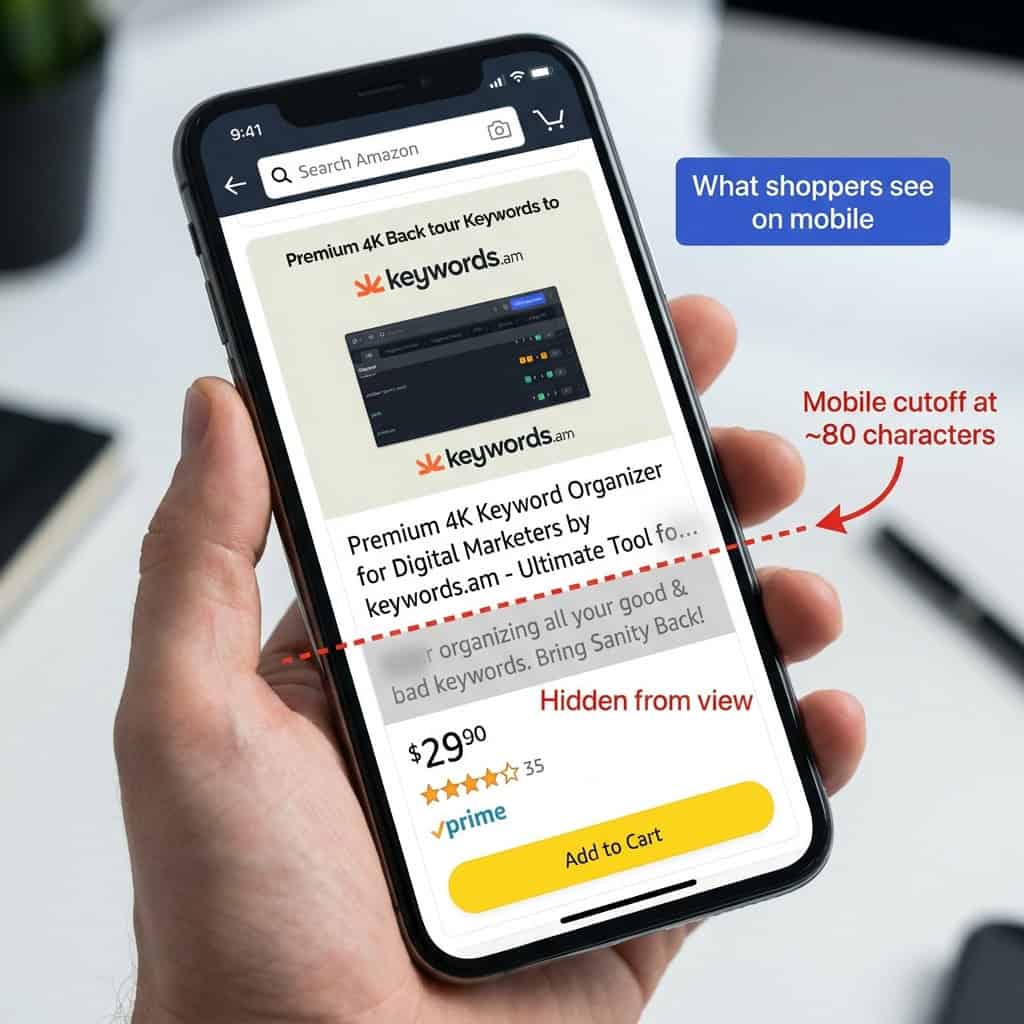
- The Mobile Limit (~70-80 characters): The most important limit for conversion is the mobile display view. Over 70% of Amazon traffic comes from mobile devices, where titles are truncated after approximately 70-80 characters. Critical information—brand name, main product identity, and key feature—must be front-loaded within this space.
The best practice is to write for mobile first. Craft a compelling, keyword-rich title under 80 characters, then strategically expand it with secondary information to meet your category’s maximum limit.
What Are Amazon Bullet Point Character Limits?
Amazon allows up to 500 characters per bullet point for sellers and 255 for vendors. However, only the first 1000 bytes total across all five bullets get indexed for search ranking.
This creates a two-tiered system for bullet points: a display limit and an indexing limit.
- Display Limit (up to 500 characters/bullet): This is the maximum amount of text you can show to a customer. This limit varies by category, with sellers often having higher limits than vendors. For example, some apparel categories may recommend only 255 characters per bullet.
- Indexing Limit (1,000 bytes total): This is the hidden limit that impacts SEO. Amazon’s search algorithm only considers the first 1,000 bytes of content across all five of your bullet points. Any keywords placed beyond this point are visible to the customer but invisible to the search engine.
The optimal strategy is to keep the total character count for all five bullets combined at or below 1,000 characters (assuming standard ASCII). A safe and effective structure is five bullet points of 200 characters each. This ensures all your keyword-rich copy falls within the indexed zone. Analysis of top-performing listings shows that sellers who optimize bullet structure see an average 15% improvement in keyword indexing coverage. For more advanced keyword placement, consult the TFSD Framework.
What Is the 249-Byte Backend Keyword Limit?
Amazon limits backend search terms to exactly 249 bytes in US/UK/EU marketplaces, 500 bytes in Japan, and 200 bytes in India. Exceeding this limit by even one byte causes Amazon to de-index the entire field.
This is the most technical and punishing of all of Amazon’s limits. When you exceed the byte limit, there is no error message in Seller Central and no partial credit. All keywords in the field are silently ignored by the search algorithm.
Key marketplace variations include:
* US, UK, EU: 249 bytes
* Japan: 500 bytes
* India: 200 bytes
To maximize your use of this limited space, follow these formatting rules:
* Use spaces to separate keywords; no commas or semicolons are needed.
* Do not repeat words.
* There is no need to include variations like plurals; Amazon’s algorithm handles stemming.
Sellers dealing with multiple languages must be especially careful. A German phrase like “für größe farbe” is 18 characters but consumes 20 bytes. Tools that count bytes are essential for anyone selling internationally or using special characters. For a full workflow, see the guide to Amazon backend keywords.
What Are Amazon Description and A+ Content Limits?
Amazon product descriptions are limited to 2000 characters of plain text (HTML deprecated since 2021). A+ Content modules vary from 150 to 6000 characters depending on module type.
For the standard product description, the 2,000-character limit is consistent across most marketplaces. The most significant recent change was the deprecation of HTML tags in July 2021, meaning all descriptions must now be plain text.
A+ Content offers a more visual way to present product information, but it comes with its own set of limits that vary by the module used.
Module Type |
Headline Limit |
Body Text Limit |
|---|---|---|
Standard Text |
160 chars |
300-1000 chars |
Image Header with Text |
150 chars |
6000 chars |
Premium Text |
80 chars |
5000 chars |
A standard A+ Content layout allows for up to five modules, while Premium A+ allows for seven. While placing text within images is a way to bypass these character limits, this text is not indexed by Amazon or Google and is inaccessible to screen readers, creating a negative user experience.
What Happens When You Exceed Amazon’s Character Limits?
Consequences vary by field: titles get silently truncated on mobile, bullets beyond 1000 bytes lose SEO value, and backend keywords exceeding 249 bytes are completely de-indexed with no error message.
- Titles: Seller Central may accept a title that is over the category limit, but it will be truncated in search results. On mobile, it will always be cut off at ~70-80 characters for display.
- Bullet Points: The full text will be displayed to the customer, but any keywords after the 1,000-byte indexing limit will not contribute to your search ranking.
- Backend Search Terms: This is the most severe penalty. Exceeding the byte limit by a single byte renders the entire field useless for SEO.
- Product Description: An oversized description will typically trigger an error message, preventing you from saving the listing edit.
How Have Amazon Character Limits Changed Over Time?
Amazon’s limits have evolved dramatically: backend keywords dropped from 5000 characters pre-2016 to 250 bytes in 2017. The 2024 expansion to 500 bytes is inconsistent across categories, so 249 bytes remains the safe default.
This history is important because much of the advice found online is dangerously outdated.
Year |
Change |
Impact |
|---|---|---|
Pre-2016 |
5000 character backend limit |
The era of “keyword stuffing.” |
Aug 2017 |
250 byte limit enforced |
The modern byte-based limit was established. |
July 2021 |
HTML deprecated in descriptions |
All descriptions became plain text only. |
Jan 2025 |
Title policy update |
Stricter category-specific title limits rolled out. |
Feb 2024 |
500 byte expansion (some categories) |
An inconsistent rollout means 249 bytes is still the safest bet. |
FAQ – Amazon Character Limits Questions
What is the Amazon title character limit?
200 characters for most categories, but it varies: Electronics (150), Apparel (125), Pet Supplies (80). Mobile only displays ~70-80 characters regardless of limit.
What is the Amazon bullet points character limit?
500 characters per bullet for most sellers (255 for vendors), but only the first 1000 bytes total across all bullets get indexed for search. Aim for 200 characters per bullet to stay in the indexed zone.
What is the Amazon backend keywords limit?
249 BYTES (not characters) in US/UK/EU, 500 bytes in Japan, 200 bytes in India. Exceeding by even 1 byte causes Amazon to ignore ALL your backend keywords.
Is Amazon’s limit bytes or characters?
It depends on the field. Titles and bullets use character limits. Backend search terms use BYTE limits. Standard ASCII = 1 byte per character, but umlauts = 2 bytes, Japanese = 3 bytes, emojis = 4+ bytes.
Why are Amazon keywords not indexing?
Most likely the backend search terms exceed 249 bytes. Amazon silently de-indexes the entire field when exceeded. Use a byte counter tool to verify the actual byte count, especially if using non-ASCII characters.
What is the Amazon product description character limit?
2000 characters. Note that HTML formatting is no longer supported as of 2021 – use plain text only.
How many characters show on Amazon mobile?
Only ~70-80 characters of a title display on mobile devices. Always frontload brand name and key product info in the first 70 characters.
Does Amazon count spaces in character limits?
Yes, spaces count toward character limits. For backend search terms, spaces also count toward byte limits. However, commas between backend keywords are not needed – space separation is sufficient.
Conclusion
Understanding and respecting Amazon’s character and byte limits is a fundamental part of technical SEO. The key takeaways are clear: backend search terms are limited by bytes, not characters; mobile truncation is the most important constraint for titles; and only the first 1,000 bytes of bullet points are indexed.
The most immediate action any seller can take is to audit backend search terms with a proper byte counter. If listings are in the US or EU and over 249 bytes, search visibility is being lost right now. For a deeper dive on next steps, read about Amazon listing optimization.
For proper byte counting and TFSD-optimized listings, explore how Keywords.am’s listing tools handle character and byte limits automatically—so sellers can focus on keywords that convert, not counting bytes.




