

- Amazon’s January 2025 policy overhaul limits title word repetition to twice per listing and caps character counts strictly.
- AI-driven enforcement now scans titles, bullets, and backend fields, automatically suppressing listings that show stuffing patterns.
- Targeting 100% keyword coverage often triggers penalties; an 80% target with natural language variation is safer and more effective.
- The TFSD framework (Title, Features, Search terms, Description) ensures each keyword appears once in the highest-priority field without duplication.
- Backend search terms must not duplicate visible keywords; doing so wastes the 249-byte limit and risks suppression.
- Recovery from suppression involves auditing via Seller Central, rewriting compliant fields, and waiting 15 minutes to 72 hours for reinstatement.
📑 Table of Contents
- What Does Amazon Consider Keyword Stuffing in 2026?
- What Happens When Amazon Catches Keyword Stuffing?
- Where Should Each Keyword Go? The Placement Priority Hierarchy
- How Do You Check If Your Amazon Listing Is Keyword Stuffed?
- How Do You Optimize Amazon Listings Without Keyword Stuffing?
- What Should You Do If Your Amazon Listing Gets Suppressed for Keyword Stuffing?
- Frequently Asked Questions About Amazon Keyword Stuffing
- Conclusion
On January 21, 2025, Amazon enforced a significant update to its product title requirements, limiting word repetition to a maximum of twice per title and strictly capping character counts across most categories. Sellers who failed to comply were given a brief 14-day window before Amazon’s automated systems began auto-rewriting titles. This marked a decisive shift from passive guideline suggestions to active, algorithmic enforcement.
The landscape for Amazon sellers has shifted dramatically since that date. AI-driven enforcement has escalated throughout 2026, with sophisticated automated systems now scanning titles, bullet points, descriptions, and backend keywords for stuffing patterns. These systems operate continuously, often suppressing listings without warning when manipulation is detected.
This guide covers what Amazon considers keyword stuffing, how to audit listings for compliance, and the placement strategy that maximizes coverage without crossing the line. By utilizing visual coverage indicators and a structured placement hierarchy, sellers can maintain high search visibility while safeguarding their account health against increasingly strict compliance measures.
What Does Amazon Consider Keyword Stuffing in 2026?
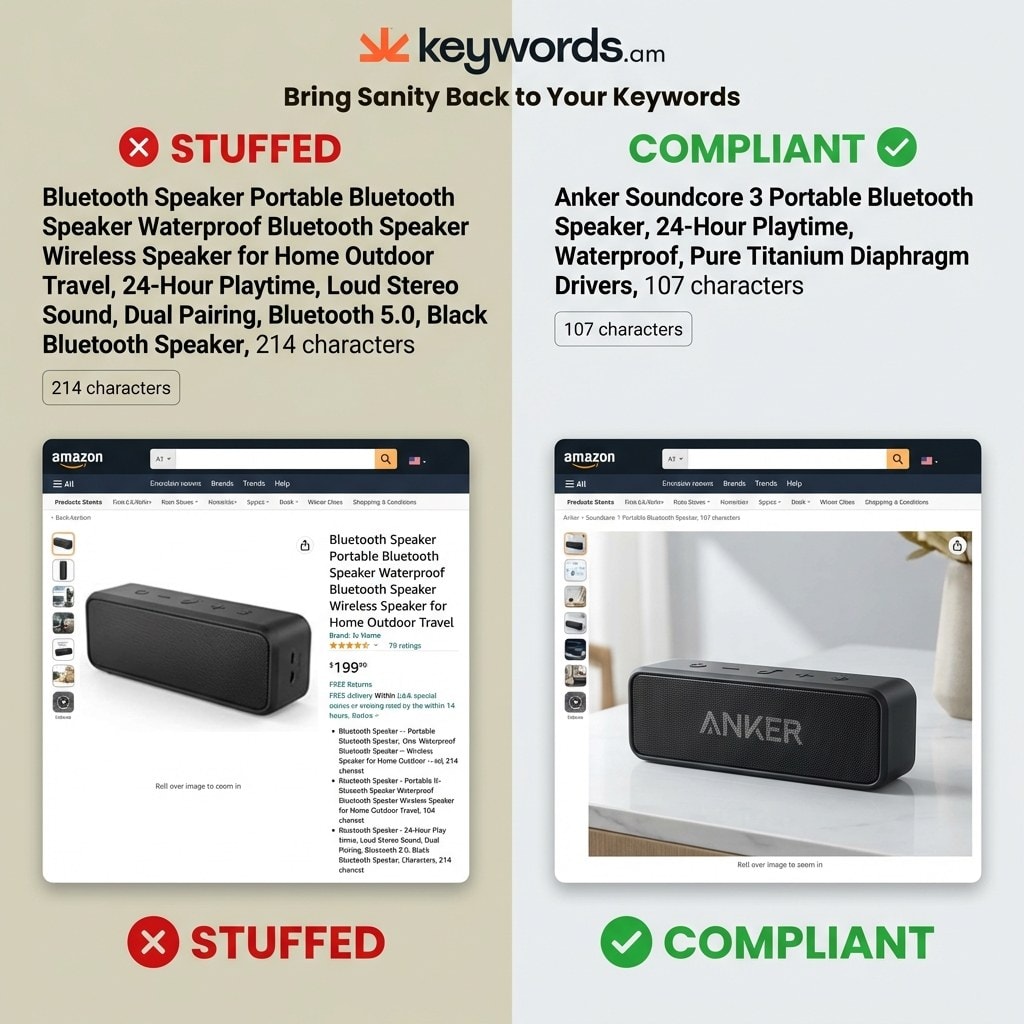
Amazon considers keyword stuffing as repeating words more than twice in titles, exceeding character limits, duplicating visible keywords in backend fields, and inserting irrelevant or competitor brand terms.
To remain compliant, sellers must understand precisely what triggers Amazon’s suppression algorithms. The definition of “stuffing” is now a specific set of measurable criteria.
The most critical violation occurs in the product title. Under current policy, repeating any single word more than twice (including plurals) triggers a flag. For example, “Premium Bluetooth Speaker Portable Bluetooth Speaker Wireless Bluetooth Speaker” repeats “Bluetooth” and “Speaker” three times, a direct violation. A compliant version would use each term once or twice at most: “Premium Portable Bluetooth Speaker with Wireless Connectivity.” Promotional phrases like “Best Seller” or “#1 Choice” are strictly banned.
Backend search terms represent another major enforcement area. Copying keywords from the title or bullet points into backend fields wastes the strict 249-byte limit. If a seller exceeds this limit by even a single byte, Amazon’s system ignores the entire field. This “all or nothing” approach makes backend stuffing functionally counterproductive.
Irrelevant keywords also pose a significant risk. Inserting competitor brand names or unrelated category terms violates Amazon’s Terms of Service and is considered a deceptive practice that can lead to account-level penalties. The algorithm also evaluates bullet points for natural language quality; lists of keywords disguised as sentences are flagged for low quality.
Table: Amazon Title Character Limits by Category
|
Category |
Character Limit |
Mobile Display |
|---|---|---|
|
Most categories |
200 characters |
~80 characters visible |
|
Electronics |
150 characters |
~80 characters visible |
|
Apparel & Fashion |
125 characters |
~80 characters visible |
|
Pet Supplies |
80 characters |
~80 characters visible |
Source: Carbon6 – New Amazon Product Title Requirements
What Happens When Amazon Catches Keyword Stuffing?
Amazon’s penalties escalate from automatic title rewrites with a 14-day warning to full listing suppression, algorithmic traffic demotion, and potential loss of Buy Box eligibility for repeat violators.
The consequences of non-compliance are severe. Amazon has engineered a graduated system of penalties designed to force adherence to its guidelines.
The first stage is often an automatic title rewrite. Amazon’s AI generates a “correction suggestion,” giving sellers 14 days to accept or propose a compliant alternative. Ignoring this results in Amazon rewriting the title automatically, often leading to generic, unappealing text that fails to convert.
More severe violations lead to listing suppression, making the product effectively invisible in search results. Non-compliant listings can experience traffic reductions of up to 40% compared to compliant counterparts. This suppression happens without a direct “takedown” notice; the product simply stops ranking.
Repeat offenders face account-level penalties. Consistent violations trigger account health warnings, and between 22% and 35% of active sellers have experienced suspension due to compliance issues. These suspensions freeze funds and halt sales during the appeal process. Compliance metrics also influence Buy Box eligibility; a history of violations can reduce a seller’s share of the Buy Box, decimating sales volume.
In 2026, Amazon’s AI now cross-references listings against external content, including seller websites, to check for consistency. Discrepancies can trigger reviews. For a detailed breakdown, refer to the listing suppression guide.
Where Should Each Keyword Go? The Placement Priority Hierarchy
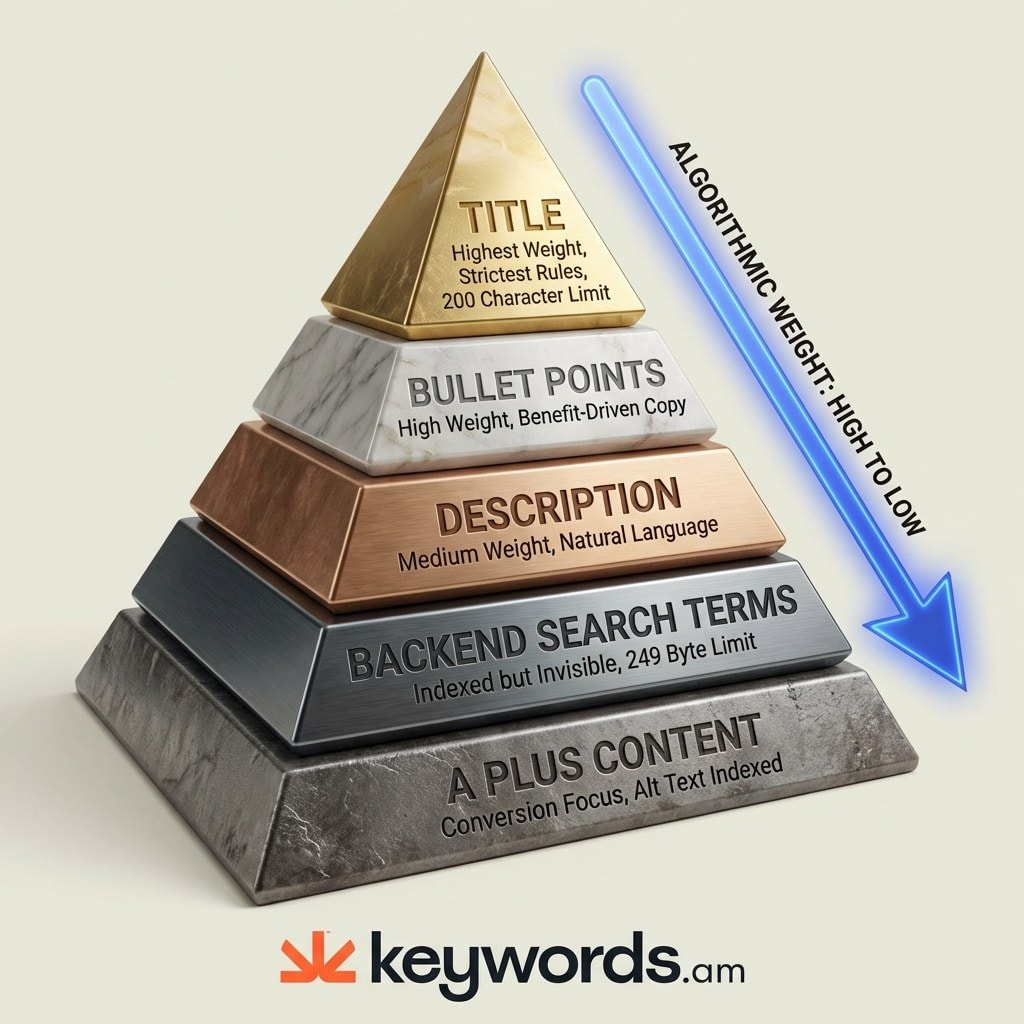
Each keyword should appear once in the highest-priority field: titles carry the most algorithmic weight but strictest rules, followed by bullets, description, and backend search terms for overflow.
The most effective way to avoid stuffing is to adopt the TFSD framework (Title, Features, Search terms, Description), ensuring coverage without redundancy.
1. The Title: High Weight, Strict Rules
The title is the most critical field but has a strict 200-character limit. Reserve it for the primary keyword phrase and 1-2 essential secondary keywords. Since Amazon indexes every word, there is zero benefit to repeating a term. Use each high-value word exactly once.
2. Bullet Points (Features): Contextual Power
Bullet points offer high weight and flexibility. Use this space for secondary keywords and long-tail phrases woven into benefit-driven copy. Instead of “Durable, strong, long-lasting,” write: “Constructed from heavy-duty aluminum for a durable design that ensures long-lasting performance.” This integrates keywords naturally. See the bullet points guide.
3. Product Description: The Narrative Layer
The text-based description is indexed and carries medium weight. It is ideal for remaining long-tail variations and contextual phrases, written in natural, narrative language. The algorithm expects complete sentences here.
4. Backend Search Terms: The Invisible Overflow
Use the backend for synonyms, misspellings, and Spanish variations. These 249 bytes are indexed but invisible. Crucially, never repeat words already in the title or bullets. If “Bluetooth” is in the title, putting it in the backend wastes space. The backend should be unique. The “Swiss Army Knife” tool within Keywords.am helps automate this deduplication. Learn more in the backend keywords guide.
5. A+ Content: Conversion and Alt Text
A+ Content primarily drives conversion. While visual content isn’t indexed traditionally, Alt Text on images is. Use relevant descriptive terms here, but keep body text focused on brand storytelling.
How Do You Check If Your Amazon Listing Is Keyword Stuffed?
Audit listings by checking keyword density (target 1-2% per core term), running a readability test for natural language, and using coverage indicators to verify optimization stays below 100%.
To determine if a listing is at risk, perform a systematic self-audit.
1. The Keyword Density Check
Count the primary keyword’s total occurrences across the visible listing. Target a density between 1% and 2%. If the total word count is 500 words, the primary keyword should appear 5-10 times. A density of 4-6% signals unnatural content to Amazon’s AI.
2. The Readability Test
Read the title and bullets aloud. If the title sounds like a robotic list (“Running Shoes Men Sneakers Athletic Trainers”), it is stuffed. A natural title flows like a sentence. Bullet points should sound like a salesperson speaking to a customer. Awkward phrasing flags low quality.
3. Coverage Indicator Analysis
Use tools like Keywords.am with visual coverage indicators. A “100% Green” listing means every keyword is an exact match, which often indicates stuffing. A compliant listing targets ~80% coverage with a mix of green (exact match) and yellow (broad match/variation) indicators. This variation signals natural language, which the algorithm rewards.
4. Backend Deduplication Audit
Check backend terms against visible content. If a word appears in the title or bullets, remove it from the backend. The Swiss Army Knife automates this, ensuring every byte of the 249-byte limit adds unique value.
How Do You Optimize Amazon Listings Without Keyword Stuffing?
Place each keyword once in the highest-priority field using the TFSD approach, push overflow terms to backend search terms, and refresh backend keywords every 3-4 weeks with seasonal variations.
Rebuild your strategy with the “One Keyword, One Field” rule. Assign each keyword to its best location and do not repeat it. Amazon’s indexer associates the term with the product from a single occurrence.
For terms not in visible fields (synonyms like “gadget” or misspellings), use the backend search terms. Use spaces, not commas, to maximize the 249-byte limit. “Kitchen tool utensil gadget” is more efficient than “kitchen, tool, utensil, gadget.”
Implement a seasonal refresh for backend terms. Update them every 3-4 weeks with temporal keywords (e.g., “christmas gift” in Q4, “mothers day gift” in April). This keeps the listing relevant to trends without cluttering visible fields.
For A+ Content, focus on conversion. Populate Alt Text with relevant keywords, but use the visual layout to build brand affinity and overcome objections. High conversion rates improve organic rank independently of keyword density.
What Should You Do If Your Amazon Listing Gets Suppressed for Keyword Stuffing?
Check Seller Central’s listing quality dashboard for specific violations, rewrite flagged fields to comply with current policy, resubmit, and allow 15 minutes to 72 hours for reinstatement.
If suppression occurs, immediate action minimizes revenue loss.
Step 1: Diagnose the Issue
In Seller Central, go to Inventory > Manage All Inventory and filter for “Suppressed.” The “Listing Quality Dashboard” often cites specific reasons like “Title Length” or “Keyword Repetition.” This tells you exactly what the AI detected.
Step 2: Correct the Content
Rewrite the flagged fields. Ensure titles are under 200 characters with no repeated words or promotional phrases. Clear the backend field and repopulate it only with unique terms not found in visible content. The TFSD framework helps identify excess keywords.
Step 3: Resubmit and Wait
After saving, allow time for re-crawling. Suppression often lifts within 15 minutes but can take up to 72 hours. Avoid further edits during this time.
Step 4: Ongoing Monitoring
“Compliance drift” occurs as listings age. Audit high-velocity listings monthly. Use coverage indicators to keep optimization in the “safe zone” (around 80%) and avoid creeping up to the stuffed 100% level. Consult the listing suppression guide for more.
Frequently Asked Questions About Amazon Keyword Stuffing
These are the most common questions sellers ask about Amazon keyword stuffing compliance, penalties, and recovery.
Conclusion
Amazon keyword stuffing is preventable with the right placement strategy and ongoing monitoring; sellers who adopt structured optimization consistently outperform those who over-optimize.
As the marketplace evolves, the era of brute-force SEO is definitively over. Amazon’s sophisticated, AI-driven enforcement means that the “more is better” approach is now a liability. Success in 2026 requires a shift in mindset from keyword accumulation to strategic keyword placement.
- Enforcement is Escalating: What worked in 2024 is a compliance risk in 2026.
- One Keyword, One Field: Place each keyword once in the highest-priority field available, rather than repeating it.
- Target 80% Coverage: A mix of match types reflects natural language variation.
- Deduplicate Backend Terms: Ensure backend terms are unique to maximize value.
Sellers should run a title audit on top-selling ASINs today. Check for repetition and character counts. For a structured solution, the TFSD framework visualizes keyword coverage to ensure visibility without non-compliance. Explore this visual approach at Keywords.am.




