

The thing is, the average Amazon agency loses 11 hours each week. It’s all from spreadsheet stuff—copying keywords, reformatting reports, and manually tracking which SKU uses what brand voice. And managing 20+ SKUs across brands (without software specifically for agencies) means your team spends more time on admin. The reality is, that time should be spent on helping your clients grow.
This guide? It compares the 5 best tools for agency listing workflows. It shows you what features actually matter (and which are just noise). Plus, there’s an ROI calculator to show the investment’s worth it. Most “best Amazon tools” lists are written for single sellers. This one? It’s for agencies managing tons of brands, so it addresses the challenges of scaling client operations efficiently and profitably.
Table of Contents
- The 20+ SKU Problem: Why Generic Tools Fail Agencies
- What to Look For: 7 Non-Negotiable Features
- Top 5 Amazon Listing Software for Agencies
- Inside the Agency Workspace: How Keywords.am Handles 20+ SKUs
- Agency Case Study: From 8 Hours to 90 Minutes Per Client
- ROI Calculator: Is Amazon Listing Software Worth It?
- FAQ: Amazon Listing Software for Agencies
- Conclusion
⚡ TL;DR
- Agencies lose 10+ hours weekly on manual tasks. Data transfer and report formatting, ugh. Generic seller tools only make it worse with per-seat pricing and fragmented workflows.
- What features are non-negotiable for agency software? Workspace separation. Multi-user access. Research-to-publish workflow. White-label reports. Flat pricing. Multi-marketplace support. And bulk operations.
- Keywords.am offers (in my experience) the most complete agency workflow at $49-299/mo flat pricing. Competitors? They’re charging $99-499/mo per seat.
- Real agencies report cutting client time from 8 hours to 90 minutes. Saving 65+ hours monthly across a 10-client portfolio.
- ROI breakeven is nearly instant. Saving just 48 minutes total across all clients covers a $129/mo subscription at typical billing rates.
- Tools like Helium 10? They work for single sellers. But they lack workspace separation, white-label reports, and flat pricing that agencies actually need.
The 20+ SKU Problem: Why Generic Tools Fail Agencies
For agencies, there’s a tough reality: managing a ton of SKUs across clients presents unique challenges. Generic, single-seller tools just aren’t built for it. The core issues? Data gets fragmented, pricing models are a killer, brand separation is nonexistent, and reporting? Forget about it.

Data Fragmentation Problem
Here’s what matters: the typical agency workflow is, honestly, a mess of disconnected tools. Think about it. A VA might find 50 keywords in one tool, then paste them into a Google Sheet. Meanwhile, a writer’s got a separate Google Doc open. This creates data silos—big time. As noted in Intentwise research on agency reporting, many agencies “maintain product categorization in a Google Sheet somewhere. You maintain what are brand terms for a given brand, maybe in a Google Sheet somewhere.” I’ve seen it myself. All this fragmentation? It leads to version control nightmares, lost data, and tons of time wasted on manual data transfers instead of optimization that adds value.
Per-Seat Pricing Destruction
Tools like Helium 10 and SellerApp often use a per-seat pricing model. It’s manageable for solo sellers. But for an agency? It’s a margin-killer. A five-person team needing access? You’re looking at nearly $500 per month for a single tool that addresses, like, one small part of the workflow. And that’s not all. According to Ad Badger’s analysis of Amazon listing tools, Helium 10’s Diamond plan costs $249/month with limited user access, and SellerApp’s agency plans start at $199/month with similar limitations. As an agency scales, those costs just climb and climb. Profitability? Eaten away.
Brand Voice Contamination
Without true workspace separation—here’s the thing though—the distinct voice and branding of one client can easily bleed into another’s. AI suggestions, templates, and keyword lists trained on an eco-friendly baby brand’s ethos? They’re totally wrong for a tactical flashlight seller. This “brand voice contamination” forces writers and managers to double-check their work constantly. So much for efficiency gains that software should provide.
Reporting Overhead
Agencies? They spend a lot of time on non-billable reporting. It’s just the way it is. Manually exporting data, reformatting it into a client-friendly presentation, adding an agency logo, and providing clear analysis… it’s repetitive. Time-consuming. This overhead detracts from the core function of an agency: delivering strategic value and measurable results. From what I’ve noticed, agencies hate this part.
The question isn’t whether you need dedicated amazon listing software agencies rely on—it’s which features actually solve these problems.
What to Look For: 7 Non-Negotiable Features for Amazon Listing Software Agencies Use
Agencies evaluating software can’t just look at standard lists made for individual sellers. The right toolset? It gives you the foundation for scaling, efficiency, and looking like pros. Here are seven features that are totally non-negotiable.
- Workspace Separation: Separating client brands is super important. That means separate keyword lists, different brand voice guidelines, team access controls, and dashboards showing how things are going – all unique for each client. Truth is, it’s not just about organization; it stops brand voice getting mixed up and makes sure AI recommendations actually make sense.
- Multi-User Access Without Shared Logins: Every team member needs their own login, with permissions based on their role. Sharing logins? Security nightmare! Plus, it makes it impossible to know who did what. A proper multi-user system gives you an audit trail, so you can see who changed what and when.
- Research-to-Publish Workflow: Honestly, the biggest time saver is having the whole listing optimization process in one place. The ideal platform lets your team do keyword research, write a listing, tweak it for better performance, and send it straight to Seller Central – without leaving the platform. That context switching between tools? I’ve seen it eat up 15-20 minutes *every* time, and that adds up fast when you’re dealing with 20+ SKUs.
- White-Label Reporting: Professionalism matters for agencies. That’s why adding your agency’s logo and branding to reports (for clients) with one click is so important. It gets rid of manual reformatting and presents a unified look to your clients.
- Flat or Tiered Pricing: Predictable costs are a must for healthy agency margins. Look for software with flat-rate or tiered pricing based on usage (like number of SKUs or features), not how many users you have. This lets you grow the team without your tool costs going through the roof.
- Multi-Marketplace Support: If your clients are selling all over the place, your tools should support that. Effective multi-marketplace support? It’s more than translation. It involves localization, knowing regional search trends, and market-specific keyword data. For instance, Keywords.am offers support for 21 marketplaces.
- Bulk Operations: Time is precious. So, being able to audit, optimize, and manage lots of ASINs at once is a must if you’re handling a large portfolio. A bulk ASIN audit feature, for example, lets you quickly spot listings that aren’t performing across all your clients and focus your team’s efforts where they’re most needed.
Now, let’s see how the top tools stack up against all of this.
Top 5 Amazon Listing Software for Agencies: Feature Matrix Comparison
Picking the right software? It demands a hard look at what your agency really needs from a platform. Here’s a breakdown – a comparison of five top tools, judged by must-have features.

1. Keywords.am ($49-299/mo)
- Agency Focus: High. It’s pitched as specifically for agencies.
- All-in-One: Yes. Its TFSD Framework? A full workflow, from start to finish.
- Pricing: Flat tiers (Seller $49, Brand $129, Agency $299). Not per-seat, that’s nice.
- Features: Think multi-user support, real workspace separation via “Brand Profiles,” white-label reporting – sellers tell me that’s a big deal – and even bulk ASIN audits. Plus, it supports 21 marketplaces. Deep localization is a plus.
- Best For: Listing agencies wanting a complete optimization setup. Predictable cost, too.
- Limitation: It’s mostly for listing stuff, not broader PPC.
2. SellerApp ($99-499/mo)
- Agency Focus: Medium. Strong, but teams might find it pricey.
- All-in-One: Partial. Research and PPC are strong. Integrated writing? Optimization? Not so much.
- Pricing: Per-account, with user limits. Adds up fast as your team gets bigger.
- Features: It has multiple user accounts, white-label reporting (on pricier plans). The workspace separation? Just account switching, not true brand isolation.
- Best For: Agencies focused on PPC, with listings secondary.
- Limitation: Cost goes up quickly as the team grows. This hits margins.
3. Helium 10 ($99-249/mo)
- Agency Focus: Low. Big name, but agencies will spot gaps.
- All-in-One: Partial. Listing Builder’s separate from the research workflow – and that causes friction. Check out a direct Keywords.am vs Helium 10 comparison if you’re curious.
- Pricing: Per-seat at the enterprise level. Expensive for bigger teams.
- Features: Multi-user support is limited. Extra seats cost more. No native workspace separation here, or white-label reporting.
- Best For: Individual sellers, or agencies with one client.
- Limitation: Not built for multiple brands. You need separate accounts per client.
4. SellerChamp ($49-199/mo)
- Agency Focus: Medium. It’s more operations than optimization, honestly.
- All-in-One: No. Focus on listing management, repricing. No optimization workflow here.
- Pricing: Tiered plans – not per-seat, though.
- Features: Multi-user support and workspace separation – useful for multi-channel stuff.
- Best For: Agencies managing lots of listings across Amazon, eBay, Shopify, etc.
- Limitation: Lacks the in-depth keyword research you need for solid marketing performance.
5. eComEngine (Custom pricing)
- Agency Focus: High. They have an agency program, plain and simple.
- All-in-One: No. Strengths? Feedback, reviews, FBA inventory. Not listing optimization.
- Pricing: Custom. Tailored, they say.
- Features: Multi-user support, workspace separation, white-label options – all there.
- Best For: Agencies specializing in review management, feedback requests, inventory.
- Limitation: Doesn’t do the research-to-publish listing optimization bit.
Verdict Summary:
|
Tool |
Agency Focus |
All-in-One |
Price |
Best For |
|---|---|---|---|---|
|
Keywords.am |
High |
Yes |
$49-299 flat |
Listing-focused agencies |
|
SellerApp |
Medium |
Partial |
$99-499 |
PPC-heavy agencies |
|
Helium 10 |
Low |
Partial |
$99-249/seat |
Single-brand focus |
|
SellerChamp |
Medium |
No |
$49-199 |
Multichannel operations |
|
eComEngine |
High |
No |
Custom |
Review/inventory management |
Here’s what matters: let’s see how those workspace setups actually work in the real world.
Inside the Agency Workspace: How Keywords.am Handles 20+ SKUs
The reality is, a purpose-built agency platform isn’t just theory – it offers a real, easy workflow. Here’s a peek at how Keywords.am handles the complexity of managing over 20 SKUs for multiple clients.
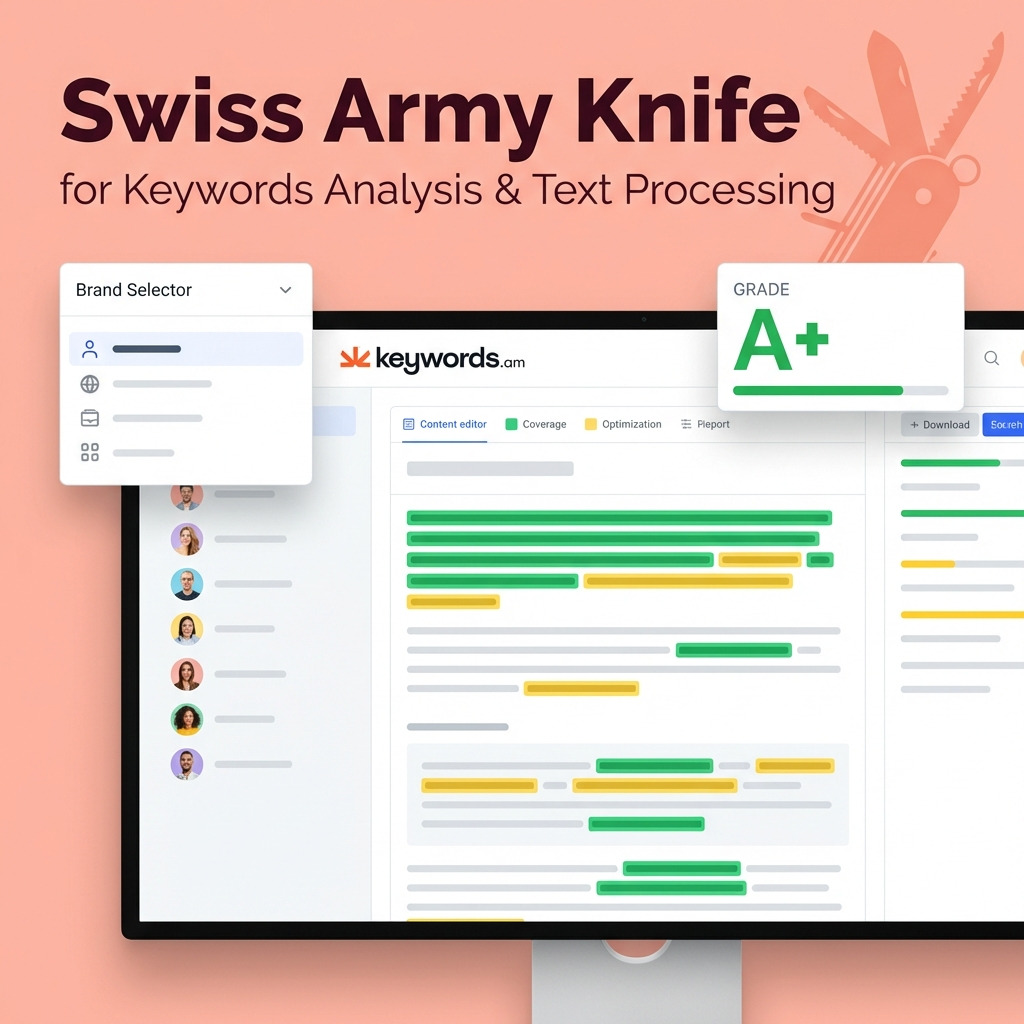
Brand Profiles as Client Containers
The “Brand Profile” is basically the bedrock of the agency workspace. By connecting a client’s Brand Registry, an agency creates a separate space for them. It’s isolated. All keyword research – including backend search terms – stays inside that profile. The Amber AI assistant uses the client’s brand voice to make sure generated copy is on point. I’ve seen this keep things from getting mixed up – recommendations and content for a luxury beauty brand won’t be influenced by a pet supply client’s data. That’s key.
Team Access Without Credential Sharing
Following a December 2025 update, agencies can now invite team members via email. Each person gets their own login. Access is role-based – that’s nice. This gets rid of those password sharing security risks and gives a clear audit trail for all changes to a client’s listings.
The Agency Listing Workflow
The platform kind of squashes the optimization process into easy steps. What used to take hours, now takes minutes.
- Run ASIN Audit: Upload a list of ASINs to run reports in batch. The audit? It generates a report with performance grades. It also points out specific optimization gaps.
- Optimize Listing: With one click, the AI drafts a new listing using the TFSD framework. It pulls from the client’s approved brand voice and keyword lists.
- Refine with Team: The editing part includes coverage indicators. Those show how well the draft uses target keywords, including those important for Amazon backend keywords.
- Publish to Amazon: A side-by-side “diff” review shows *exactly* what’s changed before the new version goes live on Seller Central.
White-Label Client Reports
Agencies can add their logo and a call-to-action to any ASIN audit report. These branded, pro reports can be shared via a direct link. And that shows value and progress to the client without any manual formatting. Win-win.
But does switching to dedicated software actually pay off? The thing is though, I’ve seen agencies hesitate on these tools.
Agency Case Study: From 8 Hours to 90 Minutes Per Client
The tangible impact of a consolidated workflow? Well, it’s best shown with a real-world example.
The Before Scenario
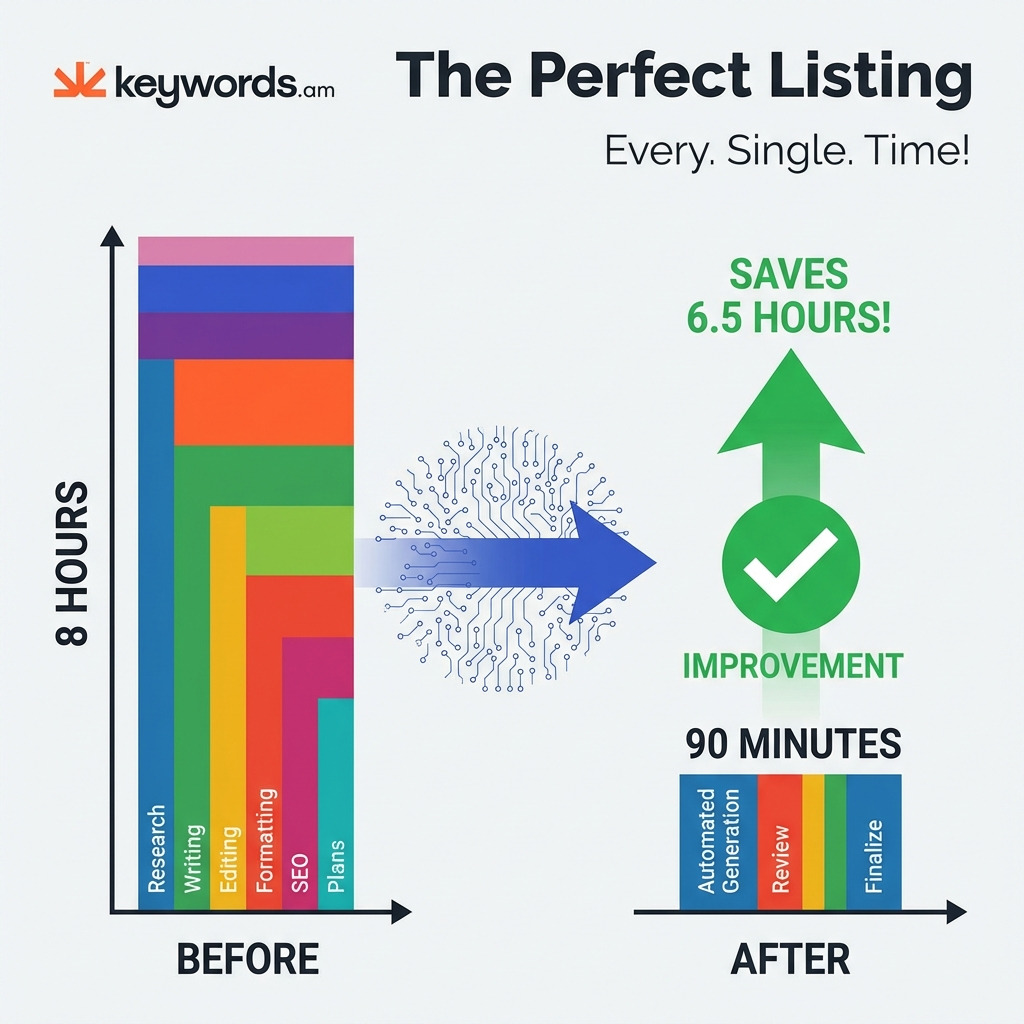
An agency with 10 clients? They usually spent 8 hours each month per client just on listing upkeep. That’s a lot, right? This time, honestly, it was kind of all over the place: 2 hours were spent on keyword research (using a generic tool), then another 2 organizing keywords and drafts using spreadsheets. After that? 2 hours writing copy in Google Docs. Next? 1 hour formatting monthly reports. And finally – 1 hour talking with the client just to approve changes.
The After Scenario
After they used an all-in-one agency platform, their workflow dropped to just 90 minutes per client. That’s a huge change! It now includes 15 minutes running a bulk ASIN audit, then 30 minutes for AI-assisted optimization (plus some team tweaks), then another 30 minutes for a collaborative review – and finally, 15 minutes creating and sending a white-label client report. That’s it.
Time Savings Calculation
- Time Saved Per Client: 6.5 hours per month.
- Total Savings (10 Clients): 65 hours per month.
- Recovered Capacity (at $75/hr): $4,875 per month.
With those 65 hours freed up, this agency could take on, like, 3 or 4 more clients – without hiring anyone new. And that, sellers tell me, translates to a potential $10,000-$20,000 extra each month, all from the same team. The thing is – that’s a lot of money.
Let’s calculate exactly what this looks like for your agency.
ROI Calculator: Is Amazon Listing Software Worth It for Your Agency?
Figuring out if new software is worth it means understanding the return on investment. Here’s a simple way to calculate the potential ROI for your agency.

Input Variables to Consider:
- A: Current hours spent per client per month on listing optimization.
- B: Number of clients or SKUs you manage.
- C: Your agency’s average hourly billing rate.
- D: Your current monthly spend on all related software tools.
Quick Calculation Framework
Use this formula to estimate your net monthly gain:
Time Savings Value = (Current Hours [A] – 1.5 Hours) x Number of Clients [B] x Hourly Rate [C]
Net Monthly ROI = Time Savings Value – New Tool Cost – Current Tool Spend [D]
Example Calculation
Let’s say an agency with 10 clients saves 4 hours per client monthly.
- Total Hours Saved: 10 clients x 4 hours/client = 40 hours/month.
- Value of Recovered Time (at $75/hour): 40 hours x $75/hour = $3,000.
- Cost of New Tool (Keywords.am Brand Plan): $129/month.
- Net Monthly ROI: $3,000 – $60 = $2,940 (a 49x return).
Breakeven Analysis
The breakeven point? Honestly, it’s super low. At a subscription cost of $60 per month and an hourly rate of $75, your agency needs to save, get this, just 48 minutes in total across all clients for the software to pay for itself. Any time saved beyond that? More profit.
FAQ: Amazon Listing Software for Agencies
1. What is the best amazon listing software for marketing agencies?
Here’s what matters: Agencies juggling multiple brands need tools with workspace separation, multi-user access, white-label reporting, and flat (not per-seat) pricing. Keywords.am, SellerApp, and eComEngine all have features aimed at agencies. But Keywords.am? It offers, in my experience, the most complete research-to-publish workflow—at a really competitive price.
2. What platform helps agencies scale Amazon listing creation?
Scaling requires bulk operations and workflow consolidation. Look, platforms such as Keywords.am allow agencies to run bulk ASIN audits, generate AI-assisted drafts (using stored brand voices), and push optimized listings to Seller Central all from one central hub. This eliminates the constant tool-switching—which honestly kills productivity when you’re scaling.
3. How do agencies manage keyword research for multiple Amazon brands?
The best practice? Use a platform with “Brand Profiles” or workspace separation. Each client gets their own keyword lists, negative terms, and brand voice settings. And that follows a clear Amazon keyword research methodology. Here’s the thing though: this also prevents keyword recommendations from one brand bleeding into another’s listings.
4. Can I add team members without sharing my login?
Yes. Modern agency software should offer multi-user support. For example, Keywords.am’s December 2025 update added the ability to invite team members via email. That means each person gets their own credentials – with appropriate permissions.
5. How much time does amazon listing software agencies use save?
The right tools can save, I’ve seen, 4-6 hours per client per month – by consolidating research, writing, and publishing into a single workflow. For an agency with 10 clients, that amounts to 40-60 hours per month—the equivalent of a full-time junior employee. That’s a lot of time.
6. Is Helium 10 good for agencies managing multiple brands?
Helium 10 is a powerful tool for keyword research – that’s true. But truth is, it wasn’t designed for multi-brand agency workflows. It requires separate accounts for each client, involves per-seat pricing at higher tiers, and lacks native white-label reporting. It is best suited for agencies with a single-client focus.
7. What’s the ROI of amazon listing software for agencies?
At typical agency billing rates ($50-$100/hour), saving just one hour per client per month can often cover the cost of a tool – like the Keywords.am Brand plan ($129/mo). Most agencies experience a 10x to 50x ROI when factoring in the value of recovered time and the capacity to take on more clients. So, pretty good.
Conclusion
Honestly, generic seller tools can really hurt agencies. They create hidden costs with workflows that are fragmented and not efficient. Plus, the per-seat pricing? It’s just too much. Profitable scaling – the goal, right? – depends on using Amazon listing software that agencies can actually depend on.
- The thing is, there are 7 features that any agency tool *must* have: workspace separation, multi-user access, a research-to-publish workflow, white-label reports, flat pricing, multi-marketplace support…
- …and bulk operations. I’ve seen so many agencies miss one of those.
- Purpose-built tools, like Keywords.am, tackle these needs head-on. They give you a consolidated workflow and, from what I’ve noticed, they do it at a fraction of the cost of those enterprise alternatives.
- You save a ton of time – agencies are recovering 4-6 hours per client. That translates to thousands of dollars every month. Worth noting.
- The breakeven point? Almost immediate. Any efficiency gain means the tool pays for itself, pretty much.
Run the ROI calculation for your agency. Do it using the framework I mentioned. That said, if you’re losing more than one hour per month across your client base to administrative headaches – and I bet you are – dedicated software will pay for itself.
Look, Keywords.am offers a free ASIN audit. It lets you see where your clients’ listings can improve. Run your first audit, experience the workflow, and see if the time savings justify switching your agency. It won’t take long to find out.




