

Reverse ASIN Lookup Explained: How to Steal Your Competitors’ Best Keywords in 2026

A top Amazon seller? They can grab over 1,000 keywords from just ten competitor ASINs really fast – under five minutes if they’re using reverse ASIN lookup. But, here’s the deal: for most sellers, trying to do that by hand, using spreadsheets, it could take days. That’s a ton of work! And the reality is, if you don’t have the right method, a lot of sellers are just guessing with their listings. They guess which keywords matter, rather than seeing what actually ranks and gets sales. And this guesswork wastes ad money. You’ll also miss chances to get more sales.
This article? It explains what reverse ASIN lookup *is*. You’ll also learn how to read the results, thinking about Amazon’s 2026 intent-focused algorithm. Plus, you’ll discover how to use the information in your listing without keyword stuffing! Many guides just show you how to find keywords. But this one tells you *where* to put them for the biggest impact using a structured method.
📑 Table of Contents
⚡ TL;DR
- What it is: Reverse ASIN lookup pulls out every keyword a competitor’s Amazon product ranks for, whether that’s through organic search or paid ads.
- How it works: You put your competitor’s ASINs into a special tool and get keywords with search volume, ranking, and how they’re trending.
- 2026 Algorithm Shift: Amazon now cares more about what buyers *want* and how well your listing converts clicks into sales, not just raw search volume. Clicks that don’t lead to sales? They hurt your ranking.
- Strategic Application: Don’t just copy every keyword your competitor uses. Find the ones that show real buyer intent and fill any keyword holes in your own listing.
- Placement Matters: Where you put keywords (Title, Features, Search Terms, Description) is as important as the keywords themselves. Use the TFSD Framework, I’ve found it really helpful.
- Avoid Common Mistakes: Keyword stuffing, focusing only on volume without thinking about if it’s relevant, and only doing research one time are ranking killers.
- Ongoing Process: Do reverse ASIN research every three months to stay on top of what your competitors are doing and what’s happening in the market.
What is Reverse ASIN Lookup?
Reverse ASIN lookup? Honestly, it’s not rocket science. It’s where you take an ASIN (Amazon Standard Identification Number) from someone you’re competing with, and pull out all the keywords that product is ranking for. Paid and organic. Simple as that.
- Search volume. For each keyword.
- The ranking of your competitor. What’s their spot?
- Keyword trends. Look at the past 30 days.
- What actually gets people to buy? Which search terms, really?
They call it “reverse” ’cause that’s how it goes. It starts from something that’s working. Here’s the thing: keyword research usually begins with a broad idea and expands. But reverse ASIN analysis? It begins with a product that’s already doing well with keywords. And then it figures out their approach. You’ll see, it surfaces data that can seriously inform your keyword strategy.
I’ve found it’s very helpful.
How Reverse ASIN Lookup Works (Step by Step)
The reality is, a reverse ASIN lookup? It’s not hard. You can do it in just four steps.
Step 1: Identify Competitor ASINs
First: find, let’s say, five to ten top-selling products in the category you care about. They’re often on page one, even with “Best Seller” or “Amazon’s Choice” badges. Honestly, these products are converting well for valuable keywords already.
Step 2: Input ASINs into a Tool
Next, copy the ASIN, or the full product URL, from your competitor’s page. Most reverse ASIN tools—Helium 10 Cerebro, Jungle Scout, or Keywords.am are solid–accept both. Here’s the deal: they just need the info!
Step 3: Analyze Extracted Keywords
The tool then spits out all the keywords those ASINs are connected to. You’ll see search volume, ranking, and changes over time. One ASIN can rank for over 1,000 keywords! So, filtering is important to find the best ones.
Step 4: Prioritize by Intent, Not Just Volume
Amazon’s 2026 algorithm update was huge. I’ve found it puts the focus on high-intent search terms, not just whatever gets lots of traffic. But the most effective thing? Filter that keyword list to zero in on terms that show someone *really* wants to buy, even if the search volume’s smaller.
Why 2026’s Algorithm Changes Everything About Reverse ASIN
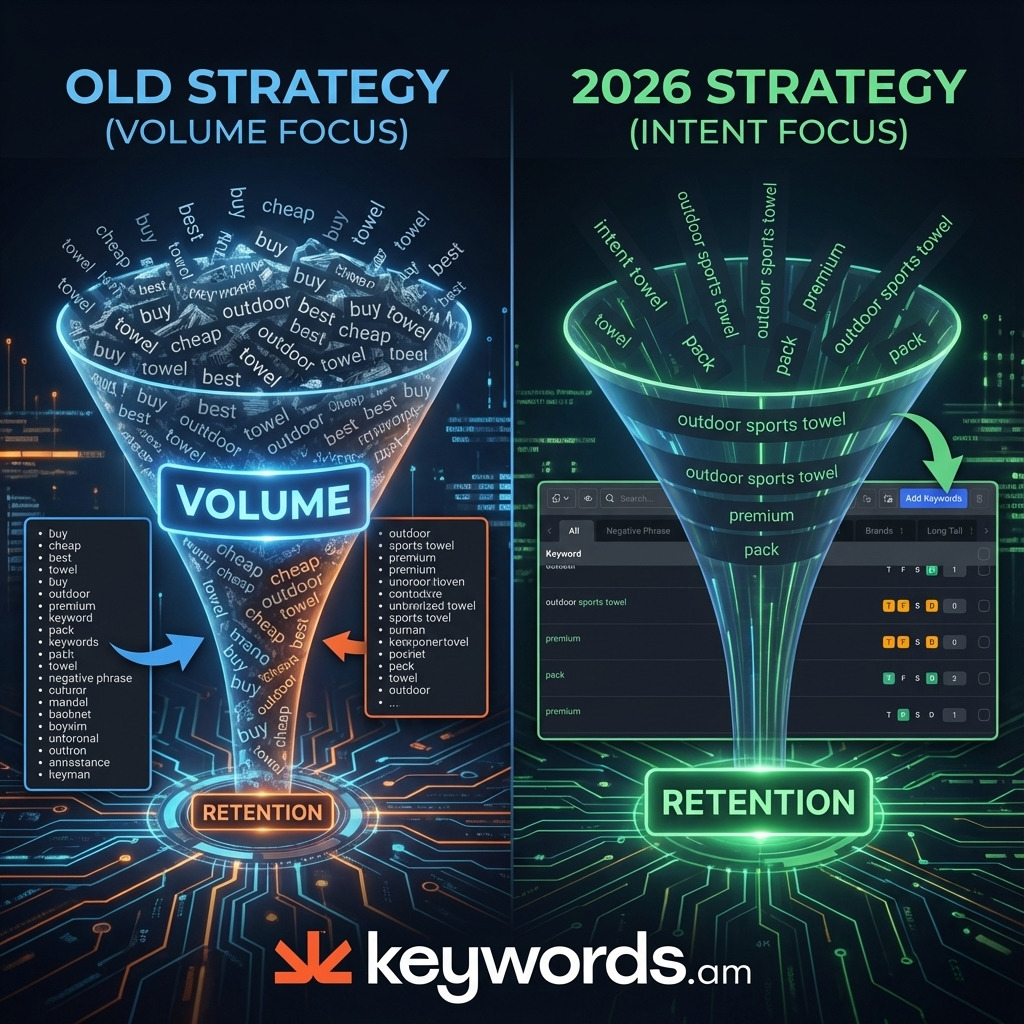
The old way? It was simple. Big search volume meant good keyword. Just use it a lot! That worked then, honestly.
But, the 2026 reality is different.
Amazon’s A9 algorithm… It’s changed things, you know. It now re-ranks keywords based on what happens AFTER the click. Conversion rates matter a lot more now. Engagement and sales tied to each term matter too.
And if a click doesn’t become a sale, it’s bad. It suggests that the keyword and the product don’t go together. So, it’s a problem.
This changes everything, you’ll see. Intent is more important than volume alone. Here’s the deal: a keyword with just 500 monthly searches but a 15% conversion rate is far better than one with 10,000 searches and a 1% conversion rate. The small one brings more sales, telling Amazon it’s relevant. So, better rankings will follow it.
Don’t just copy keywords from competitors. That won’t work now, in my experience. But, you need to filter for relevance. Filter for conversion patterns. Tools are changing to help you; we noticed that. For instance, KPS (Keyword Priority Score) from Keywords.am now puts more weight on intent signals.
I’ve found it helps sellers figure out which keywords are actually worth going after for their product. And that’s what you want, isn’t it?
Where to Place Discovered Keywords (TFSD Framework)
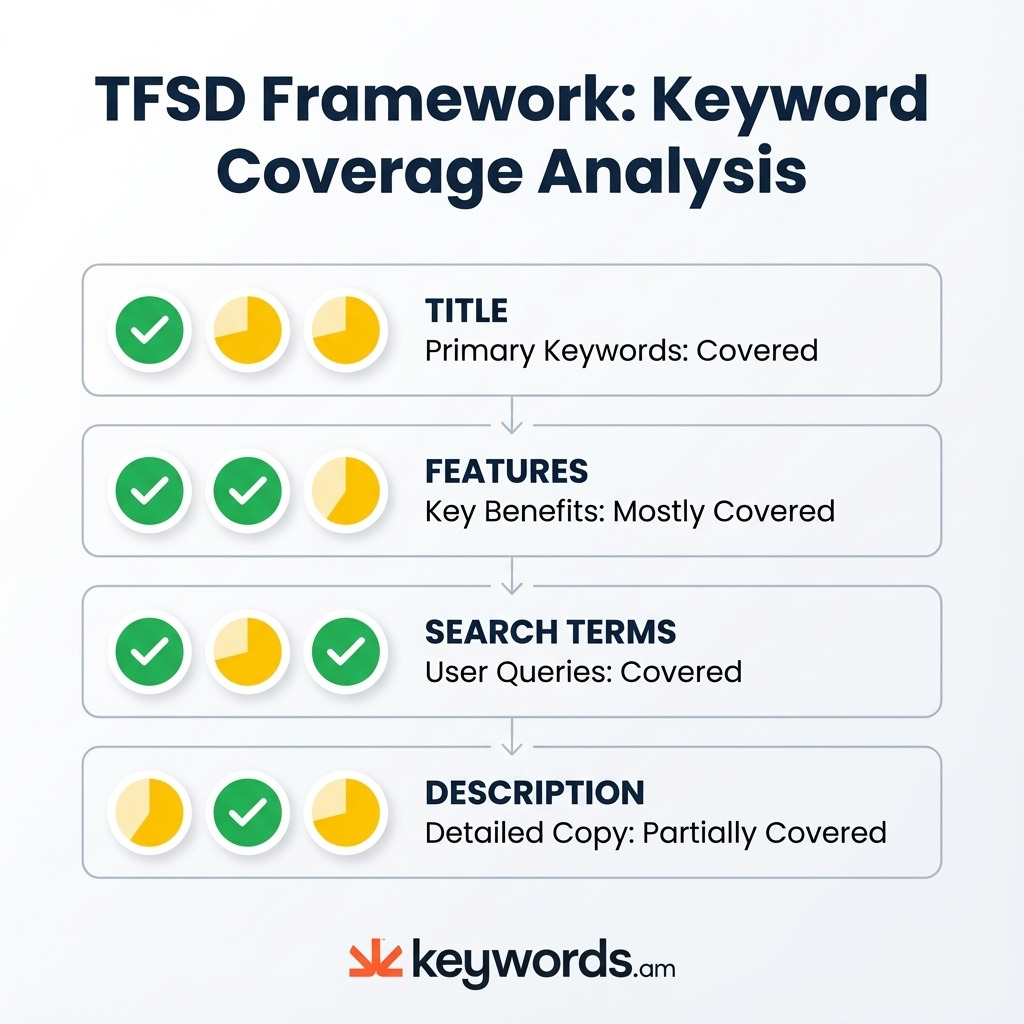
Here’s the deal. Most reverse ASIN guides? They stop after keyword discovery! But placement matters! Knowing *where* to put a keyword? It’s really important for both getting indexed and getting sales. The TFSD Framework? It’s a way to structure all this.
The TFSD model? It breaks a listing into four parts. Each has a job in your keyword plan. Simple, right?
- Title: It’s the most important. You’ll want your main keyword here. Also, include one or two longer phrases that show purchase intent. A good balance? 60% big-volume terms and 40% high-intent terms.
- Features (Bullets): This part should sell the benefits. It also helps with indexing. The keyword setup here? It’s about 70% high-intent and 30% supporting terms.
- Search Terms (Backend): This section should be 100% supportive, non-repeating keywords. Use this for variants and synonyms, and any secondary uses. Don’t repeat words already in the title or bullets!
- Description: And this area? Great for long phrases. Honestly, you can put detailed uses here too. Use it for other supporting terms that help catch those extra-specific searches.
Some tools can show you where keywords show up in these sections. It’s visual. You’ll see, this lets sellers see more than *if* a competitor uses a keyword. They can see *where* they put it! I’ve found this super helpful, actually. Keywords.am’s Reverse ASIN tool, for example, shows where keywords are across all TFSD sections. So, it helps you go from research to doing things right away.
5 Reverse ASIN Mistakes That Tank Rankings
Reverse ASIN research is powerful, but it can backfire. Honestly, you can get slapped with ranking penalties if you don’t do it right. It’s really important to steer clear of these five common errors.
1. Using All Discovered Keywords
More isn’t always better! It just isn’t. Trying to cram in every single keyword – like all 1,000+ you might find from your rivals? That leads to a messy page that doesn’t convert well. Here’s the deal: it’s better to pick maybe 50-100 really smart terms.
2. Copying Competitor Placement Exactly
What works for them might not work for you. And that’s fine! Their buyers, their price, their reputation – it’s all different. So, use what they do as a suggestion, not a strict order.
3. Ignoring Relevance for Volume
Look, using a popular keyword that doesn’t fit your product might get clicks. But it won’t get you sales. And in 2026, that mismatch? It’s going to hurt your rankings. Amazon will think your product isn’t a great match for what people are searching for.
4. Keyword Stuffing the Backend
The backend search terms field has a limit. It’s under 250 bytes, not 500 like some people think. I’ve found that repeating words you’ve already used in the title? A total waste. It won’t help your ranking at all.
5. Performing One-Time Research
Amazon keeps changing. It just does. Competitors are always tweaking things, and trends shift. Reverse ASIN research? It should be done at least every three months. You’ll see that keeps your listing in the game.
FAQ – Reverse ASIN Lookup Questions
What is reverse ASIN lookup?
Here’s the thing: it’s seeing all the keywords your rival’s product ranks for on Amazon. And that includes both the free ones and the paid ones. Give it an ASIN, and it lists keywords. You also get search volume and ranking info.
Is reverse ASIN lookup free?
Some free tools offer basic lookups. They’re limited, though. But for *good* data—search volume, how it changes, past rankings—you usually pay. You’ll need something like Helium 10, Jungle Scout, or Keywords.am.
How many competitor ASINs should I analyze?
5-10 is a good number, honestly. You don’t want to get lost. Focus on the top ones. Products on Page 1 or “Best Seller” badges. Don’t just grab random ASINs.
Can I use reverse ASIN for PPC keyword research?
Yes, you totally can! The reality is, these keywords are great for Sponsored Products campaigns. Sellers can sort for keywords where rivals are paying. That’s how you see what they’re doing.
How often should I run reverse ASIN research?
I’ve found it’s good to do it every three months for your current products. And also, when you enter a new category or launch something. It shows you the competitor changes and also seasonal stuff.
Does copying competitor keywords guarantee better rankings?
No way. In 2026, Amazon cares more about sales than keywords. So, copy keywords that don’t match, sales go down. Your rankings will suffer. It’s that simple.
Conclusion
Reverse ASIN lookup? It’s a really neat way to see what keywords your rivals are targeting. But honestly, just finding those keywords is only the start. The 2026 changes to Amazon’s system mean what buyers really want, and what actually makes them click “buy”, are far more important than just how often a word is searched. Success? It isn’t just about which keywords you target, it’s about where you put them in your listing using the TFSD idea.
The goal? Smart keyword picks. You want to patch things up, not just shove in every possible keyword. Here’s the deal: Pick your three best-selling competitors. Then, use reverse ASIN lookup on each. You’ll see I’ve found this works. Find ten relevant keywords that you’re missing. Add them to the weakest part of your listing. That’s usually the backend search terms or the description. But, it can work. This small change can give you real results fast. For a more in-depth look at fixing up your listing, see the comprehensive Amazon listing optimization guide.
Ready to see where your rivals put keywords, not just which ones? Try Keywords.am’s Reverse ASIN tool. We noticed it shows keyword placement in all TFSD areas. You can use what you learn right away. So, you can fix things with care.




