

Here’s the deal: a crazy 59% of U.S. consumers don’t even start their product searches on Google! They head straight to Amazon. So, Amazon keyword research? It’s totally central to doing well in ecommerce. Nail it, and your product? It can really take over its area. But get it wrong, and, honestly, even the best product won’t be seen.
Amazon SEO isn’t what it used to be. The A10 algorithm, which is Amazon’s latest ranking thing, doesn’t just reward brands that find keywords with tons of searches and stuff them everywhere. Modern amazon keyword research? In my experience, it’s a smarter thing now. It focuses on what the buyer wants and uses data, not just trying to get the most searches possible. This guide will show you that amazon keyword research for 2026 and beyond.
Table of Contents
- What Is Amazon Keyword Research? (The 2026 Reality)
- Why Most Amazon Keyword Research Wastes Your Time
- The KPS Method – Priority-First Amazon Keyword Research
- Intent Mapping – Where Each Keyword Belongs
- Finding High-Intent Keywords with Long-Tail Discovery
- Using Coverage Indicators to Know When Amazon Keyword Research Is Complete
- Amazon Keyword Research for Multiple Marketplaces
- Common Amazon Keyword Research Mistakes (And How to Avoid Them)
- FAQ – Amazon Keyword Research
- Conclusion
⚡ TL;DR
- Focus on 3-5 primary + 10-15 secondary keywords – quality over quantity drives conversions
- Use priority scoring (KPS) – rank keywords by demand, relevance, opportunity, and trustworthiness
- Map keywords to TFSD sections – Title, Features, Search Terms, Description each serve different purposes
- Long-tail keywords convert better – “silent usb desk fan for office” beats “desk fan” for sales
- Stop at 80% coverage – visual Coverage Indicators show when optimization is complete
- Localize for each marketplace – byte limits and cultural nuances vary across Amazon’s 21 markets
- Refresh research quarterly – shopper behavior and trends evolve constantly
What Is Amazon Keyword Research? (The 2026 Reality)
Amazon keyword research? It’s figuring out what words people type into Amazon to find stuff. It’s, honestly, the base of Amazon Search Engine Optimization (SEO). It affects if people see your stuff, where it ranks, and how much you sell.
Here’s the deal: in 2026, amazon keyword research is different. It’s changed a lot. Amazon’s A10 is smarter than the old A9 algorithm. Now it cares way more about what shoppers actually want and how they naturally talk, instead of just counting keywords. The reality is, it understands what a shopper is trying to buy, even if their wording isn’t perfect. So, you can’t just think, “How often should I repeat this word?” You’ve got to think: “Does this listing really give people what they want when they search this?” That’s what matters. Good amazon keyword research and using it right? That’s how you get your stuff to rank well without paying for ads.
Why Most Amazon Keyword Research Wastes Your Time
A lot of sellers feel stuck doing amazon keyword research all the time, but it doesn’t really pay off. It’s super annoying. And honestly, it’s because the ways people usually do it just don’t work with the A10 algorithm or how people shop now.
Here’s the deal: the biggest problem I see is the volume trap. So many sellers just focus on keywords with huge search volume, thinking that more traffic automatically means more sales. But, in my experience, those really popular words are usually too general and just attract people browsing, not buying. They have terrible conversion rates. It’s a waste of ad money and hurts your organic ranking.
And this focus on volume? It often leads to keyword stuffing. That’s where you cram as many keywords as possible into your listing. This tactic is now actively penalized. According to reports on the A10 algorithm, it knows when you’re trying to trick the system and might lower your listing. Ouch.
Look, the huge number of amazon keyword research tools doesn’t help either. There’s just data overload. So many different platforms give you different info, and there’s no easy way to know what to focus on. It’s paralyzing! We noticed that according to recent industry data, 34% of Amazon sellers now use AI tools for listing optimization, but most still struggle to identify which keywords actually drive conversions. That’s a problem.
Finally, the reality is that those old-school amazon keyword research methods never really give you a “done” signal. You’re never sure if your optimization is finished or working. They continuously add more keywords, often past the point of diminishing returns, without knowing if it’s helping or hurting their rank. It can be a real mess, you’ll see.
The KPS Method — Priority-First Amazon Keyword Research
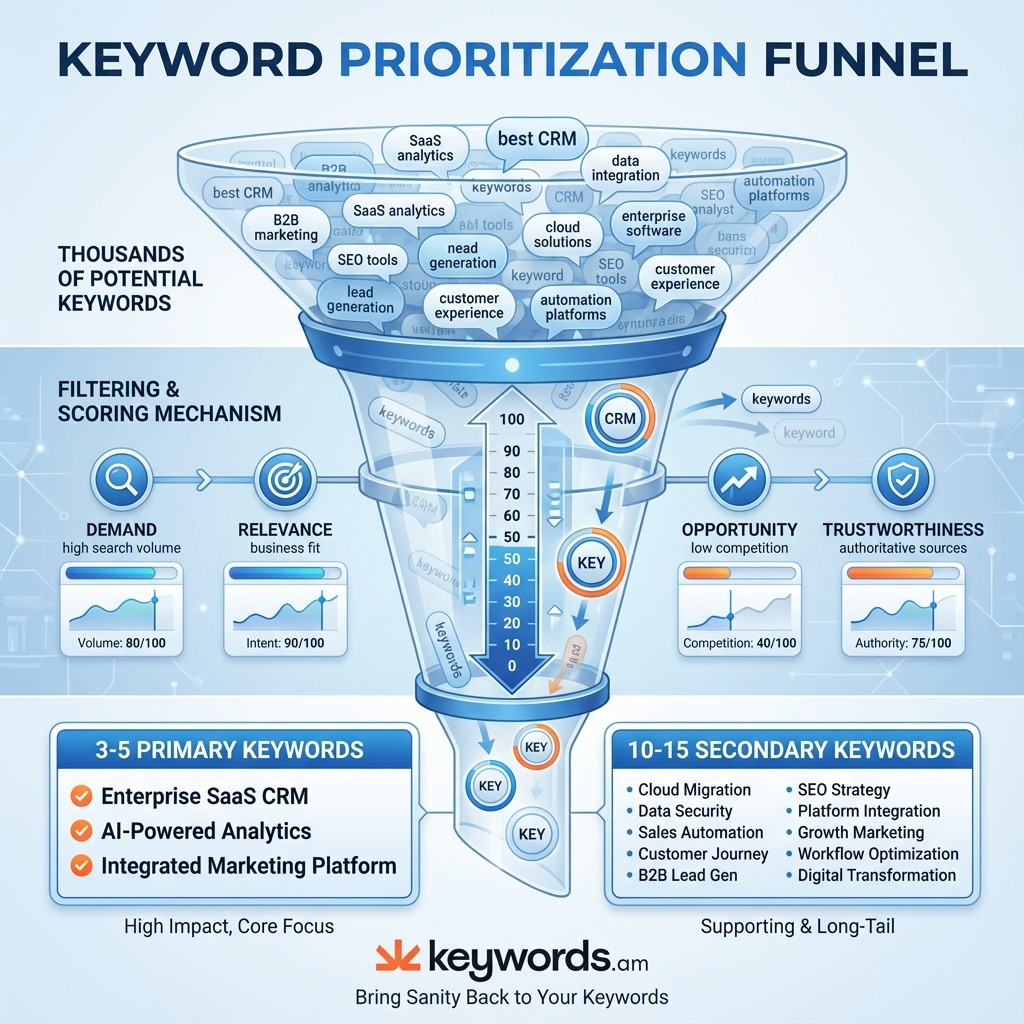
Here’s the deal: a priority-first method really helps with Amazon keyword research. Honestly, it’s the fix you need if you’re caught in the “volume trap”. It changes things. You stop obsessing about tons of keywords. Instead, you think about the quality and potential of a few. The Keywords.am Priority Score (KPS) uses this idea.
KPS? It’s a score from 0-100. Each keyword gets one. It’s based on four things, and they’re weighted:
- Demand: The search volume and search trend for the keyword.
- Relevance: How contextually related the keyword is to the seed product or ASIN.
- Opportunity: A measure of the competitive environment. If you want a product to rank, high-opportunity keywords are where it’s possible.
- Trustworthiness: The reliability of the data source for the given keyword.
This scoring model changes how we see a keyword’s value. It uses the formula: Priority = (Search Volume + Relevance) - Competition. But here’s the thing, this ensures a keyword with good relevance and low competition will score higher. Even if its search volume is just ok. It’ll beat a super generic keyword with crazy competition.
You want 3-5 primary keywords with the best KPS scores. Then, I’ve found it useful to find 10-15 supporting keywords. Using this approach, that’s the goal. That’s a clear, actionable base for your listing. You can find these through tools. I’m talking about Amazon’s Search Query Performance reports and PPC Search Term reports. And the KPS scoring methodology? It turns the chaos of keyword research into priorities. It’s amazing.
Intent Mapping — Where Each Keyword Belongs
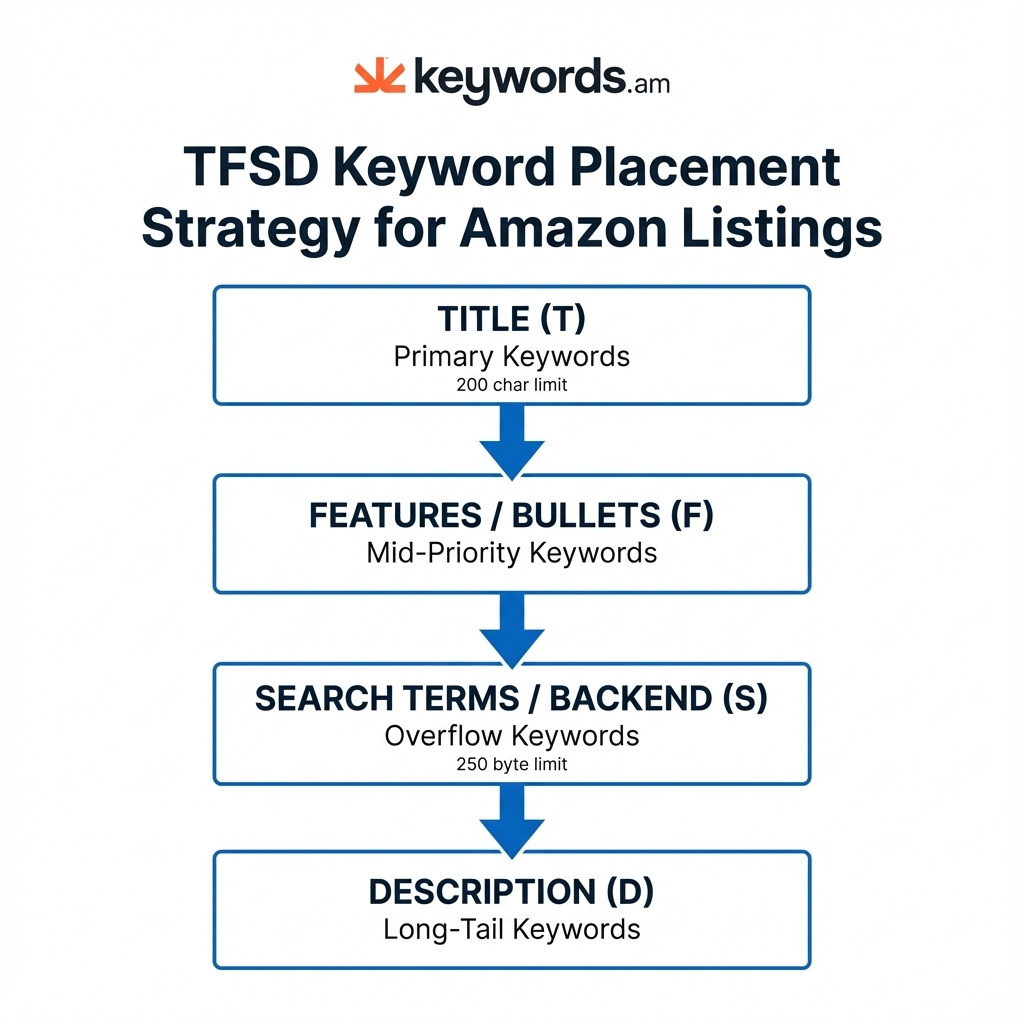
Finding top keywords with amazon keyword research? That’s only part of it. Where you put them is super important. The TFSD Framework? It’s a way to sort each keyword into the spot on your listing where it’ll do the most good. Simple as that.
- Title (TFSD-T): This is prime SEO space, honestly. You’ll want your absolute best keywords from your amazon keyword research here. They should be the most popular, most relevant phrases describing your product. For phones, keep the super important stuff within the first 60-80 characters, though it’s 200 characters total as of January 2025.
- Features/Bullets (TFSD-F): Perfect spot for those so-so keywords from your amazon keyword research. Work them into bullet points that explain how cool your product is and what it does. It’s where you can hit those more specific searches, the reality is.
- Search Terms/Backend (TFSD-S): Here’s the deal: This area? Hidden. But Amazon sees it. Great for typos, similar words, and those super-specific keywords from your amazon keyword research that just don’t fit anywhere else. Keep it under 250 bytes. Don’t go over, or Amazon won’t see any of them.
- Description (TFSD-D): This section lets you add those less important, long-tail keywords from your amazon keyword research. It gives extra info for both customers and the A10 thingy, so you can rank for the super specific searches.
Don’t repeat yourself! Amazon only looks at a keyword once in the whole listing (Title, Bullets, Backend, Description). Repeating? It doesn’t help, and it wastes space. It’s true. For all the details, check out the TFSD Framework. You’ll see.
Finding High-Intent Keywords with Long-Tail Discovery
Long-tail keywords? They’re just longer, super-specific search phrases. Sure, each one gets searched less often. But the reality is, all those long-tail searches together? They make up most searches. And they convert way better. Clear buyer intent, you know?
Finding those long-tail keywords? It involves a few things.
- Amazon Autocomplete: Type something into that Amazon search bar. Then? Look at what Amazon suggests. Honestly, it’s a direct peek into what shoppers are actually searching.
- Competitor Analysis: A Reverse ASIN lookup shows the keywords that get the top competitors traffic. And sales.
- AI-Powered Expansion: Methodologies like IntentIQ use AI. They expand one keyword into tons of related phrases. Things you might not even think of.
The Amazon keyword research process is pretty systematic.
- Start with a general keyword. Something broad like “water bottle”.
- Expand that list. Use autocomplete. Competitor analysis, too. And those AI tools, of course.
- Filter it. You’ll need the KPS scoring method. That will show you high-potential long-tails.
- Map keywords! Use the TFSD sections. I’ve found Features, Search Terms, and Description fields work best.
Using Coverage Indicators to Know When Amazon Keyword Research Is Complete
Knowing when you’re done with Amazon keyword research? It’s tough. You don’t want to do too little, but you can also go overboard.
That’s a problem, honestly. So, Coverage Indicators can help. This system looks at where your important keywords are in your listing’s TFSD sections. You’ll see color codes:
- Green: Means you got an exact match. The keyword is there, just like you wanted.
- Yellow: Means all the words are there, but not in the right order.
Here’s the deal: Amazon keyword research is done when your high-priority keywords are green or yellow in their TFSD spots. It’s all about the data, you know? It takes out the guessing. I’ve found that once you hit about 80% coverage of your top keywords, adding more just doesn’t help that much. It’s not worth the time.
Amazon Keyword Research for Multiple Marketplaces
So, you’re thinking about selling on all 21 of Amazon’s marketplaces. Makes sense! But here’s the deal: you can’t just use the same keywords everywhere. What people search for isn’t the same across countries, not even in countries that speak the same language.
This is super important: character versus byte counting. It’s technical, I know. But in Japan, for example, the backend search term limits are based on bytes. Not characters. A single Japanese character? It can take up 3 bytes. This means that 250-byte limit? Maybe it only holds 80 characters. And some keyword tools don’t factor this in. It’s a problem. If you go over the limit, Amazon ignores your keywords. Ouch.
Smart international keyword research means understanding what people really mean when they search in each area. You’ve got to look at the culture and how people talk, not just translate words directly from English. It’s intent-aware localization. You’ll want a keyword research tools comparison that shows you which ones can handle multiple marketplaces. I’ve found this is often overlooked, honestly.
Common Amazon Keyword Research Mistakes (And How to Avoid Them)
Honestly, messing up is as important as getting it right.
1. Keyword Stuffing: I’ve seen it happen. Like we said before, the A10 algorithm is smart. It can spot this and actually hurt your listings. So, you want language that sounds real, that makes sense.
2. Ignoring Backend Search Terms: Here’s the deal: tons of sellers don’t even bother with these. It’s a missed chance! So many keywords could be indexed. Don’t skip it!
3. Repeating Keywords: It’s tempting, I know. But repeating keywords in your title, bullets, and backend? It doesn’t boost your ranking. It just wastes space. Use that space for more different terms!
4. Volume Obsession: Big volume isn’t everything. When you chase after high-volume but low-relevance keywords, you’ll get poor sales. And you waste ranking power. You’ll see.
5. One-Time Research: Things change. The reality is, how shoppers search isn’t set in stone. It changes. That’s why Amazon keyword research should be checked maybe every 3 or 6 months. It helps you stay current.
FAQ — Amazon Keyword Research
How many keywords should sellers use on an Amazon listing?
Here’s the deal: quality beats quantity. You don’t need a million! A good listing usually aims for 3-5 top keywords. Then add 15-25 secondary and long-tail terms. Put them where they matter – Title, Features, Backend Search Terms, and Description.
Do backend keywords affect ranking?
Yes, they do! They’re invisible to buyers. But Amazon’s A10 algorithm sees them. In my experience, backend terms are a big part of how Amazon decides what searches your product can show up for.
How often should sellers update their amazon keyword research?
The reality is, things change. Update your Amazon keyword research every 3-6 months. That’ll let you keep up with changing search habits. Plus, seasonal stuff and what your competitors are doing.
What’s the difference between A9 and A10?
A9 used to care a lot about sales and keyword density. A10 is smarter. It cares more about what buyers actually want and how relevant your product is to their search. It’s more advanced, honestly.
Should sellers use exact match or broad keywords?
They both have their uses. Use exact match keywords in your Title. That’s where they’re most effective. But, for Features, Backend, and Description? I’ve found a mix works best. Use broad variations and long-tail exact matches. This will help you grab more searches related to your product.
Conclusion
So, doing amazon keyword research well in 2026 means forgetting old tricks. Focus on what really matters. The priority-first way – combining data smarts, smart placement, and always learning – gives you a plan for ranking well for a long time. It’s not about chasing volume anymore. It’s about finding buyers.
Here’s the deal. Use tools like KPS and TFSD. They make sense of the A10 thing. You’ll build listings that get seen and sell stuff. It’s that simple.
Ready? Honestly, it’s easier than you think. Want to try a priority-first keyword plan? Try Keywords.am free and run an ASIN report. See the impact data can have! I’ve found it makes a real difference.




