

Finding the best Amazon keyword research tool 2026? Honestly, it isn’t just about the numbers – it’s about survival. Think about it: what if you increased production based on a demand prediction that was, like, 40% off? You’d be stuck with tons of stuff nobody wants and totally miss what’s popular.
The reality is, that’s happening to Amazon sellers everywhere. Too many people are still chasing those “vanity metrics.” You know, those huge keywords that look awesome on a report but don’t actually lead to sales. Sellers can waste a ton of money on ads using general terms like “travel umbrella” just because some tool said it gets 45,000 searches. But here’s the thing: the conversion rate? Pretty much zero, because people are just browsing, not buying. Does that sound familiar?
Table of Contents
- Intent-Based Algorithms: So, What Really Happened Back in ’26?
- Choosing the Right Amazon Keyword Research Tool: The 2026 Throwdown
- The “Volume Trap”: Why You Need to Watch Out
- Keywords.am’s Specialist Thing: How It Works, Basically
- Feature Face-Off: Tool vs. Tool – Who Wins?
- Amazon Keyword Tools: What’s It Gonna Cost? (The Pricey Details)
- So, Which Keyword Tool Is Best for *You*? Seriously, though?
- Our Final Thoughts: Building Your 2026 Tech Setup – Here’s What We Think
⚡ TL;DR
- Intent over Volume: Huge search volume doesn’t mean automatic sales. Amazon’s A9 is now dialed into what buyers *actually* want.
- The Volume Trap: Third-party tool volume guesses? They can be way off—like, 30-50% different from Amazon’s numbers.
- TFSD Framework: Keywords.am uses this method. It links keywords to your Title, Features, Search Terms, and Description for max exposure. Pretty smart, huh?
- Byte-Level Precision: Backend keywords? Counted by bytes, not just letters. Mess it up, and you might lose your backend indexing. Yikes!
- 2026 Stack Strategy: Use the big names (Helium 10, Jungle Scout) to *find* keywords at first. Then, use Keywords.am to actually *rank*.
- Best Value: Keywords.am is pretty affordable to start with – around $49 a month. The “all-in-one” deals? They can be $99+, but honestly, most sellers don’t use half those extra features anyway.
Okay, so here’s the thing. This guide is all about Amazon keyword tools. We’re pitting the big names against the newer, intent-focused options. The reality is, we’re looking at three main things: Data Accuracy, Optimization Depth, and getting the most for your money – your Return on Investment. Sounds good, right?
The Shift to Intent-Based Algorithms in 2026
So, you wanna nail down the best Amazon keyword research tool for 2026? Keyword stuffing is totally out, right? And Amazon’s A9 algorithm? It’s seriously leveled up its game. These days, it isn’t just about hitting those exact keyword matches.
It’s running on LLMs and this “COSMO” (Commonsense Knowledge) graphs thing. Search Engine Journal got it right: the algorithm’s trying to get inside customers’ heads – to figure out what they *mean*, not just the words they use. It’s all about understanding their intent.
Here’s the deal: a lot of keyword tools haven’t caught up yet. They’re still spitting out “estimated search volume.” Honestly, that’s often just a shot in the dark. The reality is, it can be off by, say, 30-40% compared to what Amazon *actually* sees. Seriously, can you trust those numbers? I don’t think so!
Semantic Anchoring: How COSMO Graphs Redefine Relevance
Okay, so back in early 2024, the Amazon research team showed off COSMO (COmmonSense knowledge for e-COmmerce). Amazon Science says they’re using LLMs to figure out what shoppers *really* want. You with me? Like, if you type in “shoes for pregnancy,” COSMO kinda *knows* you’re probably looking for “slip-on,” “comfortable,” and “breathable” shoes. Pretty clever, right?
Here’s the thing: if you want to seriously crush it in 2026, your tools can’t just match keywords. They’ve got to actually *understand* what a customer *means*. That’s why the best Amazon keyword research tool 2026 has to deal with semantic anchoring. Honestly, it isn’t only about search volume anymore – it’s about seriously analyzing buyer intent. What are people *really* searching for, deep down?
These days, smart sellers aren’t relying on just one “do-everything” platform. To get the best Amazon keyword research tool 2026 setup, they’re mixing tools that find *tons* of keywords with tools that are super targeted and accurate. Makes sense, don’t you think?
Competitive Analysis: Choosing the Best Amazon Keyword Research Tool 2026
Helium 10: The “All-in-One” Platform
Helium 10… yeah, it’s still a big name. Seriously, feature-wise, it’s gotta be in the running for the top Amazon keyword tool in 2026. It’s basically your whole Amazon biz in one place.
Strengths:
– Cerebro: This is still *the* way to spy on your competitors using those reverse ASIN lookups. It’s awesome.
– Breadth: You get inventory stuff, automatic emails, and PPC tools all in one subscription. Not bad, right?
Weaknesses:
– Cost Efficiency: Let’s be real, the monthly cost is high – we’re talking $100+. And if you only sell a few things, you might not even use all the features. So, you gotta ask yourself, is it really worth the money?
– Optimization Logic: Okay, so tools like “Frankenstein” and “Scribbles”… They still kinda treat keywords like just random words. They don’t *really* get the context and SEO importance, do they?
Jungle Scout: The Product Research Leader
So, you’re thinking about selling stuff online? You’ve probably heard of Jungle Scout. It’s a popular leading Amazon keyword research solution. It looks good, and honestly, it can be handy for figuring out what to sell.
Strengths:
– Opportunity Finder: It helps you spot niches that are doing well but aren’t super competitive. Pretty sweet, right?
– User Experience: It’s really simple to use, especially if you’re new to this.
Weaknesses:
– Data Granularity: It’s okay for finding products, but here’s the thing: the keyword info isn’t always detailed enough if you want to nail your ranking.
– Optimization Constraints: The listing builder doesn’t have everything you need to improve your backend indexing in 2026. Now what are you going to do?
Data Dive: The Research Workflow Specialist
Data Dive? It’s basically about getting your research sorted right from the start. Think of it as a way to double-check your ideas and really nail down those keywords. Plus, it works with what you’re already using, kinda showing you how things are done.
Strengths:
– Guided Workflows: It turns research into “dives” you can repeat. That’s the main thing. You don’t have to reinvent the wheel every time, and honestly, who wants to do that, right?
– AI-Powered Insights: This is where it gets interesting. They’re using AI to help you write copy and even put together product briefs. Pretty sweet, isn’t it?
Weaknesses:
– Dependency: Look, here’s the deal: it needs info from other sources, like Jungle Scout. So, the reality is it’s more like a useful sidekick than something completely self-sufficient. Just keep that in mind.
– Learning Curve: Getting the hang of the workflow might take a minute. If you prefer a more free-form, hands-on style of research, it might take some getting used to. You feel me?
SellerSprite: The International Market Expert
SellerSprite? Yeah, they’ve got keywords. Tons of them, honestly. Selling on Amazon in different countries? You should probably check them out.
Strengths:
– Extensive Database: Here’s the thing: their keyword database is seriously huge. You’ll find a boatload of information, I promise.
– Market Research: Want to know what’s selling like crazy? Or maybe you’re curious about what your competitors are doing in other countries? Look, their tools are actually pretty good for that sort of thing.
Weaknesses:
– Complex Interface: Okay, it’s a bit much to take in at first glance. All that data and so many choices can be overwhelming, especially if you’re just starting out. Don’t you think?
– Metric Overload: Does it feel like they’re throwing *everything* but the kitchen sink at you? Honestly, sometimes they show you way too much stuff, without really saying what matters. Wouldn’t that be a bit much?
AMZScout: The All-Rounder for Beginners
AMZScout? Yeah, it’s got some decent stuff. It helps you uncover products, nail those keywords, and keep tabs on the competition. Honestly, if you’re just dipping your toes into online selling, it’s worth a look.
Strengths:
– Ease of Use: The layout is pretty simple. You shouldn’t get lost trying to find products and keywords.
– Value: They offer a lifetime plan. If you’re in it for the long game, that could save you some serious money. Not bad, huh?
Weaknesses:
– Data Accuracy: Their search volume estimates? They’re not always spot-on. You’ll find that’s the case with many tools like this, though.
– Limited Advanced Features: It might not have absolutely everything you need if you’re a big-time seller or an agency. Need more than just the basics? Then AMZScout might not be a perfect fit.
MerchantWords: The Original Keyword Database
MerchantWords? Yeah, they’ve been around for ages. Honestly, they’re one of the original Amazon keyword tools, so they have a ton of data from way back.
Strengths:
– Historical Data: They’ve been grabbing keyword data for years. Seriously, years. Isn’t that helpful if you want to see how things have changed?
– Simple Interface: They focus on keyword research. It’s really straightforward, which makes it easy to pick up.
Weaknesses:
– Lack of Broader Features: The reality is, it doesn’t have it all. You won’t find listing creation or PPC features like you see in those larger suites. It’s pretty bare-bones.
– Volume Estimates: The search volume data? Some sellers question just how accurate it is. Is that a problem for you? That’s something you’ll need to determine.
SellerApp: The Data-Driven Platform
SellerApp? It’s got a ton of tools that can automate stuff and help you make smarter choices using data. Think about finding *perfect* keywords, or running killer PPC campaigns.
Strengths:
– PPC Integration: Their Amazon ad campaign stuff? Honestly, it’s pretty decent. You’ll probably see some improvements.
– AI Automation: The AI scoring gives you a cool way to check your listings. Plus, it suggests ways to improve ’em! I mean, what’s not to like?
Weaknesses:
– Higher Price Point: Okay, here’s the thing: it can cost more than some other options, especially if you’re a smaller seller. Just something to keep in mind.
– Complexity: Those advanced features are strong, no question. But learning them all? It might take a bit of time. You up for that?
Keyword Tool Dominator: The One-Time-Fee Option
Okay, so this tool? It grabs data straight from Amazon’s autocomplete suggestions. The whole point? To build a huge list of those long, really specific keywords people are actually searching for.
Strengths:
– One-Time Payment: You pay once and you’re done. No monthly fees draining your budget. It’s seriously easy on the wallet.
– Long-Tail Focus: It’s great at finding those less competitive, very targeted keyword phrases. Pretty neat, isn’t it?
Weaknesses:
– No Search Volume Data: Honestly, it won’t tell you how many searches these keywords get. You’ll have to find that data somewhere else, you know?
– Limited Scope: It just suggests keywords. Don’t expect it to do reverse ASIN lookups or anything with competitors. It simply doesn’t do those things.
Sonar: The Free Powerhouse
Sonar, by Perpetua, won’t cost you a cent. And guess what? It has some neat features, like a reverse ASIN lookup.
Strengths:
– Completely Free: Seriously, it’s free! We’re talking zero dollars. That’s a big win, especially if you’re a seller watching your budget.
– Reverse ASIN: You know what’s cool? Not many free tools have this. It’s a reverse ASIN lookup. Pretty handy, right?
Weaknesses:
– Basic Functionality: Look, the reality is it’s not loaded with features like the paid options. All that detailed filtering and data? Not here.
– Data Depth: Let’s be real, the keyword database isn’t as huge as what you’d see in paid tools. But hey, it’s free – what do you expect?
KeywordTool.io: The Suggestion Engine
It’s pretty similar to Keyword Tool Dominator; it snags ideas from those autocomplete suggestions. And the reality is, the paid version? It unlocks even more features.
Strengths:
– Idea Generation: You can pull up hundreds of keyword suggestions really fast. I mean, seriously, it’s quick.
– Multi-Platform: It isn’t just for Amazon, you know. It also digs into Google, YouTube, and more.
Weaknesses:
– Relies on Google Data: Search volume guesses often come from Google. But look, Google’s info isn’t always perfect for Amazon. Is it?
– Not a Full Suite: It doesn’t have *everything* you might want in a complete Amazon tool. But is that something that’s important to you?
Amazon Product Opportunity Explorer: The First-Party Data Source
Okay, so Amazon has this free tool, and honestly, it’s pretty handy. It tells you what people are searching for but can’t find. Plus, it suggests products based on what Amazon already knows.
Strengths:
– First-Party Data: The data? Straight from Amazon. Honestly, it doesn’t get any better than that!
– Niche Identification: Want new product ideas? It’s really good at pinpointing those gaps in the market. It shows you exactly what shoppers are looking for.
Weaknesses:
– Not a Keyword Tool: It’s for market research, not finding keywords to stuff into your listings. Make sense?
– Limited Scope: The thing is, only pro sellers in a few countries can actually use it. Bummer, isn’t it?
The “Volume Trap” in Third-Party Estimates
Here’s the thing: Amazon doesn’t just hand out precise search volume data via their public API.
Those figures you see in Helium 10, Jungle Scout, or any other Amazon keyword tool? They’re just guesses, really. The reality is, they’re often built on clickstream data. Compare the same keyword in different tools, and you’ll see the numbers are wildly different—sometimes by more than 50%. Pretty wild, huh?
The “Weather Forecast” Analogy:
Counting on these guesses? It’s like preparing for a beach trip using some old book instead of checking the actual weather. Yeah, it *usually* rains in April, but what if it’s sunny *today*?
The Strategic Risk:
What happens if you base your whole launch on an estimated search volume of “22,000,” but the actual, intent-driven volume is much lower? You’ll end up wasting money on PPC, and your organic ranking will take a hit. Amazon’s algorithm will hurt listings that don’t convert well (Unit Session Percentage) by showing them less. You don’t want that, do you?
The Solution:
You need to shift your main attention from Volume to Relevance. Makes sense, doesn’t it?
The Specialist Approach: Keywords.am Methodology
Keywords.am? Yeah, it’s a bit different. This isn’t about showing off or how much money you’ve got. Instead, it’s all about ranking. Thing is, it’s built for one purpose: Amazon SEO & Listing Optimization.
So, how do they do it? Well, it boils down to three main things: the TFSD Framework, Signal-Based Optimization, and Precision Byte Counting. But what do these actually *mean*, right?
1. The TFSD Framework
Okay, so getting to the top isn’t just about throwing keywords all over the place. You actually need a plan. We use something called the TFSD framework to help sort keywords. Basically, it shows how much weight the algorithms give each one:
– T (Title): Your title? Yeah, it’s super important. Get those keywords exactly right here. Honestly, it really matters.
– F (Features): Think bullet points. They need to be readable and get indexed by Amazon, right?
– S (Search Terms): Here’s your secret weapon. Use this behind-the-scenes area to sneak in extra keywords. The reality is, it’s pretty darn important.
– D (Description): This gives the A9 algorithm the context it needs to understand your product.
The platform helps you out along the way (look for the Green/Orange lights). It makes sure you keep key phrases together, instead of just checking off single words. Want to learn more? TFSD Framework will give you some deeper insight. So, what do you think; wanna give it a shot?
2. Keyword Priority Score (KPS)
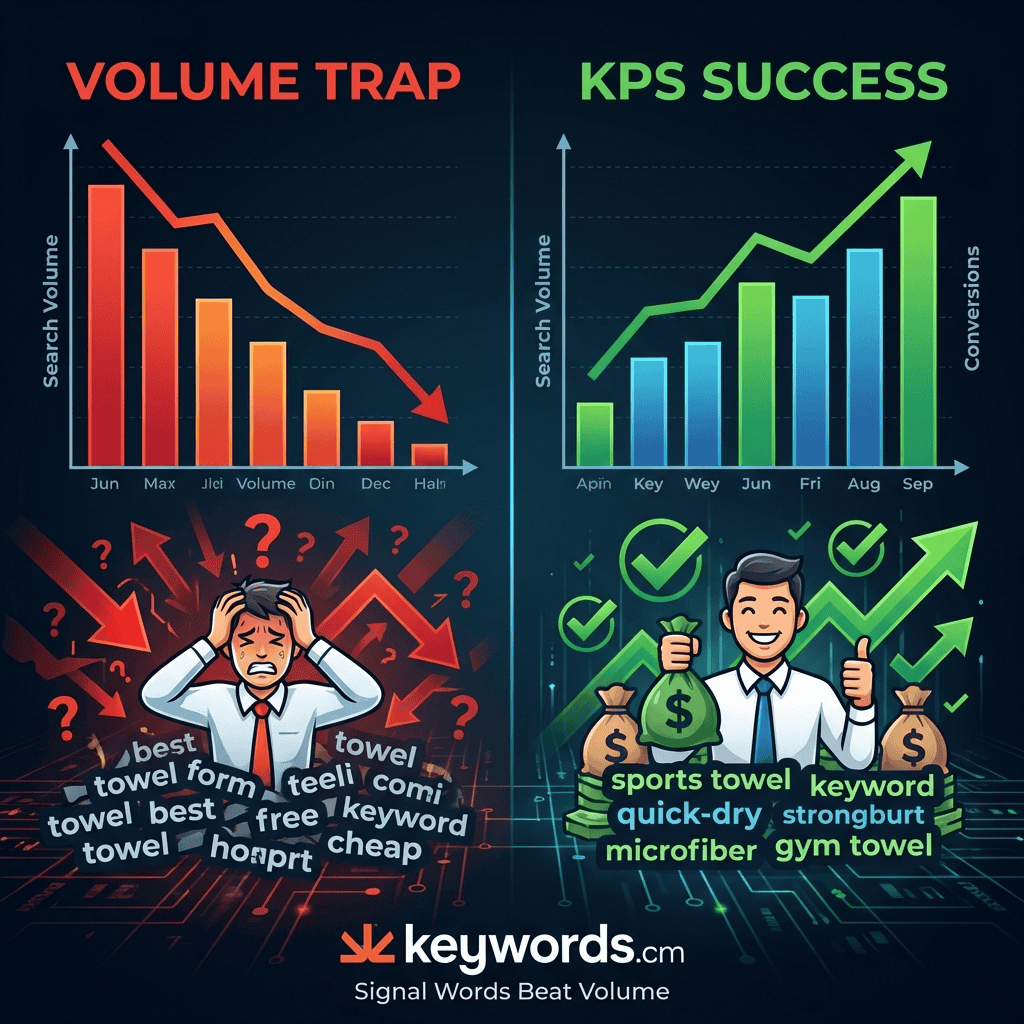
Okay, so here’s the thing: we aren’t just chasing after those huge search numbers that often lead nowhere. Keywords.am has this thing called the Keyword Priority Score (KPS). Think of it as our… secret weapon! It checks out estimated conversion rates, how tough the competition is, and how well the keyword matches what you’re selling. Then, bam! It gives you a score from 1 to 100.
What does that mean for you? Well, a high KPS likely means the keyword *will* get you sales. Plus, you’ve got a pretty good shot at ranking for it. Honestly, isn’t that way better than *just* looking at search volume?
3. Precision Byte Counting
Okay, so here’s a 2026 compliance problem we’re seeing a lot: backend search terms. Smart sellers know Amazon indexes those backend keywords by bytes, not just characters. Here’s the thing: multi-byte characters – like vowels with umlauts, special symbols – can easily push a 249-character string over that 250-byte limit. And then? Boom. Total suppression of the backend field. Pretty rough, right?
Keywords.am? We count at the byte level. That makes absolutely sure you’re 100% compliant. It also stops that silent de-indexing. No nasty surprises. You don’t want that, do you?
The Physics of Indexing: Bytes vs. Characters
The Amazon Seller Central documentation is pretty clear on this: search terms (that’s backend keywords) must be under 250 bytes. Regular English characters? One byte each. But special characters (umlauts, accented vowels, non-Latin characters)? Those can take up to 4 bytes. Wild, isn’t it?
Here’s the kicker: if an “All-In-One” tool *only* counts characters, it might let you save a 249-character string, but honestly, it could actually *be* 270 bytes! Amazon won’t chop it off, though. Usually, they silently ignore the *entire* string. So, any reliable Amazon keyword tool *has* to index by bytes to avoid this mess. Honestly, really understanding these backend keyword best practices often decides whether you show up in the search results or vanish. It’s really that important, isn’t it?
4. Automated Data Hygiene (The Swiss Army Knife)
Honestly, when you’re looking at what the competition is up to, you get a ton of data, right? But here’s the thing: it’s often a mess. You’ll see repeats, loads of extra words, and just stuff that doesn’t matter. Trying to sort it all out by hand in spreadsheets? That’s a time drain, and honestly, you’re likely to mess something up.
The Swiss Army Knife? It’s your built-in data cleaner, really. It automatically wipes out duplicates, gets rid of filler words, and preps your keywords fast. The reality is, it turns that messy info into something you can actually use for indexing. Pretty cool, isn’t it?
Feature Comparison Matrix
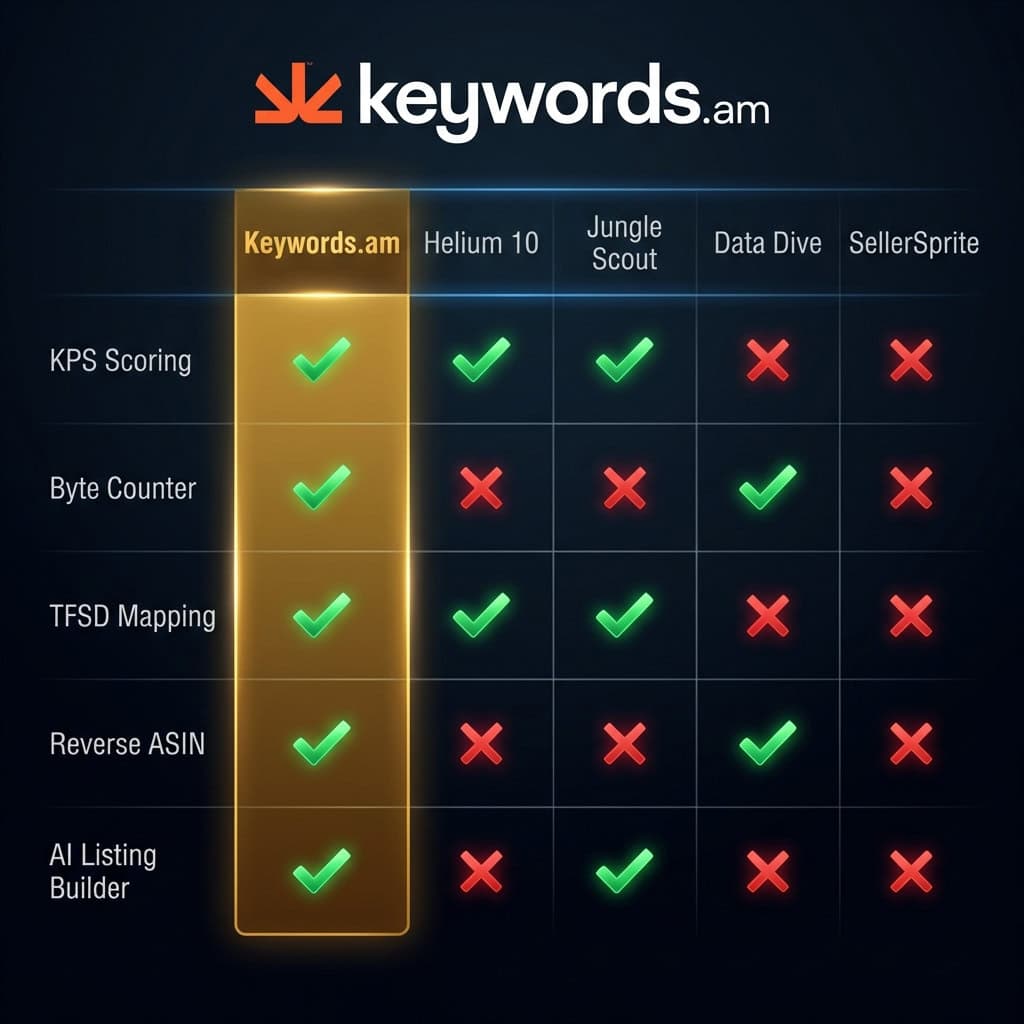
|
Feature |
Keywords.am |
Helium 10 |
Jungle Scout |
Data Dive |
SellerSprite |
AMZScout |
MerchantWords |
SellerApp |
Sonar |
|---|---|---|---|---|---|---|---|---|---|
|
Reverse ASIN |
✅ |
✅ |
✅ |
✅ |
✅ |
✅ |
✅ |
✅ |
✅ |
|
Seed Keywords |
✅ |
✅ |
✅ |
✅ |
✅ |
✅ |
✅ |
✅ |
✅ |
|
KPS Scoring |
✅ |
❌ |
❌ |
❌ |
❌ |
❌ |
❌ |
❌ |
❌ |
|
Byte Counter |
✅ |
❌ |
❌ |
❌ |
❌ |
❌ |
❌ |
❌ |
❌ |
|
TFSD Mapping |
✅ |
❌ |
❌ |
❌ |
❌ |
❌ |
❌ |
❌ |
❌ |
|
PPC Integration |
❌ |
✅ |
✅ |
✅ |
✅ |
✅ |
❌ |
✅ |
❌ |
|
AI Listing Builder |
❌ |
✅ |
✅ |
✅ |
✅ |
✅ |
✅ |
✅ |
❌ |
|
Marketplaces |
10+ |
15+ |
10+ |
10+ |
10+ |
10+ |
10+ |
10+ |
8 |
Price Comparison of Top Amazon Keyword Tools
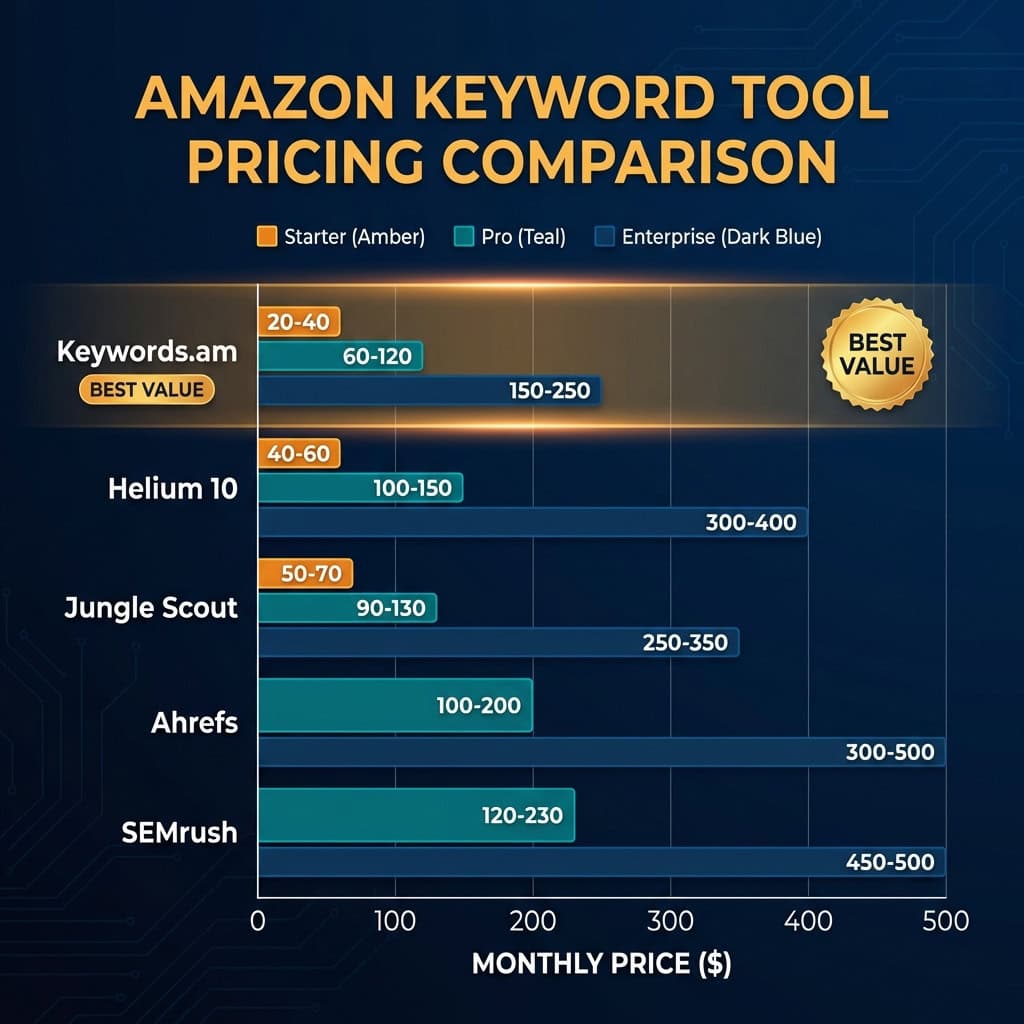
|
Tool |
Free Trial / Plan |
Seller Plan (monthly) |
Pro Plan (monthly) |
Enterprise / Agency Plan |
|---|---|---|---|---|
|
Keywords.am |
7-day Free Trial |
$30 |
$60 |
$120 |
|
Helium 10 |
Free Limited Plan |
$39 |
$99 |
$249+ |
|
Jungle Scout |
7-day Money Back |
$49 |
$69 |
$129+ |
|
Data Dive |
Contact for Trial |
$39 |
$149 |
$490 |
|
SellerSprite |
Free Trial |
$79 |
Varies |
Varies |
|
AMZScout |
Limited Free Tools |
$59.99 |
$399.99 (Annual) |
Custom |
|
MerchantWords |
3 Free Searches |
$35 |
$79 |
$149 |
|
SellerApp |
7-day Free Trial |
$99 |
Varies |
$250+ |
|
Sonar |
Completely Free |
N/A |
N/A |
N/A |
|
Keyword Tool Dominator |
3 Free Searches |
$70 (One-Time) |
N/A |
N/A |
Note: Prices are approximate and subject to change. Annual plans often provide significant discounts.
Which Keyword Tool is Best For You?
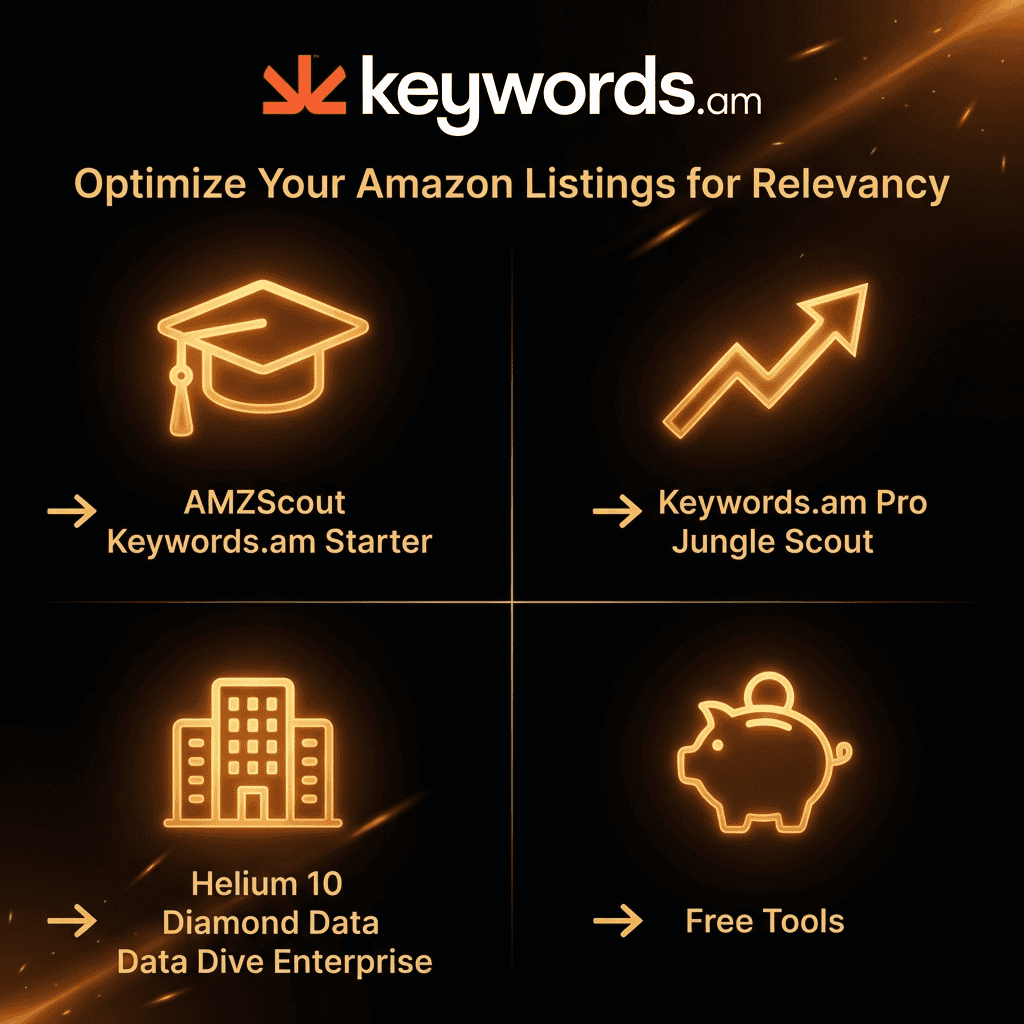
So, you’re on the hunt for the best Amazon keyword research tool 2026? That’s what’s up! But here’s the thing, honestly, there’s no one-size-fits-all answer. It all boils down to *your* needs, and where your biz is right now. What are you *really* hoping to achieve?
Best for Beginners
Just starting out? Honestly, ease of use and price are everything. AMZScout? It’s got a simple design and some really great features. If money’s tight, Sonar offers the basics, like reverse ASIN lookups, and the reality is, it’s free! You can’t beat that as a starting point, right?
Best for Growing Sellers
Sellers need good data to grow, right? Helium 10 is still a really good all-in-one choice. It’s packed with tools – and not just for keywords, either. Honestly, you can do a lot with it.
Jungle Scout is great too, especially if you’re still hunting for new products to sell. Looking for the next big thing? It might be a good place to start.
Best for Agencies/Enterprise
Alright, big companies and agencies, they need serious tools. They need data they can trust, and things that play nice with everything else. Keywords.am? It’s honestly a great pick for SEO and keeping tabs on your rankings. Here’s the thing: it’s got some features you won’t see anywhere else, like byte counting and the TFSD framework.
Want to really dig into market data and get your workflows under control? Data Dive could be just what you need. It’s made to help you get organized. For teams, that’s a *huge* plus, don’t you think?
Best Free Options
Okay, so budget’s tight? That doesn’t mean you’re out of options. Free tools can still give you a ton of good info. Sonar? Honestly, it’s probably the best free option, when you think about it. And don’t forget Amazon’s Product Opportunity Explorer. Seriously, it should be part of what you do every day. It’s got first-party data for market research that’s just… wow. Even though it’s not exactly a keyword tool.
Verdict: Constructing the 2026 Tech Stack
So, the “best” tool, you say? Isn’t it more about finding what *you* vibe with? Look, when you’re searching for the best Amazon keyword research tool 2026, think about where your business actually stands. What do you *really* need right now?
– Need to find new products? Honestly, Jungle Scout and the Amazon Product Opportunity Explorer are still great for finding niches that are winners.
– Gotta manage a ton of stuff? Helium 10 gives you the setup for massive inventories.
– Want to seriously crush it with ranking and SEO? Keywords.am gives you specific data to help you dominate those search results.
Top brands in 2026, what’s their secret sauce? The reality is, they’re not relying on just one tool. They use the broad ones to get the big picture. Then, they feed that info into Keywords.am to really dial things in and watch rankings and sales climb. You want in on that, don’t you?
Scaling with Intelligence: The Specialist’s Advantage
So, scaling up? It can be a real headache, right? Honestly, the reality is that simply throwing every tool you have at the problem (the old “Kitchen Sink” approach) will probably just lead to more technical debt as your business grows. And when you’re dealing with multiple brands, you really need to keep things separate. Top agencies? They’re using Keywords.am to check listings. They’re also making sure every “Signal Word” is hitting green in the TFSD Framework. They want everything organized.
Here’s the thing: sellers that go from “ranking” to completely “dominating” are usually the ones writing titles that convert and focusing on features that sell. Makes sense, doesn’t it? You want a good Amazon keyword research platform to deliver actual results, not just a bunch of data that doesn’t make any sense. Do you really want to wade through all that useless information?
Frequently Asked Questions

Q: Why do my keywords get indexed but not ranked?
A: So, what’s the deal here? It’s probably your backend keywords. The reality is, even some of the top-rated Amazon keyword tools mess this up. They count characters, not bytes, which is a problem. Keywords.am? We’re byte-precise. You won’t get de-indexed without even knowing, which is a definite plus!
Q: Is Search Volume the best metric for keyword research?
A: Nah, not really. In this Amazon keyword research guide, we focus on Purchase Intent. High search volume can just mean people are browsing, not buying. We suggest targeting “Signal Words” – keywords with lower volume but *much* better conversion rates. You can usually spot ’em using a metric like KPS.
Q: Can I use Helium 10 and Keywords.am together?
A: Absolutely! Honestly, elite sellers often grab initial competitor data from Helium 10 (Cerebro). Then, they dump that list into Keywords.am to clean it up and make it better. *After* that, they send it all to Seller Central.
Q: How often should I update my product’s keywords?
A: Look, you’ll want to check your keywords every quarter or so. Amazon’s search changes *constantly*, and you want your listing to stay fresh. Keep ahead of the competition. Definitely refresh your keywords before big holidays or sales like Prime Day.
Q: What is the difference between frontend and backend keywords?
A: Frontend keywords? Customers see those—they’re in your title, bullet points, and description. Backend keywords? Those are hiding in the “Search Terms” field in Seller Central. Both help with indexing, that’s for sure. Backend terms let you target similar words, typos, and even competitor terms without cluttering up your public listing, you know?
Q: How long does it take to see results from keyword optimization?
A: Amazon might index changes pretty quickly – maybe in a day or two. But seeing a real shift in your organic ranking? That can take weeks, honestly. Sales, conversion rates, and reviews all play a role. So, good keywords are just the beginning.
Q: Is it better to target single keywords or long-tail phrases?
A: The truth is, you need both! Short, popular keywords are great for getting noticed. But they’re also super competitive. Long-tail phrases (3+ words)? Less search volume, but people searching that way are usually ready to buy. So, better conversion rates, right? Doesn’t a quality keyword research tool sound helpful for finding that sweet spot?
Q: How do I know if my keywords are being indexed by Amazon?
A: You can do a manual check yourself. Just search on Amazon for your product’s ASIN plus a keyword (like “B012345678 wireless headphones”). If your product shows up, then you’re indexed for that word. Some tools can also check indexing automatically for you.
Q: Can I rank for keywords in a different language?
A: Sure, you can if you’re selling in a marketplace where that language is common. Think Spanish keywords in the US. Add keywords in other languages to your backend search terms and reach a bigger audience. Why not?
Q: What are “striker” keywords?
A: “Striker” keywords? Those are your absolute best keywords. The ones you think have the best mix of relevance and a good chance of leading to a sale. Usually, you’ll want to put these in the title for the biggest impact. Makes sense, doesn’t it?
Ready for Data You Can Bet Your ASIN On?
Estimates? They’re not written in stone, are they? Look, if you want the best Amazon keyword research tool, start a free trial of Keywords.am today. The real thing to keep an eye on is what actually matters: the revenue coming in. What do you think?




