

📑 Table of Contents
- What does Amazon keyword indexing actually mean?
- Where does Amazon check for keywords to index?
- Why does exceeding the byte limit silently de-index all backend keywords?
- How can sellers check if their Amazon keywords are indexed?
- What are the 7 most common reasons Amazon keywords fail to index?
- How is Rufus AI changing what gets indexed in 2026?
- How should sellers monitor keyword indexing over time?
- Frequently Asked Questions About Amazon Keyword Indexing
- Conclusion
⚡ TL;DR
- Indexing vs. Ranking: Indexing is binary (you appear in search or you don’t), while ranking determines your position. Ranking is impossible without indexing.
- The 5 Indexing Locations: Amazon checks Title, Bullet Points, Backend Search Terms, Description, and Structured Data.
- The Silent Killer: Exceeding the 249-byte limit in backend search terms causes Amazon to ignore the entire field, not just the excess.
- Bytes ≠ Characters: Accented characters (é, ñ, ü) consume 2 bytes each. Non-English sellers are most at risk of exceeding limits without realizing it.
- Rufus AI Impact: In 2026, semantic understanding means A+ Content and images now influence search visibility, moving beyond exact keyword matching.
- Troubleshooting: The 7 most common failures include duplicate keywords, suppression, category mismatches, and parent-child conflicts.
- Action Step: Check your top 10 revenue keywords for indexing status using the ASIN + keyword search method right now.
An estimated 47% of Amazon sellers have had keywords silently de-indexed, meaning their products vanished from search results without a single warning from Amazon. For these sellers, optimization efforts are futile because the algorithm simply does not acknowledge the product exists for those specific search terms.
Most sellers optimize for ranking without first confirming their keywords are indexed. That is like trying to win a race when your name isn’t on the entry list. Think of indexing as the phone book. If your number isn’t listed, no one can call you, no matter how great your business is or how much you spend on advertising.
This guide covers what amazon keyword indexing means, the five listing fields Amazon checks, the byte-limit trap that causes silent de-indexing, seven reasons keywords fail to index, and how to monitor indexing as Rufus AI changes the search landscape.
What does Amazon keyword indexing actually mean?
Amazon keyword indexing is the process where Amazon associates specific keywords with a product listing, determining whether that product appears in search results at all.
The distinction between indexing and ranking is the single most common source of confusion for sellers. Indexing is binary: a product is either indexed for a keyword or it is not. Ranking is positional: it determines where an indexed product appears in the search results (e.g., page 1 vs. page 10). If a product is not indexed for “wireless earbuds,” it will never appear for that search term, regardless of sales velocity or PPC spend. A product can be indexed but ranked poorly, appearing on page 47. That represents an indexing success but a ranking problem. However, without indexing, ranking is a mathematical impossibility.
This distinction is critical because many sellers waste budget trying to improve the rank of a keyword that isn’t even indexed. Diagnostic steps must always prioritize indexing first. The TFSD Framework provides a structured approach to ensuring keywords are placed in the right fields for maximum indexing coverage. If the “phone number” isn’t in the book, no amount of marketing will make the phone ring.
Where does Amazon check for keywords to index?
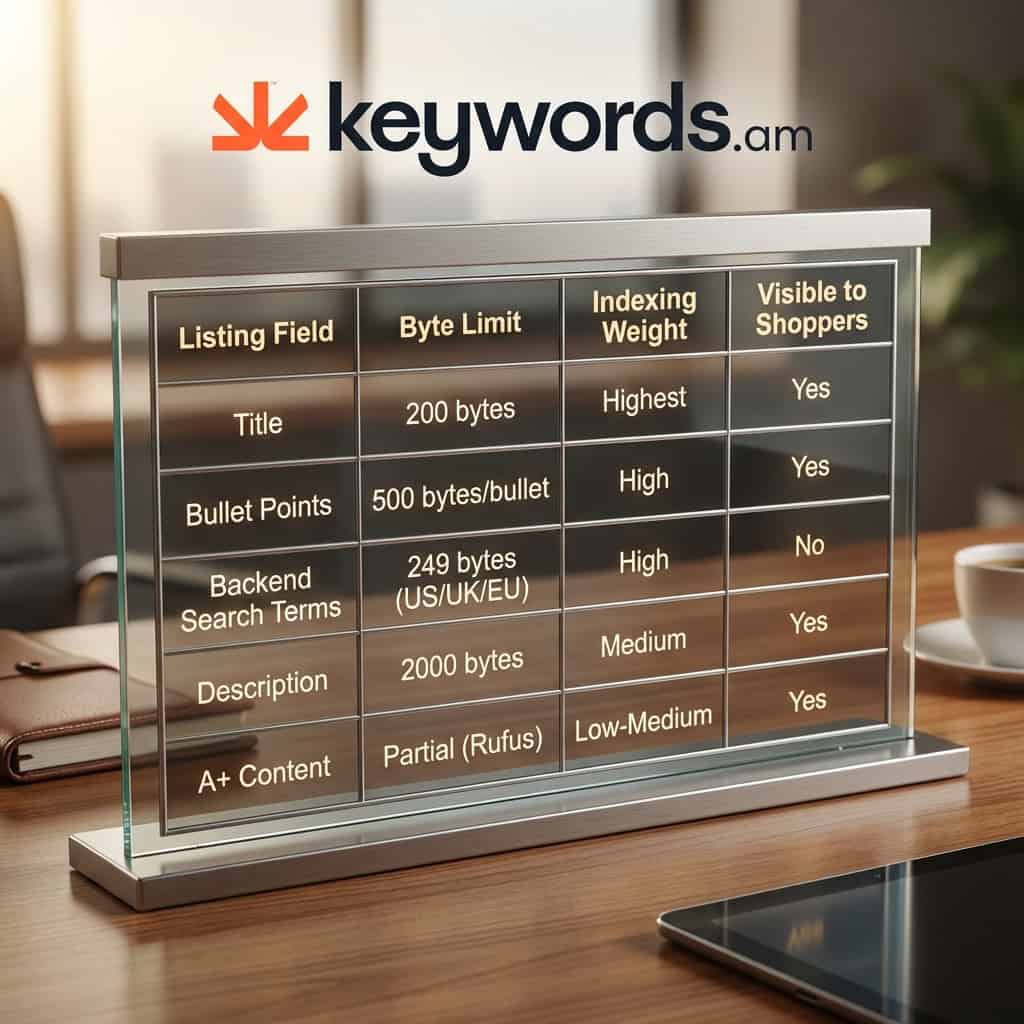
Amazon checks five primary listing fields for keywords: product title, bullet points (features), backend search terms, product description, and structured data attributes.
Each field carries a different weight in the amazon keyword indexing algorithm. The Product Title holds the highest indexing weight. Keywords placed here are indexed the fastest and have the strongest influence on search visibility. However, titles are limited to approximately 200 bytes, requiring sellers to prioritize their most critical terms.
Bullet Points (Features) are the second priority. Amazon indexes keywords from all five bullet points, with a limit of 500 bytes per bullet. These fields are visible to shoppers and the algorithm, making them essential for both conversion and discovery.
Backend Search Terms are invisible to shoppers but fully indexed by Amazon. This field, limited to 249 bytes in US, UK, and EU marketplaces, is the designated place for synonyms, misspellings, and foreign-language terms that might clutter the visible listing.
The Product Description is also indexed but carries lower weight than the title, bullets, or backend terms. Historically, A+ Content (Enhanced Brand Content) was not indexed for search. However, with the introduction of Rufus AI, this has changed. Rufus reads A+ Content for semantic understanding, using the text and visual data to better match products with shopper intent.
This structure maps directly to the TFSD Framework (Title, Features, Search terms, Description), a structured approach to keyword placement that ensures coverage across all indexing locations.
Listing Field |
Indexed? |
Byte Limit |
Indexing Weight |
Visible to Shoppers |
|---|---|---|---|---|
Product Title |
Yes |
200 bytes |
Highest |
Yes |
Bullet Points |
Yes |
500 bytes/bullet |
High |
Yes |
Backend Search Terms |
Yes |
249 bytes (US/UK/EU) |
High |
No |
Product Description |
Yes |
2,000 bytes |
Medium |
Yes |
A+ Content |
Partial (Rufus reads it) |
No hard limit |
Low-Medium (growing) |
Yes |
Subject Matter / Intended Use |
Yes |
Varies |
Medium |
No |
Why does exceeding the byte limit silently de-index all backend keywords?
When backend search terms exceed 249 bytes, Amazon silently ignores the entire field rather than truncating it, resulting in zero keywords being indexed from that field.
The most dangerous aspect of Amazon’s backend search term system is the distinction between bytes and characters. While standard English letters (A-Z) count as one byte each, accented characters (like é, ñ, ü) count as two bytes, and some Asian characters can count as three or four. For example, the German word “Kühlschrank” (refrigerator) contains 11 characters but consumes 12 bytes because the “ü” is a two-byte character.
For sellers in European marketplaces, this distinction matters enormously. A 2024 analysis of Amazon EU listings found that approximately 23% of German and French sellers exceeded the byte limit without realizing it, simply because accented characters consumed more space than expected. For a detailed character and byte limit reference, sellers can verify exact limits by marketplace.
When a seller exceeds the 249-byte limit, Amazon does not trigger an error message or simply ignore the extra words. Instead, the system drops the entire field. Every single keyword in the backend search terms stops working. The Seller Central interface will accept the input without complaint, leading the seller to believe their optimization is complete. Meanwhile, behind the scenes, the product has been de-indexed for all those hidden terms. This silent failure is a primary reason why an estimated 47% of sellers have experienced keyword de-indexing without realizing it.
Calculations must always be done using a UTF-8 byte counter, not a character counter. Regional variations also matter: 249 bytes for US, UK, and EU marketplaces, 500 bytes for Japan, and 200 bytes for India.
How can sellers check if their Amazon keywords are indexed?
Sellers can check amazon keyword indexing by searching their ASIN plus the keyword in Amazon’s search bar, or by using specialized bulk-checking tools.
The most reliable manual method is to perform a search on Amazon using the product’s ASIN combined with the specific keyword (e.g., B0XXXXXXXXX keyword). If the product appears in the search results, it is indexed for that term. If the result is “No results for…”, the product is not indexed. This method is accurate but time-consuming, as it requires checking each keyword individually.
For efficiency, many sellers use Chrome extensions or specialized software. Tools like the Helium 10 Index Checker allow for bulk verification. However, these tools rely on Amazon’s API, which can occasionally experience delays.
More advanced solutions involve coverage tracking. Coverage indicator tools go beyond binary checks by identifying exactly which listing field (Title, Bullets, Backend, etc.) is responsible for the indexing. This granular data helps sellers understand not just if they are indexed, but why.
It is important to note that indexing is not instantaneous. After making changes to a listing, it typically takes 24 to 48 hours for Amazon’s algorithm to crawl and update the index. Checking too early can result in false negatives.
What are the 7 most common reasons Amazon keywords fail to index?
Amazon keywords fail to index due to byte-limit violations, duplicate keywords across fields, restricted terms, category mismatches, listing suppression, parent-child conflicts, and recent edits not yet crawled.
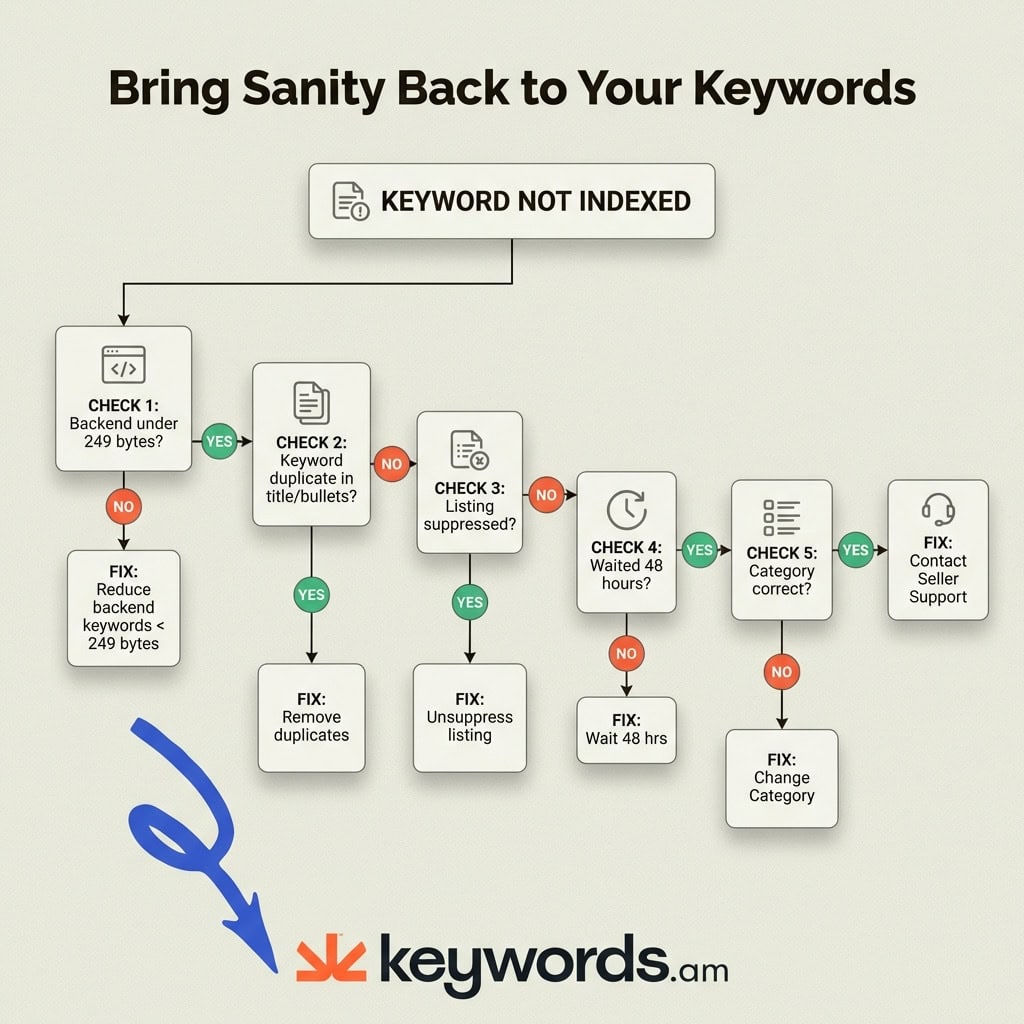
When a keyword fails to index, it is usually due to one of the following seven specific issues. Diagnosing the root cause is the first step to recovery.
-
Backend search terms exceed byte limit
Cause: The field exceeds 249 bytes (not characters), causing Amazon to drop the entire field.
Fix: Use a UTF-8 byte counter to verify the length. Remove low-value terms or filler words until the total count is 249 bytes or fewer. -
Duplicate keywords across fields
Cause: Repeating keywords in the backend that already appear in the title or bullets wastes valuable space. Amazon indexes a keyword once; repetition does not increase indexing strength.
Fix: Ensure backend search terms only contain keywords that do not appear in visible fields. If “wireless earbuds” is in the title, putting it in the backend wastes 16 bytes for zero benefit. -
Restricted or blocked keywords
Cause: The listing contains prohibited terms, such as pesticide claims, medical promises, or offensive language. Amazon blocks these terms from indexing to comply with policies.
Fix: Review Amazon’s restricted product claims policy. Remove any brand names that do not belong to the seller, as these violate Terms of Service. -
Category mismatch
Cause: The product is listed in an incorrect browse node (category). Amazon limits indexing to terms relevant to the specific category.
Fix: Verify the item’s browse node assignment in Seller Central. If a yoga mat is listed under “Sports Accessories” instead of “Exercise & Fitness > Yoga,” it may not index for specific yoga-related terms. -
Listing suppression killing indexing
Cause: The entire listing is suppressed due to image violations, pricing errors, or missing information. A suppressed listing is removed from search entirely.
Fix: Check the Account Health dashboard immediately. Resolve all suppression issues. Optimizing keywords on a suppressed listing is like tuning an engine on a car with no wheels. -
Parent-child variation conflicts
Cause: Child variations do not automatically inherit all keywords from the parent listing. Each child ASIN has its own indexing profile.
Fix: Optimize and check indexing for each child listing individually. Specific attributes like color or size (e.g., “red,” “XL”) must be present in the specific child’s backend data. -
Recent listing edits not yet crawled
Cause: Amazon’s system has not yet processed recent changes.
Fix: Wait at least 48 hours after updating a listing before checking indexing status. Patience is step one in troubleshooting.
How is Rufus AI changing what gets indexed in 2026?
Amazon’s Rufus AI uses semantic understanding rather than exact keyword matching, meaning natural language, structured data attributes, and even image content now influence amazon keyword indexing and search visibility.
The introduction of Rufus AI marks a shift from strict keyword matching to intent matching. Traditionally, if a shopper searched for “jogging footwear,” a product needed to explicitly contain those words to be indexed. Rufus, utilizing large language models (LLMs), understands that “running shoes” are semantically equivalent to “jogging footwear,” allowing products to appear for relevant queries even without exact keyword matches.
This shift has elevated the importance of A+ Content. While historically ignored by the search algorithm, A+ Content is now read by Rufus for semantic context. The AI processes both the text and visual elements of Enhanced Brand Content to build a more complete understanding of the product. This does not mean sellers should stuff A+ Content with keywords; rather, they should focus on well-written, natural descriptions that clearly communicate product benefits.
Structured data attributes like Subject Matter, Target Audience, and Intended Use also feed directly into Rufus’s knowledge graph. Many sellers leave these fields blank, which is a missed opportunity for additional indexing coverage. Additionally, Rufus employs computer vision to analyze product images. Text overlays on infographics, lifestyle images, and comparison charts are now treated as data sources. Product images are no longer just for shoppers; they are data for the algorithm.
The sellers who win in 2026 will be those who master both disciplines: maintaining strict keyword indexing for traditional search while optimizing semantic content for AI-powered discovery.
How should sellers monitor keyword indexing over time?
Sellers should check amazon keyword indexing weekly using automated tools, track changes after every listing edit, and audit full keyword coverage monthly to catch silent de-indexing before it impacts sales.
Indexing is not a “set it and forget it” task. Algorithm updates, category changes, or even competitor actions can affect a product’s visibility. A proactive monitoring strategy is essential.
Weekly spot checks should be performed on the 10-15 highest-revenue keywords. If a keyword that drives 30% of sales drops out of the index, every day of delay results in lost revenue. These checks can be done manually or via automated alerts.
Post-edit verification is critical. Whenever a listing is updated, whether it’s a price change, a title tweak, or a new image, sellers should wait 48 hours and then re-verify indexing for key terms. Listing changes can sometimes trigger a re-indexing event that accidentally drops terms.
Finally, a monthly full audit is recommended. This involves checking all target keywords across all listing fields. Manually checking hundreds of keywords is impractical, which is where automated solutions become necessary. Running a full listing audit can verify hundreds of terms across five fields in minutes, ensuring that no silent de-indexing events go unnoticed.
Frequently Asked Questions About Amazon Keyword Indexing
These are the most common questions sellers ask about amazon keyword indexing, from A+ Content visibility to re-indexing timelines.
Does A+ Content get indexed for keyword search?
A+ Content is not traditionally indexed for direct keyword search, but Amazon’s Rufus AI now reads A+ Content for semantic context in AI-powered search results.
This is a 2026 development. Sellers should write natural A+ Content that describes product benefits rather than stuffing keywords. The SEO value is indirect but growing.
How long after editing does re-indexing take?
Amazon typically re-indexes listing changes within 24-48 hours, though some changes like category updates can take up to 72 hours.
Sellers should avoid checking indexing immediately after edits. False negatives from premature checks often lead to unnecessary troubleshooting and panic.
Can PPC campaigns affect organic keyword indexing?
PPC campaigns do not directly cause keywords to become indexed, but advertising a product for specific terms can accelerate Amazon’s recognition of keyword relevance.
The relationship is indirect. PPC generates sales velocity on specific keywords, which signals relevance to Amazon’s algorithm. However, for a keyword to be indexed, it must first be present in the listing’s data.
What happens if backend search terms are over the byte limit?
Amazon silently ignores the entire backend search terms field when it exceeds the 249-byte limit, resulting in zero backend keywords being indexed.
This is the most dangerous indexing trap because Amazon provides no error or warning. The Seller Central interface accepts the input, but the algorithm drops the entire field, rendering all those keywords useless.
Do parent listings pass keyword indexing to child variations?
Parent listings do not fully pass keyword indexing to child variations, meaning each child ASIN must be optimized and checked individually for indexing.
Color, size, and style-specific keywords should be added to each child variation’s backend search terms. Optimizing a parent listing for “blue running shoes” does not guarantee that the red variation will index for that term.
Conclusion
Amazon keyword indexing is the invisible foundation of product visibility, and mastering it requires both technical precision and ongoing monitoring.
The distinction between indexing and ranking, the strict 249-byte limit for backend terms, and the specific locations Amazon checks for data are non-negotiable realities for sellers. With the addition of Rufus AI, the landscape is evolving to include semantic understanding and visual data, but the core technical rules remain in effect.
Sellers who ignore these mechanics risk silent de-indexing, where products effectively disappear from the shelf without warning. By implementing a routine of weekly spot checks and monthly full audits, brands can ensure their products remain visible to the millions of shoppers searching for them every day.
Immediate Action: Check your top 10 revenue-generating keywords for indexing status right now using the ASIN + Keyword search method.
Next Step: Run a full keyword indexing audit across all listing fields to identify gaps and silent failures.




