Amazon Fundamentals
Why your Amazon data never matches (and which numbers to trust)
Amazon data accuracy explained: 7 reasons seller tools disagree, which report to trust for profit vs. inventory vs. keywords, and how to diagnose gaps.

A seller checks estimated monthly sales for one kitchen gadget ASIN across three platforms. Helium 10 shows 2,400 units. Jungle Scout estimates 3,800. Seller Central reports 1,950. That spread isn’t a glitch, it’s a feature of how Amazon’s data ecosystem works.
Conflicting numbers lead to bad inventory bets and wasted ad spend. Sellers who can’t explain why the figures disagree can’t decide where to put capital, and inventory mismanagement quietly drains margin all year. Amazon data accuracy is less about finding the “right” tool and more about matching the right source to the right decision.
This guide covers the seven root causes of discrepancies, a source-of-truth hierarchy by use case, and a diagnostic sequence for when something looks off. It won’t tell you which tool is “most accurate,” because no single tool can be universally correct.
Why Do Amazon Seller Tools Show Different Numbers?
Amazon seller tools disagree because they pull from different endpoints, use different estimation algorithms, and report over different timeframes that Amazon’s own infrastructure never reconciles. True amazon data accuracy is hard to pin down because the ecosystem is fragmented by design.
Seller Central, the Selling Partner API (SP-API), the Advertising API, and Brand Analytics each serve data on different latencies. A sale recorded in the Advertising API may not show in SP-API for hours. Even Amazon’s own reports often disagree, with Business Reports and Payments showing different totals for the same date range.
Third-party tools face an extra problem: they have to estimate competitor sales from proxy signals. Amazon doesn’t publish competitor unit counts. Tools track Best Seller Rank, review velocity, and inventory signals, then apply proprietary models to guess volume. Because each model uses a different training set, estimates diverge.
What Are the 7 Causes of Amazon Data Discrepancies?
Seven distinct obstacles drive Amazon data discrepancies: timezone mismatches, metric definition conflicts, refresh delays, estimation algorithm variance, ASIN aggregation differences, pending order movement, and API rate limiting. Working through them in order resolves most “why don’t my numbers match” tickets.
1. Timezone Differences
The most common cause of “missing” sales is timezone drift. Amazon’s SP-API records in UTC, while Seller Central dashboards display Pacific Time.
A sale at 11:00 PM PST on January 15 shows up on January 15 inside Seller Central. That same moment is 7:00 AM UTC on January 16, so an API-connected tool reports it on the 16th. Comparing daily totals creates false gaps that are purely timezone artifacts.
2. Report Definition Mismatches
“Sales” isn’t one metric. Ordered Product Sales (Business Reports) counts orders when the customer clicks Buy Now, before cancellations. Settled Product Sales (Payment Reports) only counts orders after payment clears and the item ships.
Comparing an “orders” view in one tool against a “settled” view in another will show a gap. Based on practitioner reports, cancellation and refund drag commonly produces a mid-single-digit percentage gap between the two, though the exact figure depends heavily on category and promo activity.
3. Data Refresh Delays
Latency varies by surface. Seller Central dashboards update within 15 to 60 minutes, while downloadable reports can lag up to 48 hours.
The SP-API has specific limits documented in Amazon’s official API guidelines, and FBA inventory reports are often cached and throttled to roughly every 30 minutes. If a tool pulls at noon and gets an 11:30 cache, recent sales stay invisible until the next refresh. Those gaps usually close within 24 hours.
4. Estimation Methodology Differences
For competitor analysis, every tool estimates. Each major tool runs its own algorithm to convert BSR into unit volume.
The models train on different datasets. A tool with electronics-heavy training data may handle headphones well but miss on supplements. Based on published methodology comparisons, most estimators land in the 60 to 80 percent accuracy range for products with stable rank, so a “1,000 units/month” estimate could realistically mean 600 to 1,400. Treat the output as directional.
5. Parent vs. Child ASIN Aggregation
Variation products complicate reporting. Some tools roll everything up to the parent ASIN; others report per child.
If Tool A shows family-level sales (1,200 units) and Tool B shows the best-selling variation (400 units), the numbers look wrong but aren’t. Always check whether a reported figure is a specific variation or a rolled-up family total.
6. Pending Orders and Returns
Orders can sit “Pending” for days during payment verification, and returns process days or weeks after the sale.
When a return clears, Amazon deducts it from the sales total retroactively. A “Last Month” report viewed on February 1 might read $10,000, then drop to $9,800 by February 15 as returns settle. Tools that store a snapshot without re-syncing keep showing the original figure.
7. API Rate Limiting and Data Gaps
Amazon enforces strict rate limits on SP-API. When several tools hit the same endpoint at once, Amazon rejects requests.
If congestion persists, gaps form. A tool may miss a block of orders because its requests were denied, and without a manual re-sync those gaps become permanent holes in historical data. Amazon’s own guidance discourages running duplicate apps against the same report types.
| Feature | Seller Central | Tool A (API-based) | Tool B (scraper/extension) | Cause of discrepancy |
|---|---|---|---|---|
| Timezone | PST/PDT | UTC | Local browser time | Sales shift to adjacent days |
| Metric | Ordered sales | Ordered or shipped | Estimated sales | Ordered vs. settled vs. estimated |
| Latency | ~1 hour | ~1 to 4 hours | Real-time snapshot | Refresh delays and caching |
| Status | Dynamic (updates with returns) | Often static snapshot | Static snapshot | Return and pending handling |
Which Amazon Data Source Should Sellers Trust?
The trustworthy source depends on the decision. Sellers often want one “perfect” number, but the authoritative source shifts by use case. Establishing a baseline for amazon data accuracy means pairing each business question with the correct report.
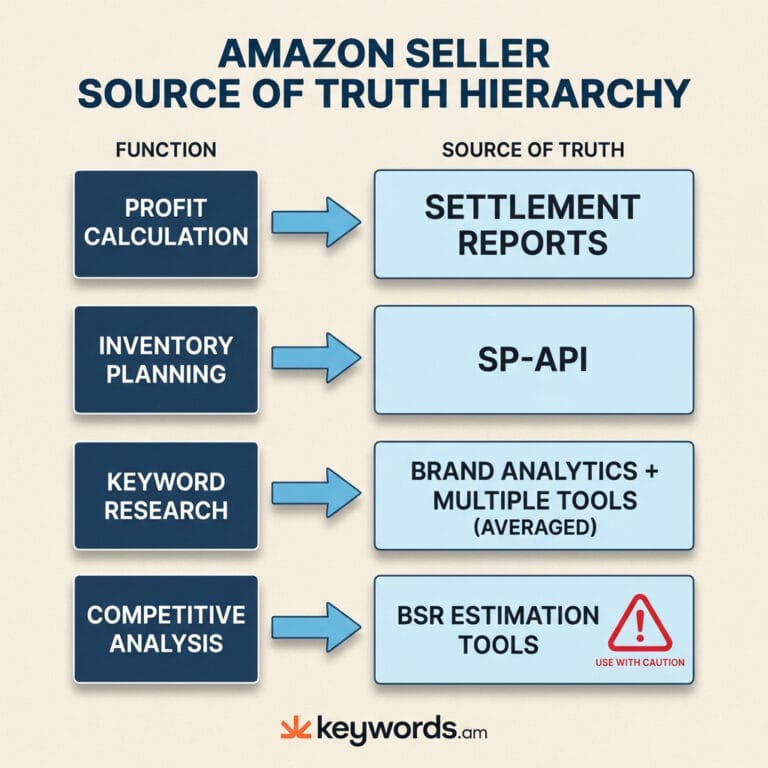
Source of Truth Hierarchy
| Use case | Best data source | Why | Avoid |
|---|---|---|---|
| Profit calculation | Settlement reports | Actual disbursements, fees, refunds | Dashboard “sales” widgets |
| Inventory planning | SP-API + Seller Central | Real-time stock, FBA inbound status | Third-party sales estimates |
| Keyword research | Brand Analytics + multi-tool average | First-party search data, cross-referenced volume | Any single tool’s volume figure |
| Competitive analysis | BSR-based estimation tools | The only option for competitor data | Treating estimates as exact |
| Ad performance | Advertising API / Campaign Manager | Direct first-party performance | Attributing all growth to ads |
For profit calculation, settlement reports are the only source that matters. They detail what Amazon actually deposited after fees, reserves, and refunds. Dashboard revenue is a vanity metric here.
For keyword research, no third-party tool has perfect visibility. Amazon’s Brand Analytics gives a precise Search Frequency Rank, and combining that with averaged third-party volumes reduces single-source risk. See the Amazon keyword research methodology guide for a workflow that stacks these sources.
For competitive analysis, use estimation tools but trust the trend over the integer. A “5,000 units” competitor estimate should read as “high volume,” not as a plan input. The reverse ASIN lookup guide covers how to apply the same thinking to competitor keyword data.
When Should Sellers Worry About Data Discrepancies?
A 10 to 30 percent spread between estimation tools is normal. Discrepancies above 30 percent, or disagreements inside first-party reports greater than 5 percent, point to a configuration problem worth chasing.
Acceptable Variance Ranges
- Sales estimates (tool vs. tool): 10 to 30 percent variance is typical based on published methodology comparisons.
- Dashboard vs. downloaded reports: under 5 percent is expected, driven by timezone and lag.
- Settlement vs. ordered reports: 10 percent or more depending on return and cancellation rates.
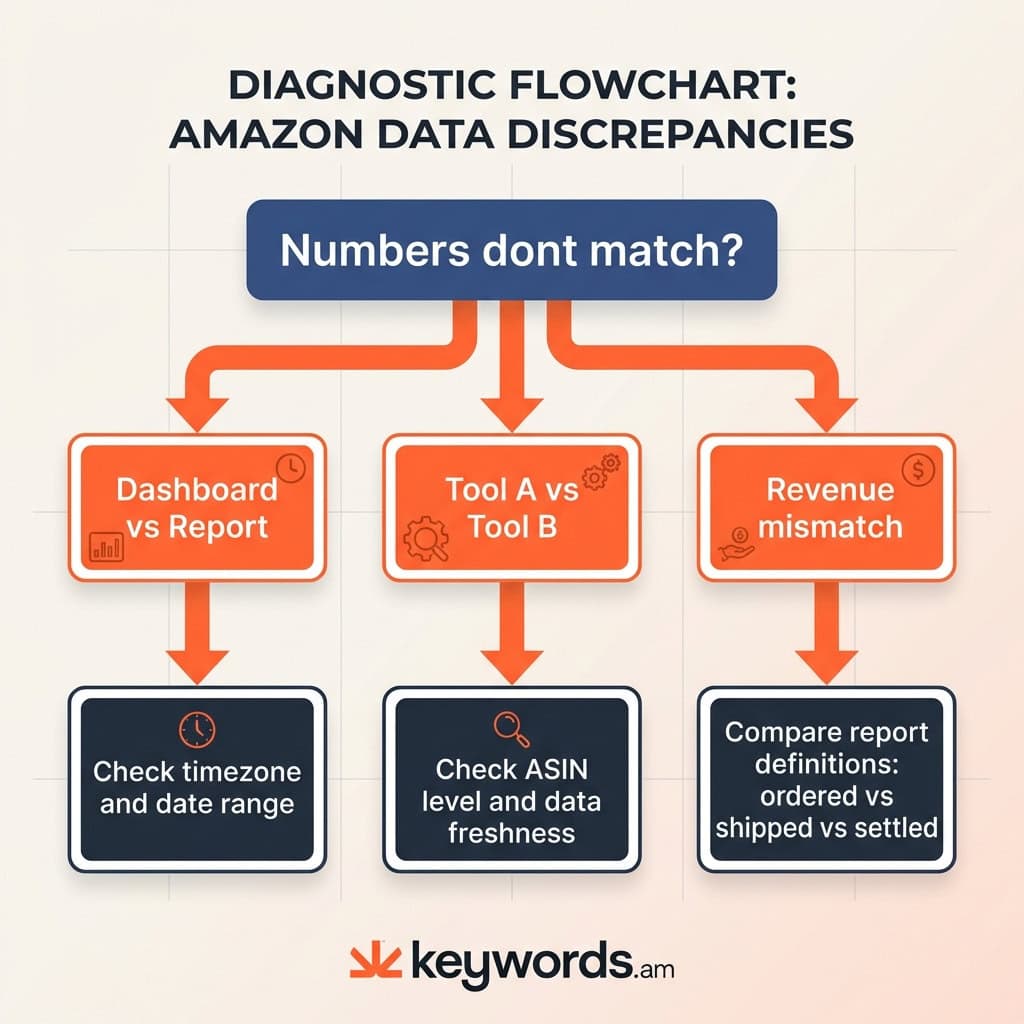
Diagnostic Troubleshooting Checklist
If a gap falls outside those ranges, work through this sequence:
- Check timezone and dates. Same date range on both sides? One UTC, one PST?
- Verify ASIN level. Parent vs. child mismatch?
- Compare report definitions. Ordered (gross) vs. settled (net)?
- Check data freshness. If a competitor tool shows zero sales for a live product, it probably hasn’t scraped recently.
- Audit account connections. Expired API tokens are a common silent failure.
- Review excluded transactions. Promo filters and giveaway exclusions can hide real sales.
How Does Transparent Data Methodology Improve Amazon Decisions?
Transparent methodology reveals how a number is calculated and how confident the tool is in it. That context lets sellers separate hard measurements from rough estimates.
Opaque “black box” tools present numbers as facts with no context. Without knowing whether data is API-sourced or modeled, sellers can’t weigh reliability. Real amazon data accuracy depends on knowing the pedigree behind each figure.
A transparent methodology answers four questions:
- Source. API, scraped, or estimated?
- Confidence. How much data supports this value?
- Freshness. When was it last updated?
- Type. Measured fact or calculated probability?
Structured frameworks like the TFSD framework push optimization toward verifiable process, letting sellers audit listings against a defined standard rather than trusting a tool’s secret grade. Pair that with disciplined listing optimization and the data stack starts producing decisions instead of noise.
Frequently Asked Questions About Amazon Data Accuracy
Why do Helium 10 and Jungle Scout show different sales numbers for the same ASIN?
Each tool runs its own BSR-to-sales algorithm trained on a different sample of products, and neither sees actual competitor orders. The estimates diverge because the models weight recent rank changes, review velocity, and category behavior differently. Cross-checking both usually produces a more useful range than trusting either one on its own.
How accurate are Amazon sales estimator tools in 2026?
Based on published vendor methodology notes and third-party comparisons, most estimators land in the 60 to 80 percent accuracy range for products with stable Best Seller Rank. Niche categories and volatile rank swings commonly produce wider error bands, which is why practitioners treat the numbers as directional rather than definitive. Only Seller Central’s first-party reports are exact for your own account.
Why don’t Seller Central dashboard numbers match my downloaded reports?
Seller Central dashboards show near-real-time data in Pacific Time, while downloadable reports use UTC and can lag up to 48 hours. The dashboard is good for quick checks; downloaded reports are what accounting should use. Aligning timezones and date windows closes most of the gap on its own.
Which Amazon report is most accurate for profit tracking?
Settlement reports (Payments) are the right source because they reflect actual disbursements after fees, refunds, and reserves. Business Reports show ordered sales before cancellations and overstate revenue. For P&L, tax work, and real margin analysis, settlement data is the only valid source.
Is Amazon Brand Analytics data trustworthy?
Brand Analytics draws directly from Amazon’s own search logs, so the Search Frequency Rank is the strongest signal of relative keyword demand available to brand-registered sellers. It doesn’t give absolute search volumes, but the ranking itself is first-party. Pair it with third-party volume estimates to translate the rank into planning numbers.
Conclusion
The frustration of conflicting numbers is manageable once sellers stop hunting for a single “right” figure and start matching sources to decisions.
- Context first. Know whether a number is measured or estimated before acting on it.
- Match the source. Settlement for the wallet, SP-API for the warehouse, estimates for the war room.
- Expect variance. A 10 to 30 percent spread between estimation tools is standard.
- Prefer transparency. Tools that expose confidence levels beat tools that don’t.
- Baseline the gap. Measure your own ordered-vs.-settled variance so you know what “normal” looks like.
Pick the last fully closed week and compare Ordered Product Sales in Business Reports against Settled Product Sales in Payments. Note the percentage gap; that’s your personal baseline error rate, and most future “discrepancies” will fall inside it. If you want a cleaner starting point for the keyword side of this stack, start with the free Amazon keyword tool or create a Keywords.am account to see confidence-scored data in your own listings.