

📑 Table of Contents
- What can free Amazon keyword research actually tell you?
- What free keyword tools does Amazon provide inside Seller Central?
- Which free third-party Amazon keyword tools are worth using?
- How do you combine free sources to approximate paid-tool accuracy?
- How do free Amazon keyword methods compare to paid tools?
- When does paying for Amazon keyword tools make financial sense?
- Frequently Asked Questions About Free Amazon Keyword Research
- Conclusion
⚡ TL;DR
- Amazon provides 5 free keyword tools inside Seller Central that most guides ignore.
- Product Opportunity Explorer gives bucketed search volume data without Brand Registry.
- Brand Analytics dashboards (Search Query Performance, Top Search Terms, Search Catalog Performance) require Brand Registry.
- Free third-party tools like Sonar, KeywordTool.io, and Keyword Tool Dominator supplement Amazon’s native data.
- Combine 3+ free sources using the cross-validation method to approximate paid-tool accuracy.
- Free methods work well for sellers with fewer than 10 SKUs and under five thousand dollars monthly revenue.
- Five specific signals indicate when upgrading to paid tools delivers positive ROI.
Amazon sellers spend between forty and two hundred dollars per month on keyword research tools, but Amazon itself provides five free keyword analytics tools that most sellers never discover. Many business owners assume that reliable data requires a subscription, overlooking powerful native dashboards hidden within Seller Central.
Keywords.am sells a keyword research tool. This article covers what sellers can genuinely accomplish for free, where free methods hit their ceiling, and when paying makes financial sense. Most “free keyword research” guides are bait-and-switch promotions for paid tools. Sellers deserve an honest assessment of what free methods can and cannot do.
This guide covers all five Amazon native keyword tools, the best genuinely free third-party options, a method for combining free sources, and a clear framework for knowing when to invest in paid tools.
What can free Amazon keyword research actually tell you?
Free Amazon keyword research reveals keyword suggestions, relative popularity, competitor visibility, and seasonal trends, but cannot provide exact search volumes, difficulty scores, or historical data beyond 90 days.
Before diving into specific tools, it is crucial to understand the structural limitations of free data. Amazon keeps its most precise metrics guarded. However, directionally accurate data is sufficient for many early-stage decisions.
The following table outlines exactly what free methods can and cannot deliver:
What Free Methods CAN Do |
What Free Methods CANNOT Do |
|---|---|
Generate keyword suggestions from autocomplete |
Provide exact monthly search volumes |
Show relative popularity buckets (high/medium/low) |
Calculate keyword difficulty or competition scores |
Reveal competitor keyword strategies (manual ASIN analysis) |
Track competitor keywords at scale automatically |
Identify seasonal trends via Google Trends |
Show historical Amazon search data beyond 90 days |
Show click share and conversion share (Brand Analytics) |
Provide cross-marketplace keyword comparison |
Surface niche-level demand data (Product Opportunity Explorer) |
Alert you when keyword rankings change |
“Free” on Amazon often comes with hidden prerequisites. Access usually requires a Professional Seller account ($39.99/month). Furthermore, Brand Analytics requires Brand Registry, necessitating a registered trademark. Therefore, while the tools are technically free to use, the barrier to entry involves both time and capital.
Free tools work best in combination. By layering multiple sources, sellers can “cross-validate” data to approximate the insights paid algorithms generate. For those needing a gentler introduction, Amazon keyword tools for non-technical sellers offers a simplified overview.
What free keyword tools does Amazon provide inside Seller Central?
Amazon provides five free keyword tools inside Seller Central: search bar autocomplete, Product Opportunity Explorer, Search Query Performance, Top Search Terms, and Search Catalog Performance dashboards.
These tools are direct windows into customer behavior, unpolluted by external estimation algorithms.
Amazon Search Bar Autocomplete
The search bar is the most direct source of keyword intent. When a user types a partial query, Amazon’s algorithm suggests completions based on real-time search frequency. Sellers can use the “alphabet method” (typing a root keyword followed by “a”, then “b”) to reveal long-tail variations. While it lacks volume data, it discovers real-time vernacular shifts.
Product Opportunity Explorer
Available to all Professional Sellers (no Brand Registry needed), Product Opportunity Explorer organizes the catalog into “niches.” It provides aggregated search volume, growth percentages, and product counts for keyword clusters. While search volumes are bucketed across the entire niche rather than per keyword, it effectively validates demand. It is available in the US and major European marketplaces.
Search Query Performance Dashboard (Brand Registry required)
Search Query Performance (SQP) offers actual search query counts, providing full-funnel metrics per query: impressions, clicks, cart adds, and purchases. It shows “Brand Share” (the percentage of market volume your brand captures). With data back to 2023, SQP diagnoses exactly where a listing loses customers.
Top Search Terms Dashboard (Brand Registry required)
This dashboard ranks the top 1 million search terms by frequency. It reveals the top three clicked ASINs for each term, along with their click and conversion share. Sellers can reverse-engineer competitor success by identifying who wins traffic for high-volume keywords.
Search Catalog Performance Dashboard (Brand Registry required)
While SQP is query-centric, Search Catalog Performance (SCP) is product-centric. It details how a specific ASIN performs across all search queries, showing impressions, CTR, and conversions. It helps diagnose visibility versus conversion problems.
Three of these tools require Brand Registry. For a complete methodology, refer to the Amazon keyword research methodology.
Which free third-party Amazon keyword tools are worth using?
The best genuinely free third-party Amazon keyword tools include Sonar by Perpetua, KeywordTool.io’s free tier, Keyword Tool Dominator, and Google Trends for seasonality analysis.
Sonar by Perpetua offers a 180+ million keyword database and is 100% free. Its standout feature is the reverse ASIN lookup, showing keywords for which a competitor ranks. It only captures page-1 rankings at the time of the last update, but it is unmatched in the free tier for competitor snapshots.
KeywordTool.io (Amazon mode) generates over 750 suggestions per search from autocomplete. The free tier hides quantitative data like volume and CPC, making it a brainstorming tool rather than an analytical one.
Keyword Tool Dominator allows roughly three free searches per day, scraping autocomplete for long-tail buyer keywords. It is useful for sporadic research.
Google Trends tracks search interest over time, validating seasonality. It prevents sellers from launching seasonal products at the wrong time by showing historical interest patterns.
Amazon PPC Search Term Reports show actual customer search terms that triggered ad impressions. For sellers running ads, this is the most accurate “free” data available because it is based on actual spend.
SellerSprite offers a limited free tier (roughly 10 daily uses) for keyword mining and reverse ASINs, plus an unlimited Chrome extension for rank checking.
Note that Helium 10 discontinued its open free plan in 2024. For a detailed breakdown, see the best Amazon keyword research tool comparison.
How do you combine free sources to approximate paid-tool accuracy?
Combine Amazon autocomplete for keyword discovery, Product Opportunity Explorer for demand validation, and Google Trends for seasonality to triangulate keyword value without paid tools.
The “cross-validation” method manually verifies data points across three independent sources.
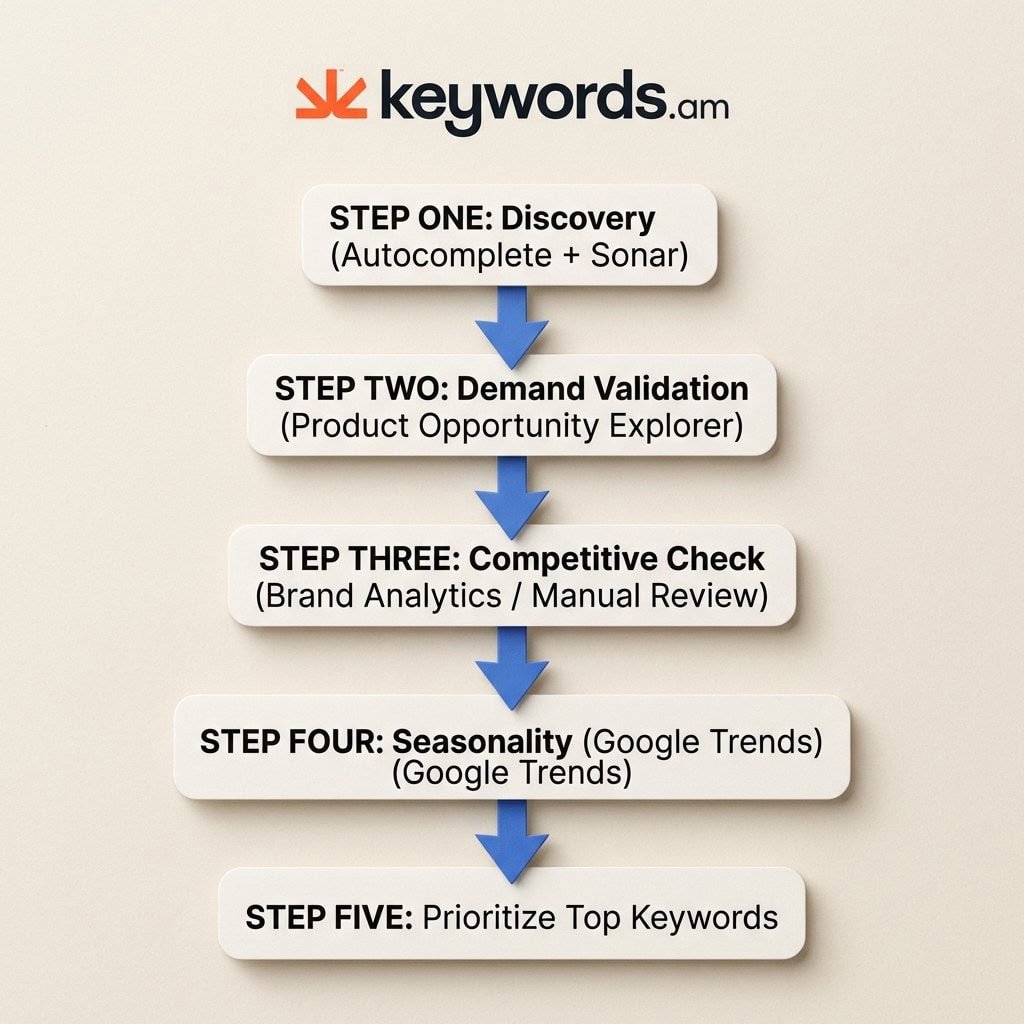
Step 1: Discovery. Use the alphabet method in Amazon’s search bar and Sonar’s reverse ASIN lookup to build a list of 50-100 keyword candidates.
Step 2: Demand Validation. Plug top candidates into the Product Opportunity Explorer. Use “Niche Search Volume” and “Search Volume Growth” to confirm actual demand. Discard low-volume niches.
Step 3: Competitive Check. If Brand Registered, use Top Search Terms to see which ASINs dominate clicks. If not, manually check Page 1 results for review counts and ratings to estimate difficulty.
Step 4: Seasonality Check. Run top candidates through Google Trends to ensure interest is stable or growing, avoiding strictly seasonal fads.
Step 5: Prioritize. Score keywords on Demand, Competition, and Relevance. Focus on the top 10-15 with high demand and manageable competition.
This method takes 2-3 hours per product versus 15 minutes with a paid tool. The trade-off is currency for time.
How do free Amazon keyword methods compare to paid tools?
Free tools provide keyword suggestions and relative demand signals, while paid tools at thirty to one hundred twenty dollars per month add exact volumes, difficulty scores, competitor tracking, and automation.
The primary difference is data velocity and context. Paid tools aggregate millions of data points into actionable metrics.
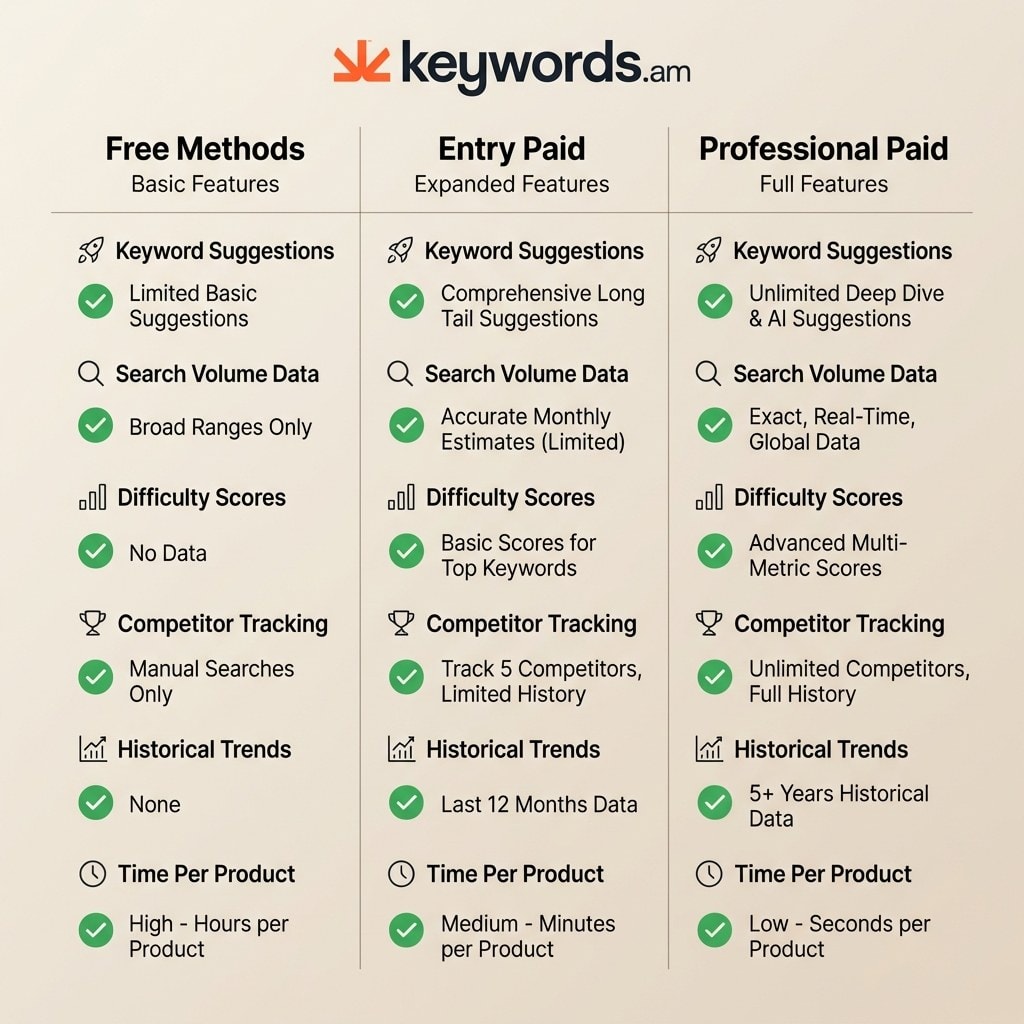
Feature |
Free Methods |
Entry Paid (thirty to forty dollars/mo) |
Professional Paid (ninety-nine dollars+/mo) |
|---|---|---|---|
Keyword suggestions |
Yes (autocomplete, Sonar) |
Yes (larger databases) |
Yes (comprehensive) |
Search volume data |
Bucketed only (POE) |
Estimated monthly volumes |
Exact/estimated with historical trends |
Keyword difficulty score |
Not available |
Basic scoring |
Advanced competitive metrics |
Reverse ASIN lookup |
Limited (Sonar page-1) |
Full competitor lists |
Multi-ASIN comparison |
Competitor tracking |
Manual only |
Basic alerts |
Automated monitoring |
Historical trends |
90 days max (POE) |
12-24 months |
2+ years |
Listing optimization |
Manual |
Guided workflow |
AI-assisted |
Time per product |
2-3 hours |
15-30 minutes |
5-15 minutes |
The time discrepancy (2-3 hours vs 15 minutes) is the strongest argument for paid tools. For pricing details, see Keywords.am pricing.
When does paying for Amazon keyword tools make financial sense?
Paying for keyword tools makes financial sense when sellers manage more than five active SKUs, exceed five thousand dollars in monthly revenue, or run PPC campaigns requiring exact search volume data.
Five signals indicate free tools are a bottleneck:
- Managing 5-10+ active SKUs: Cross-referencing takes 15-30 hours/month. a $49 tool saving this time pays for itself at just $2/hour.
- Monthly revenue exceeds five thousand dollars: A 5% improvement in targeting generates $250 in value, covering the subscription cost multiple times.
- Running PPC campaigns: Without exact volume data, ad spend is wasted on guesswork.
- Need competitor intelligence at scale: Tracking 10+ competitors requires automation to catch rank changes instantly.
- Expanding to multiple marketplaces: Free tools are mostly US-focused; international expansion requires broader databases.
For those in between, Keywords.am free tier serves as a bridge. Manual methods eventually hurt rankings, as detailed in why spreadsheets hurt Amazon SEO rankings.
Frequently Asked Questions About Free Amazon Keyword Research
These are the most common questions sellers ask about free Amazon keyword research methods, tools, and when to consider upgrading.
Conclusion
Free Amazon keyword research works well at small scale. The key is combining Amazon’s native tools with third-party free options and knowing the five signals for when to upgrade.
Success on Amazon does not initially require expensive software. It requires accurate data and a willingness to dig for it.
* Amazon’s Native Tools are Underused: Product Opportunity Explorer and Search Query Performance offer first-party data that no third-party tool can replicate.
* Cross-Validation is Essential: Combining autocomplete, niche data, and seasonality checks creates a comprehensive picture of market demand.
* ROI Logic Dictates Upgrades: When the value of your time or the cost of wasted ad spend exceeds thirty dollars a month, upgrading is an investment.
Immediate Action: Log into Seller Central today and open the Product Opportunity Explorer. Search for your primary product category and note the top five search terms by niche volume.
When you are ready to see what exact volume data looks like without a credit card, try the free Amazon keyword tool. It is the logical next step from manual research to data-driven optimization.




