

📑 Table of Contents
- Why does your Amazon Brand Store matter more than you think?
- What is the hidden keyword opportunity in Amazon Brand Stores?
- How do you research keywords specifically for your Brand Store?
- The 5-point Amazon Brand Store optimization checklist
- How do you measure Amazon Brand Store performance?
- Frequently Asked Questions About Amazon Brand Store Optimization
- Conclusion
⚡ TL;DR
- Google indexes Brand Store pages individually. Each page name becomes a separate search result, creating a second SEO channel most sellers ignore.
- Generic page names waste keyword opportunities. Labels like “Shop All” and “New Arrivals” compete for zero search volume.
- Brand Analytics data reveals category-level keywords. These are the exact terms shoppers use to find products within a brand.
- A 5-point checklist covers the full optimization. This includes homepage tiles, category naming, mobile testing, A+ integration, and custom URLs.
- Store Insights tracks what works. Page views, daily visitors, and sales attribution connect keyword decisions directly to revenue.
You’ve optimized every listing. Keyword-researched every title. But your Brand Store (the single page Google actually indexes with your brand name) still says “Shop All” and “New Arrivals.” That’s leaving money on the table.
Sellers treat Amazon Brand Stores as pure design projects. They pick lifestyle images. They arrange products attractively. Then they just hope shoppers will browse. Zero brands apply keyword strategy to page names, category titles, or product groupings. Not even competitor guides address storefront keyword strategy. Look at Amazon’s own best practices guide. The focus remains squarely on visual layout and branding, completely ignoring search optimization.
This 2026 Amazon Brand Store guide details the exact keyword research methodology required. It breaks down how to choose page names that rank on Google, structure categories for Amazon search, and measure the actual results. The framework follows a strict 5-point checklist built to capture organic search traffic.
Why does your Amazon Brand Store matter more than you think?
Amazon Brand Stores get indexed by Google as standalone pages. That makes them a powerful second SEO channel. While competitors fight over listing rankings alone, smart brands capture external traffic.
Google indexes Brand Store pages individually. Each page title becomes a completely separate Google search result. Sellers assume only product detail pages matter for external search engines. They’re wrong. A well-structured store page with a targeted title acts as a dedicated landing page in Google search results. That creates a clear advantage over relying solely on Amazon’s internal search algorithm. High domain authority flows directly from Amazon to these custom storefront pages.
Brand Stores also serve as the primary landing page for Sponsored Brand ads. Poorly optimized stores hemorrhage ad spend. Driving paid traffic to a confusing storefront guarantees immediate bounces. Sellers investing heavily in Amazon listing optimization frequently neglect the actual destination of their top-of-funnel ads. Shoppers clicking a Sponsored Brand banner expect an intuitive, searchable experience perfectly matching their initial query.
Mobile shoppers browse stores directly. Data from Statista shows 77% of Amazon traffic comes from mobile devices. A clunky smartphone layout kills conversions instantly. Fast-swiping shoppers look for recognizable terms, not generic labels. Navigation must be frictionless. Text needs to be perfectly legible without zooming. These tight physical screen constraints demand clear, concise category naming conventions.
Brand Analytics provides store-level search data showing exactly what shoppers search within a brand. This data source dictates user intent. Sellers can see the exact phrases customers type right after landing on the storefront. That internal search behavior provides a literal roadmap for structuring the store’s entire navigation.
But knowing your store matters isn’t enough. The real opportunity lies in a place most guides ignore entirely. Keywords.
What is the hidden keyword opportunity in Amazon Brand Stores?
Brand Store page names, category titles, and product groupings all get indexed by Google, creating keyword placement opportunities most sellers waste on generic labels.
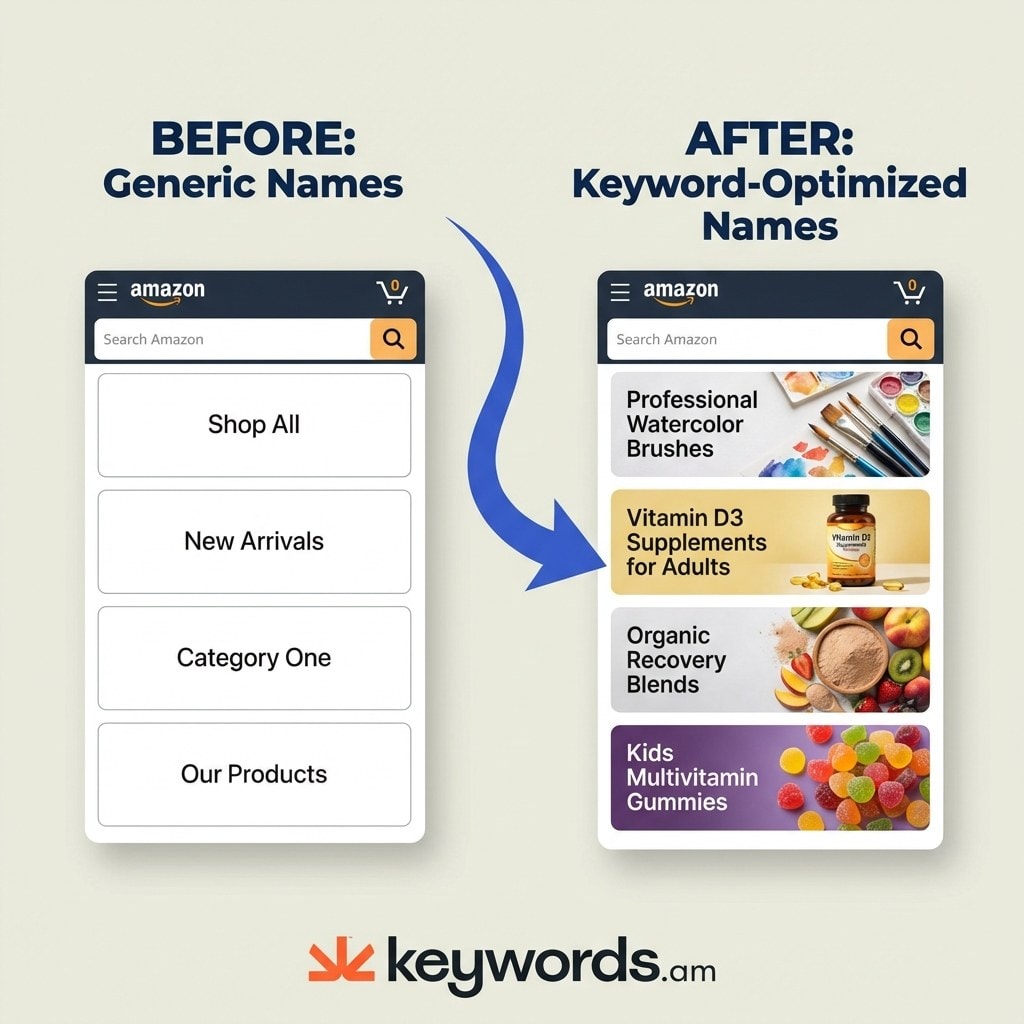
Store page names appear directly as Google search results. A generic page named “Shop All” competes for zero search volume. An optimized page named “Professional Watercolor Brushes” competes for high-intent search queries. This before-and-after example exposes the gap between a static brochure and a searchable asset. Shoppers searching for specific products on Google click descriptive titles. Page names function exactly like H1 tags for search crawlers.
Category and subcategory titles show up in breadcrumbs. That creates another valuable indexing surface. Breadcrumbs help users navigate back and forth. But more importantly, they send strong relevance signals to search engines. Clear, keyword-rich breadcrumbs tell Google exactly what the page contains and how it relates to the broader site architecture. They reinforce the page’s primary topic naturally, completely avoiding keyword stuffing.
Product grouping by keyword theme captures completely different search intents. Grouping by use case always beats grouping by internal product lines. A supplement brand needs to organize products by “Recovery Supplements” or “Daily Energy” instead of “Line A” or “Line B.” Shoppers search for solutions to their specific problems. They don’t search for arbitrary catalog designations. Sellers have to align their product organization with actual external search behavior to maximize visibility.
Store search bar queries reveal exactly what shoppers want from a specific brand. Analyzing this internal data highlights glaring missed opportunities. If thousands of users search for a specific term inside the store, that exact term deserves its own dedicated page. Tracking Brand Analytics search query performance identifies these exact phrases. The data strips all the guesswork out of store architecture. It replaces blind assumptions with concrete search volume metrics.
These keyword surfaces only deliver results with the right keywords in place. Store keyword research operates fundamentally differently from listing keyword research.
How do you research keywords specifically for your Brand Store?
Brand Store keyword research starts with branded search queries from Brand Analytics, targeting category-level keywords and mapping one primary keyword per store page.
Start with branded search queries. Brand Analytics shows exactly what people search alongside a brand name. Examples include “[Brand] vitamins,” “[Brand] for kids,” or “[Brand] bundles.” Make these phrases your exact page names. Shoppers already associate the brand with these specific categories. That makes them highly relevant targets for Amazon Brand Store optimization.
Target category-level keywords instead of product-level terms. Page names require broader language to capture multiple items. “Vitamin D3 5000 IU softgels” is a product keyword. “Vitamin D Supplements” is a category keyword. Broad category terms capture top-of-funnel traffic from users still exploring their options. Save the granular product terms for individual detail pages. Sellers frequently confuse these two levels of optimization. The result? Overly narrow store pages that fail to rank for broad, high-volume searches.
Research Google search intent for brand-plus-category queries. Use Google to see what people actually look for when pairing a brand with a category. Check the “People Also Ask” boxes. Review the related searches at the bottom of the results page. This external data confirms whether the chosen category terms actually have real-world demand outside of Amazon. It validates every keyword choice before you even touch the store builder.
Map keywords to store pages systematically. Create a strict, document-based mapping framework. Assign exactly one primary keyword per page. Internal product tiles then reinforce that theme with supporting terms. An “Organic Skincare” page needs product tiles highlighting “vegan face wash” or “natural moisturizers.”
Tools like Keywords.am streamline this entire process. The platform’s Brand Analytics integration pulls branded search query data directly into store page naming decisions. Sellers grab the right data instantly. No more manual spreadsheet work just to map a store effectively.
With the right keywords locked in, the next step involves applying them systematically across every single element of the store.
The 5-point Amazon Brand Store optimization checklist
A fully optimized Brand Store requires keyword-rich page titles, search-intent product grouping, mobile-first layouts, and custom URLs with target keywords.
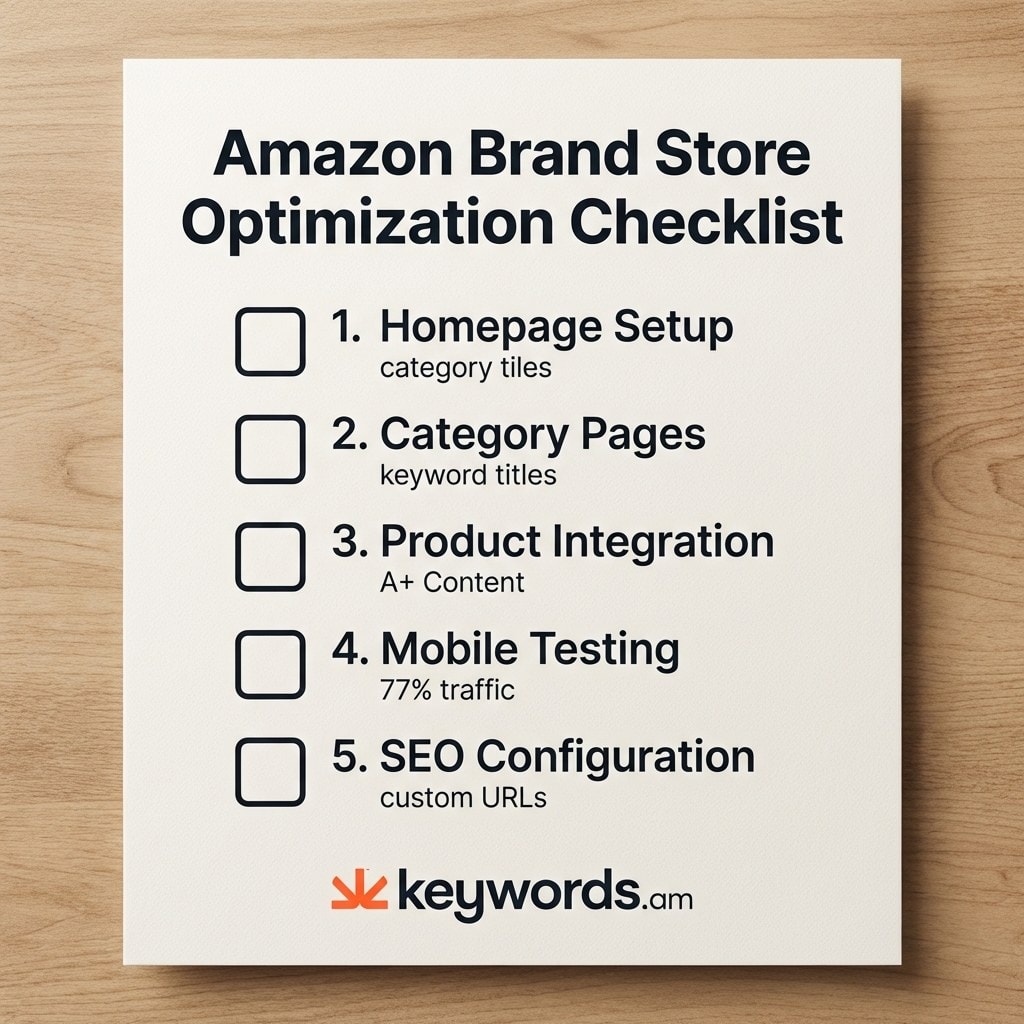
The execution phase transforms raw research into a high-converting storefront. This checklist covers the five critical areas of Amazon Brand Store optimization.
- Homepage setup: Hero images must communicate a clear value proposition instantly. Below the hero image, place 3 to 4 category tiles featuring keyword-rich labels. These category tile labels serve as direct keyword placements indexed by search engines. Include a dedicated bestsellers section to drive immediate conversions from high-intent visitors.
- Category pages: Every single page requires a keyword-optimized title. Group products by search intent rather than internal SKU numbers or abstract product lines. A page title of “Organic Vitamin D Supplements” consistently crushes “Category 1.” Use comparison layouts. They help shoppers decide between similar items without ever leaving the store environment.
- Product detail integration: Embed A+ Content previews directly inside store pages. Place strong customer reviews next to high-ticket items to build immediate trust. Add cross-sell product tiles at the bottom of category pages to boost average order value.
- Mobile optimization: Mobile traffic accounts for 77% of all Amazon visits. Test every single page on a mobile device before hitting publish. Use single-column layouts for frictionless scrolling. Ensure large tap targets for clumsy thumbs. Verify that all text remains perfectly readable without zooming in.
- SEO setup: Amazon Store Builder enables custom page URLs. Pack these URLs with primary target keywords. Create strong internal linking between store pages using text links and descriptive image tiles. This establishes a crystal-clear hierarchy for search engine crawlers.
Store Element |
Generic (Before) |
Optimized (After) |
Why It Matters |
|---|---|---|---|
Homepage tile |
“Shop All” |
“Professional Watercolor Brushes” |
Google indexes tile labels |
Category page |
“Category 1” |
“Vitamin D3 Supplements for Adults” |
Appears in breadcrumbs |
Custom URL |
/stores/brand/page/1 |
/stores/brand/vitamin-d-supplements |
Keyword in URL boosts ranking |
Product grouping |
By SKU number |
By use case (Recovery, Daily, Sports) |
Captures different search intents |
How do you measure Amazon Brand Store performance?
Amazon Store Insights tracks page views, daily visitors, sales attribution, and time on page. These metrics reveal exactly which keyword-optimized pages drive the most conversions and traffic.
The Store Insights dashboard acts as the central hub for performance data. It tracks page views, daily visitors, sales per page, and average time on page. Sellers need to check these specific metrics weekly to gauge the true health of their storefront. Without this hard data, Amazon storefront optimization efforts are just blind guesses.
Connect keyword changes directly to traffic shifts. Track the results of a page rename using a simple A/B approach. Rename one single page. Track the data for two weeks. Then compare the results to the previous period. A successful keyword optimization almost always shows an immediate lift in daily visitors.
Google Search Console data provides another deep layer of visibility. Verifying an Amazon store URL in Google Search Console reveals external search impressions for store pages. Most sellers have no idea they can track their Amazon store directly in GSC. This advanced tactic reveals exactly which Google queries trigger specific store pages. That provides invaluable keyword ideas for future iterations.
Knowing when to update matters just as much as the initial setup. Refresh keyword mapping quarterly. Adjust the store architecture based on seasonal search trends. Search intent shifts throughout the year. The store must adapt to survive. Using an Amazon listing audit tool regularly identifies when product-level changes dictate a sudden need for store-level updates.
Metric |
What It Tells You |
Action Trigger |
|---|---|---|
Page views |
Which pages attract traffic |
Low views = weak keyword or poor placement |
Daily visitors |
Overall store health trend |
Declining = refresh content or keywords |
Sales/visitor |
Conversion effectiveness |
Low ratio = product-page mismatch |
Time on page |
Content engagement quality |
Under 15 seconds = page not delivering value |
Before launching or refreshing a store, audit the layout to avoid the silent mistakes that kill conversions.
Frequently Asked Questions About Amazon Brand Store Optimization
These are the absolute most common questions brand-registered sellers ask about Amazon Brand Store optimization and storefront strategy.
Conclusion
Treating an Amazon Brand Store strictly as a design exercise ignores its single most powerful capability.
- Google indexing represents the biggest missed opportunity for most sellers. Individual store pages can rank externally.
- Keyword strategy for stores demands category-level terms. These are completely distinct from product-level listing keywords.
- This Amazon Brand Store SEO approach ensures coverage across homepage elements, category naming, mobile usability, A+ integration, and backend setup.
- Measurement through Store Insights connects these specific keyword decisions directly to real revenue and traffic shifts.
Open your Brand Store right now. Check your page names. If any say “Shop All,” “New Arrivals,” or “Category 1,” you just found your first Amazon Brand Store optimization opportunity. Small changes to these specific titles yield immediate visibility improvements.
Gathering the right data remains the hardest part of the entire process. Leveraging Keywords.am’s Brand Analytics integration allows sellers to use actual search query data for intelligent page naming. It completely eliminates the guesswork. Apply this exact same keyword precision to product title optimization. That maintains rock-solid consistency across your entire catalog.




