

📑 Table of Contents
- What Is the Difference Between Amazon Product Descriptions and Bullet Points?
- What Are Amazon’s Product Description Rules and Character Limits?
- How Do You Write an Effective Amazon Product Description in 5 Steps?
- How Should Keywords Be Integrated Into Amazon Product Descriptions?
- Amazon Product Description Templates by Category
- Does A+ Content Replace Amazon Product Descriptions?
- Frequently Asked Questions About Amazon Product Descriptions
- Conclusion
⚡ TL;DR
- Descriptions ≠ bullets: Bullet points hook with scannable features; descriptions close the sale with narrative, objection handling, and long-tail keywords.
- 2,000 characters, plain text only: No HTML since July 2021. Avoid prohibited terms like “best,” “#1,” “cure,” or pricing references.
- 5-step framework: Buyer problem → product solution → supporting specifics → address objections → confidence close.
- Descriptions ARE indexed: Amazon’s algorithm reads description text for keyword matching, making it ideal for long-tail phrases.
- A+ Content is NOT indexed: Brand Registry sellers need both a keyword-optimized standard description (for SEO) and A+ Content (for conversion).
- TFSD placement: The Description is “The Story” in the TFSD Framework. Use Coverage Indicators to see which keywords belong here vs. title or bullets.
Most Amazon sellers spend hours perfecting their title and bullet points, only to paste a generic, afterthought paragraph into the product description field. This 2,000-character section remains the most underutilized conversion tool in a listing, often treated as a dumping ground for leftover keywords rather than a persuasive sales asset.
The product description field serves a specific function within Amazon’s listing hierarchy. While titles drive initial traffic and bullet points highlight features, the description is the “D” in the TFSD Framework: the designated conversion closer designed to tell a story and overcome buyer hesitation. Neglecting this field or treating it as a duplicate of the bullet points leaves revenue on the table.
This guide provides a comprehensive approach to optimizing an Amazon product description in 2026. It covers the essential rules, a proven 5-step writing framework, category-specific templates, and strategies for using descriptions effectively alongside A+ Content. Unlike generic advice that treats descriptions in isolation, this methodology integrates the description into a complete listing strategy using the TFSD Framework to ensure every character contributes to sales.
What Is the Difference Between Amazon Product Descriptions and Bullet Points?
Bullet points deliver scannable features and benefits for quick comparison, while product descriptions provide narrative context, objection handling, and brand storytelling that converts hesitant browsers into buyers.
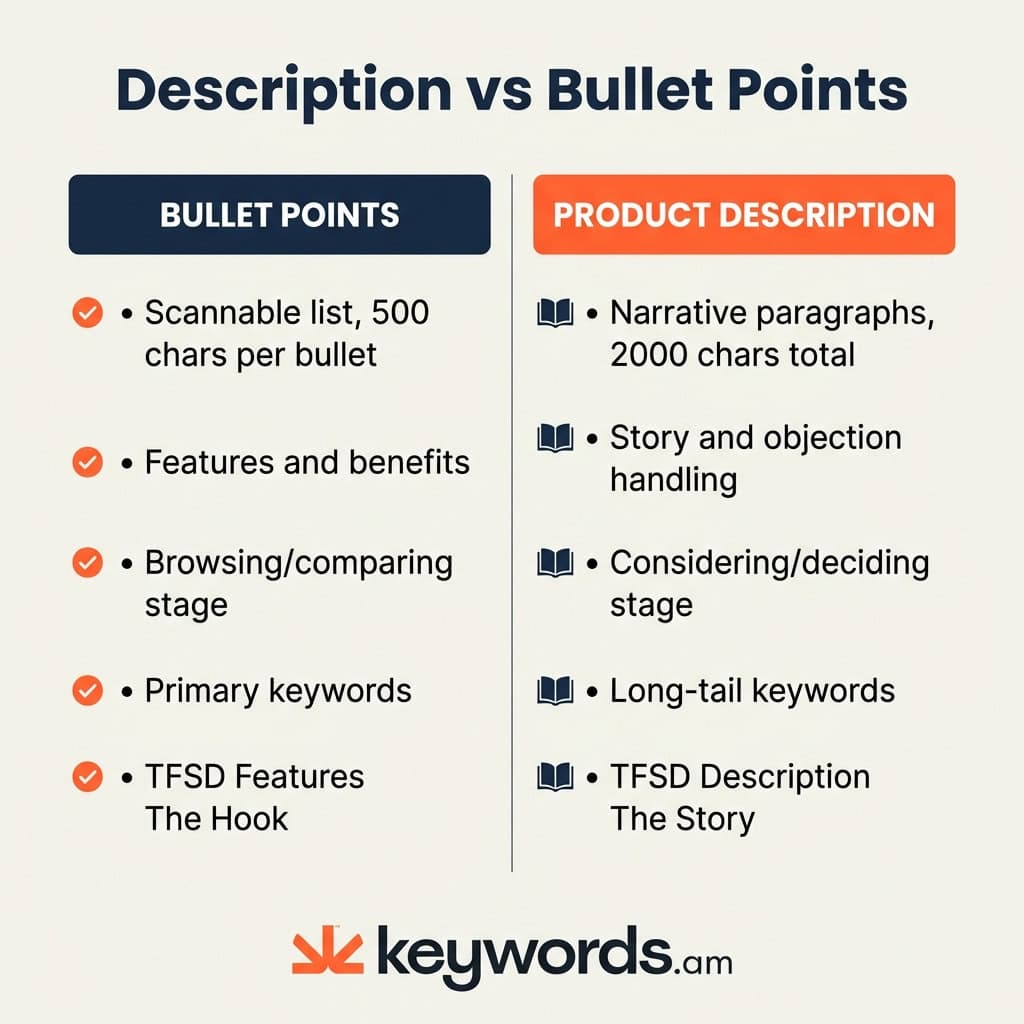
Sellers often struggle to differentiate between these two fields, leading to repetitive content that fails to add value. The Amazon Bullet Points Guide explains that bullet points function as the top-of-funnel “hook,” truncated at roughly 70-80 characters on mobile devices. Their primary job is to deliver immediate, punchy benefits for shoppers comparing multiple products rapidly.
In contrast, the product description operates at the bottom of the funnel. It serves the detail-oriented buyer who has moved past the initial scan and needs substantive information to make a final decision. Consider a seller offering a high-end coffee grinder. Their bullet points might list “stainless steel burrs” and “15 grind settings.” A weak description would simply repeat these specs. An optimized amazon product description, however, paints a picture: “Experience the rich aroma of freshly ground beans every morning. Unlike ceramic burrs that crack under pressure, the stainless steel core maintains consistent granularity for the perfect pour-over or espresso.”
This distinction is central to the TFSD Framework, which assigns specific roles to the Title, Features (bullets), Search terms, and Description to prevent keyword cannibalization and ensure a cohesive customer journey.
Comparison: Amazon Product Description vs. Bullet Points
Attribute |
Bullet Points |
Product Description |
|---|---|---|
Format |
Scannable list (5 bullets) |
Narrative paragraphs |
Character limit |
500 per bullet |
2,000 total |
Primary purpose |
Features & benefits |
Story & objection handling |
Buyer stage |
Browsing / comparing |
Considering / deciding |
Keyword role |
Primary + secondary keywords |
Long-tail + contextual keywords |
Mobile display |
Truncated at 70-80 chars |
Displayed prominently |
TFSD role |
Features (The Hook) |
Description (The Story) |
Understanding these distinct roles prevents redundancy. The description is the place to expand on claims made in the bullets, adding the “how” and “why” that space constraints in the feature list do not permit.
What Are Amazon’s Product Description Rules and Character Limits?
Amazon allows 2,000 characters for product descriptions in plain text only, prohibits HTML formatting, and restricts content including pricing claims, review quotes, competitor mentions, and external URLs.
Before writing, sellers must navigate the technical constraints of the platform. The standard product description field allows for a maximum of 2,000 characters. Crucially, since July 2021, Amazon has deprecated the use of HTML tags in this field. This means bolding, italics, and bullet lists are no longer supported. The only formatting tool remaining is the line break, which is essential for separating walls of text into digestible paragraphs. Detailed breakdowns of these constraints can be found in the Amazon Character Limits guide and Amazon Seller Central Product Detail Page Rules.
Amazon also enforces strict content policies. Violating these can lead to listing suppression, where the product is removed from search results entirely. Prohibited content includes:
- Customer Reviews & Testimonials: Quotes from buyers are not allowed.
- Promotional Language: References to pricing, “free shipping,” or availability (e.g., “In stock now”).
- Contact Information: Phone numbers, email addresses, or physical addresses.
- External Links: URLs directing traffic away from Amazon.
- Medical Claims: Any statement implying the product can “cure,” “treat,” or “prevent” a disease without FDA approval.
Furthermore, enforcement on restricted terms has tightened significantly in 2025. Words like “best,” “#1,” and “guaranteed” are automatic flags for Amazon’s algorithm.
- Violation: “The #1 best acne cure guaranteed to work overnight.”
- Compliant: “Formulated to help reduce the appearance of blemishes with consistent use.”
Sellers must write within these boundaries, using clear, compliant language that persuades without breaking the rules.
How Do You Write an Effective Amazon Product Description in 5 Steps?
An effective Amazon product description follows five steps: open with the buyer’s problem, present the product as the solution, support with specifics, address objections, and close with a confidence statement.
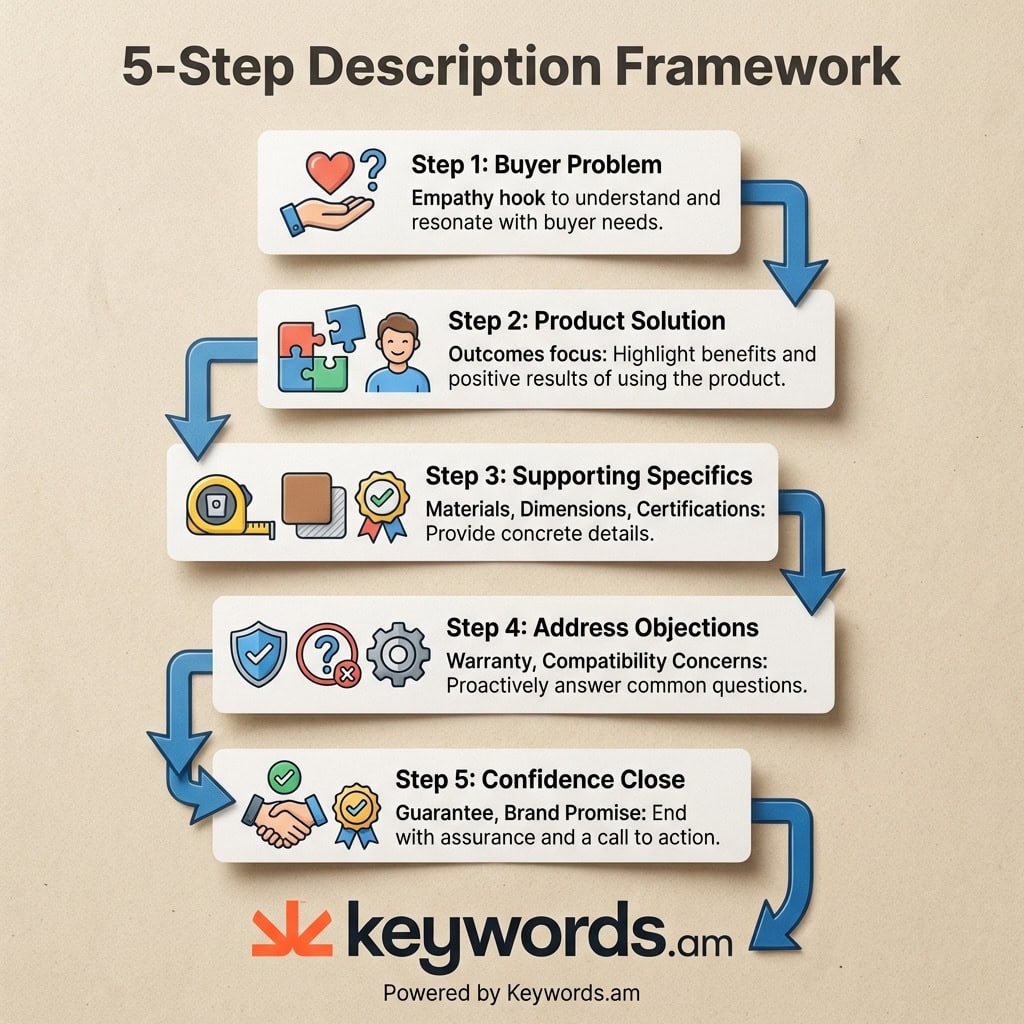
Structuring 2,000 characters of plain text can be daunting. Without a framework, descriptions often become rambling blocks of text. The following 5-step process ensures the content remains focused, persuasive, and readable.
Step 1: Start with the buyer’s problem (Empathy Hook)
Open by acknowledging the frustration or need that brought the customer to the listing. This validates their search intent.
Example: “Tired of flimsy spatulas that melt on the grill or snap under the weight of a heavy steak?”
Step 2: Present the solution (Your Product)
Position the product as the answer to that specific problem. Focus on the outcome, not just the feature.
Example: “The GrillMaster Pro is engineered to handle high heat and heavy cuts, giving total control over the barbecue without the worry of melted plastic.”
Step 3: Support with specifics
Build confidence with hard data. Vague claims are ignored; specific details sell.
Example: “Forged from a single piece of 420-grade stainless steel, the extra-long 18-inch handle keeps hands safe from flare-ups, while the non-slip silicone grip ensures precision handling.”
Step 4: Address objections
Identify the top reasons a customer might hesitate (e.g., warranty, durability, or compatibility) and address them directly.
Example: “Dishwasher safe and rust-resistant, this tool is built to last through seasons of daily use.”
Step 5: Close with confidence
End with a strong statement that reinforces the brand promise.
Example: “Upgrade any grilling toolkit with professional-grade reliability.”
The Difference in Action
- What most sellers write (Generic): “This spatula is made of steel. It is good for grilling. It has a long handle and is easy to clean. Buy one today for your kitchen.”
- Optimized Description: “Stop struggling with kitchen tools that can’t take the heat. The GrillMaster Pro is the heavy-duty solution for serious pitmasters. Constructed from thick, 420-grade stainless steel, it supports up to 5 lbs without bending. The 18-inch handle provides essential reach, keeping cooks cool while they sear. Rust-proof and dishwasher safe, it cleans up in seconds so hosts can get back to their guests.”
How Should Keywords Be Integrated Into Amazon Product Descriptions?
Product descriptions should target long-tail keywords and contextual phrases not already covered in the title or bullet points, placed naturally within sentences rather than listed or stuffed.
A common misconception among sellers is that product descriptions are not indexed by Amazon’s A9 search algorithm. Ranking factor analyses consistently confirm that while titles carry the most weight, descriptions are indeed indexed and contribute to search visibility. This makes the description field the ideal location for long-tail keywords and synonyms that would look awkward or cluttered in the title or bullets.
The TFSD Framework emphasizes strategic placement to avoid “keyword stuffing,” which is the practice of jamming every possible term into every field. This harms readability and can trigger spam filters. Instead, if the title targets “Running Shoes,” the description is the place for specific variations like “lightweight footwear for marathon training” or “breathable mesh sneakers for jogging.”
Keywords.am’s Coverage Indicators Explained guide details how to identify which high-value terms are missing from a listing. By reviewing these indicators, sellers can strategically weave the remaining keywords into the description’s narrative. For example, rather than listing “waterproof, durable, camping, hiking” at the bottom of the text, a seller should write: “Whether hiking through rain or camping in damp conditions, the waterproof lining ensures gear stays dry and durable against the elements.”
Tools like Smart Listing can assist in generating drafts that naturally incorporate these missing terms, ensuring the amazon product description reads well for humans while signaling relevance to the algorithm.
Amazon Product Description Templates by Category
Description templates vary by category because supplements require compliance language, home goods need use-case scenarios, and electronics demand technical specifications and compatibility details.
Different products require different persuasion strategies. Below are three category-specific templates that apply the 5-step framework.
Template 1: Supplements / Health & Wellness
Focus: Purity, ingredients, and compliance (no medical claims).
[Problem Hook] Maintaining balanced energy levels in a busy world can be a challenge. Without proper nutritional support, it is easy to feel drained.
[Solution] [Product Name] provides a natural way to support a daily wellness routine. Formulated with [Key Ingredient], it is designed to complement a healthy lifestyle.
[Specifics] Each serving delivers [Dosage] of pure [Ingredient Name], harvested from [Source/Region]. The formula is non-GMO, gluten-free, and manufactured in a GMP-certified facility.
[Objections/Compliance] This product contains no artificial fillers or synthetic preservatives and is third-party tested for purity.
[Close] Make [Product Name] a reliable part of any morning regimen.
Template 2: Home & Kitchen
Focus: Lifestyle, dimensions, and material quality.
[Problem Hook] A cluttered countertop can make cooking feel like a chore. Finding an organization solution that looks as good as it functions is often difficult.
[Solution] The [Product Name] transforms kitchen space, combining elegant design with practical utility.
[Specifics] Crafted from sustainable [Material Name], this organizer measures [Dimensions] to fit perfectly under standard cabinets. The [Feature, e.g., weighted base] prevents tipping.
[Objections] Designed for real homes, it is easy to clean with a damp cloth. The durable construction resists warping, even in humid environments.
[Close] Experience a more organized kitchen with [Product Name].
Template 3: Electronics / Tech Accessories
Focus: Compatibility, specs, and contents.
[Problem Hook] A device dying in the middle of a critical task is frustrating, especially with a charger that takes hours to restore power.
[Solution] The [Product Name] offers high-speed performance engineered for efficiency.
[Specifics] Featuring [Tech Spec, e.g., 20W PD output], this unit charges compatible devices up to 50% in just 30 minutes. It supports [Protocol Name] and includes a [Cable Length] reinforced cable.
[Compatibility Matrix] Compatible with: [List major devices, e.g., iPhone 13/14/15, Galaxy S22/S23, iPad Pro].
[Objections] Built-in safety features protect against overcharging and overheating.
[Close] Power up with confidence using [Product Name].
Does A+ Content Replace Amazon Product Descriptions?
A+ Content does not replace the standard product description for SEO purposes because Amazon does not index A+ Content text for search, making the standard description essential for keyword visibility.
Sellers with Brand Registry often assume that once they create A+ Content (formerly EBC), they can ignore the standard text description. This is a critical SEO mistake. While A+ Content visually suppresses the text description on the product detail page, the standard description text remains live in the backend code.
Crucially, Amazon officially states that A+ Content is not indexed for search. This means the keywords used in image alt text and text modules within A+ Content do not contribute to organic ranking. In contrast, the standard text description is indexed. Therefore, deleting the text description or leaving it blank effectively removes 2,000 characters of keyword indexing potential from the listing. For more information, sellers can review the Amazon A+ Content Overview.
The data supports a dual strategy: A+ Content is a powerful conversion driver, with Amazon reporting an average sales lift of 5.6% for listings that use it. It engages visual shoppers. The standard description, meanwhile, serves the search algorithm. The optimal approach is to write a keyword-rich text description for SEO, and then build visually compelling A+ Content to convert the traffic that those keywords generate. For sellers without Brand Registry, the standard description is the only tool available, making its optimization even more critical.
Frequently Asked Questions About Amazon Product Descriptions
Amazon allows 2,000 characters for standard product descriptions in plain text format, with no HTML formatting permitted since July 2021. This limit includes spaces and punctuation. Sellers should maximize this space for detailed information, as outlined in the Character Limits guide.
Yes, Amazon indexes product description text for keyword matching, making descriptions valuable for long-tail keywords not covered in titles, bullets, or backend search terms. While less weighted than the title, it is a key component of broad search visibility.
No, Amazon deprecated HTML formatting in product descriptions in July 2021. Only plain text with line breaks is supported for standard descriptions. Using HTML tags now may result in the tags displaying as raw text or the description being rejected.
Update an Amazon product description whenever keyword strategy changes, seasonal opportunities arise, or customer feedback reveals new objections that the description should address. Regular optimization ensures the listing remains relevant to current search trends.
Amazon prohibits customer reviews, pricing references, shipping claims, external URLs, contact information, competitor mentions, and unsubstantiated health or safety claims in product descriptions. Violations can trigger listing suppression.
Conclusion
The product description is often the final checkpoint between a browsing customer and a completed sale. While titles and bullet points do the heavy lifting of attracting traffic and highlighting key features, the description provides the narrative depth required to overcome hesitation and build trust.
Key Takeaways:
* Distinct Roles: The TFSD Framework clarifies that descriptions are for storytelling and objection handling, not just keyword stuffing.
* No Duplication: Never copy-paste bullet points. Use the description to expand on features and target long-tail search terms.
* SEO + Conversion: Standard descriptions are indexed for search; A+ Content is not. Brand Registry sellers must utilize both to maximize traffic and sales.
* Structured Approach: The 5-step framework (Problem, Solution, Specifics, Objections, Close) transforms generic text into persuasive copy.
Immediate Action:
Audit one product description today. Check if it duplicates bullet points or misses critical long-tail keywords. Apply the 5-step framework to rewrite it, focusing on the customer’s problem and the specific solution the product offers.
For a precise analysis of listing keyword gaps, use Keywords.am’s TFSD editor. The Coverage Indicators will instantly reveal which high-value keywords are missing from a description, allowing sellers to fill the gaps and capture more traffic.




