

📑 Table of Contents
- Why does your Amazon product title matter more than any other listing element?
- What are Amazon’s 2026 product title requirements?
- What is the ideal Amazon product title structure?
- How does mobile truncation change your title strategy?
- Before-and-after amazon product title optimization examples by category
- How do you find the right keywords for your Amazon title?
- How do you A/B test your Amazon product title?
- Frequently Asked Questions About Amazon Product Title Optimization
- Conclusion
TL;DR
- Over 70% of Amazon shoppers use mobile devices, where product titles truncate at approximately 80 characters, often obscuring critical product information.
- Amazon’s 2026 title requirements enforce a 200-character limit for most categories, strict rules against prohibited characters and word repetition, and auto-correction for non-compliant titles after 14 days.
- An ideal title structure prioritizes Brand Name, Top Keyword Phrase, Key Differentiator, and Use Case/Audience, with the most crucial information appearing within the first 80 characters.
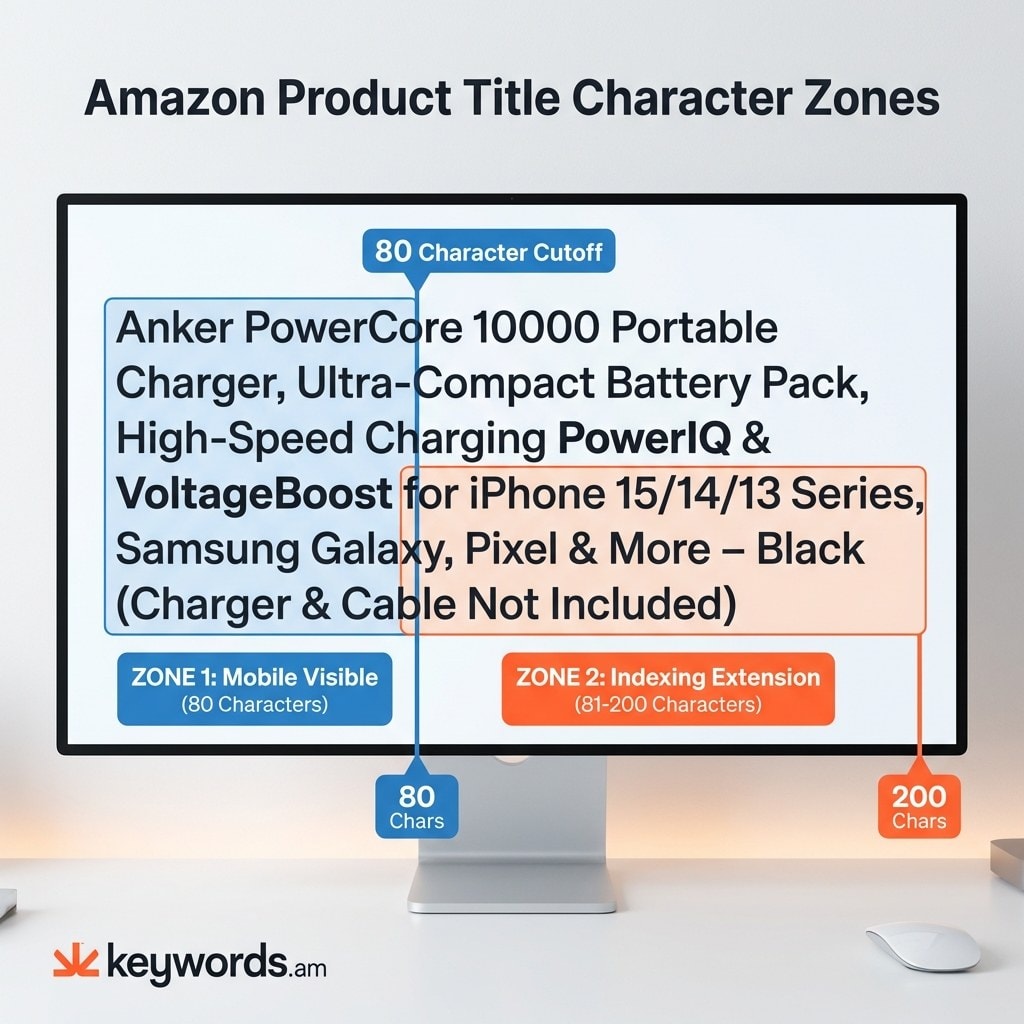
- The “two-zone” title strategy allocates the first 80 characters for mobile visibility and the remaining characters for deeper keyword indexing.
- The TFSD framework (Title, Features, Search terms, Description) guides keyword distribution, ensuring high-priority terms are in the title while others are placed in supporting listing elements.
- Brand-registered sellers can use Amazon’s Manage Your Experiments tool to A/B test title variations and identify which versions drive higher sales.
- Strategic keyword research, focusing on relevance and search volume, is crucial for selecting the most impactful terms for title placement.
Over 70% of Amazon shoppers browse on mobile devices, where product titles truncate at roughly 80 characters. This means a significant portion of keywords sellers pack into their titles are invisible to most buyers. While most amazon product title optimization advice focuses on the 200-character limit, the 80-character mobile display is the real constraint — and getting it wrong costs sellers both clicks and conversions.
This guide details 2026 title requirements, a mobile-first structure, category-specific rewrites, and A/B testing methods. It introduces a two-zone title system: the mobile-visible zone and the indexing zone.
Why does your Amazon product title matter more than any other listing element?
The product title is the only listing element that influences both keyword indexing and click-through rate simultaneously, making it the single highest-leverage optimization for Amazon sellers.
Amazon’s A10 algorithm prioritizes title keywords for indexing over bullet points, descriptions, or backend search terms, significantly impacting visibility. As the primary text in search results alongside images and price, a compelling title directly influences click-through rates. Given that over 70% of Amazon traffic is mobile and titles truncate at ~80 characters, optimizing for desktop only risks lost conversions as most shoppers won’t see the full title.
The TFSD framework emphasizes the title’s singular influence, positioning it at the apex of the optimization hierarchy. The framework distributes keywords across Title, Features, Search terms, and Description — but the title carries the most weight for both ranking and shopper engagement.
Understanding why titles matter is step one — but sellers need to know the current rules before they start rewriting.
What are Amazon’s 2026 product title requirements?
Amazon enforces a 200-character title limit with strict rules against repeated words, prohibited characters, and ALL CAPS, with automatic corrections applied after a 14-day review window.
Most Amazon product titles are limited to 200 characters, measured in bytes, affecting multi-byte language titles. Prohibited characters include !, $, ?, _, {, }, ^, ¬, and ¦ (unless part of a brand name); others like ~, #, <, >, * are context-specific. A “no-repeat-word” rule limits the same word to two appearances, excluding articles and prepositions (e.g., “Vitamin Vitamin C Supplement with Vitamin D” is non-compliant).
Since January 2025, Amazon auto-corrects non-compliant titles after a 14-day grace period for brand-registered sellers, meaning sellers lose control of their title copy if they don’t comply. Some categories, like apparel, enforce stricter limits, sometimes as low as 80 characters.
Requirement |
Rule |
Example Violation |
|---|---|---|
Character limit |
200 characters (most categories) |
Title exceeding 200 chars gets auto-truncated |
Prohibited characters |
No !, $, ?, _, {, }, ^, ¬, ¦ |
“Best Vitamin C!!! Amazing Value!!!” |
Word repetition |
Same word max 2x (excl. articles/preps) |
“Vitamin Vitamin C Vitamin Supplement” |
ALL CAPS |
Not allowed (except brand acronyms) |
“BEST VITAMIN C SUPPLEMENT EVER” |
Promotional language |
No “Best Seller,” “Free Shipping,” “#1” |
“Best Seller Premium Vitamin C – Free Shipping” |
Auto-correction |
14-day window, then Amazon rewrites |
Non-compliant title replaced by Amazon’s version |
For detailed category-specific character limits, consult the Amazon character limits guide. Following these rules is essential to prevent compliance warnings and title suppression from keyword stuffing.
With the rules established, the next question is how to structure a title that maximizes both compliance and conversion.
What is the ideal Amazon product title structure?
The strongest Amazon product title optimization structure follows a four-part formula: Brand Name, Top Keyword Phrase, Key Differentiator, and Use Case or Audience — with the highest-priority terms in the first 80 characters.
The mobile-first principle demands the brand, primary keyword, and key differentiator appear within the first 80 characters, forming Zone 1 (mobile visible). Information beyond this serves as Zone 2 (indexing extension), adding secondary keywords for broader search coverage.
The TFSD framework guides keyword distribution. The title gets the top 2-3 priority keywords, while others are spread across bullet points, backend search terms, and the description, preventing keyword stuffing. Keyword Priority Score (KPS) helps identify high-relevance, high-search-volume terms for the title. Lower-priority keywords fit other listing fields. Consult the Amazon keyword research methodology for detailed guidance.
But even a perfectly structured title fails if sellers don’t account for what mobile shoppers actually see.
How does mobile truncation change your title strategy?
Mobile devices display only the first 75-80 characters of a product title, meaning sellers must front-load brand name, primary keyword, and key differentiator before the cutoff point.
Title display varies significantly by device:
View |
Characters Shown |
Where Shoppers See It |
|---|---|---|
Mobile search results |
~75-80 |
Browsing/searching on phone |
Desktop search results |
~115-120 |
Browsing/searching on computer |
Product detail page |
Full 200 |
After clicking into the listing |
This requires front-loading: brand, primary keyword, and key differentiator must be within the first 80 characters. For example, a 180-character title like “BrandName Pro-Series Ergonomic Office Chair with Adjustable Lumbar Support, Breathable Mesh Back, 3D Armrests, and Smooth Rolling Casters for Home and Office Use – Black, Modern Design” would truncate to “BrandName Pro-Series Ergonomic Office Chair with Adjustable Lumbar Support, Brea…” on mobile, losing key differentiators like 3D Armrests and Breathable Mesh.
Theory is useful, but seeing actual title rewrites across categories makes the structure concrete.
Before-and-after amazon product title optimization examples by category
Category-specific title templates show the practical difference between keyword-stuffed titles and structured, mobile-optimized titles across electronics, supplements, beauty, home, and pet products.
To demonstrate mobile-first amazon product title optimization, here are before-and-after examples across five common Amazon categories.
Electronics
- Before (165 characters): “MegaSound Xtreme Portable Bluetooth Speaker with Super Bass, 20W Output, IPX7 Waterproof, 24-Hour Battery Life, Outdoor & Indoor Use, Black, Wireless Party Speaker with LED Lights”
- Mobile View (~80 chars): “MegaSound Xtreme Portable Bluetooth Speaker with Super Bass, 20W Output, IPX7…”
- After (110 characters): “MegaSound Xtreme Portable Bluetooth Speaker – IPX7 Waterproof, 24-Hour Battery, Super Bass for Outdoor Parties”
- Mobile View (~80 chars): “MegaSound Xtreme Portable Bluetooth Speaker – IPX7 Waterproof, 24-Hour Battery…”
Supplements
- Before (185 characters): “NutriBoost Pure Turmeric Curcumin Supplement with Bioperine for Joint Support & Anti-Inflammatory Benefits – 1000mg, Non-GMO, Vegan Capsules, Natural Antioxidant for Digestion and Immune Health”
- Mobile View (~80 chars): “NutriBoost Pure Turmeric Curcumin Supplement with Bioperine for Joint Support &…”
- After (90 characters): “NutriBoost Turmeric Curcumin with Bioperine – 1000mg for Joint Support & Anti-Inflammatory”
- Mobile View: Full title visible on mobile
Beauty
- Before (190 characters): “GlowUp Hyaluronic Acid Serum for Face – Anti-Aging Moisturizer with Vitamin C & E, Deep Hydration, Wrinkle Reduction, Brightening & Firming, 2oz, Korean Skincare for All Skin Types, Fragrance-Free”
- Mobile View (~80 chars): “GlowUp Hyaluronic Acid Serum for Face – Anti-Aging Moisturizer with Vitamin C &…”
- After (95 characters): “GlowUp Hyaluronic Acid Serum – Anti-Aging Face Moisturizer with Vitamin C & E for Deep Hydration”
- Mobile View: Full title visible on mobile
Home & Kitchen
- Before (178 characters): “ChefMate Non-Stick Frying Pan Set – 8, 10, 12 Inch Skillets with Ergonomic Handles, Induction Compatible, PFOA-Free, Dishwasher Safe, Durable Cookware for Everyday Cooking, Black”
- Mobile View (~80 chars): “ChefMate Non-Stick Frying Pan Set – 8, 10, 12 Inch Skillets with Ergonomic Hand…”
- After (93 characters): “ChefMate Non-Stick Frying Pan Set – 3-Piece, Induction Compatible, PFOA-Free for Easy Cooking”
- Mobile View: Full title visible on mobile
Pet
- Before (195 characters): “Pawsome ChewGuard Indestructible Dog Toy for Aggressive Chewers – Tough Rubber Bone for Large Breeds, Dental Health, Reduces Boredom, Non-Toxic, Vet Approved, Long Lasting Playtime, Red & Blue Pack”
- Mobile View (~80 chars): “Pawsome ChewGuard Indestructible Dog Toy for Aggressive Chewers – Tough Rubber…”
- After (107 characters): “Pawsome ChewGuard Indestructible Dog Toy – Tough Rubber Bone for Aggressive Chewers, Promotes Dental Health”
- Mobile View: Full title visible on mobile
This pattern emphasizes brand, primary keyword, and differentiator within the 80-character mobile zone, extending with secondary keywords for full indexing.
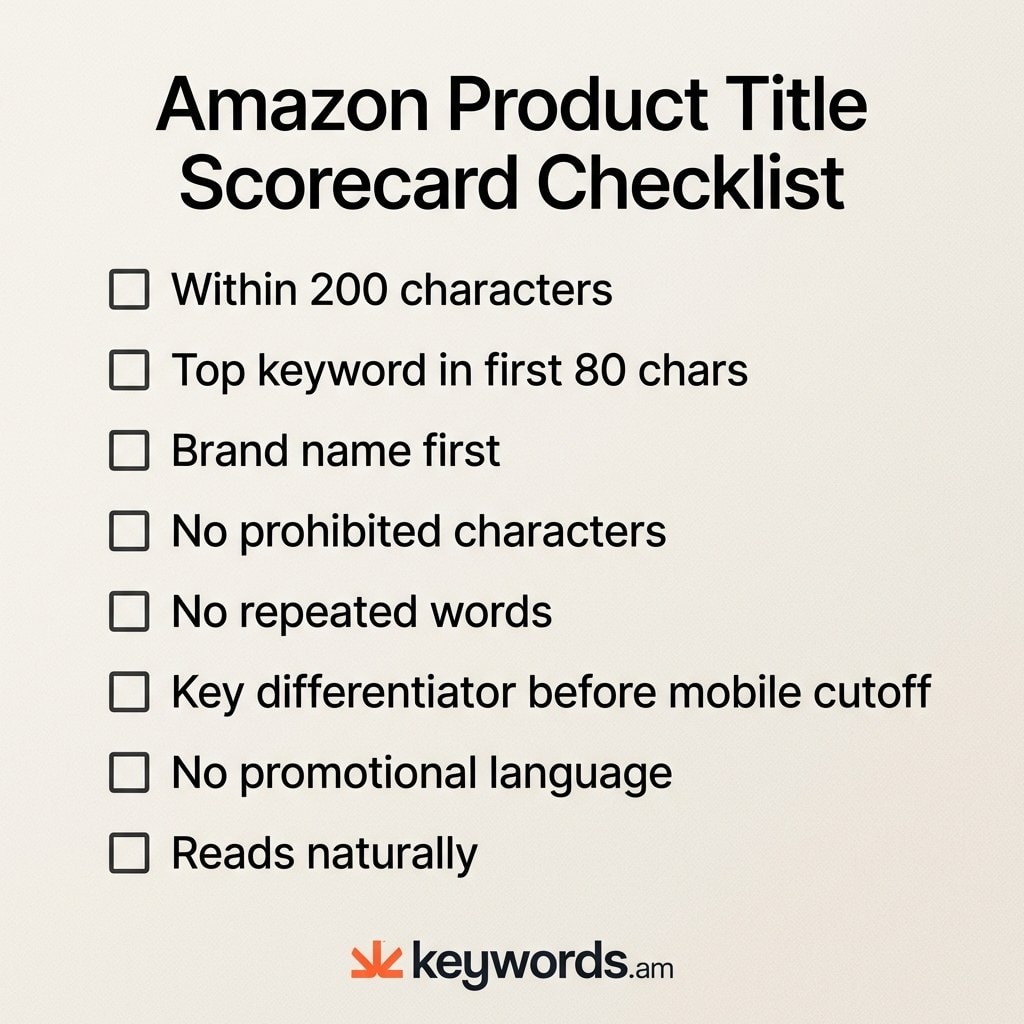
Title Scorecard:
Criteria |
Check |
|---|---|
Within 200-character limit |
☐ |
Top keyword in first 80 characters |
☐ |
Brand name at the start |
☐ |
No prohibited characters |
☐ |
No repeated words (beyond 2x) |
☐ |
Key differentiator before mobile cutoff |
☐ |
No promotional language |
☐ |
Reads naturally (not keyword-stuffed) |
☐ |
To evaluate your current titles against these criteria, paste your ASIN into the Keywords.am Listing Audit Tool and see how your title scores.
Great titles start with great keywords — knowing which terms to prioritize makes or breaks the structure.
How do you find the right keywords for your Amazon title?
Finding the right title keywords requires reverse ASIN analysis of top competitors, search volume validation, and relevance scoring to identify the two or three terms that earn title placement.
Effective keyword research for Amazon product title optimization starts with reverse ASIN analysis of top competitors to identify organically ranking keywords and market demand. Prioritize relevance over raw search volume; high-volume, irrelevant keywords attract poor traffic and harm conversions. The aim is strong search demand combined with precise product alignment. For detailed guidance, consult the Amazon keyword research methodology.
Under the TFSD framework, the title uses 2-3 impactful keywords. Remaining keywords are distributed across Features (bullet points), Search terms (backend), and Description for comprehensive indexing without compromising title clarity. Explore free Amazon keyword research tools for additional insights.
Once the title is live, sellers need data — not guesses — to know if it’s working.
How do you A/B test your Amazon product title?
Amazon’s Manage Your Experiments tool lets brand-registered sellers A/B test product titles by splitting traffic between two title versions and measuring which generates more sales over a set period.
Brand-registered sellers can use Amazon’s “Manage Your Experiments” tool in Seller Central to A/B test product titles. It splits customer traffic between two title versions, tracking sales performance to identify the superior option. For statistically significant results, Amazon advises running experiments for at least four weeks; shorter tests can produce unreliable data.
A/B testing requires isolating one variable at a time, such as keyword order, feature emphasis, or benefit framing. Testing multiple changes concurrently prevents accurate attribution of results. For instance, comparing “Brand + Feature + Keyword” versus “Brand + Keyword + Feature” isolates the order’s impact. Detailed experimentation methodology is in the Amazon A/B testing guide.
Frequently Asked Questions About Amazon Product Title Optimization
Amazon product title optimization raises dozens of practical questions beyond structure and keywords. Here are the most common questions sellers ask.
Conclusion
Amazon product title optimization in 2026 requires a mobile-first, two-zone approach. Key takeaways:
- The first 80 characters (mobile visible zone) are crucial for shopper engagement.
- Subsequent characters (indexing zone) extend keyword depth for Amazon’s algorithm.
- The four-part formula (Brand, Top Keyword, Key Differentiator, Use Case/Audience) ensures compliance and conversion.
- Adhering to 2026 amazon title requirements is essential to prevent auto-corrections and suppression.
Immediate Action: Use a character counter on your top three ASIN titles to identify the 80-character mobile cutoff. That’s what mobile shoppers see.
Optimize Your Titles: Evaluate your title’s performance with the Keywords.am Listing Audit Tool for immediate, actionable insights.




