Keyword Research
How to Avoid Amazon Keyword Stuffing in 2026 (The Compliance Guide Every Seller Needs)
Avoid Amazon keyword stuffing in 2026 with this compliance guide covering title limits, backend rules, placement strategy, and listing suppression recovery.

Amazon keyword stuffing is now the single fastest way to tank a listing in 2026. Since Amazon’s January 21, 2025 title policy update, repetition is capped at twice per word, character limits are enforced category by category, and automated systems can rewrite non-compliant titles without your approval. The old “pack every keyword everywhere” playbook isn’t a style preference anymore, it’s a conversion and compliance problem that compounds every week you ignore it.
This guide walks through what counts as stuffing under current rules, how to audit a listing before Amazon’s AI does, and where each keyword should actually live. The goal is simple: full search coverage without triggering suppression, demotion, or an account health warning.
If you want a quick benchmark before reading further, run a title stuffing audit now with the free Amazon keyword tool to see which of your terms are duplicated across fields.
What does Amazon consider keyword stuffing in 2026?
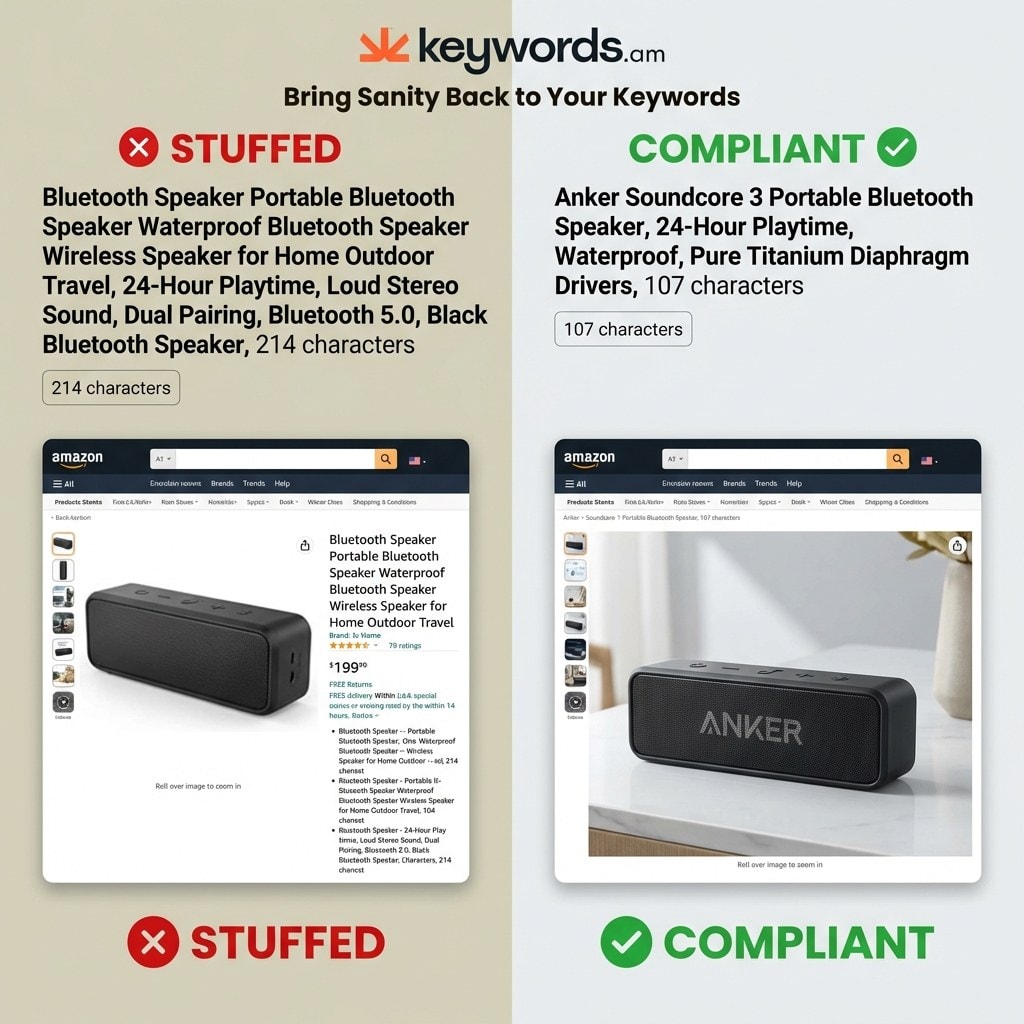
Amazon treats keyword stuffing as repeating a word more than twice in a title, exceeding category character caps, duplicating visible terms in backend fields, or inserting unrelated or competitor brand names. Each of these is now measurable by automated systems, not a reviewer’s judgment call.
The title is the strictest field. “Premium Bluetooth Speaker Portable Bluetooth Speaker Wireless Bluetooth Speaker” repeats both “Bluetooth” and “Speaker” three times, which trips the cap. A compliant rewrite is “Premium Portable Bluetooth Speaker with Wireless Connectivity.” Promotional language like “Best Seller,” “#1 Rated,” or “Top Choice” is banned regardless of placement.
Backend search terms are the second major enforcement zone. Copying title or bullet words into the backend wastes the 249-byte budget, and overshooting the limit by a single byte causes Amazon to drop the entire field from indexing. The “all or nothing” rule makes backend stuffing actively harmful, not just inefficient.
Irrelevant keywords (competitor brands, unrelated category terms, trending but off-topic phrases) violate Amazon’s ToS and can trigger account-level action. The quality model also flags bullets that read as keyword lists rather than complete sentences.
Amazon title character limits by category (as of early 2026)
| Category | Character Limit | Mobile Visible |
|---|---|---|
| Most categories | 200 characters | ~80 characters |
| Electronics | 150 characters | ~80 characters |
| Apparel and Fashion | 125 characters | ~80 characters |
| Pet Supplies | 80 characters | ~80 characters |
Source: Carbon6, New Amazon Product Title Requirements. Always confirm your specific category’s current cap inside Seller Central before publishing.
What happens when Amazon catches keyword stuffing?
Penalties escalate from automatic title rewrites to suppression, organic rank demotion, and (for repeat offenders) Buy Box eligibility loss. The sequence is predictable, which is the only good news.
The first step is usually a correction suggestion. Amazon’s system generates a compliant alternative title and gives sellers roughly 14 days to accept it or propose their own. Ignore the window and Amazon rewrites the title for you, often with generic phrasing that strips out brand voice and tanks conversion.
Harder violations go straight to listing suppression. The product stops surfacing in search without a formal takedown, which is why so many sellers only notice the issue when weekly revenue drops. Seller reports suggest suppressed listings can lose roughly 30 to 40 percent of organic traffic before anyone catches it in the account, though actual impact varies by category and ASIN velocity.
Repeat violations roll up to account health. Compliance history influences Buy Box share, and persistent flags can trigger temporary suspension while an appeal is reviewed. For a deeper walk-through of recovery, see the listing suppression guide and the companion conversion rate guide for the downstream revenue impact.
Where should each keyword go in your listing?
Each keyword belongs in the single highest-priority field it fits, not scattered across every field “for safety.” Amazon indexes a term once per listing regardless of how many times it appears, so repetition only adds compliance risk.
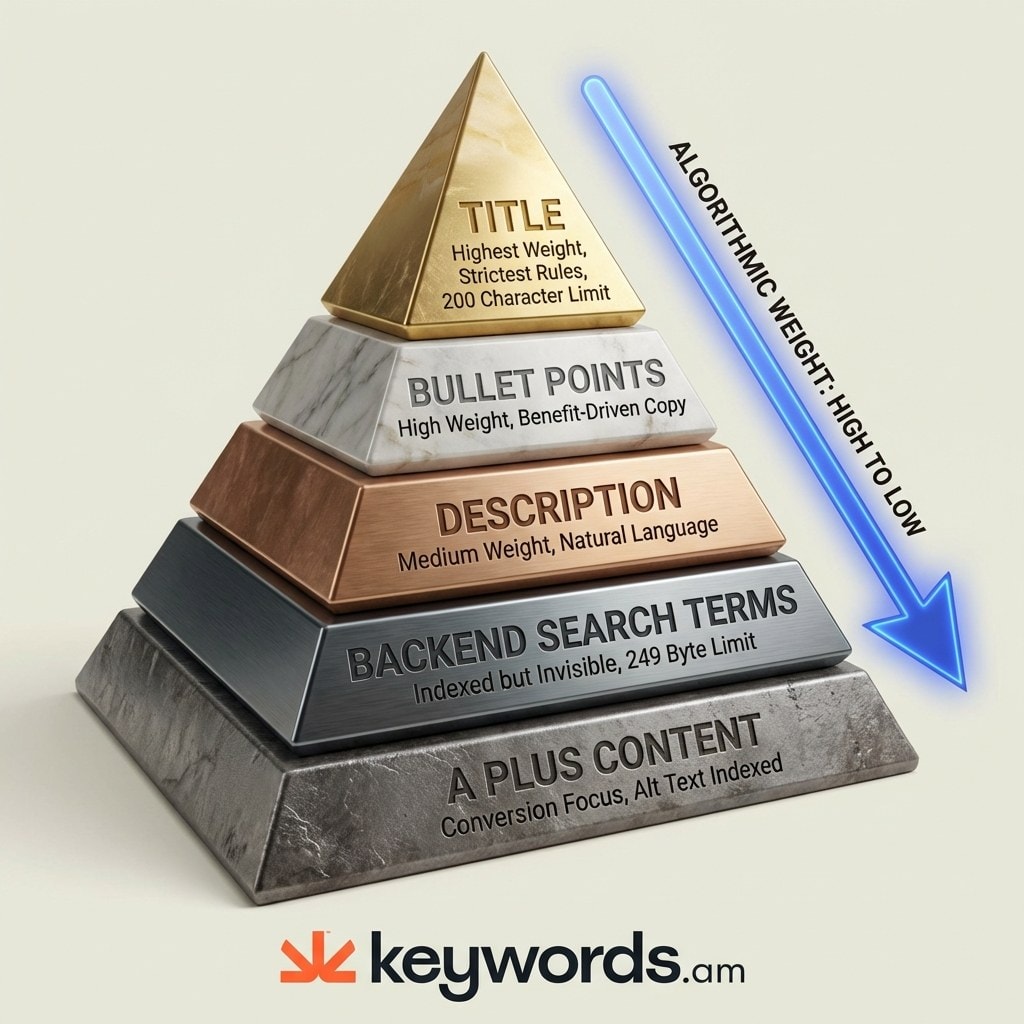
The TFSD framework (Title, Features, Search terms, Description) is the cleanest way to assign placement. The TFSD framework guide covers the full methodology, but the short version is below.
1. Title: highest weight, strictest rules. Reserve it for the primary phrase plus one or two essential secondary terms. Use each high-value word once.
2. Bullet points: contextual power. Weave secondary keywords and long-tail phrases into benefit-driven sentences. “Constructed from heavy-duty aluminum for long-lasting outdoor use” beats “Durable, strong, long-lasting.” See the bullet points guide for structure templates.
3. Product description: narrative layer. Medium weight, indexed, and the right place for remaining long-tails and contextual phrases in natural sentences.
4. Backend search terms: invisible overflow. Put synonyms, common misspellings, Spanish variants, and alternate category terms here. Never duplicate visible content. The backend keywords guide covers byte budgeting in detail.
5. A+ Content: conversion first. Alt text is indexed and useful for secondary coverage; body copy should carry brand voice and objection handling. The A+ Content optimization guide has layout patterns that convert.
How do you check if your Amazon listing is keyword stuffed?
Audit by combining a density check, a readability test, a coverage review, and a backend deduplication pass. Each one catches a different failure mode.
Keyword density check. Count every appearance of the primary keyword across the visible listing. Aim for 1 to 2 percent of total word count. Anything north of 4 percent for a single term reads as unnatural to Amazon’s quality model.
Readability test. Read the title and bullets aloud. If the title sounds like a parts list (“Running Shoes Men Sneakers Athletic Trainers Jogging”), it’s stuffed. If a bullet point reads like SEO copy instead of a benefit, rewrite it.
Coverage indicator analysis. Tools like Keywords.am visualize how well your copy covers your target keyword set. A listing that shows 100 percent exact-match green across every term is often over-optimized. Healthy listings sit around 80 percent, with a mix of exact matches and broad variants. Pair this with a reverse ASIN lookup on top competitors to see which terms are worth the real estate.
Backend deduplication. Compare your backend field against visible content. Any word that shows up in both is wasted bytes. The reverse ASIN methodology guide and the keyword research methodology both cover deduplication workflows in more depth.
How do you optimize without keyword stuffing?
Start from the “one keyword, one field” rule and build outward. Assign each term to its best location, then let the backend handle overflow.
Use spaces, not commas, in backend search terms to maximize the 249-byte budget. “Kitchen tool utensil gadget” fits more terms than “kitchen, tool, utensil, gadget.” Skip filler words like “the,” “and,” or “for.”
Refresh backend terms every three to four weeks. Rotate in seasonal phrases (“christmas gift,” “mothers day gift,” “back to school”) during the relevant windows, then swap them back out. This keeps the listing responsive to seasonal search behavior without touching visible copy, which should stay stable to protect conversion rate.
For titles specifically, work from a priority list of the two or three terms you need to rank for, then round out with modifiers that match shopper language. The product title optimization guide has frameworks for category-specific structures. Pair this with disciplined PPC campaign structure and the negative keywords guide so paid traffic reinforces (rather than fights) your organic placement.
What should you do if your listing gets suppressed?
Diagnose in Seller Central, rewrite the flagged fields, resubmit, and wait. Most sellers lose more revenue to delayed response than to the original violation.
Step 1: diagnose. Go to Inventory > Manage All Inventory, filter by “Suppressed,” and open the Listing Quality Dashboard. Amazon usually names the specific issue (title length, repeated word, missing attribute).
Step 2: correct. Rewrite flagged fields to current spec. Clear the backend and repopulate it only with unique terms. If the title was the problem, strip promotional language and bring every word under the two-appearance cap.
Step 3: resubmit and wait. Save, then leave the listing alone. Reinstatement typically happens within 15 minutes to 72 hours. Repeated edits during the review window can extend the wait.
Step 4: monitor. Compliance drift is real as listings age and copy gets edited by multiple team members. Audit high-velocity ASINs monthly. The competitor analysis guide covers how to benchmark your compliance posture against category leaders, and the Amazon SEO vs Google SEO comparison explains why “write for Google” habits break Amazon rankings.
Frequently Asked Questions About Amazon Keyword Stuffing
How many times can you repeat a keyword in an Amazon title?
Amazon caps word repetition at two appearances per title, and plurals or alternate forms count toward the limit. The rule has been enforced since January 21, 2025. Prepositions, articles, and conjunctions are exempt.
What is the Amazon backend keyword byte limit?
The backend search terms field must stay under 250 bytes, which gives you roughly 249 usable bytes of input. Exceeding the cap by one byte causes Amazon to ignore the entire field, so overshooting is worse than leaving space on the table. Accented and CJK characters consume more bytes per character.
Does Amazon index A+ Content for search in 2026?
Amazon has confirmed that alt text on A+ images contributes to search indexing, but text rendered inside image files does not. Use A+ Content primarily to drive conversion through brand story and objection handling, with alt text as a secondary SEO layer.
What is a good keyword density for Amazon listings?
Target 1 to 2 percent density on core terms across visible fields, which works out to roughly 5 to 10 mentions of the primary keyword per 500 words of copy. Densities above 4 percent for a single term start triggering unnatural-language flags in Amazon’s quality model.
Does Amazon penalize keyword repetition in bullet points?
Bullet points don’t have a hard repetition cap like titles do, but bullets that read as keyword lists rather than product benefits can trigger quality flags that suppress rank. Each bullet should work as a complete sentence that a shopper would actually find useful.
Conclusion
- Enforcement is automated and continuous. Amazon’s 2025 title policy and the 2026 escalation in AI review mean violations surface faster than ever.
- One keyword, one field. Repetition adds risk without adding ranking signal, since Amazon indexes a term once per listing.
- Around 80 percent coverage is the sweet spot. A mix of exact and broad matches reads as natural language and avoids over-optimization flags.
- Audit on a schedule. Compliance drift happens as copy gets edited; monthly reviews of top ASINs catch issues before they suppress.
- Watch adjacent policies. Decorative symbols and promotional language can trigger the same enforcement system, so check your Amazon emoji policy exposure alongside your keyword audit.
If you want structured coverage data instead of guessing, run your top ASINs through the free Amazon keyword tool today, or upgrade to the annual plan to monitor compliance drift across your full catalog.