

📑 Table of Contents
⚡ TL;DR
- Product research tools estimate sales based on Best Seller Rank (BSR) history, with accuracy varying by 15-30%.
- Jungle Scout is ideal for beginners, while Helium 10 offers a comprehensive suite for advanced sellers.
- Free options like Amazon’s Product Opportunity Explorer handle 60-70% of initial research needs.
- Most sellers skip demand validation: checking keyword search volume trends to confirm if interest is growing or declining.
- The “Find → Filter → Validate → Decide” workflow prevents investing in products with shrinking demand.
- Smart sellers use a dedicated keyword tool to validate demand signals before committing inventory dollars.
Every year, thousands of Amazon sellers invest between $5,000 and $15,000 in inventory based on a single product research tool’s sales estimate. Some of those estimates are off by 30% or more, leading to warehouses full of stagnant stock. The allure of “passive income” often clouds the reality that data is only as good as its interpretation. Sellers see a high estimated revenue figure and assume instant success, ignoring the fact that these tools provide snapshots of the past, not predictions of the future. The difference between a profitable launch and a costly mistake often lies not in the product research tool itself, but in the validation step that follows. A step most sellers completely overlook.
Product research tools are essential for filtering millions of ASINs into a manageable list of opportunities. However, none of them validate demand independently. They show what is selling right now, based on BSR and historical data. They do not tell sellers whether demand for that product is growing, stable, or plummeting. A product might show 500 sales last month, but if the search volume for its main keywords has dropped 40% in the last quarter, those sales are vanishing.
This guide compares the 10 best Amazon product research tools, including powerful free alternatives that many sellers ignore. Beyond the comparison, it introduces a critical demand validation workflow. This process uses keyword search volume trends to confirm product viability, separating informed business decisions from expensive guesses. By the end, sellers will understand not just which tool to use, but how to use it to protect their capital.
What does an Amazon product research tool actually measure?
Product research tools estimate monthly sales, track Best Seller Rank, analyze competition density, and calculate profit margins for Amazon product opportunities.
At their core, these tools are data aggregators. They do not have direct access to Amazon’s internal sales ledger. Instead, they scrape public data points (primarily the Best Seller Rank, or BSR) and use proprietary algorithms to estimate unit sales. Because Amazon’s BSR algorithm is complex, these estimates are educated guesses. Industry data suggests that even market leaders can have an accuracy variance of 15-30%. This margin of error is acceptable for identifying trends, but dangerous if used as the sole basis for a five-figure investment.
Key metrics provided include estimated monthly revenue, review counts, and competition scores. A product with 10,000 reviews is harder to unseat than one with 50. Most tools also include an FBA fees calculator to help sellers estimate net profit margins. What these tools notably do not show is the “why” behind the sales. They don’t reveal if a sudden spike is due to an external marketing campaign or a viral trend. More importantly, they often lack granular data on keyword search volume trends. While they might show current search volume, they rarely visualize the long-term trajectory of consumer interest.
Understanding the competitive landscape requires more than just sales estimates. Advanced sellers often use reverse ASIN lookup explained strategies to see exactly which keywords are driving traffic to competitor listings. This reveals whether a competitor is ranking for high-volume generic terms or relying on specific long-tail phrases. Knowing this distinction is crucial for accurate validation.
With these capabilities in mind, here is how the leading tools compare.
How do the best Amazon product research tools compare?
Jungle Scout leads for beginners at $49/month, Helium 10 offers the deepest feature set at $129/month, and Amazon’s Product Opportunity Explorer is free for all sellers.
The market for Amazon seller tools is crowded, but when evaluating the best Amazon product research tools, the field narrows down to a few key players. The table below compares the most popular options based on price, key strengths, and suitability for different types of sellers. Note that prices listed are for monthly billing as of early 2026.
|
Tool |
Starting Price |
Key Strength |
Best For |
Free Tier |
|---|---|---|---|---|
|
$49/mo |
Supplier Database + AccuSales |
Beginners, first product launch |
7-day money-back |
|
|
$129/mo (Platinum) |
Advanced filtering, 30+ tools |
Experienced sellers wanting full suite |
Limited free plan |
|
|
$29/mo |
Brand/category mapping |
Wholesale & arbitrage sellers |
7-day free trial |
|
|
AMZScout |
$49.99/mo ($1,600 lifetime) |
Lifetime plan available |
Budget-conscious long-term sellers |
Limited free trial |
|
Viral Launch |
$69/mo (Market Intel: $25/mo) |
Launch-focused intelligence |
Sellers planning product launches |
14-day free trial |
|
ZonGuru |
$29/mo (Researcher) |
Niche Finder, beginner-friendly UI |
New sellers starting research |
7-day free trial |
|
SellerSprite |
$99/mo |
Deep marketplace coverage (global) |
International/multi-marketplace sellers |
Limited free tier |
|
Amazon Product Opportunity Explorer |
Free |
Official Amazon data, niche analysis |
All sellers (often overlooked) |
Fully free |
|
Keepa |
Free (Premium: ~$19/mo) |
Historical BSR/price tracking |
Price & demand trend analysis |
Free tier available |
|
CamelCamelCamel |
Free |
Price history tracking, alerts |
Budget research and deal monitoring |
Fully free |
A closer look reveals that sellers spending less than $79/month can still access powerful research capabilities. SmartScout and ZonGuru offer powerful features at a lower entry point. SmartScout specifically excels by visualizing Amazon’s catalog to highlight brand dominance and sub-category opportunities, making it excellent for identifying gaps in established markets.
Full-suite tools like Helium 10 and Jungle Scout justify higher prices by bundling product research with keyword tools, listing optimization, and PPC management. For a seller already generating revenue, these all-in-one solutions simplify operations. However, for a new seller who has not yet selected a product, paying for a PPC manager is unnecessary. This “feature bloat” is why many new entrants are better off starting with leaner tools.
The free options (Amazon’s Product Opportunity Explorer, Keepa, and CamelCamelCamel) are often underestimated. Amazon’s own tool provides data directly from the source, eliminating estimation error. Keepa is practically mandatory for any serious seller, providing historical graphs of price and BSR that reveal whether a product’s success is sustainable. These three tools combined can handle 60-70% of the basic research needs for a new seller at zero cost.
Each tool has a specific strength. Here is what separates them.
Which tool works best for each seller type?
Beginners should start with Amazon’s free Product Opportunity Explorer, growing sellers benefit most from Jungle Scout or SmartScout, and agencies need Helium 10’s Diamond plan.
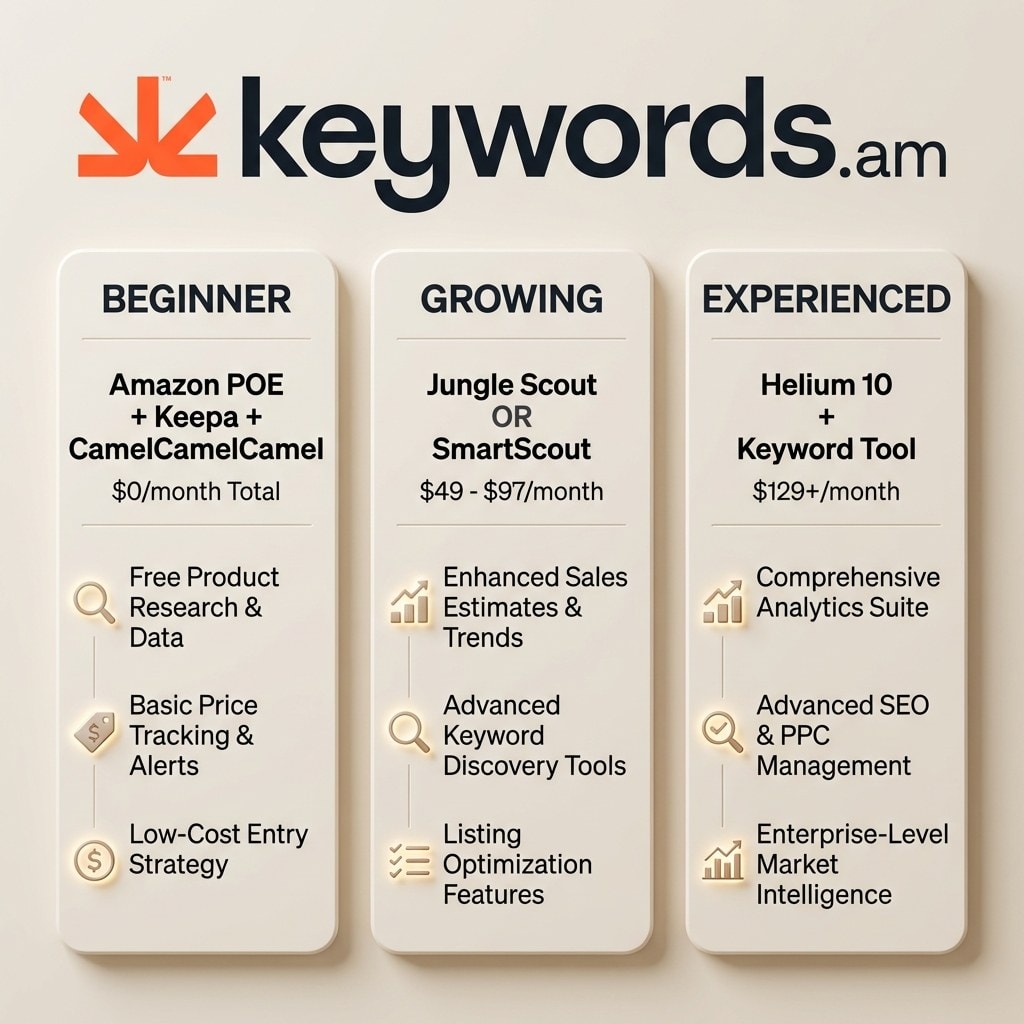
Selecting the right software is about matching capabilities to a seller’s business stage. Overpaying for enterprise features early on drains capital better spent on inventory.
First-time sellers ($0-$49/mo budget)
Start with Amazon’s Product Opportunity Explorer (free), Keepa (free version), and CamelCamelCamel (free). There is no need to purchase a subscription to simply browse ideas. Amazon’s internal tool allows sellers to search for niches and understand competitive concentration. Keepa allows sellers to vet individual products. Start here. If a seller needs a paid interface, ZonGuru’s Researcher plan at $29/month is a low-risk entry point offering a more guided experience.
Growing sellers (1-10 SKUs, $49-$129/mo)
Once a seller has a product live, efficiency becomes worth paying for. Jungle Scout’s Growth Accelerator ($79/mo) is the standard for private label sellers. Its “Opportunity Finder” streamlines the process from idea to sourcing. Alternatively, for wholesale or brand portfolio building, SmartScout Essentials ($97/mo) offers unique insights into brand market share. The choice comes down to the business model: Jungle Scout for new products, SmartScout for analyzing existing brands.
Experienced sellers (10+ SKUs, $129+/mo)
For established brands, Helium 10 Platinum ($129/mo) is the logical choice. The value proposition shifts to business management. Helium 10’s suite includes refund management, keyword tracking, and email automation, replacing multiple standalone subscriptions. Advanced sellers might also mix SmartScout with a dedicated keyword tool to get deep category analysis and precise keyword validation without being tied to a single ecosystem.
Budget-maximizers and International Sellers
Sellers with a long-term horizon should consider AMZScout’s Lifetime Plan ($1,600), which eliminates recurring expenses. For those selling outside the US, SellerSprite ($99/mo) provides data depth that US-centric tools often miss, making it preferred for multi-marketplace expansion.
For a broader perspective on the essential software stack, explore the full guide to the best Amazon seller tools, which covers inventory management and finance solutions.
But no matter which of the best Amazon product research tools sellers choose, there is a validation step that most skip entirely.
What is the demand validation step that most sellers skip?
Demand validation uses keyword search volume trends to confirm whether a product’s demand is growing, stable, or declining before committing inventory dollars.
The biggest gap in standard product research is reliance on lagging indicators. Product research tools show estimated sales and BSR, which are historical metrics. A BSR of 500 tells sellers a product sold well yesterday. It does not tell sellers if consumer interest is about to drop. Sellers often mistake high current sales for permanent demand, leading to the “inventory trap” (buying stock just as the market cools).
Consider a practical example: A seller finds a “garlic press” listing with 2,000 estimated monthly sales. The tool gives it a high score. The seller orders 3,000 units. However, if they had checked search volume trends for “best garlic press” and “garlic mincer,” they might have seen an 18% decline over six months. That sales velocity of 2,000 is likely the tail end of a peak. No product research tool surfaces this “red flag.” Keyword trends are the leading indicator of future sales; sales estimates are merely the lagging indicator.
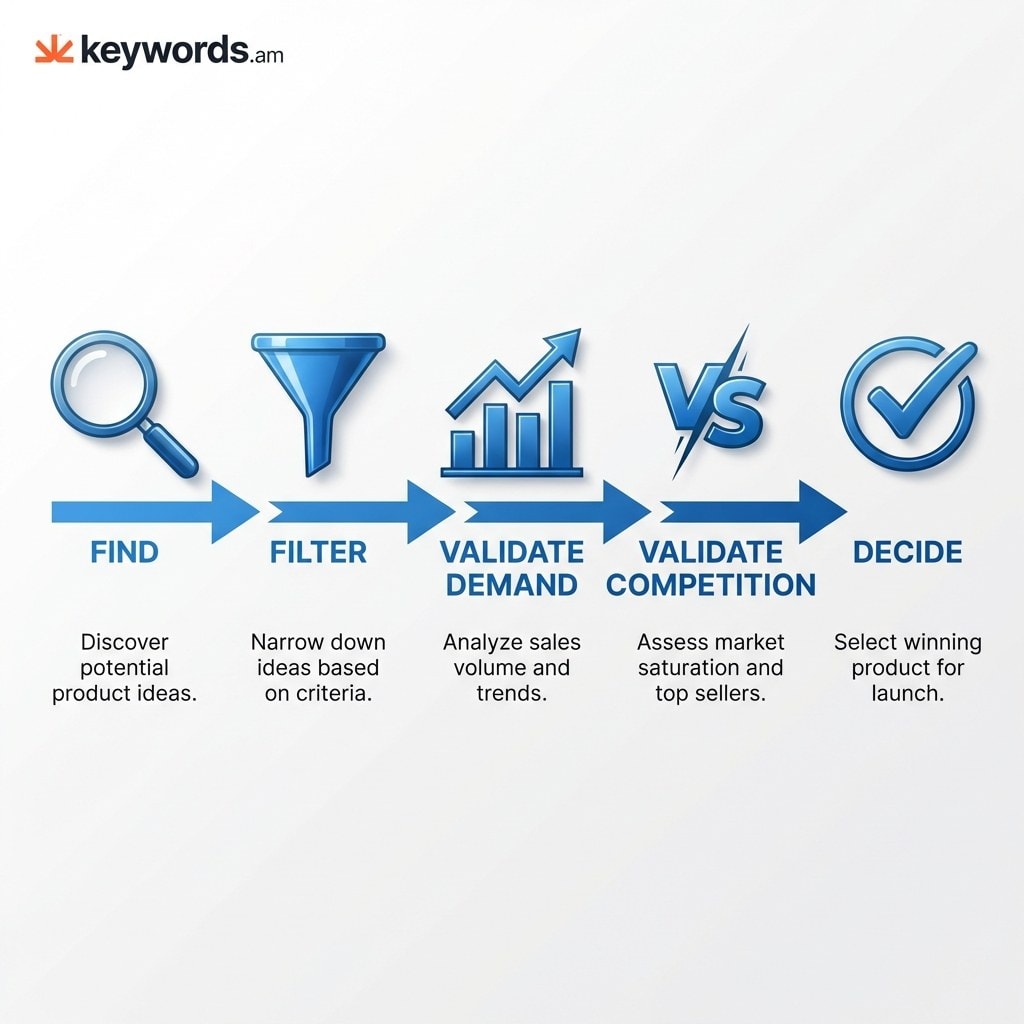
To avoid this, smart sellers implement a four-step workflow:
1. Find: Use a product research tool to identify candidates based on BSR, revenue, and reviews.
2. Filter: Narrow the list by applying criteria for revenue, competition, and fees.
3. Validate Demand: Check keyword search volume history for the top 5-10 search terms. Are trend lines growing, stable, or declining?
4. Validate Competition: Run a reverse ASIN lookup on top competitors to see which keywords they rank for. This reveals if there are “easy wins.”
5. Decide: Only proceed if product metrics look good AND keyword demand trends confirm a healthy trajectory.
By adding this validation layer, sellers move from hoping a product sells to knowing there is active traffic. Reviewing the Amazon keyword research methodology helps explain how to interpret search volume data nuances. Furthermore, using the best Amazon keyword research tool for this phase is often more effective than relying on limited modules in general product research suites.
Here is how that validation step works in practice.
How does keyword validation work alongside product research?
After identifying a product candidate, sellers check keyword search volume trends for its top search terms to confirm demand is stable or growing before investing.
Implementing keyword validation takes about 15 minutes but can save thousands of dollars. It serves as the final “go/no-go” gauge.
Step 1: Extract Core Keywords
Identify the top 5-10 keywords describing a product. If researching a “weighted blanket,” terms might include “weighted blanket for adults,” “heavy blanket,” and “anxiety blanket.” Most tools list related keywords, or use Amazon’s autocomplete.
Step 2: Analyze Volume Trends
Plug these keywords into a tool visualizing search volume over 6-12 months. Look for the shape of the line.
* Growth (Green Light): Trending upward year-over-year. The market is expanding.
* Stable (Yellow Light): Flat or consistent seasonal patterns. A safe bet if competition isn’t overwhelming.
* Decline (Red Flag): Trending downward. Consumer interest is fading. Proceed with extreme caution.
Step 3: Cross-Reference Competitors
Use a reverse ASIN tool to check the top 3 competitors. This validates the keyword list and clarifies ranking difficulty. If competitors are fighting for a single high-volume keyword, launch costs will be high. If a seller finds high-volume keywords where competitors have weak organic rankings, a seller has found a gap. Keywords.am’s KPS (Keyword Priority Score) system is particularly useful here, helping to identify which terms actually matter for a specific niche.
The Compound Effect
Sellers who consistently apply this step avoid the mistake of launching into a dying market. It shifts focus from “what can be sold?” to “what do people want to buy?” Once live, the best Amazon analytics tools can help track performance against these baselines.
Frequently Asked Questions About Amazon Product Research Tools
**These are the most common questions sellers ask when choosing product research tools, from free options to validation strategies.**
Conclusion
The best Amazon product research tools depend on budget and experience level, but every seller benefits from adding a keyword-based demand validation step.
The journey to a successful Amazon product launch begins with accurate data. While tools like Jungle Scout and Helium 10 provide the initial map, relying on them exclusively can lead to navigating with outdated charts. The most successful sellers understand that sales estimates are just the starting point.
- Free tools (Amazon POE, Keepa, CamelCamelCamel) cover 60-70% of basic product research.
- Paid tools add speed and advanced filtering. Choose based on seller type, not marketing claims.
- No product research tool validates demand through keyword trends. That requires a separate step.
- The Find → Filter → Validate → Decide workflow catches expensive mistakes before they happen.
For an immediate validation check, open Amazon’s Product Opportunity Explorer and search for one product niche a seller is considering. Then, check whether the top search terms for that niche are growing or declining. If the trend is negative, reconsider the investment. For the validation step, a dedicated keyword research tool shows search volume trends, keyword priority scoring, and competitive gaps that product research tools miss. The best Amazon keyword research tool compares the options to help sellers build a complete, data-driven validation stack.




