

📑 Table of Contents
- Why do most Amazon listing refresh strategies fail?
- What are the 5 data triggers for an Amazon listing refresh?
- How does a conversion rate drop signal the need for a listing refresh?
- How does keyword deindexation silently kill listing performance?
- The Search Term Report feedback loop (Trigger 3)
- How does Brand Analytics SQP reveal when competitors are gaining ground?
- Competitive landscape shifts (Trigger 5)
- Which Amazon listing changes carry ranking risk?
- Frequently Asked Questions About Amazon Listing Refresh Strategy
- Conclusion
⚡ TL;DR
- Calendar-based updates waste time and risk rankings, while inaction lets competitors steal market share.
- The best Amazon listing refresh strategy uses 5 specific data triggers to signal when an update is truly necessary.
- A 15% drop in conversion rate for 7 consecutive days indicates a severe listing-to-search-intent mismatch requiring immediate attention.
- Silent keyword deindexation kills organic sales and requires rapid keyword redistribution via the TFSD framework.
- PPC Search Term Reports reveal converting keywords missing from organic listings, presenting immediate free-traffic opportunities.
- Brand Analytics Search Query Performance (SQP) data shows exactly when competitors start capturing click share on core terms.
- Reverse ASIN analysis uncovers competitor keyword additions, allowing proactive listing updates before revenue drops.
A seller watches conversion slide for three straight weeks. Is the listing broken, or is this just seasonal noise? There’s no way to tell without the right data. Amazon sellers tend to fall into two camps: constant tinkerers who change listings on a hunch, and conservative sellers who won’t touch anything for years. Both approaches cost real revenue.
Plenty of guides explain how to write a strong listing from scratch. Almost none address the harder question: when does an existing listing actually need an update? The standard “update quarterly” advice ignores a basic reality. Some listings need attention monthly. Others perform fine for a year. Without clear data triggers, sellers either waste time tweaking things that don’t need fixing or miss the signals that a product is quietly declining.
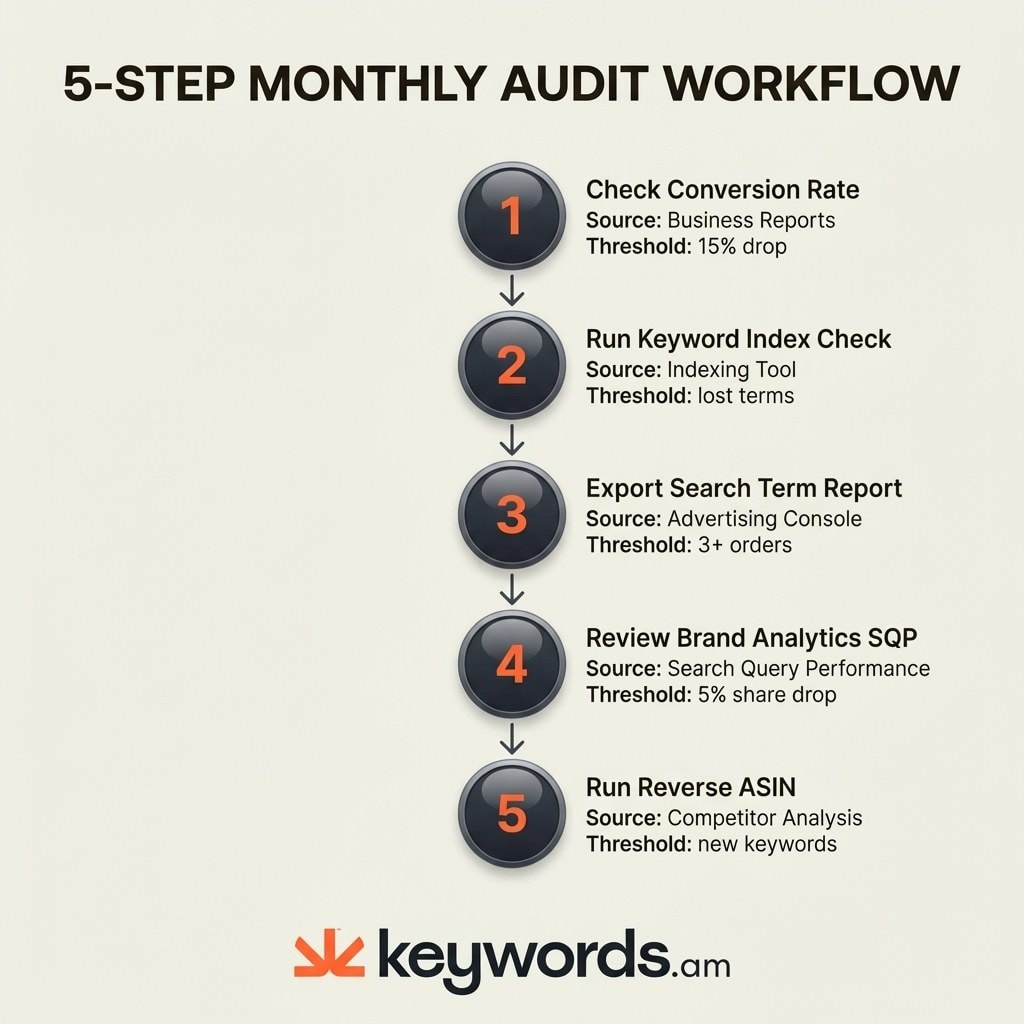
A data-driven amazon listing refresh strategy replaces guesswork with raw signals. Sellers track five specific triggers to determine exactly when a refresh is necessary. Each trigger has a specific threshold, an underlying data source, and a concrete action plan.
- Conversion rate decline
- Keyword indexing loss
- Search Term Report gaps
- Brand Analytics market share erosion
- Competitive landscape shifts
Why do most Amazon listing refresh strategies fail?
Most Amazon listing refresh strategies fail because they rely on arbitrary calendars or gut instinct instead of performance data that signals when a specific listing element actually needs changing.
The tinkerer makes changes without concrete data to back them up. And every title update carries real risk. Changing a title forces the A10 algorithm to recalculate relevance, which often triggers temporary ranking drops. Sellers who tweak their titles every few weeks end up disrupting their own organic momentum, chasing perfection while accidentally sabotaging visibility.
The opposite approach is just as dangerous. Seller forums are full of merchants managing 38,000+ ASINs who rarely change anything. The fear of breaking a listing that “works” keeps them frozen. But competitors don’t freeze. They improve images, expand keyword coverage, and capture market share one listing at a time. A stagnant listing loses its edge slowly enough that the seller doesn’t notice until revenue has already eroded.
Calendar-based advice misses the point entirely. A listing sitting at a stable 15% conversion rate doesn’t need a quarterly update just because the calendar says so. But a listing that’s dropped from 12% to 8%? That needs attention right now, regardless of what month it is. For reference, average Amazon conversion rates sit between 9-11% overall, with 13-15% considered strong. The takeaway: sellers need their own product-specific baselines, not generalized schedules.
Knowing when to act requires a systematic approach. Every successful listing optimization strategy depends on identifying the exact moment an update becomes necessary. Data triggers provide that precision.
What are the 5 data triggers for an Amazon listing refresh?
The 5 data triggers are conversion rate decline, keyword indexing loss, Search Term Report gaps, Brand Analytics market share erosion, and competitive landscape shifts detected through reverse ASIN analysis.
These triggers cover the entire spectrum of listing performance. They monitor direct sales metrics, organic visibility, advertising synergy, market share, and competitor movements. Sellers monitoring these five areas never have to guess if a listing needs work.
Trigger |
Data Source |
Threshold |
Urgency |
|---|---|---|---|
Conversion Rate Decline |
Business Reports |
15% drop below 30-day average for 7 days |
High |
Keyword Indexing Loss |
Rank/Indexing Checkers |
Complete loss of organic rank for a core term |
High |
Search Term Report Gaps |
Advertising Console |
3+ orders at target ACoS for an unindexed term |
Medium |
Brand Analytics SQP Erosion |
Search Query Performance |
5% drop in click share for a top keyword |
Medium |
Competitive Landscape Shifts |
Reverse ASIN Analysis |
Competitors ranking for high-volume new terms |
Low-Medium |
Each signal operates independently. A listing might maintain strong conversion rates while silently losing keyword indexation. Another product might rank well but slowly bleed market share to a visually superior competitor. Monitoring all five triggers ensures complete coverage against revenue-draining issues.
How does a conversion rate drop signal the need for a listing refresh?
A conversion rate dropping 15% or more below its 30-day rolling average for 7 consecutive days signals that the listing no longer matches buyer expectations for its target search terms.
Finding this data is straightforward. In Seller Central, go to Business Reports, select Detail Page Sales and Traffic, and look at the Unit Session Percentage column. That’s the raw conversion rate. When it drops 15% below the rolling average and stays there for a full week, something has gone wrong. Either the listing no longer matches what shoppers expect when they click, a competitor has stepped up their game, or the market itself has shifted.
When this trigger fires, there’s a specific audit order that works. Start with the main image. It drives over 80% of click-through decisions and shapes the buyer’s first impression more than any other element. If the image still holds up against competitors, look at the title. Then check price positioning relative to the top five organic competitors. After that, review bullet points and A+ Content.
One important rule: don’t make permanent changes based on one bad week. Use Amazon’s Manage Your Experiments tool to A/B test improvements before committing. These tests need 4 to 6 weeks minimum to reach statistical significance. Cutting a test short leads to false positives and potentially worse performance. Test the main image first, since it has the biggest impact on both clicks and conversions.
Most sellers check conversion rates regularly because that data is visible and easy to interpret. But some of the worst performance killers operate where sellers can’t see them.
How does keyword deindexation silently kill listing performance?
Keyword deindexation removes a listing from search results for specific terms without any notification, causing organic traffic and sales to drop while the seller sees no visible listing change.
What causes it? Minor listing edits, algorithm updates, policy changes, and catalog data overwrites. Amazon doesn’t send any notification when it happens. A seller wakes up to a 20% sales drop, checks the listing, sees everything looks normal, and blames the algorithm. What actually happened: their product vanished from a key search results page without a trace.
Catching deindexation requires proactive monitoring. Running periodic checks with an indexing tool catches missing keywords before the revenue impact compounds. If a product goes from position 5 to completely unranked overnight, that’s an indexing failure, not a slow organic decline. The methodology for checking keyword indexing involves comparing known target keywords against actual search visibility.
Fixing deindexation requires deliberate keyword placement. Sellers verify keyword presence using the TFSD framework priority order. They check if the missing keyword still exists in the title, features (bullet points), search terms (backend), or description. A catalog overwrite might have erased backend search terms without altering the visible listing. Using accurate coverage indicators helps map exactly where each critical keyword lives.
Monitoring cadence is critical. Sellers should check their top 20 revenue-driving keywords bi-weekly for indexing status. Dedicated rank tracker tools automate this monitoring, providing instant alerts when a high-value keyword drops out of the index. Keywords.am offers rank tracking built to catch these sudden drop-offs. Helium 10 and DataHawk also provide rank monitoring features.
While indexing losses happen silently and require specialized tools to detect, Amazon provides other critical data points right inside the advertising console.
The Search Term Report feedback loop (Trigger 3)
The Search Term Report reveals converting PPC search terms not present in organic listing content, meaning sellers pay for clicks on keywords that should generate free organic traffic.
Shoppers don’t search the same way forever. New phrases, new variations, new intent patterns emerge all the time. The Search Term Report captures exactly what buyers type before clicking an ad and making a purchase. Pulling these reports monthly from the Advertising Console surfaces organic opportunities that most sellers miss.
The workflow requires specific filtering. Understanding the full Search Term Report methodology helps sellers extract maximum value. Download the report and filter for terms generating 3 or more orders while maintaining an ACoS below the target threshold. Cross-reference these high-converting terms against the existing listing keyword coverage. Sellers must determine if these exact phrases exist in the title, bullets, or backend search terms. Often, a highly profitable PPC term does not appear anywhere in the organic listing.
Adding these missing terms is a core part of any amazon listing refresh strategy and directly reduces advertising spend. When a listing ranks organically for a term, it captures free traffic. Sellers incorporate these discovered keywords using the TFSD placement priorities. The title carries the highest algorithm weight, followed by bullet points, backend search terms, and finally the product description.
Run this check on a monthly cadence. PPC data requires sufficient volume to be statistically meaningful. Checking weekly yields noisy data with low order counts. Monthly reviews provide clear, actionable keyword targets proven to convert real buyers.
Advertising data shows what shoppers type. Another powerful Amazon tool reveals exactly how a product performs against its competitors for those specific searches.
How does Brand Analytics SQP reveal when competitors are gaining ground?
Brand Analytics Search Query Performance shows click share and conversion share trends for specific keywords, revealing exactly when competitors capture market share on terms a seller previously dominated.
Access requires Brand Registry enrollment. Sellers navigate to Seller Central, select Brands, open Brand Analytics, and choose Search Query Performance (SQP). This dashboard provides actual Amazon data on how shoppers interact with a brand’s products after searching specific terms.
The metrics to watch: click share, conversion share, and purchase share for the top 10 to 20 revenue keywords. A 5% drop in click share on a keyword the seller used to dominate? That’s a warning. Competitors have improved their listings for that term. Here’s how to read the hierarchy: if impression share stays high but click share drops, the listing is still showing up in results but it’s no longer compelling enough to earn the click. That usually means the main image or price needs a refresh.
When SQP data shows erosion, the response needs to be targeted. Look at what competitors actually changed on their listings for that keyword. Then update the element that has the biggest impact on click-through rate. In most cases, that means refreshing the main image or tightening the title for better readability and keyword placement.
Review SQP data quarterly. Weekly fluctuations create false alarms. Three-month trends clearly illustrate whether a product is gaining or losing its grip on core search terms. Sellers using Brand Analytics SQP as part of their amazon listing refresh strategy gain a significant competitive intelligence advantage.
SQP tracks known keywords well. However, competitors often discover new keyword targets that never appear in a brand’s SQP dashboard.
Competitive landscape shifts (Trigger 5)
Reverse ASIN analysis on the top 3-5 competitors every quarter reveals new keywords entering their listings, new image strategies, and A+ content improvements that signal market shifts requiring a listing response.
Competitors do not stand still. They run external traffic, discover new niches, and update their listings to capture different search intents. Running reverse ASIN analysis quarterly on the top 3 to 5 competitors per ASIN exposes these shifts. A quarterly cadence works well because competitor listing changes take time to manifest as ranking improvements.
Sellers look for specific indicators during this analysis. They identify new high-volume keywords the competitor ranks for that their own listing misses. They note new image styles, graphic callouts, or updated A+ content formats. They also track pricing repositioning. The focus remains on keywords with measurable search volume that the seller’s current listing fails to cover.
Addressing these gaps requires a measured response. Add missing keywords via the standard TFSD placement strategy. Prioritize keyword gaps on terms with existing conversion data from PPC campaigns over terms with pure search volume. Adding high-volume keywords that fail to convert actively harms a listing’s overall conversion rate. Update images or A+ content only if competitors show materially better visual communication of the product’s benefits.
Monitoring the market ensures a listing never falls behind. Executing competitor analysis and utilizing a reverse ASIN lookup provides the necessary intelligence. Knowing exactly when and why to change a listing is half the equation. The other half involves executing those changes without destroying existing organic rank.
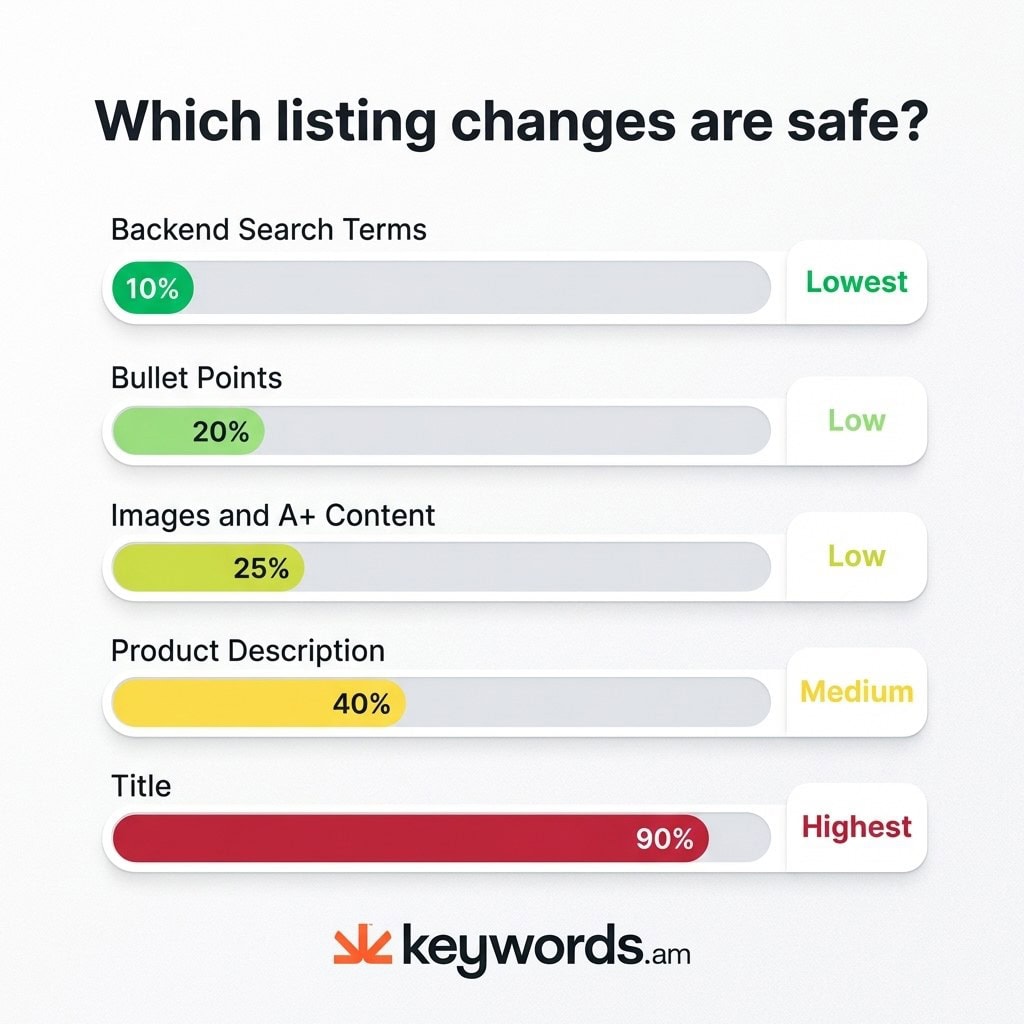
Which Amazon listing changes carry ranking risk?
Backend search terms carry the lowest ranking risk because they have no visible impact, while title changes carry the highest risk because they can trigger A10 recalculation and temporary ranking fluctuation.
Every edit carries a distinct risk profile. Any amazon listing refresh strategy that ignores risk levels is incomplete. Changing the wrong element at the wrong time destroys weeks of organic ranking progress.
Listing Element |
Risk Level |
Why |
Recommendation |
|---|---|---|---|
Backend Search Terms |
Lowest |
No visible impact, no reindexation trigger |
Change freely when data supports it |
Bullet Points |
Low |
Rarely triggers reindexation |
Update when conversion data or keyword gaps justify it |
Images & A+ Content |
Low |
Improves conversion without keyword disruption |
Test via Manage Your Experiments first |
Product Description |
Low-Medium |
Carries some keyword weight |
Update alongside bullet point changes |
Title |
Highest |
Can trigger A10 recalculation, temporary ranking drop |
Only change when data clearly supports it, one word at a time |
Here’s the golden rule: one change at a time. Wait 7 to 14 days to measure impact before touching anything else. Changing the title, bullets, and main image all at once makes it impossible to tell which edit helped and which one hurt.
Backend search terms are essentially a free move. Update keyword coverage there without changing anything visible to shoppers and without any ranking risk. It’s the safest testing ground for newly discovered terms.
Title changes are a different story. Any title modification should go through A/B testing first. The Manage Your Experiments tool lets brands test two titles side by side, splitting traffic evenly, so sellers can see which performs better without risking a permanent ranking drop.
Applying the correct A/B testing guide ensures changes are statistically valid.
Frequently Asked Questions About Amazon Listing Refresh Strategy
These are the most common questions sellers ask about Amazon listing refresh timing and strategy.
Conclusion
A successful Amazon listing refresh strategy relies on verifiable data rather than calendar alerts. Identifying the exact moment an update becomes necessary prevents costly ranking disruptions and captures missed revenue opportunities.
- The 5-trigger system replaces guesswork and arbitrary calendars with data-driven decisions.
- Backend search terms provide the safest starting point for any listing refresh.
- Making one change at a time and waiting 7-14 days minimizes risk.
- Brand Analytics SQP remains the most underused data source for competitive intelligence.
- Every listing refresh requires updated keyword research to ensure changes target actual search intent.
Start with one ASIN. Pick the highest-revenue product. Pull conversion data from Business Reports, run a quick keyword indexing check, and export the latest Search Term Report. That 15-minute audit will show whether a refresh is needed or whether the listing is fine as-is.
Keywords.am, along with tools like Helium 10, provides the rank tracking, reverse ASIN analysis, and keyword indexing data behind each of these 5 triggers. Start tracking today to catch performance drops before they hit the bottom line.




