PPC
The Amazon PPC audit guide for 2026 (and the step every agency skips)
An Amazon PPC audit that actually works starts with listing keyword coverage, not campaign settings. Step-by-step framework from listing gaps to bids.

Most PPC audits on Amazon start in the wrong place. Sellers jump straight into Campaign Manager, tweak bids and budgets, and never bother checking whether the listing underneath actually contains the keywords those campaigns are paying for.
Auto campaigns read listing content to figure out which search queries to match. In our own reverse ASIN audits, listings routinely miss a large share of the keywords their direct competitors already rank for, which shows up later as irrelevant auto matches and wasted spend. This amazon ppc audit framework starts with listing keyword coverage before touching campaign settings.
The rest of the guide walks through each audit layer in the order that saves the most money first, from listing gaps to bid strategy and back into the feedback loop that compounds every quarter.
Why do most Amazon PPC audits miss the biggest source of wasted spend?
Most advertising audits only examine campaign settings like bids and budgets while ignoring listing keyword coverage, the root cause of irrelevant auto campaign matches.
A typical PPC checklist runs eight to ten items. Match types, dayparting, bid strategies, budget splits across ad formats. It all gets checked. Scrolling down to the actual product page rarely happens.
Sellers end up burning money on bid experiments while the listing itself is half-finished. Nobody stopped to ask whether the foundation can hold traffic at all.
Auto campaigns work off the listing. Amazon’s algorithm reads the title, bullets, description, and backend search terms to figure out what the product is. That text decides which search queries get matched. If a garlic press listing never mentions “crusher,” the auto campaign won’t bid on it, because the algorithm doesn’t know the product does that.
It’s a bit like tuning a car engine without checking the fuel tank. Sharp bids can’t generate sales when the traffic doesn’t match the product. A real audit looks outside Campaign Manager and asks how Amazon’s algorithm matches customer searches to product pages, and whether those pages give it anything useful to work with. Our guide to Amazon listing optimization covers the listing side in depth.
What is Audit Step Zero and how does listing keyword coverage affect PPC?
Audit Step Zero means running a reverse ASIN analysis on your listing to identify missing keywords before reviewing any campaign setting or bid strategy.
Running a competitor keyword analysis produces a gap report, essentially an x-ray for missed revenue. It shows the exact search terms competitors rank for that don’t appear anywhere in the listing. Sort by volume, and there’ll usually be high-intent keywords hiding in that gap. Each one is both an organic ranking miss and a paid targeting blind spot.
A reverse ASIN lookup only works if the right competitors are selected. Pick direct competitors at similar price points. Aspirational top sellers or unrelated categories pollute the gap data.
Once the gap report is ready, cross-reference the top 20 converting terms from the Search Term Report against listing text. If a keyword isn’t in the listing, no bid adjustment fixes that. Amazon checks whether a word exists in the listing before deciding organic placement. When a large share of top-converting search terms aren’t in the listing (which is common in the audits we run), campaign optimization alone won’t move the needle.
The TFSD Framework lays out where each recovered term should land:
| Field | Keyword Type | Priority |
|---|---|---|
| Title | Highest-volume, highest-intent terms | 1 |
| Features (bullets) | Supporting variations and use-cases | 2 |
| Search Terms (backend) | Long-tail and synonym variants | 3 |
| Description | Contextual and buyer-language phrasing | 4 |
How long does Step Zero actually take? For one ASIN, about 20 to 30 minutes. Pull a reverse ASIN lookup on three direct competitors, export the gap list, check it against the listing, and flag what’s missing. The part that eats time isn’t the analysis, it’s picking the right competitors to benchmark against.
With listing coverage verified, the audit can move into the campaign structure itself. The foundation is now solid enough to support traffic.
How should you audit your Amazon PPC campaign structure?
Audit campaign structure by reviewing the auto/manual split, match type segmentation, ad format budget allocation, and checking for keyword overlap between campaigns.
First check: are auto and manual campaigns separated? If they’re tangled together, fix that before anything else. Then check whether manual campaigns split by match type, with exact, phrase, and broad living in their own ad groups. When they’re all jumbled in one group, broad match gobbles the budget before exact terms even get a chance.
Proper Amazon PPC campaign structure also dictates budget allocation across ad formats:
| Ad Format | Budget Share | Best For |
|---|---|---|
| Sponsored Products | 85-95% | Direct conversion, search result placement |
| Sponsored Brands | 5-10% | Brand awareness, headline search ads |
| Sponsored Display | 0-5% | Retargeting, audience-based targeting |
If PPC is still relatively new, lean toward 95% on Sponsored Products. It’s where the conversions happen and the returns are the most predictable. Sponsored Brands need better creative and more testing runway. Watch out for branded and non-branded terms sharing a campaign, because that makes ACOS look deceptively low and hides real customer acquisition cost.
Next, look for keyword overlap. If the same term is targeted in three different campaigns, those campaigns bid against each other in the same auction and inflate CPCs. This happens constantly when a broad auto campaign runs alongside manual campaigns without negative exact keywords blocking the overlap.
One last structural check: naming conventions. Something like “ProductName_SP_Exact_Brand” tells you everything at a glance. Messy naming turns every audit into an archaeology dig. If it takes more than two seconds to identify what a campaign does, the naming needs work.
Campaign structure is the skeleton. The Search Term Report reveals what’s actually happening inside those campaigns.
How do you audit the Search Term Report using the 4-bucket framework?
Audit the Search Term Report by sorting every search term into four buckets: Winners to protect, Potential to scale, Money Pits to cut, and Low Data to monitor.
Start by exporting the last 30 to 60 days. In Seller Central, go to Advertising, Reports, Create Report, Sponsored Products, Search term. One gotcha: Amazon can take several days to attribute a sale back to a click, so pulling yesterday’s report gives misleading ACOS. With a clean date range, categorize every search term:
- Winners (low ACOS, high spend): Protect them. Move to exact match ad groups if they’re not there already. Verify each one is indexed in the listing.
- Potential (low ACOS, low spend): Scale by increasing bids or adding them to dedicated manual campaigns. These are underexploited opportunities.
- Money Pits (high ACOS, high spend): Cut them with negative keywords or drastic bid reductions. These terms actively drain the budget.
- Low Data (few clicks or conversions): Keep running for two to four more weeks before making decisions.
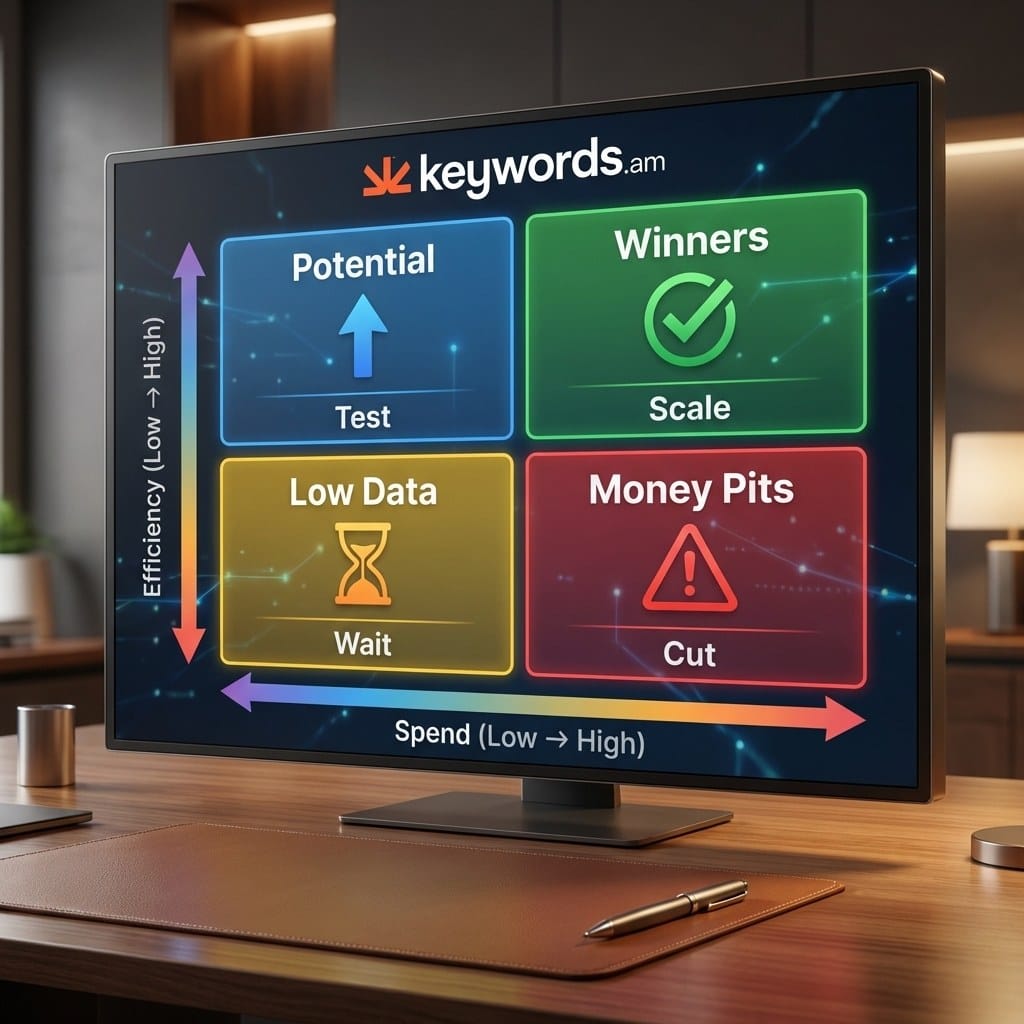
The Search Term Report contains the real queries customers typed. Grab the top 10 to 15 terms from Winners and check that every one is present in the listing. This is where Audit Step Zero pays off again. If a converting term doesn’t appear in the listing, the seller pays for clicks on a keyword Amazon can’t organically tie to the product.
Flag any search terms appearing in both Winners and Money Pits across different campaigns. This signals a campaign structure problem, not a keyword problem. Match type or placement differences cause the variance. A term might convert at the top of search but fail on product pages. Check placement reports before making changes.
Branded search terms (containing the brand name) will almost always land in the Winners bucket. Separate branded and non-branded performance when calculating overall ACOS. Blending the two creates a misleading average that hides poor non-branded results behind high-converting branded traffic. Our breakdown of Amazon ACOS and TACOS goes deeper on this.
Search term data reveals where budget goes. Bid and budget settings determine how much flows there.
What should a bid and budget audit cover for Amazon PPC?
A bid and budget audit covers bid strategy selection, placement modifier effectiveness, daily budget pacing, and break-even ACOS tied to unit economics.
Amazon offers three bid strategies. “Dynamic bids, down only” is the safe default; Amazon backs off when a click probably won’t convert. “Dynamic bids, up and down” lets Amazon push bids higher on promising clicks, but can double CPC for placements that still don’t convert. Only use this on proven Winners with 30+ days of conversion history. “Fixed bids” give full control to the seller, which makes them the best option for testing unfamiliar terms.
Next, check placement modifiers for Top of Search and Product Pages. Sellers often crank these up because Top of Search looks good on reports, but a $1.50 base bid with a 100% modifier means paying $3.00 per click for that placement. If conversion rate doesn’t match the premium, it eats through daily budget fast. Pull a placement report before adjusting any modifier and compare conversion rates across Top of Search, Rest of Search, and Product Pages.
Budget pacing is the other big one. Per Amazon PPC optimization best practices, check whether campaigns exhaust their daily budget too early. A campaign that runs dry at 4 PM misses the 6-10 PM window when conversions often spike. Look for the “Limited by budget” flag in Campaign Manager. Any campaign hitting 100% utilization consistently either needs more budget or tighter targeting.
How to calculate break-even ACOS
The formula: (Sale Price - Cost of Goods - FBA Fees) / Sale Price x 100.
Take a product selling at $29.99. Production runs $8.00 and FBA pick-and-pack fees eat $10.50. That leaves $11.49 before ad spend, putting break-even ACOS at 38%. If a non-brand campaign sits above 38% for a full month, every sale from that campaign loses money.
| Metric | Amount |
|---|---|
| Sale Price | $29.99 |
| Cost of Goods | $8.00 |
| FBA Fees | $10.50 |
| Pre-Ad Profit | $11.49 |
| Break-even ACOS | 38% |
Smart sellers don’t aim for break-even. Set target ACOS at 50-70% of break-even to leave real profit margin. In this example, that’s a 19-27% ACOS target on non-brand campaigns.
Bid optimization prevents overpaying. Negative keywords prevent paying for the wrong traffic entirely.
How do you run a negative keyword audit on Amazon?
A negative keyword audit identifies high-ACOS search terms that should be blocked and checks for over-negation that accidentally prevents converting terms from triggering ads.
Start with a simple filter: search terms above break-even ACOS with more than 10 clicks and zero sales. These aren’t borderline calls, they’re straight-up budget drains. Sort by spend descending so the biggest holes get patched first. Adding a negative keyword takes five seconds and stops the bleed immediately.
Check existing negative lists for over-negation. Seasonality or listing updates can turn a money pit into a winner. A “gift” term might fail in March but convert well in Q4. Using Amazon negative keywords correctly requires distinguishing campaign-level from ad-group-level blocks. Campaign-level negatives block the term everywhere within that campaign. Ad-group-level blocks it only where it performs poorly, letting the term trigger in other ad groups where it may convert.
Match type matters here. Phrase match negatives block anything containing that word sequence, so negating “red shoes” also blocks “large red shoes.” Exact match is safer because it only blocks that precise term. Getting this wrong kills good traffic. Review the full negative list at least once a quarter, because terms that bombed in Q1 might convert well in Q4.
Negative targeting also applies to competitor ASINs. If auto campaigns keep targeting a cheaper competitor product and generating zero conversions, negate that specific ASIN. Most sellers ignore this product-targeting cleanup during ad campaign reviews.
Negative keywords close the leaks. The final step connects everything back to where the audit started.
How does the PPC-to-listing feedback loop improve future campaigns?
The feedback loop is simple: pull top-converting search terms out of PPC data and plug them back into the listing, which lifts both organic ranking and future auto campaign targeting.
Take the top 15-20 converting search terms and hold them against the listing. If a Winner term doesn’t appear in the title, bullets, or backend, that’s organic ranking sitting there unclaimed. Auto campaigns won’t match it as well going forward either. These terms are the closest thing to a cheat sheet for buyer language.
Distribute these keywords across the listing using the TFSD Framework. The biggest winners get Title placement. Supporting terms go into Features. Long-tail variants fill backend Search Terms. The Description picks up contextual phrasing. After updating, verify the keywords are picked up by Amazon’s index within a few days, since the only way to confirm the changes stuck is to actually check.
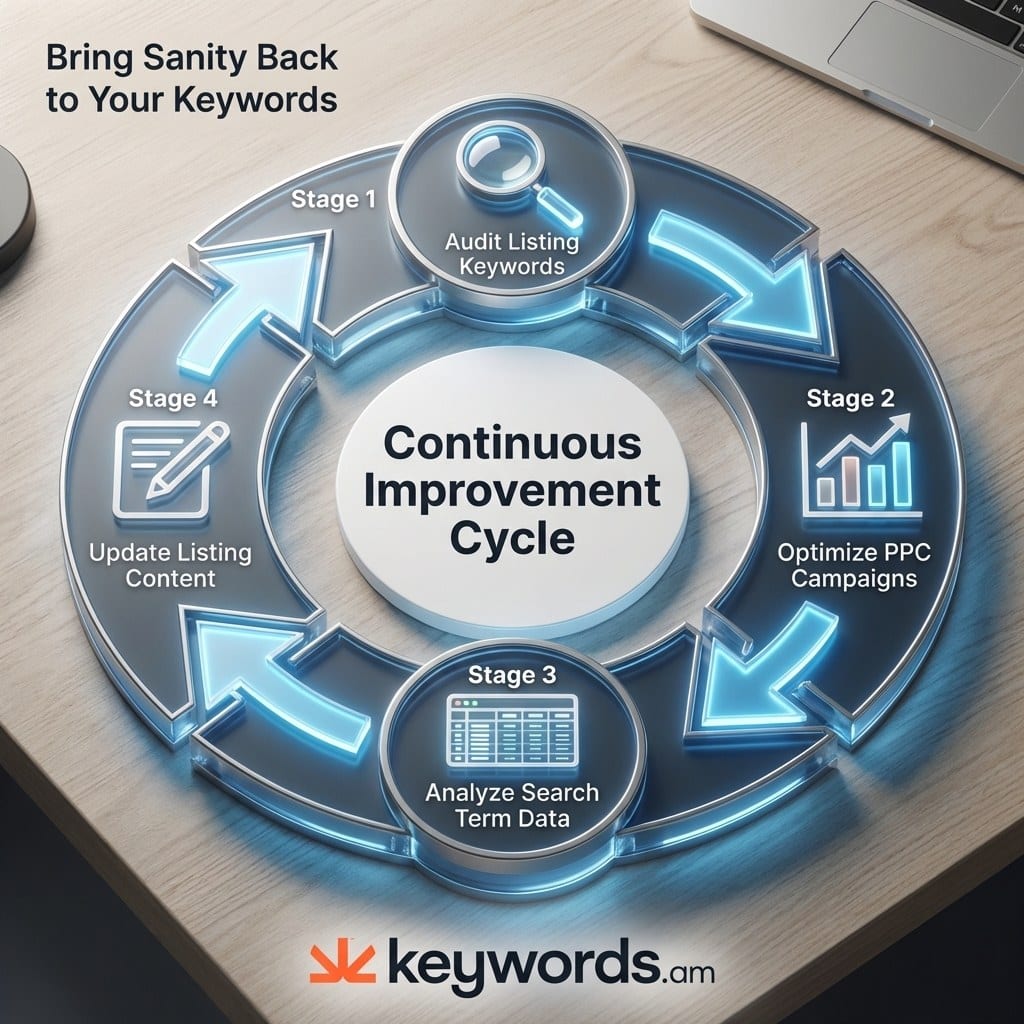
That’s what makes this a compounding cycle. Each quarterly audit fills listing gaps. The improved listing generates better auto matches. Cleaner auto data feeds the next audit with tighter search term reports. The first full audit takes a few hours. By the fourth quarter, it’s a 30-minute check-in, because organic rank starts carrying more weight and reducing dependence on high bids.
Ad spend becomes market research. Every click generates data about what buyers search for. That data goes back into the listing. A better listing lowers cost per click over time.
Frequently Asked Questions About Amazon PPC Audits
How often should you audit Amazon PPC campaigns?
Run a full PPC account review quarterly, review search term reports and negative keywords monthly, and check budget pacing and bid adjustments weekly. The quarterly cadence aligns with seasonal shifts and gives enough data to spot trends without over-reacting to noise.
What metrics matter most when auditing Amazon PPC?
ACOS (Advertising Cost of Sale), TACOS (Total ACOS including organic), conversion rate per search term, and budget utilization rate. ACOS shows campaign efficiency while TACOS reveals whether PPC is driving enough organic lift to justify the spend.
Can sellers run a PPC audit without an agency?
Yes. Sellers with access to their Search Term Report and a reverse ASIN tool can run every step in this framework. An agency adds value through cross-account benchmarks and pattern recognition, but the methodology itself is straightforward.
How does listing quality affect Amazon PPC performance?
Listing quality directly controls auto campaign targeting because auto campaigns read the title, bullets, description, and backend search terms to match search queries. A listing missing relevant keywords generates irrelevant auto matches and wastes ad budget on traffic that never converts.
What is break-even ACOS and how do you calculate it?
Break-even ACOS is the maximum ACOS at which a campaign still generates profit. The formula is (Sale Price minus Cost of Goods minus FBA Fees) divided by Sale Price, multiplied by 100. A product selling at $29.99 with $8 COGS and $10.50 FBA fees has a break-even ACOS of roughly 38%.
Conclusion
The pattern across most PPC audits is clear: they skip the listing. That’s where the biggest budget waste hides.
- Check the listing before the campaigns. If it doesn’t contain the keywords those campaigns target, no bid strategy fixes the problem.
- Don’t skip Audit Step Zero. A reverse ASIN lookup and indexation check surface gaps that campaign tweaks can’t touch.
- Sort search terms into four buckets. Winners, Potential, Money Pits, and Low Data replaces gut feelings with a system.
- Tie every non-brand bid to break-even ACOS. Scaling a campaign above break-even means paying to lose money per unit.
- Each audit builds on the last one. PPC data feeds the listing, the listing gets stronger, and the next audit starts from a better baseline.
Run a reverse ASIN lookup on your top 3 competitors using the free Amazon keyword tool and check how many of their keywords are missing from your listing. That specific gap is the starting point for the next amazon ppc audit, and it’s the one step most agencies never take.