

📑 Table of Contents
- Does Amazon actually index A+ Content for search?
- Where do keywords actually matter in A+ Content?
- Which A+ modules give the most keyword real estate?
- How does A+ Content conversion lift create an indirect SEO flywheel?
- How should sellers measure and test A+ Content performance?
- Frequently Asked Questions About Amazon A+ Content Optimization
- Conclusion
- A+ body text is not indexed by Amazon’s internal search but is crawled by Google.
- Image alt-text is the highest-value keyword zone, fully indexed by Amazon.
- Conversion rate improvements from A+ Content create an indirect SEO flywheel.
- Mobile optimization is critical as over 60% of Amazon traffic comes from mobile devices.
- Keyword research must precede design to ensure alt-text and headers are optimized.
Amazon sellers hear conflicting advice every week regarding Enhanced Brand Content: one expert claims A+ Content is fully indexed by the algorithm, another insists it is purely for aesthetics, and both sound entirely convincing. The truth lives in the middle, and misunderstanding it costs sellers both conversions and organic visibility.
Without clarity on what A+ Content can and cannot do for search ranking, sellers typically fall into one of two traps. They either skip keywords entirely, leaving significant revenue on the table by treating the modules as purely visual elements, or they stuff every text module with high-volume search terms, wasting effort on non-indexed fields that the A10 algorithm ignores.
This guide maps exactly which A+ Content elements Amazon indexes, which ones Google picks up, and how conversion improvements from well-optimized content feed back into organic rank. By understanding the specific mechanisms at play, brands can stop guessing and start implementing a data-backed amazon a+ content optimization strategy.
Does Amazon actually index A+ Content for search?
Amazon does not index A+ body text for internal search, but image alt-text is indexed, and Google crawls all A+ Content for organic discovery.
The debate over indexing is often framed as a binary “yes or no,” but the reality is more nuanced. Extensive testing and documentation confirm that A+ body text (the paragraphs found in Standard Text modules) is not indexed by Amazon’s A10 algorithm for keyword ranking. Sellers who stuff these sections with keywords in hopes of ranking for “garlic press” or “running shoes” will find no direct correlation in Amazon’s search results. This position is held by agencies like Olifant Digital and is supported by years of split-testing data showing that text density in A+ descriptions does not directly manipulate Amazon’s internal search rank.
However, this does not mean the content is invisible to search engines. Amazon’s own Seller Central documentation explicitly states that image alt-text “helps products appear in search results.” This is a critical distinction: while the visible paragraph text may be ignored by the internal crawler, the metadata attached to images is actively read and utilized. This makes alt-text a primary lever for amazon a+ content optimization, yet it is often the most overlooked element during the design phase.
Google operates differently. Google bots crawl and index all A+ Content, making it discoverable through Google Shopping and Google Images. This external indexing means that while a specific keyword in A+ text might not help rank on Amazon, it can drive traffic from Google’s organic search results directly to a listing. This is a significant advantage for brands looking to capture off-platform traffic.
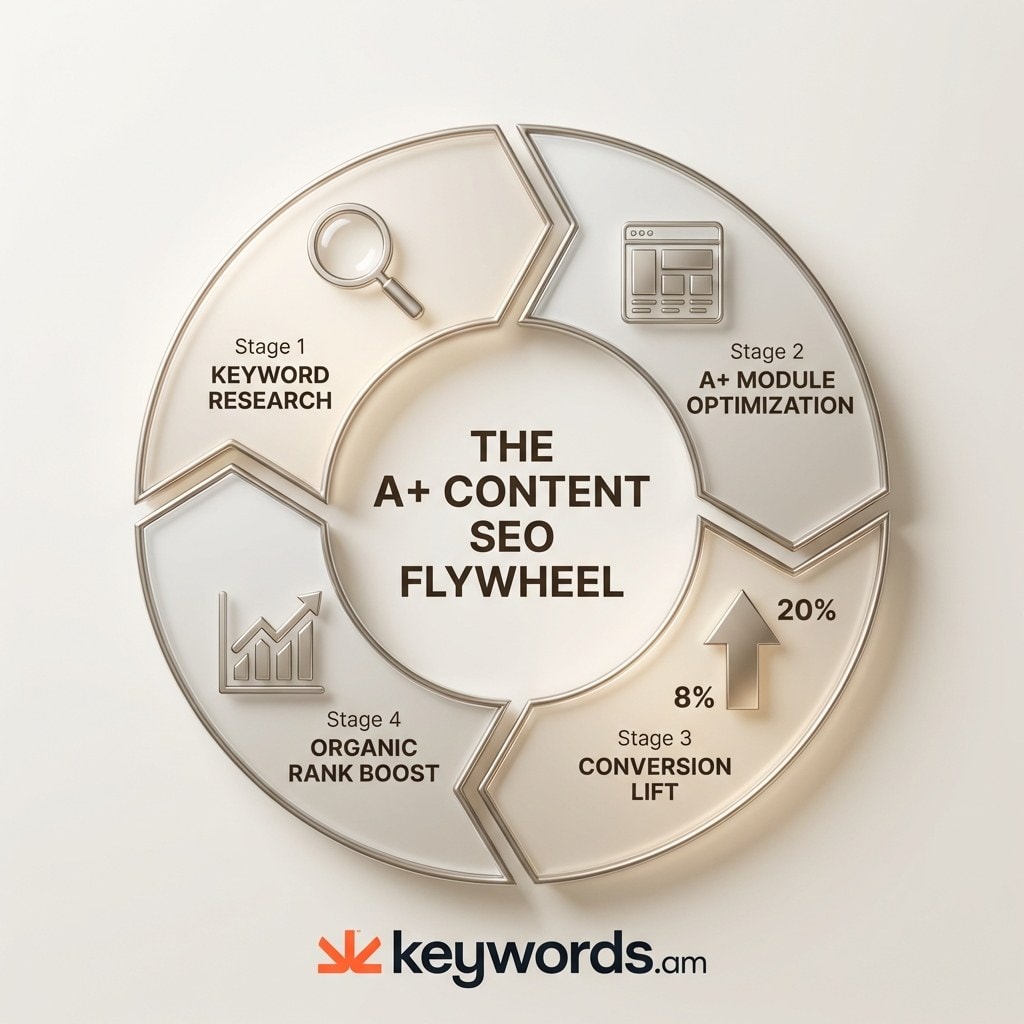
The conversion improvement from high-quality A+ Content (up to 8% for Basic and 20% for Premium, according to Amazon) creates an indirect ranking signal. Amazon’s algorithm prioritizes products that sell. By improving the click-through and purchase rates, optimized content signals to the algorithm that the product is relevant and desirable, leading to improved organic placement over time.
What A+ Content CAN vs. CANNOT Do for SEO
|
SEO Factor |
Indexed by Amazon? |
Indexed by Google? |
Impact Level |
|---|---|---|---|
|
A+ body text |
No |
Yes |
Low (Amazon), Medium (Google) |
|
Image alt-text |
Yes |
Yes |
High |
|
Comparison chart headers |
Partial |
Yes |
Medium |
|
Brand Story text |
No |
Yes |
Low |
|
Video transcripts (Premium) |
No |
No |
None for SEO |
Understanding these distinctions shifts the strategy from “stuffing keywords everywhere” to “placing a+ content keywords where they count.”
Where do keywords actually matter in A+ Content?
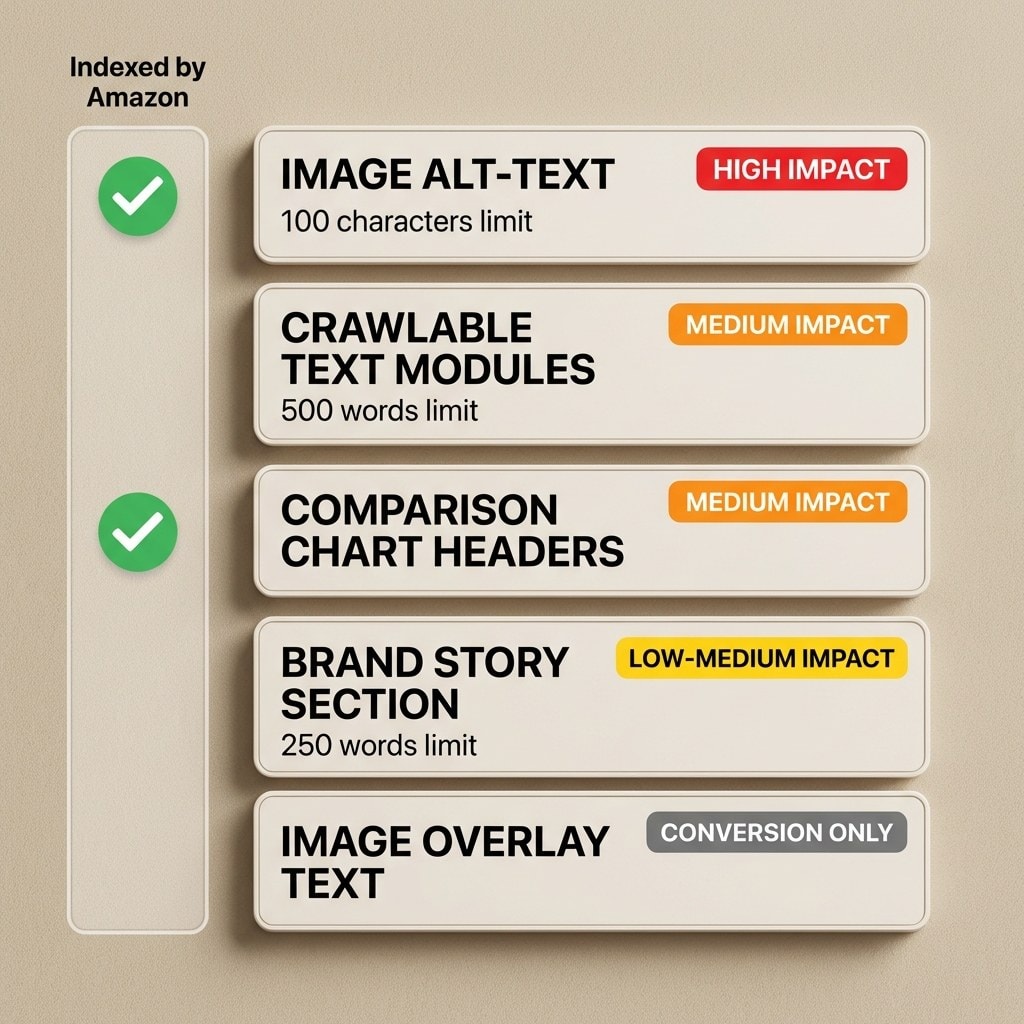
Keywords matter most in five A+ Content zones: image alt-text fields, crawlable text modules, comparison chart headers, Brand Story sections, and image overlay text.
Once sellers accept that indiscriminate keyword usage is ineffective, the focus shifts to the five specific zones where optimization yields results. The most critical of these is Zone 1: Image alt-text. Amazon allows a 100-character limit per image for alt-text. Because this field is confirmed to be indexed, it should be treated with the same strategic importance as the backend search terms. Instead of using generic file names or descriptions like “blue running shoe side view,” sellers should use exact-match and long-tail keywords. For example, “mens trail running shoes waterproof size 10” utilizes the character limit to target specific search intent. Including common misspellings or Spanish keywords can also be effective here, similar to a backend keyword strategy, provided they remain relevant to the image content.
Zone 2 consists of crawlable text modules, such as the Standard Text, Standard Single Image & Sidebar, and Standard Three Images & Text modules. While Amazon may not index this text for its internal search, Google does. Writing up to 500 words of keyword-rich, natural language in these sections helps capture external traffic. It is important to adhere to Amazon character limits to ensure the text remains readable and effective for human shoppers while satisfying Google’s crawlers.
Zone 3 covers comparison chart headers. The headers for columns and rows in comparison modules are visible and text-based. There is evidence suggesting partial indexing for these specific fields, likely due to their structured nature. Using product keywords rather than generic terms like “Feature 1” or “Size” can provide a marginal indexing benefit while significantly aiding shopper navigation.
Zone 4 is the Brand Story section. This often-underutilized asset allows for 200-250 words of text that appear across every ASIN in a brand’s catalog. Because the Brand Story propagates globally across the brand’s listings, it offers a massive scale advantage. Optimizing this text ensures that the brand’s core value proposition and primary keywords are associated with every single product, creating a cohesive keyword footprint.
Finally, Zone 5 is image overlay text. This is text that is baked directly into the image file. It is not crawlable by any bot, Amazon or Google. However, it is crucial for conversion. This text should focus entirely on persuasive copy and key selling points to convince the human shopper. Since it has zero SEO value, there is no need to force awkward keywords here; focus instead on clarity and benefits.
Which A+ modules give the most keyword real estate?
Standard Comparison Chart, Standard Single Image and Specs Detail, and Standard Three Images and Text modules offer the most keyword placement opportunities among the 17 Basic A+ modules.
Not all of the 17 available Basic A+ modules are created equal when it comes to amazon enhanced brand content optimization. Sellers are limited to five modules per listing (excluding the Brand Story), so choosing the right combination is a strategic decision. To maximize keyword real estate, priority should be given to modules that offer the highest volume of alt-text fields and structured text options.
The Standard Comparison Chart is widely considered the most valuable module for both SEO and conversion. It allows sellers to compare up to six ASINs. Each column and row header provides a text field, and the module acts as a powerful cross-selling tool. By linking to other products in the catalog, sellers can keep customers within their brand ecosystem. From an SEO perspective, the structured data and multiple internal links send strong relevance signals.
The Standard Single Image and Specs Detail module is another strong option. It combines a large visual asset with a specification table and descriptive text. This format is ideal for technical products where specifications like “wattage,” “dimensions,” or “material type” are common search terms. The table format allows for the natural inclusion of long-tail feature keywords that might feel forced in a standard paragraph.
The Standard Three Images and Text module offers a balanced approach. It provides three distinct image slots (each with its own 100-character alt-text field) alongside three text blocks. This triples the opportunity for indexed alt-text compared to a single large image module, while still providing ample room for descriptive copy that Google can crawl.
For brands with access to Premium A+ Content, the opportunities expand significantly. Premium content allows for seven modules instead of five, larger images, and interactive elements like video and hotspots. Video modules come with their own metadata fields, and the increased module count simply means more space for alt-text and content. With Premium A+ currently free for eligible sellers who meet the criteria (Brand Registry, 5 approved Basic projects, and a published Brand Story), it represents a substantial upgrade in keyword footprint. For a deeper look at premium a+ content guide considerations, the qualification path is straightforward for established brands.
How does A+ Content conversion lift create an indirect SEO flywheel?
Higher conversion rates from optimized A+ Content generate more sales velocity, which Amazon’s algorithm interprets as a ranking signal, creating a compounding SEO benefit.
The relationship between A+ Content and amazon a+ content seo is not just about keywords; it is fundamentally about behavioral signals. Amazon’s A10 algorithm is designed to maximize revenue, meaning it heavily weighs conversion rate (CVR) and sales velocity when determining search rank. A product that converts 15% of visitors is far more likely to rank at the top of page one than a product that converts 5%, even if the latter has perfect keyword optimization. This is where the indirect SEO flywheel begins.
Well-designed A+ Content keeps shoppers on the page longer and answers their questions more effectively. Amazon reports that Basic A+ Content can increase sales by up to 8%, while Premium A+ Content can drive a lift of up to 20%. For a brand generating $1 million in annual sales, a 20% lift translates to $200,000 in additional revenue. The secondary effect is equally powerful: that increased sales velocity signals to Amazon that the product is a market leader. In response, the algorithm awards the listing better organic positions, which drives more traffic, which generates more sales (a virtuous cycle).
A case study involving a supplement brand illustrated this clearly. After implementing optimized A+ Content across 12 ASINs, the brand saw an 8.7% increase in conversion rate, resulting in $47,000 in additional profit over 90 days. Their organic keyword rankings improved across the board without any changes to their backend search terms or title. The conversion lift itself was the SEO driver.
Another critical factor is the reduction of return rates. Returns are a negative ranking signal; if customers frequently return a product, Amazon will bury it in search results. Approximately 22% of returns occur because the product did not match the online photos or description. Detailed, accurate A+ Content manages customer expectations before they buy, leading to higher satisfaction and fewer returns.
Mobile optimization plays a massive role in this flywheel as well. With over 60% of Amazon traffic now coming from mobile devices, content that is legible and engaging on a small screen converts significantly better. Most A+ Content is designed on a desktop monitor, resulting in small text and cluttered images when viewed on a phone. Sellers who optimize specifically for the mobile experience (using larger fonts and clearer visuals) often see disproportionate gains in conversion, further fueling the ranking flywheel. For a broader view on how this fits into overall listing health, refer to this comprehensive listing optimization guide.
How should sellers measure and test A+ Content performance?
Sellers should use Amazon’s Manage Your Experiments tool to A/B test A+ Content versions, tracking conversion rate, units sold, and projected annual impact.
Amazon a+ content optimization is not a one-time task; it is an iterative process. Amazon provides a powerful tool called “Manage Your Experiments” (MYE) that allows Brand Registered sellers to run A/B tests on their A+ Content. This tool splits traffic between two versions of the content (Version A as the control and Version B as the challenger) to determine which performs better statistically.
Sellers can test different variables, such as layout, image selection, or copy density. MYE tracks critical metrics including units sold, conversion rate, and total sales. It even provides a “projected one-year impact” metric to help quantify the value of the winning variation. For example, testing a “lifestyle-heavy” version against a “feature-heavy” version can reveal what resonates best with the specific target audience.
The most common mistake sellers make is designing the visual content first and then trying to shoehorn keywords in later. Effective a+ content best practices 2026 start with data. Before a single pixel is designed, sellers should conduct thorough keyword research to identify high-volume, relevant terms for the alt-text and header fields. Tools like Keywords.am can help identify these terms, ensuring that the content strategy is built on a foundation of actual search data.
Experiments should run for a minimum of four weeks to gather enough data for statistical significance. Ending a test too early can lead to false positives. In 2026, Amazon updated the tool to include preselected optimal settings and the ability to automatically publish the winning version once statistical significance is reached, streamlining the process.
While tools like MYE handle the A/B testing, sellers should also use external listing optimization tools to monitor amazon a+ content indexing and overall listing health. It is also vital to avoid over-optimization; read up on keyword stuffing to ensure content remains compliant and effective.
Frequently Asked Questions About Amazon A+ Content Optimization
> These are the most common questions sellers ask about amazon a+ content optimization, answered with current 2026 data.
Conclusion
Effective A+ Content optimization requires targeted keyword placement in indexed zones, mobile-first design, and ongoing A/B testing to compound the conversion-to-ranking flywheel.
Optimizing Amazon A+ Content is not about choosing between aesthetics and SEO; it is about integrating them. The fact that Amazon does not index body text should not discourage sellers. Instead, it should clarify the strategy: focus keyword efforts on the high-impact zones like image alt-text and crawlable headers, and dedicate the visual elements to driving conversion.
The real power of A+ Content lies in its indirect SEO value. By improving the shopping experience, answering customer questions, and showcasing the product in a premium light, brands drive higher conversion rates. This sales velocity is the strongest signal a seller can send to Amazon’s algorithm. When combined with a disciplined approach to mobile optimization and continuous A/B testing, A+ Content becomes a formidable engine for organic growth.
Success starts with the right data. Before designing or revising A+ Content, sellers need the keyword data to inform every alt-text field, comparison chart header, and module copy decision. A tool like Keywords.am provides the research foundation that makes A+ Content optimization strategic rather than decorative.




