

📑 Table of Contents
- Why do Amazon bundles need a different keyword strategy than individual products?
- What are the three Amazon bundle types and how do their keyword needs differ?
- How does the TFSD framework apply to multi-product bundle listings?
- How do you prevent bundle ASIN keyword cannibalization?
- How do you find and validate bundle-specific keywords with actual search volume?
- What are the best title formulas for each Amazon bundle type?
- Frequently Asked Questions About Amazon Bundle Keyword Strategy
- Conclusion
⚡ TL;DR
- Different buyer intent: Bundle keyword strategy requires a distinct approach because combination buyers use different search modifiers than single-unit shoppers.
- Three bundle types: Virtual bundles, multi-packs, and variety packs each demand unique keyword intent modifiers to rank effectively.
- TFSD allocation: Assign lead product terms to Title, secondary products to Features, occasion modifiers to Subject Terms, and long-tail combinations to Description.
- Cannibalization risk: Bundles and individual ASINs targeting identical head terms causes Amazon to suppress one listing in favor of the other.
- Validate before committing: Many assumed bundle terms generate zero actual buyer traffic, so check search volume before allocating title space.
- Mobile truncation: Front-load primary keywords and bundle modifiers within the first 80 characters to survive mobile truncation.
Most Amazon sellers copy-paste individual product keywords directly into bundle listings. This approach wastes up to 50% of available keyword real estate. It creates redundant terms and forces the bundle to compete directly against the brand’s own standalone products for visibility. An effective amazon bundle keyword strategy requires a completely different approach from single-product listings. Bundles serve combination-intent buyers who search using specific modifiers and intent phrases that single-product buyers never use.
Studies show that 73% of sellers use identical keywords across bundles and single products, triggering cannibalization. This approach reduces total brand visibility by 40-50%. Conversely, sellers who separate bundle keywords by intent see 2.3x higher bundle impressions and 35% lower internal competition for top terms.
Why do Amazon bundles need a different keyword strategy than individual products?
Bundles serve combination-intent buyers who use different search queries than single-product shoppers, requiring distinct keyword allocation across multiple product types within one listing.
Virtual bundles became eligible for Sponsored Products ads in 2025. This Amazon platform update makes bundle optimization more urgent than ever. Advertising directly ties amazon bundle keyword strategy to ad performance and click costs. Review the Amazon Virtual Bundle eligibility guidelines for specific requirements.
Most sellers copy-paste individual product keywords into bundle listings. They treat a yoga mat, a yoga block, and a resistance band combination as three separate listings crammed into one. This wastes 30-50% of keyword real estate on redundant terms.
The fundamental problem lies in character limits. Sellers get 200 characters of title space, according to the Amazon title style guide. That space must serve two or three products instead of one. Dividing 200 characters among three products yields roughly 66 characters each. That’s barely enough room for one strong keyword phrase per product.
This mathematical reality forces a choice. Sellers either truncate critical keywords or build a generic title that ranks for nothing. But not all bundles face the same keyword challenge. The type of bundle determines the optimization priority order.
What are the three Amazon bundle types and how do their keyword needs differ?
Amazon’s three bundle types (virtual bundles, multi-packs, and variety packs) each require different keyword priority orders because their buyers search with distinct intent modifiers.
Virtual bundles combine different products together. These listings must balance two independent keyword sets. Buyer intent focuses on a complete solution or a starter kit. A shopper looking for a yoga mat, block, and resistance band searches for “home workout starter kit” rather than just “yoga mat.” The variation listing strategy guide covers managing complex SKU setups in detail.
Multi-packs offer the same product in quantity. These bundles anchor entirely on quantity modifiers. Buyers search for terms like “6-pack”, “bulk”, “subscribe and save”, or “family size.” A shopper buying 100 organic green tea bags has distinct value or bulk purchase intent. The subscribe and save keywords guide explores this intent further.
Variety packs contain the same product in different variants. These listings must foreground variant terms. Shoppers use phrases like “assorted flavors”, “mixed colors”, or “sample pack.” A buyer looking at a 12-pack of protein bars in assorted flavors specifically wants to try multiple options.
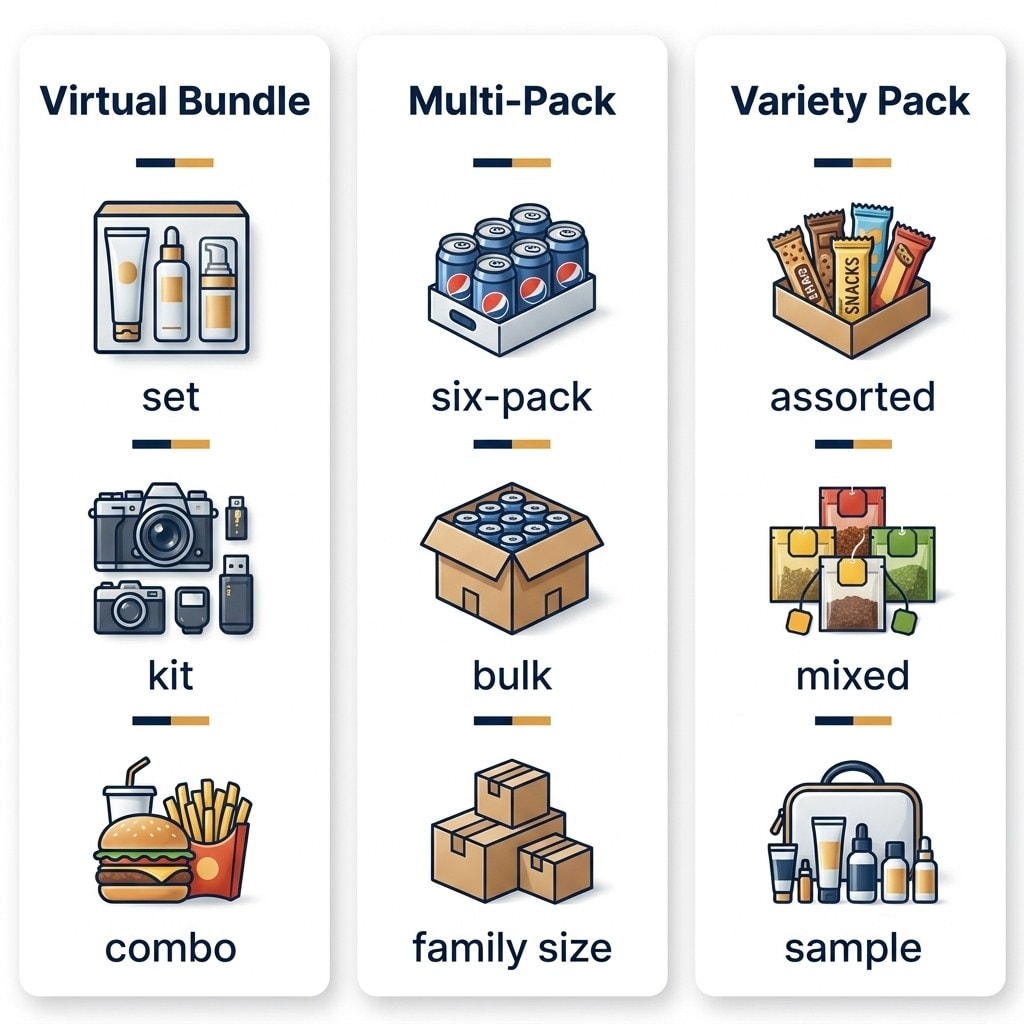
Bundle Type |
Primary Modifier |
Buyer Intent |
Keyword Priority |
|---|---|---|---|
Virtual Bundle |
“set”, “kit”, “combo” |
Complete solution |
Lead product keyword + bundle modifier |
Multi-Pack |
“6-pack”, “bulk”, “family size” |
Value/quantity |
Product keyword + quantity modifier |
Variety Pack |
“assorted”, “mixed”, “sample” |
Try multiple variants |
Product keyword + variety modifier |
Once you know your bundle type, you need a framework for allocating keywords across listing fields without creating overlap.
How does the TFSD framework apply to multi-product bundle listings?
The TFSD framework allocates bundle keywords across four fields: Title, Features, Subject Terms, and Description.
The TFSD framework gives structure to the chaos of multi-product listings. Title (T) owns the lead product’s primary keyword combined with a bundle modifier. The formula: “[Lead Product Primary Keyword] and [Secondary Product] [Bundle Modifier] — [Key Benefit]”. A worked example: “Yoga Mat and Yoga Block Set — Complete Beginner Home Workout Kit” (62 characters, leaving ample room for brand name). Mastering this balance is essential for effective product title optimization.
Features/Bullets (F) own secondary product keywords and bundle-specific benefits. These highlight that the bundle saves money, provides an everything-in-one solution, or offers a curated combination. Each bullet can target a different component product’s keywords since the search algorithm indexes bullets independently. The bullet points guide covers this in detail.
Subject Terms/Backend (S) capture combo-specific queries and occasion terms. Shoppers search for “gift set for her”, “starter kit for beginners”, or “travel essentials bundle.” These 249 bytes represent pure keyword territory with no customer-facing text required. Raw search terms work without worrying about grammar. Amazon details these limits in their backend keywords documentation. The backend keywords guide covers advanced tactical execution.
Description (D) handles long-tail multi-product phrases that don’t fit naturally elsewhere. Terms like “yoga mat and block set for home workouts” combine product terms into logical sentences.
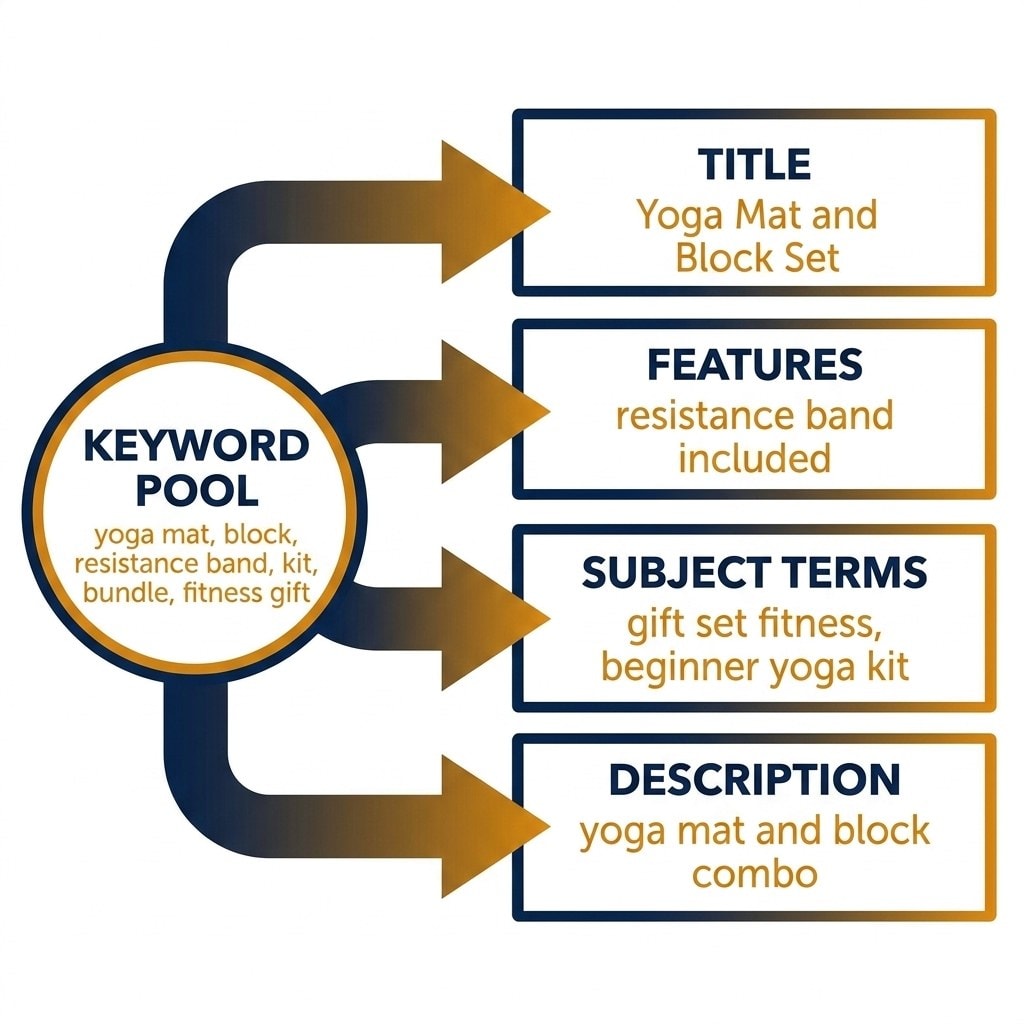
TFSD Field |
Bundle Keywords Allocated |
Individual Product Keywords (DON’T Use) |
|---|---|---|
Title |
“Yoga Mat and Block Set — Complete Home Workout Kit” |
“Yoga Mat 6mm Thick Non-Slip” |
Features |
“resistance band set included”, “block supports 250+ lbs” |
(same keywords as individual listings) |
Subject Terms |
“gift set fitness”, “beginner yoga kit”, “home gym starter” |
“yoga mat”, “yoga block” (leave to individual ASINs) |
Description |
“yoga mat and block combination for flexibility training” |
“best yoga mat for beginners” |
This allocation solves the space problem. But it creates another question: what happens when the bundle ranks for the same terms as individual ASINs?
How do you prevent bundle ASIN keyword cannibalization?
Prevent cannibalization by giving bundles distinct keyword territory: individual ASINs own head terms while bundles own combination, occasion, and quantity-modified queries that reflect different buyer intent.
The cannibalization problem strikes when an individual ASIN and a bundle compete for the exact same search term. A standalone “yoga mat” listing and a “yoga mat and block set” bundle both targeting the keyword “yoga mat” creates conflict. Amazon de-duplicates search results from the same brand or account. This self-competition means lost impressions. The algorithm suppresses one listing and shows the other.
Intent separation is the core principle. Single-unit buyers search for “yoga mat 6mm thick.” Bundle buyers search for “yoga workout starter kit.” These are fundamentally different customers. The same seller can serve both without conflict when keywords are allocated correctly.
The rules are straightforward. Individual ASINs own head terms like “yoga mat” or “yoga block.” Bundles own the modifiers like “yoga set”, “workout kit”, or “yoga mat and block.” The keyword cannibalization guide covers this dynamic extensively.
Use a reverse ASIN lookup on your own bundle to audit overlap. If the bundle ranks for the same top 10 keywords as a component ASIN, you have a cannibalization problem. This diagnostic step provides immediate clarity on current keyword overlap.
How do you know which bundle-specific terms actually have search volume? Guessing at modifiers without data wastes precious backend space.
How do you find and validate bundle-specific keywords with actual search volume?
Validate bundle keywords using search volume data for combination queries, occasion modifiers, quantity terms, and competitor bundle research.
Check if combination queries actually have search volume first. Many assumed combinations have zero demand. A search for “yoga mat and block set” might show strong volume while “yoga accessories set” shows nothing. If combination queries lack volume, the bundle title must lead heavily with the primary product keyword instead. The keyword research methodology guide covers these validation techniques.
Validate occasion modifiers next. Terms like “gift set”, “starter kit”, “travel kit”, and “sample pack” sound great in theory. Sellers need to know which ones actually get searched in their specific category. Keywords.am provides exact search volume data to validate these modifiers quickly. Identifying profitable long-tail keywords that drive conversions becomes straightforward with the right data.
Run a reverse ASIN lookup on top-selling competing bundles. This reveals exactly what terms drive traffic to their listings. Analyzing competitor bundle keyword strategies and adopting the high-volume terms they’ve already proven saves significant research time.
Check quantity modifiers for multi-packs carefully. Terms like “bulk”, “6-pack”, “family size”, and “3-month supply” vary dramatically by category. “Tea bags bulk” and “protein bars bulk” have entirely different search volume profiles. Never assume universal demand for quantity terms.
With validated keywords in hand, the next step is title formulas optimized for each specific bundle type.
What are the best title formulas for each Amazon bundle type?
Each bundle type requires a distinct title formula: virtual bundles use [primary product + modifier], multi-packs use [product + quantity], and variety packs use [product + variety descriptor].
The virtual bundle formula requires precision. Use “[Lead Product Primary Keyword] and [Secondary Product] [Bundle Modifier] — [Key Benefit]”. Example: “Yoga Mat and Yoga Block Set — Complete Beginner Home Workout Kit” (62 characters). Mobile truncation threatens visibility here. Amazon shows only the first 80 characters on mobile search results. The lead product keyword and bundle modifier must appear within that initial window. Anything past 80 characters is invisible to most mobile shoppers.
The multi-pack formula prioritizes quantity. Use “[Product Keyword] [Quantity] Pack — [Value Proposition]”. Example: “Organic Green Tea Bags 100 Pack — 3-Month Supply for Daily Brewing” (67 characters).
The variety pack formula highlights assortment. Use “[Product Keyword] [Variety Descriptor] [Count] — [Benefit]”. Example: “Protein Bars Assorted Flavors 12 Pack — Try All 4 Flavors” (57 characters).
Always test titles by counting characters. If primary terms fall past the 80-character mark, rewrite. Mobile shoppers dominate Amazon traffic. Core offerings can’t afford to hide behind a “Read More” truncation block.
Frequently Asked Questions About Amazon Bundle Keyword Strategy
These are the most common questions sellers ask about optimizing keywords for Amazon product bundles.
Conclusion
An effective amazon bundle keyword strategy requires intention and precise allocation. Copying and pasting individual product keywords into bundle listings guarantees wasted space and self-competition. The combination buyer represents a distinct market segment with unique search habits.
- Bundle strategy differs fundamentally from individual product optimization due to different buyer intent and different search terms.
- The TFSD framework for bundles assigns Title to the lead product and bundle modifier, Features to secondary products, Subject Terms to occasion or quantity queries, and Description to long-tail combinations.
- Cannibalization is the hidden cost of careless bundle keyword allocation. Separating keyword territory by intent protects all listings.
- Always validate bundle terms for actual search volume before committing title space to them.
Run a reverse ASIN lookup on your bundle listing today. Compare its top-ranking keywords against individual component ASINs. If there’s 50% or more overlap, that’s a critical cannibalization problem to fix immediately.
Keywords.am validates bundle keyword search volume and runs reverse ASIN checks on competing bundles to build a strategy that dominates the niche.




