

📑 Table of Contents
- What Is Amazon SKU Rationalization?
- Why Do Multi-SKU Sellers Need SKU Rationalization Now?
- How Does the Grow-Fix-Kill Framework Work?
- What Are the Five Data Points That Drive SKU Decisions?
- How Do You Run a SKU Rationalization Audit Step by Step?
- What Should Sellers Do With Fix SKUs?
- When Should Sellers Discontinue Amazon Products?
- Frequently Asked Questions About Amazon SKU Rationalization
- Conclusion
⚡ TL;DR
- SKU rationalization is not just inventory management: It is a strategic audit to stop bleeding margin on the bottom 60-70% of a catalog.
- Rising costs make inaction expensive: With aged inventory surcharges hitting $0.30/unit/month, holding dead stock now carries a heavy penalty.
- The Grow-Fix-Kill framework: A decision matrix that sorts products based on margin, velocity, and keyword traction.
- The “Fix” bucket is the biggest opportunity: These SKUs have potential but need specific listing optimization using the TFSD framework.
- Kill decisions must be data-driven: Discontinue products when storage costs exceed 5% of revenue and keyword rankings show no improvement.
- Quarterly audits are essential: Market dynamics change, and a “Grow” product can slip into “Fix” within 90 days.
A catalog of 200 SKUs, a team that can optimize 20 this quarter, and rising FBA storage fees eating margin on the other 180. This is the resource allocation problem that most multi-SKU Amazon sellers never solve. They just optimize whatever feels urgent.
The 80/20 rule applies brutally to Amazon catalogs. Roughly 20% of SKUs drive 80% of revenue, yet most sellers spread their optimization budget, PPC spend, and team time evenly across the entire portfolio. With average CPCs rising to $1.00-$1.05 (up 10-15% year-over-year), the cost of this dilution is no longer just lost opportunity; it is active margin destruction.
This guide introduces the Grow-Fix-Kill framework, a structured decision matrix for classifying every SKU in a catalog using five data points, then taking targeted action on each bucket. Unlike generic SKU rationalization advice, this framework connects portfolio decisions directly to listing-level optimization actions, specifically detailing what to do after a SKU lands in the critical “Fix” bucket.
What Is Amazon SKU Rationalization?
Amazon SKU rationalization is the process of evaluating every product in a catalog against profitability, velocity, and keyword performance to decide which SKUs to invest in, optimize, or discontinue.
Most sellers intuitively know that a small portion of their catalog drives the majority of their sales, but few have actually run the numbers to quantify the disparity. Amazon SKU rationalization goes beyond standard inventory management (which focuses on stock levels) to address the strategic value of each product. It asks whether a product should be in stock at all, not just how many units to order.
The cost of inaction is tangible. Every low-performing SKU consumes FBA storage fees, which now include aged inventory surcharges of $0.30 per unit per month for items aged 12-15 months. Beyond storage, these products absorb PPC budget that could be directed toward winners and take valuable optimization hours away from ASINs that have actual growth potential. When a seller maintains a 500-SKU catalog where 300 items barely break even, the profitable 200 items are effectively subsidizing the rest, dragging down the overall business valuation and cash flow.
Data reliability is critical for this process. Decisions must be based on accurate fee calculations and real-time performance metrics, as outlined in guides on Amazon data accuracy.
Why Do Multi-SKU Sellers Need SKU Rationalization Now?
Rising FBA storage fees, increasing PPC costs, and aged inventory surcharges make carrying underperforming SKUs more expensive in 2026 than ever before.
The financial landscape for Amazon sellers has shifted aggressively to penalize inefficiency. FBA storage fee pressures have intensified, with aged inventory surcharges increasing to $0.30 per unit per month for items sitting for 12-15 months, as detailed in Amazon’s FBA fee schedule. For inventory aged over 15 months, the cost jumps to $0.35 per unit or $7.90 per cubic foot, whichever is greater. Consider a catalog of 200 SKUs where 60 items are over a year old. If a seller holds just 10 units of each of those 60 SKUs, they are paying $180 per month in aged surcharges alone (before factoring in standard storage fees).
PPC cost inflation further compounds the issue. Average CPCs have reached $1.00-$1.05, representing a 10-15% increase year-over-year. Sponsored Brands clicks are even more expensive, often ranging from $1.10 to $2.50. Every dollar spent advertising a low-margin, low-converting SKU is a dollar not spent on a high-margin product that could capture more market share.
For agencies managing 50 or more client brands, the opportunity cost of optimization time is the deciding factor between profitability and burnout. An agency cannot afford to optimize every listing equally. Prioritization is survival. Furthermore, storage utilization surcharges add another layer of cost, hitting $1.58 per cubic foot at 44-52 weeks and rising to $1.88 per cubic foot at 52+ weeks. These compounding fees mean that a stagnant catalog is not just failing to grow; it is actively becoming more expensive to maintain every single day.
Tools that aggregate this data are essential. Reviewing the best Amazon analytics tools can help sellers automate the data collection required to identify these cost centers.
How Does the Grow-Fix-Kill Framework Work?
The Grow-Fix-Kill framework sorts every SKU into three action buckets based on margin, sales velocity, keyword traction, conversion rate, and storage cost ratio.
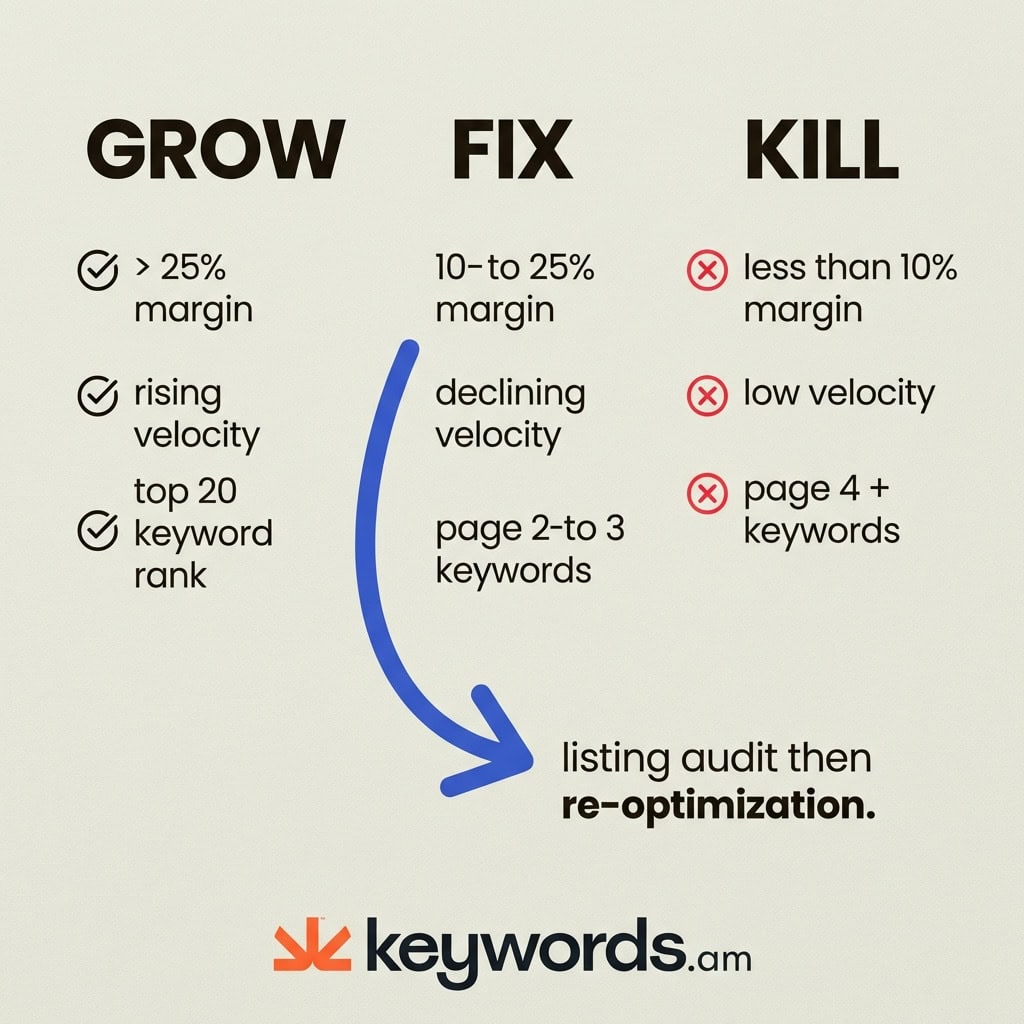
This framework simplifies complex portfolio data into clear strategic directives.
GROW Bucket
These are the winners. SKUs in this bucket have a contribution margin greater than 25%, a stable or rising sales velocity trend over the last 90 days, and rank in the top 20 for their primary keywords. The strategy here is aggressive investment: increase PPC spend, expand into variations, and invest in premium creative assets like A+ Content and video.
FIX Bucket
This is the most critical category for optimization. Fix SKUs have decent margin potential (10-25%) but are held back by poor listing quality, incorrect keyword targeting, or declining rank. These products are often “stuck” on page 2 or 3 of search results. The action here is to audit and re-optimize. By running ASIN reports to identify keyword gaps and checking Keyword Performance Scores (KPS), sellers can turn these underperformers into contributors.
KILL Bucket
These SKUs are dragging the business down. They typically show a contribution margin of less than 10%, consistently declining velocity, and a storage cost that exceeds 5% of revenue. If a product has shown no keyword ranking improvement in 90 days despite efforts, it belongs here. The action is to liquidate, remove, or discontinue to free up capital and storage space.
Grow-Fix-Kill Decision Matrix
Criteria |
GROW |
FIX |
KILL |
|---|---|---|---|
Contribution Margin |
>25% |
10-25% |
<10% |
Sales Velocity (90-day trend) |
Stable or rising |
Declining but recoverable |
Consistently declining |
Keyword Ranking |
Top 20 for primary keywords |
Page 2-3 with gaps |
Page 4+ or unranked |
Conversion Rate vs Category |
At or above average |
Below average but fixable |
Significantly below |
Storage Cost as % of Revenue |
<2% |
2-5% |
>5% |
For SKUs that land in the “Fix” bucket, the next step often involves applying the TFSD framework to systematically address listing deficiencies.
What Are the Five Data Points That Drive SKU Decisions?
The five data points are 90-day sales velocity trend, contribution margin after all fees, keyword ranking trajectory, conversion rate versus category average, and storage cost as a percentage of revenue.
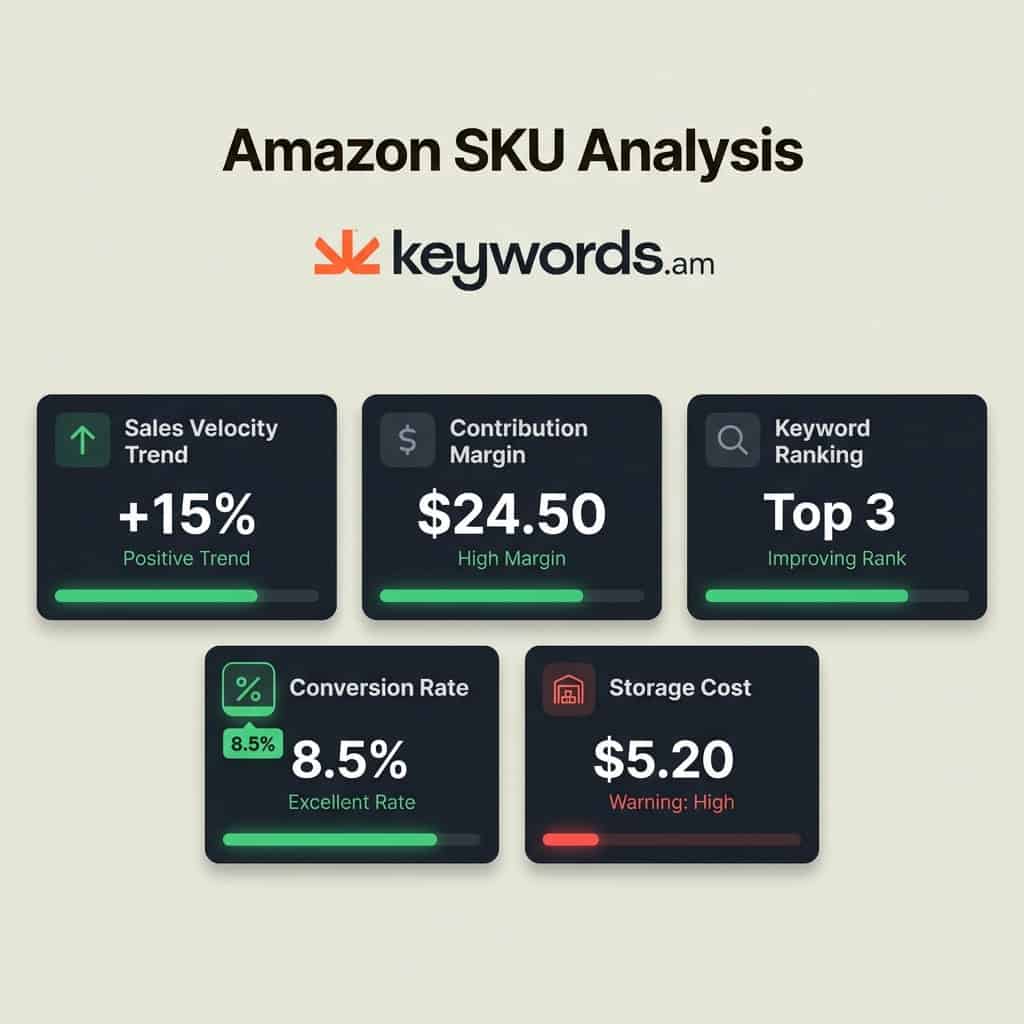
Sales Velocity Trend (90 Days)
Absolute sales volume can be misleading. A SKU generating $2,000 per month but declining by 15% month-over-month requires a different strategy than one generating $800 per month but growing by 20%. The trend reveals the product’s lifecycle stage. Sellers must look at the trajectory over a full quarter to filter out short-term anomalies.
Contribution Margin After ALL Fees
Many sellers mistake gross profit for contribution margin. True contribution margin is Revenue minus COGS, FBA fees, referral fees, PPC spend, and returns. This is the actual cash that hits the bank account. If a product’s contribution margin is thin, even a slight increase in CPCs or storage fees can turn it unprofitable. Accurate calculation here is non-negotiable.
Keyword Ranking Trajectory
Revenue is a lagging indicator; keyword ranking is a leading indicator. A SKU that is slowly losing organic positions on its main keywords will eventually see a drop in sales. Tracking this trajectory helps identify problems before revenue collapses. Using reliable Amazon keyword rank tracker tools is essential to see if primary keywords are moving up, staying stable, or sliding down.
Conversion Rate vs. Category Average
Context is everything. A 5% conversion rate might be excellent for a high-ticket electronic item but terrible for a consumable supplement. Benchmarking a SKU’s conversion rate against category averages (available via third-party tools or estimated through session data) clarifies whether the problem is the product or the traffic.
Storage Cost as % of Revenue
This is the silent margin killer. If storage fees consume more than 5% of a single SKU’s revenue, that product is being subsidized by the rest of the catalog. Calculating this ratio helps identify which items are effectively paying rent without earning their keep.
How Do You Run a SKU Rationalization Audit Step by Step?
Export the full catalog from Seller Central, pull the five metrics for each SKU, score them against Grow-Fix-Kill thresholds, and prioritize actions by bucket size and margin impact.
Step 1: Export Full SKU List
Start by logging into Seller Central and navigating to Business Reports. Download the “By ASIN > Detail Page Sales and Traffic” report. This provides the foundational data for sessions and unit session percentage (conversion rate). Ensure the date range covers at least the last 90 days to capture trends.
Step 2: Calculate Contribution Margin
Create a spreadsheet to calculate the true contribution margin for each SKU. The formula is: Revenue – (COGS + FBA Fees + Referral Fees + PPC Spend + Returns). The Amazon Revenue Calculator can help estimate fees, but actual report data is more precise. This step reveals which products are actually profitable versus those that just generate revenue.
Step 3: Pull Keyword Ranking Data
Use a keyword rank tracker to pull the 90-day ranking history for the top 3-5 keywords for each SKU. Note the direction of movement. Is the product gaining visibility or slowly disappearing from search results?
Step 4: Score Each SKU
Apply the Grow-Fix-Kill matrix thresholds to every item. A simple scoring system works well: assign a “G”, “F”, or “K” based on each of the five criteria. The majority rules, but contribution margin should act as the tiebreaker. If a product has high velocity but negative margin, it cannot be a “Grow” product until profitability is solved.
Step 5: Sort and Prioritize
Sort the list by bucket. Within the “Fix” bucket, sort by potential margin impact. A product with a 20% margin that is underperforming is a higher priority than a product with a 12% margin. These high-potential “Fix” SKUs are where the optimization team should focus their immediate efforts.
For efficient data gathering, leveraging best Amazon analytics tools can significantly speed up the process compared to manual spreadsheet work.
What Should Sellers Do With Fix SKUs?
Fix SKUs need a listing audit to identify keyword gaps, content weaknesses, and missed search terms, followed by systematic re-optimization using a structured framework like TFSD.
The “Fix” bucket represents the highest ROI activity for an Amazon team. These products have valid market demand but suffer from execution errors. The first step is to run a reverse ASIN report to see exactly which keywords competitors are ranking for that the SKU is missing. This gap analysis often reveals immediate traffic opportunities.
Next, evaluate the keywords using a score like KPS (Keyword Performance Score). KPS helps prioritize keywords based on relevance and rankability rather than just raw search volume, ensuring that optimization efforts focus on terms that will actually convert.
Once the target keywords are identified, apply the TFSD framework to re-optimize the listing elements:
* Title: Incorporate primary high-volume keywords while maintaining readability.
* Features (Bullet Points): Focus on benefits and weave in secondary keywords.
* Search Terms: Maximize the backend keywords field with relevant terms not used in the front end.
* Description: Use this space for long-tail and contextual terms that support the main keywords.
Tools like best Amazon listing audit tools can automate the detection of these issues. After re-optimizing, monitor the SKU for 30-60 days. If conversion rates and rankings improve, the product moves to “Grow.” If not, it may need to be reclassified as “Kill.”
When Should Sellers Discontinue Amazon Products?
Sellers should discontinue products when contribution margin stays below 10%, keyword rankings show no improvement after optimization, and storage costs exceed 5% of that SKU’s revenue.
The decision to kill a product is often emotional, but the data must dictate the action. When a SKU meets all three “Kill” criteria (low margin below 10%, no keyword traction stuck on page 4+ with no upward trend, and high storage cost ratio above 5%), it is actively harming the business. Keeping it “just in case” is a fallacy that ties up capital.
Liquidation is the next step. Sellers have several options:
* Amazon Outlet: A program to clear out overstock.
* Lightning Deals: Running aggressive deals at breakeven prices to convert inventory back into cash.
* FBA Removal Orders: Having the inventory returned or disposed of to stop the storage fee bleeding.
* Third-party Liquidation: Selling the stock in bulk to liquidators.
There are exceptions. A “Kill” SKU might be kept if it is essential for catalog completeness (e.g., a specific size in a variation family that drives traffic to the main listing), if it is a brand registry dependency, or if it is a seasonal product approaching its peak sales window. However, these exceptions should be rare and documented.
Frequently Asked Questions About Amazon SKU Rationalization
Conclusion
Amazon SKU rationalization transforms catalog management from guesswork into a data-driven system that protects margin, focuses optimization effort, and eliminates resource waste.
The Grow-Fix-Kill framework provides the clarity needed to navigate the complexities of selling on Amazon in 2026. By using five measurable data points (velocity trend, margin, keyword ranking, conversion rate, and storage costs), sellers can categorize their entire catalog with confidence. The “Fix” bucket represents the most immediate opportunity for revenue growth. These are products that have the fundamentals to succeed but are missing the technical optimization required to rank.
Kill decisions, while difficult, are equally important. Eliminating the bottom 20% of the catalog that drives only cost allows resources to be redeployed where they generate a return. The compounding effect of storage fees and PPC waste means that every month of delay costs money.
For “Fix” SKUs, the path forward is clear: start with an ASIN report to see exactly which keywords are missing and where the listing falls short. Keywords.am makes this analysis available in minutes (not the hours it takes with spreadsheets), allowing sellers to move directly from audit to action.




