

📑 Table of Contents
- What is Amazon Brand Registry and why does it matter in 2026?
- What are the requirements and costs for Amazon Brand Registry enrollment?
- How do you enroll in Brand Registry step by step?
- What are the standard Brand Registry benefits?
- How does Amazon Brand Registry give you access to first-party keyword data?
- How do you use Brand Registry keyword data for listing optimization?
- How does Brand Registry improve PPC keyword selection?
- What are the most common Brand Registry mistakes?
- Frequently Asked Questions About Amazon Brand Registry
- Conclusion
⚡ TL;DR
- Over 1 million brands use Brand Registry for IP protection while missing the first-party keyword data inside Brand Analytics.
- March 31, 2026 mandate requires enrollment for FBA sellers using manufacturer UPC barcodes.
- Brand Analytics provides actual Amazon search behavior metrics: impression share, click share, and purchase share.
- SQP data replaces estimated search volumes from third-party tools with factual Amazon query data.
- Connecting SQP data to Keywords.am enables listing optimization using the TFSD framework.
- Enrollment costs only the $225-$400 trademark filing fee. Amazon charges nothing.
Over 1 million brands have enrolled in Amazon Brand Registry since 2017, almost all of them for one reason: stopping counterfeits. What most don’t realize is that the program’s most valuable feature isn’t IP protection. It’s first-party keyword data.
Here’s the urgency. Starting March 31, 2026, Amazon requires Brand Registry for FBA sellers using manufacturer UPC barcodes. If you’re not enrolled, you’ll need to switch to FNSKU labels.
This guide covers enrollment requirements, the application process, and the Brand Analytics keyword data ecosystem that makes the program worth far more than a defensive IP shield.
What is Amazon Brand Registry and why does it matter in 2026?
Amazon Brand Registry is a free enrollment program that gives brand owners IP protection tools and access to Brand Analytics, Amazon’s first-party keyword and search data platform.
Think of it as three benefits stacked on top of each other. Sellers get intellectual property protection, brand-building tools like A+ Content and Storefronts, and something most guides barely mention: deep data access. Over 1 million brands participate today. Amazon says infringement reports drop by 99 percent after enrollment. The defensive side works.
But the landscape shifts hard in 2026. Amazon’s new barcode policy means FBA sellers using manufacturer UPC barcodes need Brand Registry enrollment by March 31, 2026. Miss that deadline and you’re stuck applying FNSKU labels to every unit, at 20-30 cents per item or more through prep services.
Here’s what competing guides don’t tell you. Brand Registry also opens Brand Analytics, a dashboard of actual search query data, not the rough estimates you’d get from third-party tools. Those estimates rely on autocomplete scraping or clickstream sampling. Brand Analytics shows real Amazon shopper behavior straight from the source.
Getting enrolled requires a trademark. The process is more straightforward than you’d expect.
What are the requirements and costs for Amazon Brand Registry enrollment?
The program requires an active registered trademark or pending application from a supported IP office. Amazon charges no enrollment fee, and the only cost is the trademark filing itself.
You’ll need a trademark that’s either registered or pending from an Amazon-accepted IP office. The big ones are USPTO, EUIPO, UKIPO, CIPO, and JPO. If you’ve gone through Amazon’s IP Accelerator program, a pending application works too.
The enrollment itself? Free. Amazon doesn’t charge a dime. The real cost is the trademark filing, which runs $225-$400 depending on your approach. The $225 USPTO TEAS Plus filing is the most affordable path, and plenty of sellers don’t realize it exists. TEAS Standard costs $350.
After you submit, Amazon verification takes two to ten business days. Word marks and design marks with text are accepted. Pure design-only marks without any text elements may get rejected.
Requirement |
Details |
|---|---|
Trademark |
Registered or pending from supported IP office |
Amazon Fee |
$0 (free enrollment) |
Trademark Cost |
$225-$400 (USPTO filing) |
Verification Time |
2-10 business days |
Brand Name |
Must appear on products/packaging |
Account Type |
Professional Seller or Vendor account |
With requirements clear, the enrollment process itself takes about 15 minutes.
How do you enroll in Brand Registry step by step?
Enrollment takes three steps: create an account at brandregistry.amazon.com, submit trademark details, and verify through Amazon’s code sent to the trademark office contact.
Head to brandregistry.amazon.com and sign in with your Seller Central credentials. Hit “Enroll a new brand” to kick things off.
Type your brand name exactly as it reads on the trademark certificate. Pick the trademark office from the dropdown and enter the registration or serial number.
Amazon then sends a verification code to the contact listed on the public trademark record. Enter that code in the portal, and you’re done.
One step people skip: after approval, claim your existing product listings under the brand. Add all brand variations too, including sub-brands. ASINs won’t automatically associate with the registered brand, so this manual step matters.
Most sellers head straight for IP tools after enrollment. The bigger advantage sits in the Brand Analytics tab.
What are the standard Brand Registry benefits?
Brand Registry provides IP protection tools, enhanced listing features like A+ Content and Sponsored Brands, and access to Brand Analytics dashboards with first-party search data.
The program includes several defensive and conversion-focused features.
Benefit |
What It Does |
Why It Matters |
|---|---|---|
Report a Violation |
Flag IP infringement, counterfeit reports |
99% reduction in infringement |
Transparency Program |
Item-level authentication codes |
Prevent counterfeit units reaching customers |
A+ Content |
Rich media product descriptions |
5-10% conversion improvement |
Sponsored Brands |
Brand-level PPC ads with logo/headline |
Only available to enrolled members |
Amazon Storefronts |
Custom brand landing page |
Multi-page shopping experience |
Amazon Vine |
Early reviewer program |
Generate reviews for new products |
Brand Analytics |
First-party search and purchase data |
The keyword data advantage (see next section) |
Sellers leverage A+ Content optimization to replace standard text descriptions with rich images and comparison charts. They build Amazon Brand Store strategies to create multi-page shopping destinations free of competitor ads.
The first six benefits are well-covered across the internet. Brand Analytics is the one most sellers skip. It changes the entire approach to keyword research.
How does Amazon Brand Registry give you access to first-party keyword data?
Brand Registry grants access to Brand Analytics, Amazon’s dashboard of actual search query data including impression share, click share, and purchase share for every keyword driving traffic to products.
Here’s the core difference that makes Brand Analytics worth paying attention to. Third-party keyword tools pull their numbers from browser extensions, autocomplete scraping, or clickstream panels. They’re estimates. Brand Analytics shows what Amazon shoppers actually search for and click on. One is extrapolation. The other is the real thing.
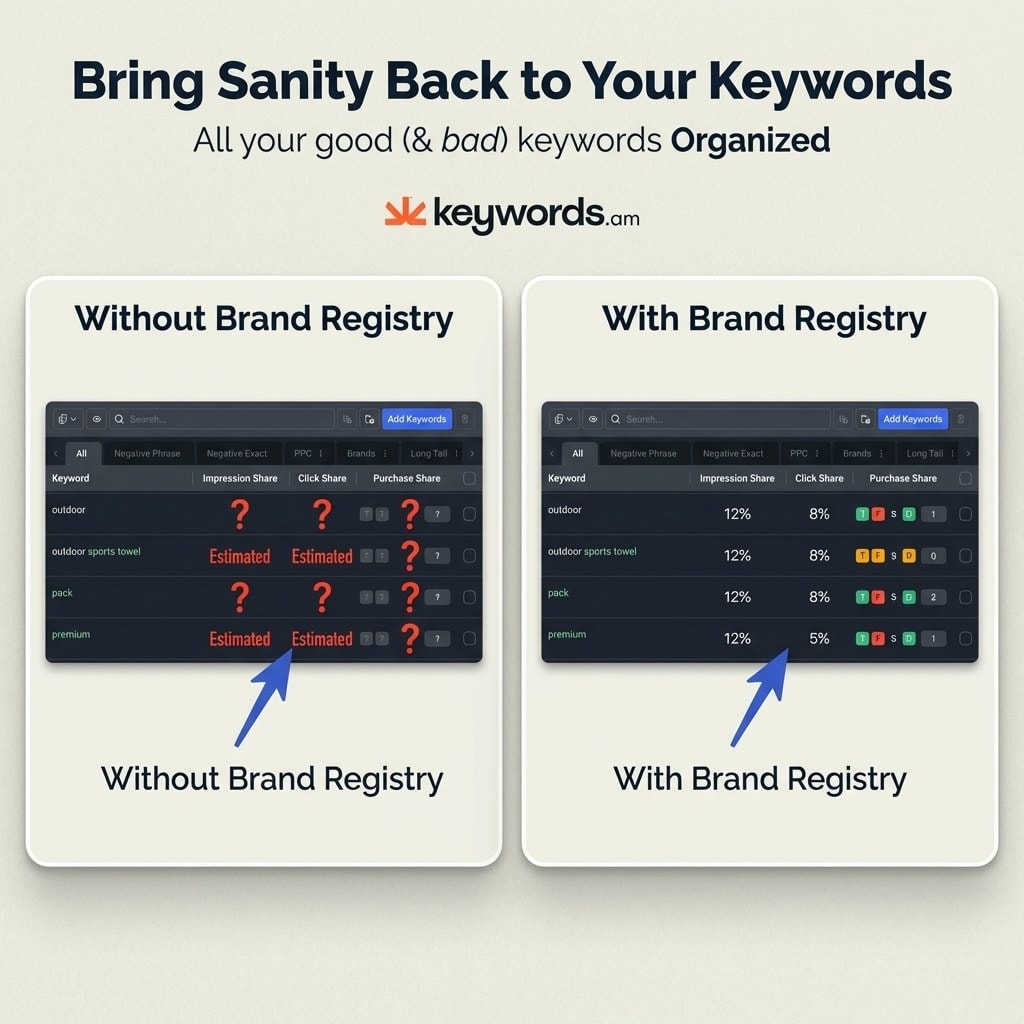
Search Query Performance (SQP)
SQP is the dashboard sellers talk about the least but should use the most. For every search term tied to an ASIN, it breaks down four metrics. Impression share tells you how often your product shows up for that term. Click share shows what percentage of clicks you’re capturing. Cart-add share tracks how many shoppers put your product in their cart. Purchase share reveals your actual slice of sales from that query.
That last metric changes everything about keyword prioritization. Instead of chasing high-volume terms that may not convert, sellers can see which queries actually drive revenue. The Search Query Performance guide breaks these metrics down in full detail.
Search Catalog Performance
This dashboard benchmarks your catalog against the broader category. If a specific ASIN underperforms on conversion rate or click-through rate relative to the category average, you’ll see it here. It’s a fast way to spot products that need attention.
Top Search Terms
This report lists Amazon’s actual most-searched queries in any category, ranked by search volume with click-through data attached. If you’ve ever wondered what shoppers in your niche type into the Amazon search bar most often, this is the answer. No estimation involved.
Market Basket Analysis
Market Basket Analysis reveals what customers buy alongside specific products. This data highlights cross-sell opportunities and exposes competitor sales patterns. Sellers use this for competitive analysis to understand bundle potential and targeted advertising campaigns.
Data Point |
Without Brand Registry |
With Brand Registry (Brand Analytics) |
|---|---|---|
Search volume |
Third-party estimates |
Actual Amazon search frequency ranking |
Click data |
Not available |
Click share per search term per ASIN |
Purchase data |
Not available |
Purchase share per search term |
Category trends |
Third-party samples |
Amazon’s own Top Search Terms |
Competitor clicks |
Not available |
Which ASINs capture clicks on your keywords |
Basket analysis |
Not available |
Co-purchased products and patterns |
Having the data is step one. Putting it to work for listing optimization is step two.
How do you use Brand Registry keyword data for listing optimization?
Connect Brand Analytics SQP data to a keyword tool like Keywords.am, identify high-purchase-share terms, and optimize listings using the TFSD framework for Title, Features, Search Terms, and Description.
Enroll in Brand Registry and access Brand Analytics through Seller Central.
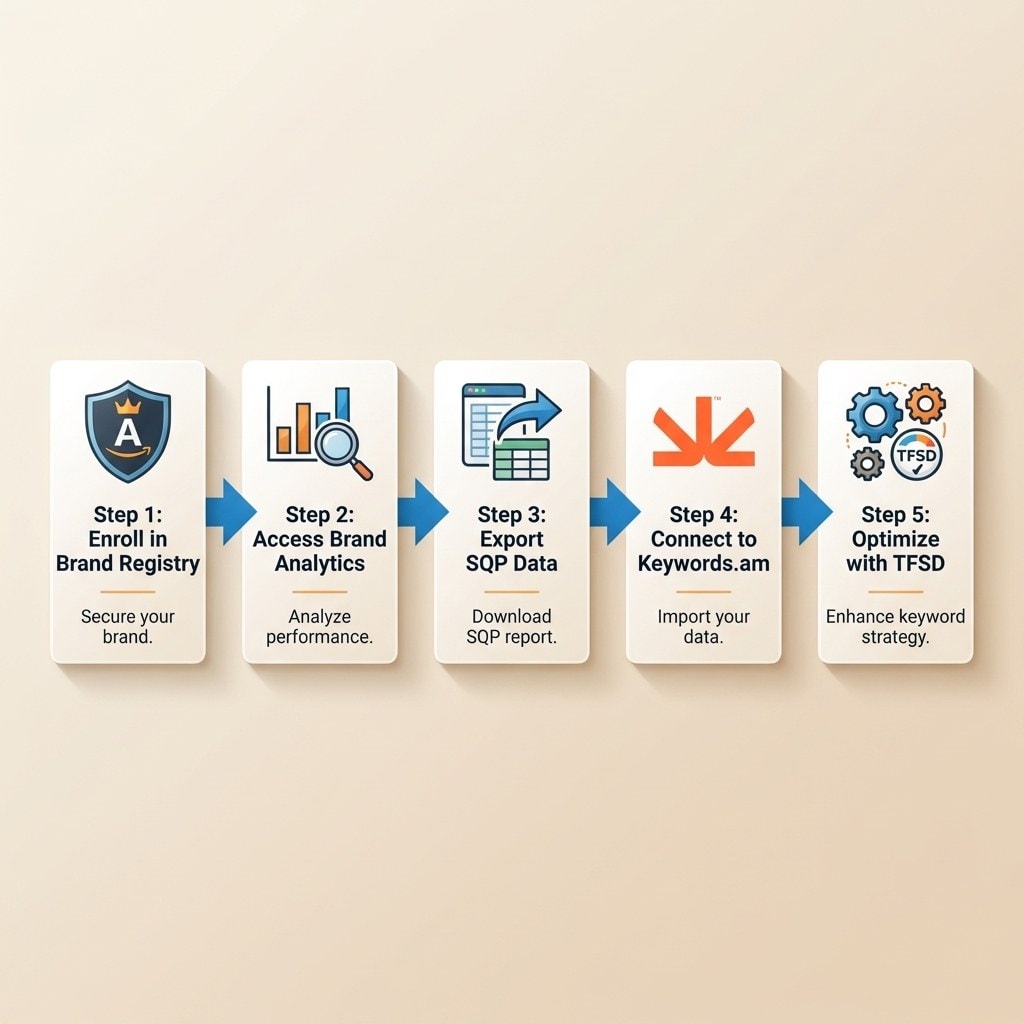
Open the Search Query Performance dashboard and look for a specific pattern: keywords where purchase share is high but impression share is low. Those are your golden opportunities. The product converts when shoppers find it, but it doesn’t show up often enough for that query.
Feed that exported SQP data into the Brand Analytics integration from Keywords.am. The platform cross-references SQP metrics with keyword priority scoring to flag which terms deserve the most prominent listing space based on real sales potential.
Then apply the TFSD Framework to place those high-priority keywords in the right spots: Title, Features, Search Terms, and Description. Getting placement right ensures Amazon’s algorithm recognizes the relevance. A full listing optimization strategy covers keyword density and placement in more detail.
Don’t treat this as a one-time exercise. Check the SQP dashboard weekly to see how impression share and click share shift after each round of optimization.
Brand Analytics data also transforms PPC campaign strategy.
How does Brand Registry improve PPC keyword selection?
Brand Registry grants Sponsored Brands ad eligibility and provides SQP purchase-share data that identifies which keywords convert into sales, replacing guesswork in PPC targeting.
Only enrolled members can run Sponsored Brands ads, the format that puts your logo, a custom headline, and product selection at the top of search results. Without enrollment, this entire ad type is off the table.
The SQP connection to PPC is straightforward. Take the purchase share data from Brand Analytics and use it to pick your ad targets. If a keyword has high purchase share but low impression share, that’s where ad spend makes the biggest impact. You’re bidding on terms already proven to convert rather than running broad match campaigns and hoping. A refined PPC keyword strategy built on first-party data outperforms guesswork every time.
SQP also reveals which competitor ASINs capture clicks on your target keywords. That’s conquest intelligence: if an inferior product grabs clicks on a high-converting term, you’ve found a prime advertising target.
Even with these advantages, many sellers make avoidable mistakes during and after enrollment.
What are the most common Brand Registry mistakes?
The biggest mistakes are applying with an unsupported trademark, not claiming existing listings after enrollment, and ignoring Brand Analytics data after the IP tools are configured.
Applying with an unsupported trademark. If the IP office isn’t on Amazon’s approved list, the application gets rejected. Always check the eligible IP offices before filing.
Skipping brand name variations. Many sellers only add the parent brand and forget sub-brands or alternate spellings. That leaves protection gaps. Include every variation upfront.
Not claiming existing listings. This catches people off guard. Enrollment doesn’t automatically connect your old product listings to the registered brand. You have to claim them manually through Seller Central, or the tools won’t apply to those ASINs.
Ignoring Brand Analytics. By far the most common and most expensive error. Sellers configure IP protection, close the tab, and never look at the analytics dashboards. The first-party keyword data sits there unused while they keep paying for third-party estimates that can’t match what Amazon provides for free.
Frequently Asked Questions About Amazon Brand Registry
These are the most common questions sellers ask about Amazon Brand Registry enrollment and benefits.
Conclusion
Brand Registry isn’t just an IP tool with a keyword bonus. For sellers who actually use the analytics, it’s the other way around: a keyword data platform that happens to come with IP protection.
- Brand Analytics replaces guesswork. SQP metrics show which keywords drive actual purchases, not estimated traffic.
- The March 2026 UPC mandate makes enrollment urgent for any FBA seller still using manufacturer barcodes.
- High purchase share + low impression share is the signal. Those keywords are converting but not getting enough visibility.
- First-party data beats third-party estimates every time. Brand Registry is the only way to access it on Amazon.
Check your trademark status today. If you hold a registered mark, start the enrollment at brandregistry.amazon.com. If you don’t have a trademark yet, file through USPTO TEAS Plus for $225 to get the process rolling.
After enrollment, connect Brand Analytics SQP data to the Keywords.am analytics integration and start turning first-party search data into optimized listings built on real shopper behavior.




