PPC
Best Amazon Sponsored Products keyword strategy for higher conversions in 2026 (and lower CPCs)
An Amazon Sponsored Products keyword strategy that trims wasted spend, harvests winners from auto to manual, and uses TFSD coverage to lower CPCs.

An Amazon Sponsored Products keyword strategy sits at the center of nearly every profitable ad account, because Sponsored Products still absorbs the majority of ad dollars sellers spend on the platform. Most campaigns bleed budget on keywords the listing was never indexed for in the first place, and that mismatch quietly drags down ROAS month after month.
Without a structured approach, sellers overpay for placements they could win cheaper. They also miss profitable placements they aren’t even eligible for. The frustrating part? Those losses don’t show up in standard reports.
This guide breaks down the keyword harvesting funnel, match type decisions, and negative keyword layering. It also digs into how listing keyword coverage affects Sponsored Products ad relevance, something most other guides skip entirely.
Running Sponsored Brands? Sponsored Brands needs a different keyword approach, with different ad formats and more upper-funnel intent. See our companion guide on Amazon Sponsored Brands keyword strategy for the format-by-format breakdown.
Why does Sponsored Products keyword strategy matter more than other ad types?
Sponsored Products still takes the largest share of Amazon ad dollars, and it converts at roughly 9 to 10% (as of 2025). That combination makes keyword targeting the single highest-ROI lever most sellers can pull.
Buyers click these ads because they appear directly in organic search results. Search results pages carry more than a dozen sponsored slots, and product detail pages hide many more placements deeper in the funnel. Sellers need a tight strategy to capture the right clicks without burning the daily budget before lunch.
Average Amazon CPCs have kept climbing year over year (as of early 2026), making keyword efficiency a survival metric rather than an advanced tactic. High click costs punish unfocused campaign management. Sellers can offset rising ad costs by cleaning up account structure, and the full playbook lives in our guide to Amazon PPC optimization.
High conversion rates only matter if campaigns target the right keywords. So how does SP keyword targeting actually work under the hood?
How does Sponsored Products keyword targeting work?
Two big buckets: automatic targeting (four modes, close match, loose match, substitutes, complements) and manual targeting where sellers pick keywords or products with broad, phrase, or exact match types.
Think of automatic targeting as Amazon’s built-in keyword discovery engine. Close match picks up terms tightly related to the product. Loose match goes wider and finds tangentially related keywords. Substitutes places the ad on competitor product pages. Complements shows the ad on frequently bought together items.
Real example: selling a stainless steel water bottle? Close match fires for “insulated water bottle.” Loose match might trigger on “hydration gear.” Substitutes shows the ad on rival bottle brands. Complements catches “bottle brush” shoppers. Four different angles, four different customer mindsets.
Manual keyword targeting is the opposite, sellers pick every keyword themselves. Broad match casts the widest net, phrase match requires the phrase to appear in order with extra words allowed around it, and exact match is the most restrictive (though it now includes close variants). Get the match type wrong and the daily budget can vanish in minutes.
Amazon typically recommends at least 25 keywords per ad group for enough reach, but quality matters more than raw count. Targeting 25 to 60 relevant keywords per ad group gives solid coverage without stretching the budget across junk terms. Stuff an ad group with hundreds of unproven keywords and the algorithm spreads spend too thin.
| Match Type | Reach | CPC Efficiency | Best For |
|---|---|---|---|
| Broad | Widest | Lowest (more waste) | Discovery, new products |
| Phrase | Medium | Medium | Intent refinement, mid-funnel |
| Exact | Narrowest | Highest (proven terms) | Proven converters, efficiency |
Manual campaigns form the backbone of a profitable account. Review our guide to proper Amazon PPC campaign structure for the layout that supports the funnel below.
Understanding the mechanics is step one. The real strategy involves building a systematic funnel that moves keywords from discovery to guaranteed conversion.
What is the keyword harvesting funnel from auto to manual?
The keyword harvesting funnel uses auto campaigns for discovery, mines Search Term Reports every two weeks, graduates winners with multiple conversions into manual campaigns, and negates them in auto to prevent cannibalization.
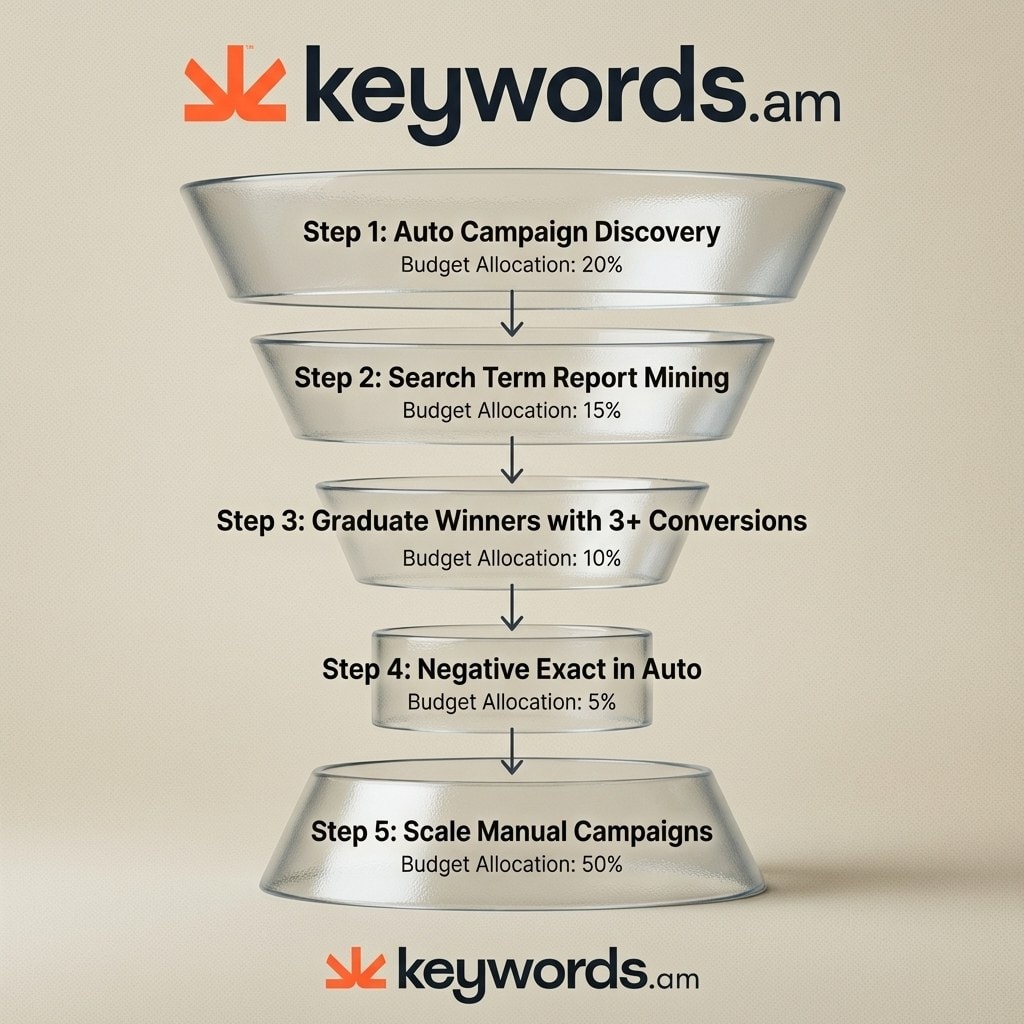
Step 1: Launch a dedicated auto campaign. Turn on all four automatic targeting modes right away. Set a conservative daily budget for the discovery phase. Name it something clear like “Auto_Discovery_[ASIN]” so the dashboard stays readable.
Step 2: Mine Search Term Reports every two weeks. Download the report from Campaign Manager and sort by conversions descending. Focus on customer search terms, not targeted keywords. There’s a big difference between the two.
Step 3: Graduate the winners. Look for search terms with 3+ conversions at target ACOS. Move them directly into a manual exact match campaign. If the target ACOS is 25% and a term has 4 conversions at 22% ACOS, graduate it now. Waiting leaves profitable terms stuck in auto where bids can’t be controlled at the keyword level.
Step 4: Negate graduated terms in auto. Add every graduated keyword as a negative exact match in the original auto campaign. This forces auto to keep hunting for new terms instead of bidding against manual. A proper negative keyword strategy seals these leaks. Skip this step and CPCs jump as the campaigns fight each other in the auction.
Step 5: Scale manual campaigns. Nudge bids on graduated exact match keywords by 10 to 15%. Add a 20 to 25% bid modifier for top-of-search placements. Monitor these terms daily and adjust based on how they perform in the exact match environment.
The funnel handles keyword discovery and graduation in a repeatable cycle. But which match types should manual campaigns actually deploy?
How should sellers choose match types for SP campaigns?
Use broad match for new product discovery at higher ACOS tolerance, phrase match for mid-funnel intent refinement, and exact match for proven converters where efficiency is the priority.
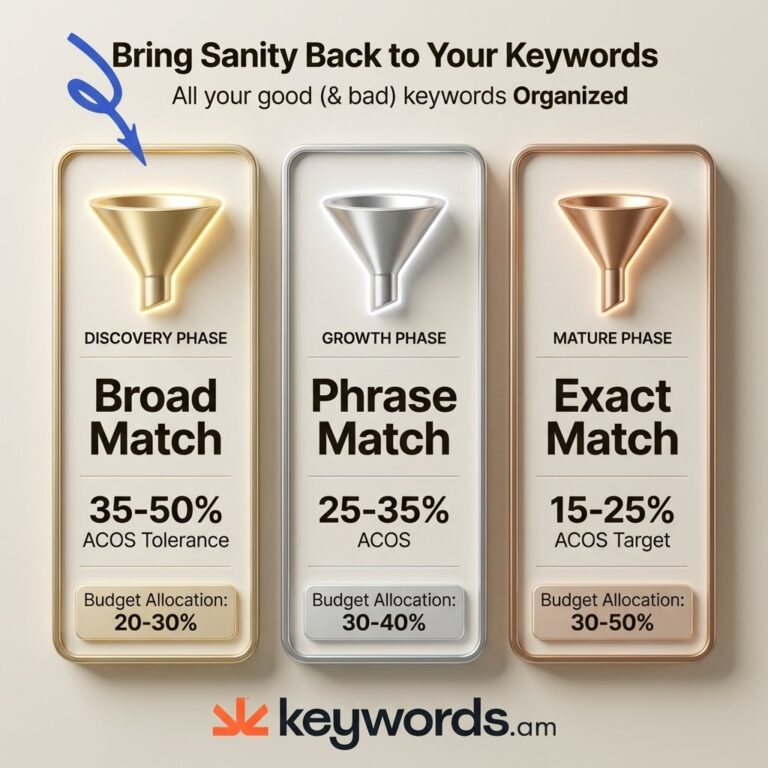
Broad match works best during launch phase and for new ASINs. Accept a 35 to 50% ACOS during the first 30 days, that’s the cost of data collection. Most sellers underuse broad match and miss valuable discovery opportunities. Leaning too hard on exact match during launch prevents sellers from learning how customers actually search.
Phrase match sits between broad and exact as a graduation step. Use it for keywords with 5 to 10 clicks and 1 to 2 conversions, promising but not yet proven. Move from phrase to exact once ACOS drops reliably below 25%. Phrase match holds placements for long-tail queries containing the core root keyword while blocking clearly irrelevant variants.
Exact match is the final destination for proven keywords. Reserve it for terms with 3+ conversions at target ACOS, the profit drivers. One catch: Amazon’s exact match now includes close variants (plurals, misspellings, small reorderings), so it isn’t as laser-focused as the name implies. Run competitive keywords through our Amazon keyword research methodology before throwing big bids at them.
Budget allocation should shift as campaigns mature. The percentages look completely different at each stage.
| Lifecycle Phase | Auto & Broad | Phrase Match | Exact Match |
|---|---|---|---|
| Launch Phase | 60% | 30% | 10% |
| Growth Phase | 30% | 40% | 30% |
| Mature Phase | 10% | 20% | 70% |
Match types dictate how broadly campaigns reach. But a deeper variable can block campaigns from showing regardless of match type.
How does TFSD keyword coverage improve SP ad relevance?
Amazon determines SP ad eligibility partly by scanning listing keyword signals across Title, Features, Search Terms, and Description. If a keyword is missing from those indexed fields, the listing usually won’t qualify to show for that query in Sponsored Products.
Here’s what most sellers miss: Amazon’s ad relevance engine doesn’t just match bids to queries. Before any auction, it checks whether the listing contains keyword signals that align with the search term. If “stainless steel water bottle” doesn’t appear anywhere in the listing’s indexed fields, an SP ad is unlikely to show for that query. Doesn’t matter if the bid is $50. Sellers pour money into bid increases on terms they can’t win because the listing never qualified.
That’s where the TFSD Framework helps. It maps keyword coverage across all four listing sections (Title, Features, Search Terms, Description), and coverage indicators flag which high-volume terms are absent from each field. Sellers run an audit, identify missing terms, and slot them back into the listing. Updated listings then qualify for more SP placements. The TFSD Framework guide walks through the mechanism in detail.
Once those listing gaps close, a compound effect kicks in. Complete keyword coverage tends to produce higher ad relevance. Higher relevance can qualify the product for more SP placements. Amazon rewards relevant listings with better auction positions and lower CPCs. Lower CPCs lift ROAS. It’s a flywheel: the listing feeds the ad engine, and the ad engine feeds the listing with conversion data.
A reverse ASIN lookup shows which keywords competitors rank for organically. The trick: always verify those keywords exist in the listing before adding them to SP campaigns. Combine that with Amazon listing optimization so the listing and campaign stay aligned.
Qualifying for more placements handles the revenue side. Eliminating waste through systematic negative keyword management protects the profit margin.
How does negative keyword layering reduce SP waste?
Negative keyword layering combines campaign-level negatives, ad-group-level negatives, and the negative exact funnel to stop auto and manual campaigns from competing, cutting a large chunk of wasted spend.
Two levels of negative keywords exist, and mixing them up causes problems. Campaign-level negatives kill a term across every ad group in the campaign. Ad-group-level negatives are surgical, they block a term in one group while letting it run in others. Competitor brand names usually belong at the campaign level (loyal brand shoppers rarely convert). Product-specific irrelevant terms belong at the ad-group level.
The negative exact funnel prevents internal competition cold. Every keyword graduated from auto to manual gets added as a negative exact in auto. It’s the most commonly missed step in campaign management, and the consequences are real: without it, auto and manual cannibalize each other and drive up CPCs.
Waste elimination comes down to strict thresholds:
- 20+ clicks, 0 conversions: negate immediately.
- 15+ clicks, ACOS above 2x target: negate or slash the bid.
Treat these as rules, not suggestions. The data tells sellers exactly what stays and what goes.
Review negatives every two weeks alongside the Search Term Report review. Build a master negative keyword list for each product category to speed up future launches. Our Amazon negative keywords guide refines this process further.
With the harvesting funnel, match types, and negative layering in place, sellers can address final edge cases.
Frequently Asked Questions About Amazon Sponsored Products Keyword Strategy
These are the questions sellers ask most often about building and tuning an Amazon Sponsored Products keyword strategy for higher conversions and lower click costs.
How many keywords should each SP ad group have?
Amazon suggests 25+ keywords per ad group, but 25 to 60 usually gives the best mix of reach and budget focus. Start narrow during launch and expand as Search Term Report data surfaces winners. Group keywords by intent so each ad group stays thematically tight.
How often should sellers check Search Term Reports?
A bi-weekly cadence works for most accounts because it captures enough clicks for reliable decisions without letting waste pile up. Weekly reviews often lack statistical significance on lower-spend campaigns, and monthly reviews let losing terms burn cash too long. Pair the review with a negative keyword pass so the loop closes each cycle.
Should sellers run auto and manual campaigns at the same time?
Yes, run both together. Auto keeps hunting for new terms while manual converts the proven ones. The critical piece is negating graduated keywords in auto so the two campaigns don’t fight each other in the auction.
What’s a reasonable ACOS target for Sponsored Products?
It depends on margin, but most established products target 15 to 25% ACOS, and launches often accept 35 to 50% during keyword discovery. Calculate break-even ACOS from the product’s profit margin, if margin is 30%, anything below 30% ACOS is profitable. Our Amazon ACOS guide walks through the math.
How does listing quality affect Sponsored Products performance?
Amazon uses listing keyword signals to help determine SP ad eligibility and relevance. Listings with keyword gaps miss placements and often pay higher CPCs on the ones they do win. Auditing coverage across Title, Features, Search Terms, and Description (the TFSD fields) is the fastest way to find where those gaps live.
Conclusion
A profitable Amazon Sponsored Products keyword strategy isn’t one campaign setting, it’s a system. Treat keyword targeting as isolated from listing optimization and the budget bleeds.
- Listing keyword coverage dictates ad eligibility and relevance.
- The harvesting funnel moves terms from auto discovery into manual profit centers.
- Match type allocation shifts budget as products mature through launch, growth, and mature phases.
- Negative keyword layering stops internal cannibalization before it eats into margins.
- Bi-weekly review cadence keeps the whole system tuned without becoming a full-time job.
The single most useful next step: open the highest-spend ASIN, audit its keyword coverage against the TFSD fields, and add missing keywords to the listing before the next Search Term Report review. Start with the free Amazon keyword tool to see which listing gaps are quietly holding SP performance back, then bring the full workflow into a Keywords.am plan once the process pays for itself.