Keyword Research
The best Amazon keyword audit process for sellers (6 measurable steps)
Run an Amazon keyword audit in 6 measurable steps: pull footprint, find gaps, score coverage, fix TFSD placement, verify indexing, and re-audit.

Most “listing audit” guides bury keywords in a checklist sitting between images and pricing. That’s not an audit, it’s a checkbox. Without a dedicated Amazon keyword audit, you can’t tell whether you’re missing high-volume terms, covering the right fields, or even indexed for the keywords you added.
That translates to lost rank, lost revenue, and invisible products. A keyword-only audit isolates the text fields, scores coverage, and closes the loop with an indexing check most sellers skip entirely.
This guide walks through a six-step process, from pulling the current footprint to re-auditing after fixes. Unlike broad listing reviews, it uses measurable coverage scoring and enforces a verification step before you call any keyword “live.”
What is an Amazon keyword audit (and why isn’t a listing audit enough)?
An Amazon keyword audit evaluates which keywords your listing targets, how well each field covers them, and where gaps exist compared to competitors. A listing audit examines images, pricing, reviews, A+ content, and keywords together. A keyword audit zooms in on keywords only.
| Feature | Listing audit scope | Keyword audit scope |
|---|---|---|
| Focus | Entire product detail page | Text fields and backend terms |
| Goal | Conversion rate optimization | Search visibility and ranking |
| Metrics | CTR, sales velocity, reviews | Keyword footprint, indexing status |
| Complexity | Broad and subjective | Deep, data-driven, structural |
A thorough keyword audit measures four things:
- Keyword footprint: which terms you currently target.
- Field coverage: which TFSD fields contain each keyword.
- Gap analysis: what competitors target that you miss.
- Indexing status: whether Amazon’s algorithm actually reads and ranks those terms.
Why bother separating this from a listing audit? Keywords don’t sit still. New products enter Amazon every day, competitors adjust copy, seasonal search patterns shift, and ranking weights change over time.
Treating keywords as one bullet inside a broader review leaves too much critical data unexamined. According to Amazon Seller Central’s discoverability guidance, search relies heavily on accurate, relevant keyword mapping across the right fields. A dedicated process makes that mapping measurable. Our Amazon listing optimization guide covers the wider page-level work when you’re ready to zoom back out.
When do you need an Amazon keyword audit?
Run a keyword audit when organic rank drops, ACoS rises without bid changes, new competitors appear, seasonal shifts approach, or a product launch plateaus.
Declining organic rank on core keywords. You were on page one, now you’re on page three. Something shifted, either the algorithm or a competitor. Ignoring the slide usually means permanent share loss.
Rising ACoS with stable bids. If PPC costs climb while bids stay flat, organic coverage has likely eroded. You end up paying for visibility that used to come free, which squeezes margin fast. See our Amazon ACoS breakdown for the underlying math.
New competitors entering your niche. A fresh competitor with better keyword coverage can push established listings down within weeks. Auditing early builds a defense before revenue drops show up. A structured Amazon competitor analysis pairs well with the audit here.
Seasonal shift approaching. Pre-season is the time to audit, not during peak. Buyers change queries around holidays, weather shifts, and annual events, and listings that don’t reflect those changes hand sales to competitors who prepared earlier.
Post-launch plateau. The initial algorithmic honeymoon fades. Sales slow, rank stalls, and the launch keyword set often doesn’t match how real buyers actually search once early data comes in.
How do you run an Amazon keyword audit in 6 steps?
A complete keyword audit follows six steps: pull your footprint, find competitor gaps, score coverage, fix placement with TFSD, verify indexing, and re-audit.
Before starting, gather:
- Your target ASINs
- A reverse-ASIN lookup tool or an ASIN audit feature
- Top three to five competitor ASINs
- Brand Analytics access (if you’re Brand Registered, see Amazon Brand Registry)
- Search Term Report from the last 30 to 60 days
Step 1: Pull your current keyword footprint
Extract every keyword your ASIN currently covers across Title, Features, Search Terms, and Description. You can compile this manually from Seller Central or use an audit tool to generate a baseline coverage map.
The outcome is a complete list of every keyword your listing touches and which field it appears in. That baseline is what you measure improvement against. You can’t optimize what you haven’t mapped.
Step 2: Identify keyword gaps with competitor analysis
Run a reverse-ASIN lookup on your top three to five competitors. Their data surfaces high-volume terms they rank for that your listing misses entirely, and that’s the keyword gap. Our reverse ASIN lookup guide explains how to extract this data cleanly.
Prioritize gap keywords by search volume and relevance. High volume but irrelevant terms waste character space and hurt conversion. Group related terms semantically before you place them, so the whole listing reads as one topic rather than a keyword pile. Our keyword research methodology covers clustering in more depth.
Step 3: Score your keyword coverage
Data without interpretation is noise. Score coverage by mapping which keywords appear in which fields and whether that coverage is complete.
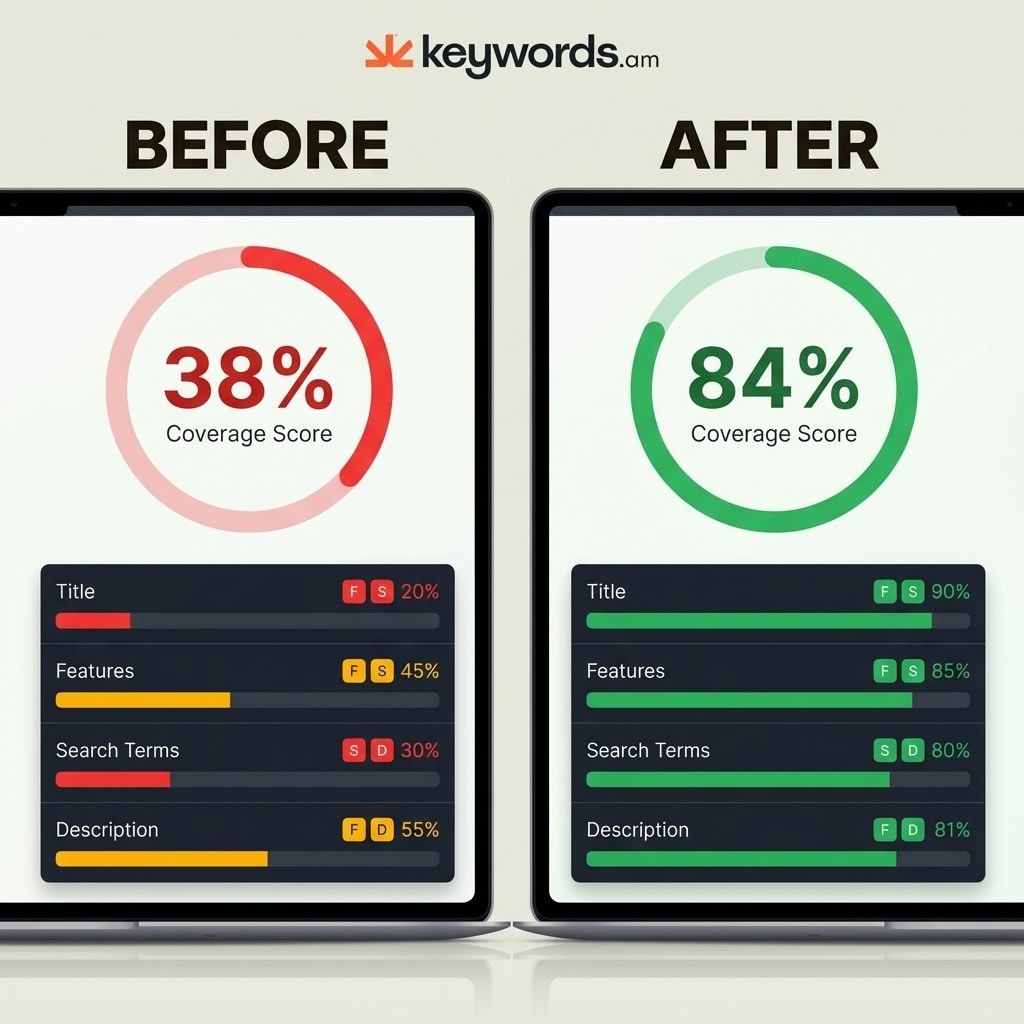
A simple traffic-light model works: green means full coverage in the right field, yellow means partial coverage, red means a priority keyword is missing from a critical field. For example, ASIN B0EXAMPLE might show Title covering 4 of 12 priority keywords, Backend covering 6, and Features covering 3, for a weak 38% score.
Measurable scoring replaces guesswork. Without numbers, sellers rely on intuition, and intuition doesn’t scale across 50 SKUs.
Step 4: Fix the gaps using the TFSD framework
Placement determines ranking outcomes. The TFSD hierarchy dictates where each keyword goes:
- Title: highest-priority keywords go here, since this field carries the most weight. See our product title optimization guide.
- Features: secondary, highly relevant supporting terms spread across bullets. Details in the bullet points guide.
- Search Terms: remaining gap keywords into the backend field. See Amazon backend keywords for byte limits and formatting.
- Description: long-tail variations woven naturally into the body, or into A+ content if you’re brand registered.
Avoid stuffing. Every field has strict byte limits, and readability directly impacts conversion. The TFSD framework guide covers the placement logic in full.

Step 5: Verify indexing after changes
Hitting publish doesn’t mean you’re done. After changes go live, confirm Amazon actually indexed the new keywords. Indexing takes anywhere from 24 hours to about 4 days.
Check manually by searching the exact keyword on Amazon and verifying your ASIN appears. If it doesn’t, type the ASIN alongside the keyword in the search bar to confirm indexing at all. If indexing fails, troubleshoot the listing before assuming the audit worked.
Skipping this step leaves you blind to backend errors, restricted terms, or algorithmic suppression.
Step 6: Re-audit to measure improvement
One audit isn’t enough, it’s a loop. Run the ASIN audit again one to two weeks after changes take effect and compare scores directly.
That same ASIN B0EXAMPLE might improve from 38% to 84% coverage, with red indicators dropping from eight to one. Track rank movement on priority keywords over the next two to four weeks.
| Field | Before audit | After audit | Change |
|---|---|---|---|
| Title | 4 of 12 keywords | 10 of 12 keywords | Poor → Excellent |
| Features | 3 of 15 keywords | 12 of 15 keywords | Poor → Good |
| Search Terms | 6 of 20 keywords | 18 of 20 keywords | Fair → Excellent |
| Description | 2 of 10 keywords | 8 of 10 keywords | Poor → Good |
| Total score | 38% | 84% | Significant lift |
How often should you audit Amazon keywords?
Audit keywords quarterly as a baseline, monthly for competitive niches, and immediately after rank drops, new competitors, seasonal events, or listing content changes.
| Situation | Audit frequency |
|---|---|
| Stable niche, established listing | Quarterly |
| Competitive or fast-moving niche | Monthly |
| Rank drop on core keywords | Immediately |
| New competitor enters top 10 | Within 1 week |
| Seasonal event approaching | 4-6 weeks before peak |
| After any listing content change | 1-2 weeks after change |
A single audit fixes today’s problems. Continuous auditing protects next quarter’s revenue. In saturated markets, competitors tweak listings constantly, and your coverage footprint has to adapt at a similar pace.
What are the most common Amazon keyword audit mistakes?
The biggest audit mistakes are chasing volume over relevance, duplicating keywords across TFSD fields, ignoring backend search terms, and skipping indexing verification.
- Chasing volume over relevance. A keyword with 50,000 monthly searches means nothing if it doesn’t match your product. Irrelevant traffic tanks conversion rate, which signals poor performance to the ranking algorithm.
- Duplicating keywords across TFSD fields. Repeating the same term in Title, Features, and Backend wastes bytes. Each field should add new coverage, not echo the last one.
- Ignoring backend search terms. Many sellers focus on Title and Bullets while leaving the backend empty or filled with irrelevant terms. As of 2025, that backend field (roughly 250 bytes on most categories) is prime space for long-tail variations and misspellings that don’t fit customer-facing copy.
- Changing titles too frequently. Repeated title edits in short windows can trigger review or suppression. Batch major edits and deploy them together instead of tinkering weekly.
- Not verifying indexing after edits. A keyword placed in a backend field only holds value if Amazon actually reads and indexes it. Skip verification and the whole audit becomes theoretical.
- Treating the audit as a one-time event. Keywords, competitors, and buyer behavior change constantly. A single audit is a snapshot, not a system.
Pair the audit with negative keyword hygiene on the PPC side. Our negative keywords guide explains how organic gaps and paid waste often trace back to the same root cause.
Frequently Asked Questions About Amazon Keyword Audits
How long does a full Amazon keyword audit take per ASIN?
A thorough audit for a single ASIN takes 30 to 60 minutes with the right tooling. Bulk audits across multiple ASINs can run 2 to 4 hours depending on catalog size and how deep you go on competitor mapping.
Can I run a keyword audit without Brand Registry?
Yes. You still have access to your Search Term Report, your own listing fields, and reverse-ASIN data on competitors. Brand Analytics adds useful search-frequency data if you have it, but the core six-step process runs fine without it.
How is a keyword audit different from an SEO audit?
An SEO audit on Amazon is functionally the same thing, since Amazon SEO lives almost entirely inside the listing text fields. It’s very different from Google SEO, which factors in backlinks, technical signals, and off-page authority. Our Amazon SEO vs Google SEO comparison covers the split.
Does a keyword audit help with PPC performance?
Yes. Stronger organic coverage on core terms cuts the paid traffic you need to buy for the same keywords, which usually lowers ACoS and TACoS. See our TACoS guide for how organic and paid interact on the P&L.
Should I audit variations separately or as a parent listing?
Audit at the parent level first, since the parent title and bullets carry most of the indexing weight. Then check each child variation for size-, color-, or flavor-specific keywords that only apply to that child.
Conclusion
- A keyword audit is not a listing audit, it’s a focused, measurable process for text-field coverage and indexing.
- The six-step loop (pull, gap, score, place, verify, re-audit) turns random optimization into a repeatable system.
- Coverage scoring hands you a concrete number to track instead of a gut feeling.
- Regular audits prevent the slow rank decay caused by competitive shifts and seasonal changes.
- Skipping indexing verification undoes the whole process, so treat that step as mandatory, not optional.
Pull up one critical ASIN and run step one right now. Extract the current keyword footprint so you know exactly where coverage stands before you change anything. Start with our free Amazon keyword tool to generate a baseline, then close the gaps from there.