Listing Optimization
The best Amazon Brand Registry guide (and the keyword data you're missing)
Amazon Brand Registry unlocks Brand Analytics keyword data most sellers ignore. Get enrollment steps, costs, and the SQP data that beats third-party tools.

Over a million brands have enrolled in Amazon Brand Registry since 2017, and almost all of them signed up for one reason: stopping counterfeits. What most sellers miss is that the program’s most valuable feature isn’t IP protection at all. It’s the first-party keyword data that comes with it.
The problem this guide fixes: sellers spend hundreds on trademarks, enroll, configure a few IP tools, then close the tab and go back to paying third-party services for estimated search volumes. Meanwhile, Brand Analytics is sitting inside Seller Central with real Amazon shopper behavior attached to every ASIN they own.
Below covers enrollment requirements, the application process, and the Brand Analytics ecosystem that makes Amazon Brand Registry worth far more than a defensive shield.
What is Amazon Brand Registry and why does it matter?
Amazon Brand Registry is a free enrollment program that gives brand owners intellectual property protection tools plus access to Brand Analytics, Amazon’s first-party keyword and search data platform.
Think of it as three benefits stacked together. Sellers get IP protection, brand-building features like A+ Content and Storefronts, and something most guides gloss over: deep data access. Amazon has publicly said that infringement reports drop dramatically after enrollment (its most cited figure has been around 99%). The defensive side works.
Brand Analytics is what changes the picture. Third-party keyword tools rely on autocomplete scraping or clickstream sampling, so their volumes are estimates. Brand Analytics shows what Amazon shoppers actually search, click, and buy, straight from Amazon’s own logs. That’s a different category of data.
Getting enrolled requires an active trademark, and the process is more straightforward than most sellers assume.
What are the requirements and costs for Brand Registry enrollment?
The program requires an active registered trademark, or in some cases a pending application, from a supported IP office. Amazon charges no enrollment fee. The only cost is the trademark filing itself.
You’ll need a trademark that’s either registered or pending from an Amazon-accepted IP office. The main ones are USPTO, EUIPO, UKIPO, CIPO, and JPO. If you’ve gone through Amazon’s IP Accelerator program, a pending application typically qualifies too.
Enrollment itself is free. The real spend is the trademark filing, which USPTO lists in the range of roughly $250 to $400 per class depending on the filing option (as of 2025). Verification then usually takes two to ten business days.
| Requirement | Details |
|---|---|
| Trademark | Registered or pending from a supported IP office |
| Amazon Fee | $0 (free enrollment) |
| Trademark Cost | Approx. $250 to $400 per class (USPTO, as of 2025) |
| Verification Time | 2 to 10 business days |
| Brand Name | Must appear on products or packaging |
| Account Type | Professional Seller or Vendor account |
Word marks and design marks with text elements are accepted. Pure design-only marks without any text often get rejected. With requirements clear, the enrollment portal takes about 15 minutes to work through.
How do you enroll in Brand Registry step by step?
Enrollment takes three steps: create an account at brandregistry.amazon.com, submit trademark details, and verify through a code Amazon sends to the trademark office contact.
Go to brandregistry.amazon.com and sign in with your Seller Central credentials. Click “Enroll a new brand” to start.
Type your brand name exactly as it appears on the trademark certificate. Pick the trademark office from the dropdown and enter the registration or serial number. Amazon then sends a verification code to the contact listed on the public trademark record.
One step most sellers skip: after approval, claim your existing product listings under the brand. Add every brand variation too, including sub-brands and alternate spellings. ASINs don’t automatically associate with the registered brand, so this manual step matters.
Most sellers head straight for IP tools after approval. The bigger advantage sits in the Brand Analytics tab.
What are the standard Brand Registry benefits?
Brand Registry provides IP protection tools, enhanced listing features like A+ Content and Sponsored Brands, and access to Brand Analytics dashboards with first-party search data.
| Benefit | What It Does | Why It Matters |
|---|---|---|
| Report a Violation | Flag IP infringement and counterfeits | Large drop in reported infringement |
| Transparency Program | Item-level authentication codes | Blocks counterfeit units at fulfillment |
| A+ Content | Rich media product descriptions | Typical 5 to 10% conversion lift |
| Sponsored Brands | Brand-level PPC ads with logo and headline | Only available to enrolled members |
| Amazon Storefronts | Custom brand landing page | Multi-page shopping experience |
| Amazon Vine | Early reviewer program | Generates reviews for new products |
| Brand Analytics | First-party search and purchase data | The keyword data advantage covered next |
Sellers combine A+ Content optimization with the standard listing optimization workflow to lift conversion, and use competitor analysis alongside IP tools to spot unauthorized sellers on their ASINs.
The first six benefits are covered everywhere. Brand Analytics is the one most sellers skip, and it changes the entire approach to keyword research.
How does Brand Registry give you access to first-party keyword data?
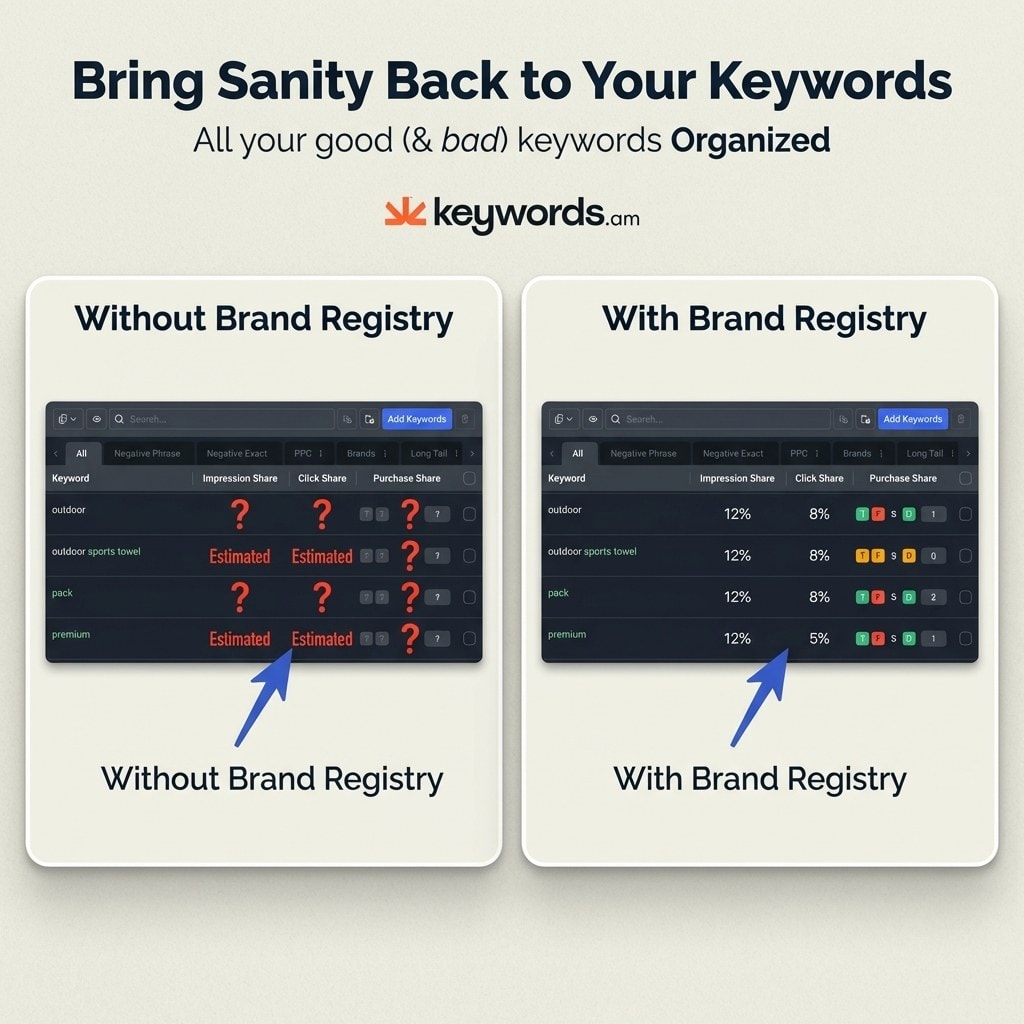
Brand Registry grants access to Brand Analytics, Amazon’s dashboard of actual search query data including impression share, click share, cart-add share, and purchase share for every keyword driving traffic to products.
Third-party keyword tools pull numbers from browser extensions, autocomplete scraping, or clickstream panels. Those are estimates. Brand Analytics shows what Amazon shoppers actually search for, click on, and buy. One is extrapolation, the other is the source. That difference matters when you’re choosing which keywords to build a listing around, as the Amazon SEO vs Google SEO comparison makes clear.
Search Query Performance (SQP)
SQP is the dashboard sellers talk about least and should use most. For every search term tied to an ASIN, it breaks down four metrics:
- Impression share: how often your product shows up for that term
- Click share: percentage of clicks you’re capturing
- Cart-add share: how many shoppers add your product to cart
- Purchase share: your actual slice of sales from that query
Purchase share changes keyword prioritization completely. Instead of chasing high-volume terms that may not convert, you can see which queries actually drive revenue for you specifically.
Search Catalog Performance
This dashboard benchmarks your catalog against the broader category. If an ASIN underperforms on conversion rate or click-through relative to the category average, you’ll see it here.
Top Search Terms
This report lists Amazon’s actual most-searched queries in any category, ranked by search frequency with click-through data attached. No estimation, no scraping. It’s what shoppers are typing, ordered by how often they type it, which is the closest thing Amazon publishes to true Amazon search volume.
Market Basket Analysis
Market Basket Analysis shows what customers buy alongside specific products. Useful for cross-sell planning, bundle ideation, and understanding competitor purchase patterns.
| Data Point | Without Brand Registry | With Brand Registry (Brand Analytics) |
|---|---|---|
| Search volume | Third-party estimates | Amazon’s own search frequency ranking |
| Click data | Not available | Click share per search term per ASIN |
| Purchase data | Not available | Purchase share per search term |
| Category trends | Third-party samples | Amazon’s Top Search Terms report |
| Competitor clicks | Not available | Which ASINs capture clicks on your keywords |
| Basket analysis | Not available | Co-purchased products and patterns |
Having the data is step one. Putting it to work is step two.
How do you use Brand Registry keyword data for listing optimization?
Export Brand Analytics SQP data, identify keywords with high purchase share but low impression share, and rebuild listings using the TFSD framework across Title, Features, Search Terms, and Description.
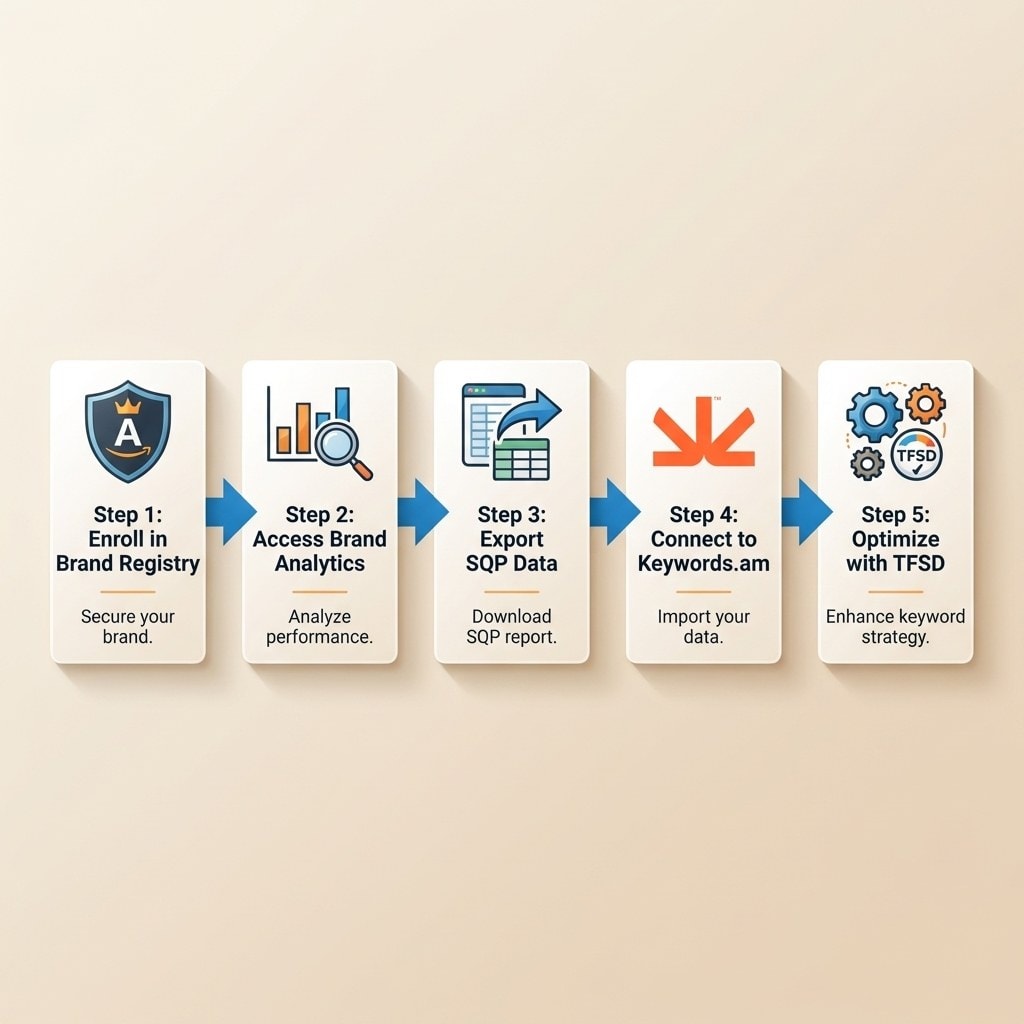
Open the Search Query Performance dashboard and look for one specific pattern: keywords where purchase share is high but impression share is low. Those are your golden opportunities. The product converts when shoppers find it, but it isn’t showing up often enough for that query.
Feed exported SQP data into Keywords.am. The platform cross-references SQP metrics with keyword scoring to flag which terms deserve the most prominent listing real estate based on real sales potential, complementing a reverse ASIN sweep on competitors.
Then apply the TFSD Framework to place those high-priority keywords in the right spots. Title gets the highest-purchase-share terms, bullet points reinforce and expand context, backend keywords catch relevant variants, and the description supports the rest. The full product title optimization workflow covers where each keyword type belongs.
Don’t treat this as a one-time exercise. Check SQP weekly to see how impression and click share shift after each optimization pass.
Brand Analytics also transforms PPC strategy.
How does Brand Registry improve PPC keyword selection?
Brand Registry unlocks Sponsored Brands ad eligibility and provides SQP purchase-share data that identifies which keywords actually convert, replacing guesswork in PPC targeting.
Only enrolled members can run Sponsored Brands ads, the format that puts your logo, a custom headline, and product selection at the top of search results. Without enrollment, that ad type is off the table entirely.
The SQP-to-PPC connection is direct. Use purchase share to pick your ad targets. Keywords with high purchase share but low impression share are where ad spend has the biggest impact, because you’re bidding on terms already proven to convert for your ASIN. That approach usually improves ACoS and TACoS faster than broad-match discovery campaigns. A tighter PPC optimization plan and cleaner campaign structure both start with this kind of data.
SQP also shows which competitor ASINs capture clicks on your target keywords. That’s conquest intelligence: if an inferior product is grabbing clicks on a high-converting term, you’ve found a prime advertising target. Layering in negative keywords then trims spend on the queries SQP shows aren’t buying.
Even with these advantages, sellers make avoidable mistakes during and after enrollment.
What are the most common Brand Registry mistakes?
The biggest errors are applying with an unsupported trademark, not claiming existing listings after enrollment, and ignoring Brand Analytics once IP tools are configured.
- Applying with an unsupported trademark. If the IP office isn’t on Amazon’s approved list, the application gets rejected. Check eligible offices before filing.
- Skipping brand name variations. Many sellers add only the parent brand and forget sub-brands or alternate spellings. That leaves protection gaps.
- Not claiming existing listings. Enrollment doesn’t automatically connect old product listings to the registered brand. You have to claim them manually, or the tools won’t apply to those ASINs.
- Ignoring Brand Analytics. The most common and most expensive error. Sellers configure IP protection, close the tab, and never open the analytics dashboards while continuing to pay for third-party estimates that can’t match Amazon’s own data.
Frequently Asked Questions About Amazon Brand Registry
How much does Amazon Brand Registry cost in 2026?
Brand Registry enrollment itself is free. The only cost is trademark registration, which runs roughly $250 to $400 per class through the USPTO as of 2025. Amazon doesn’t charge any additional fees to enroll or maintain the brand.
Can you sell on Amazon without Brand Registry?
Yes, but sellers without Brand Registry lose access to Brand Analytics keyword data, A+ Content, Sponsored Brands ads, and Amazon Storefronts. As of early 2026, non-enrolled FBA sellers also face tighter barcode requirements if they’ve been using manufacturer UPCs, which can push them toward FNSKU labeling.
How long does Amazon Brand Registry enrollment take?
After submitting a completed application with an active trademark, Amazon verification typically takes about 2 to 10 business days. The underlying trademark registration through the USPTO usually takes 8 to 14 months on its own, so plan the timeline around that step, not enrollment.
What trademark types does Amazon Brand Registry accept?
Amazon accepts text-based trademarks (word marks) and design marks that include text. Pure design-only marks without any text elements often don’t qualify. The trademark must come from an Amazon-accepted IP office such as USPTO, EUIPO, UKIPO, CIPO, or JPO.
Does Brand Registry give you a Buy Box advantage?
No. Brand Registry doesn’t directly influence Buy Box eligibility. The Buy Box algorithm weighs price, fulfillment method, seller performance metrics, and inventory availability, not brand enrollment status.
Conclusion
Brand Registry isn’t just an IP tool with a keyword bonus. For sellers who actually use the analytics, it’s the reverse: a first-party keyword data platform that happens to ship with IP protection.
- Brand Analytics replaces guesswork. SQP shows which keywords drive real purchases, not estimated traffic.
- High purchase share plus low impression share is the signal. Those keywords are already converting but aren’t visible enough.
- First-party data beats third-party estimates. Brand Registry is the only route to it on Amazon.
- Sponsored Brands and A+ Content are locked behind enrollment, so ad reach and conversion tools both depend on it.
- Enrollment costs nothing. The trademark is the only real expense.
Check your trademark status today. If you hold a registered mark, start enrollment at brandregistry.amazon.com. If you don’t, file through USPTO to get the process moving. Once you’re in, pair Brand Analytics SQP data with the free Amazon keyword tool or a full Keywords.am plan and start turning first-party search data into optimized listings built on real shopper behavior. Ready to skip the guesswork? Start with Keywords.am.