

📑 Table of Contents
- Why do most Amazon PPC audits miss the biggest source of wasted spend?
- What is Audit Step Zero and how does listing keyword coverage affect PPC?
- How should you audit your Amazon PPC campaign structure?
- How do you audit the Amazon Search Term Report using the 4-bucket framework?
- What should a bid and budget audit cover for Amazon PPC?
- How do you run a negative keyword audit on Amazon?
- How does the PPC-to-listing feedback loop improve future campaigns?
- Frequently Asked Questions About Amazon PPC Audits
- Conclusion
⚡ TL;DR
- Listing keyword coverage is the step most Amazon PPC audits skip, causing irrelevant auto campaign matches and wasted spend.
- Audit Step Zero uses reverse ASIN lookups to find missing keywords before checking campaign settings.
- Campaign structure audits should isolate auto and manual campaigns while monitoring budget allocations tightly.
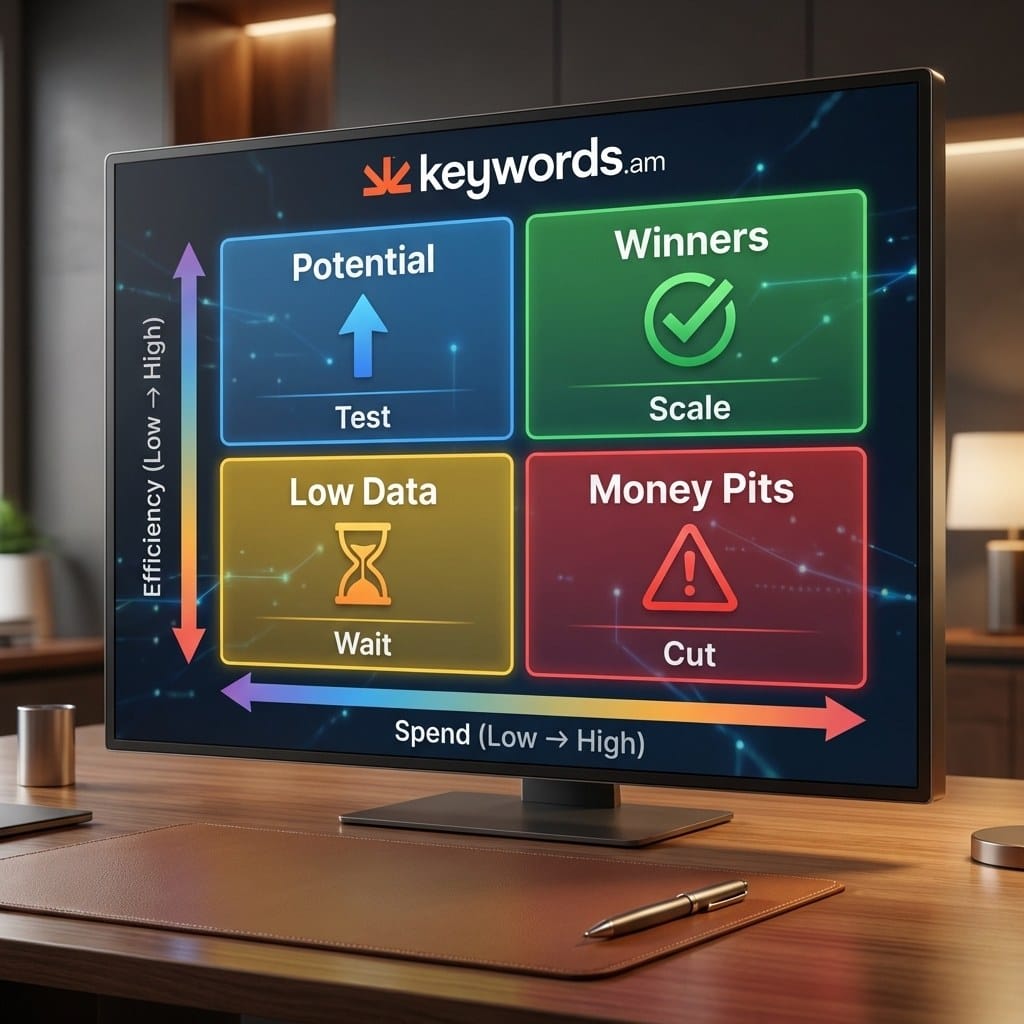
- The 4-bucket framework categorizes search terms into Winners, Potential, Money Pits, and Low Data.
- Break-even ACOS tied to unit economics prevents unprofitable campaign spend on non-brand terms.
- Negative keywords block irrelevant traffic and require careful monitoring to prevent over-negation of converting terms.
- A continuous feedback loop feeds PPC data back into listing improvements to compound results quarterly.
Most PPC audits on Amazon start in the wrong place. Sellers jump straight into campaign manager, tweak bids and budgets, and never bother checking whether the listing underneath actually contains the keywords those campaigns are paying for.
Here’s the thing: auto campaigns read listing content to figure out which search queries to match. When a listing is missing 40-60% of its relevant keywords, irrelevant auto matches start piling up from day one. This amazon ppc audit framework starts with listing keyword coverage before touching campaign settings.
Why do most Amazon PPC audits miss the biggest source of wasted spend?
Most advertising audits only examine campaign settings like bids and budgets while ignoring listing keyword coverage, the root cause of irrelevant auto campaign matches.
A typical PPC checklist runs eight to ten items. Match types, dayparting, bid strategies, budget splits across ad formats. It all gets checked. But scroll down to the actual product page? Almost nobody does that. Sellers end up burning thousands on bid experiments while the listing itself is half-finished, and they’ve never stopped to ask whether the foundation can actually hold traffic.
Here’s how auto campaigns actually work: Amazon’s algorithm reads the title, bullet points, description, and backend search terms to figure out what the product is. That text determines which search queries get matched. So if a garlic press listing never mentions “crusher,” the auto campaign won’t bid on that term. It can’t. The algorithm doesn’t know the product does that. And that’s where money disappears, click by click, on queries that don’t really fit.
It’s a bit like tuning a car engine without checking the fuel tank. No matter how sharp those bids are, they can’t generate sales when the traffic doesn’t match the product. A real amazon advertising audit looks outside campaign manager. It digs into how the algorithm actually matches customer searches to product pages, and whether those pages give it anything useful to work with.
What is Audit Step Zero and how does listing keyword coverage affect PPC?
Audit Step Zero means running a reverse ASIN analysis on your listing to identify missing keywords before reviewing any campaign setting or bid strategy.
Running a competitor analysis spits out a keyword gap report, basically an x-ray for missed revenue. It shows the exact search terms competitors rank for that don’t show up anywhere in the listing. Download it, sort by volume, and there’ll almost always be high-intent keywords in competitor listings that somehow never made it into yours. Each one of those gaps is both an organic ranking miss and a paid targeting blind spot.
A reverse ASIN lookup only works if the right competitors are selected. Pick direct competitors at similar price points. Choosing aspirational top sellers or unrelated categories pollutes the gap data. Once the gap report is ready, cross-reference the top 20 converting terms from the Search Term Report with Amazon keyword indexing status. If a keyword isn’t indexed, no bid adjustment in the world fixes that. Amazon checks whether a word exists in the listing before deciding ad placement. When 30% or more of top-converting search terms aren’t in the listing, campaign optimization alone won’t move the needle.
Once the gaps are identified, the TFSD Framework lays out where each term should land. Put the highest-volume keywords in the Title. Fill the Features with supporting terms. Stuff long-tail variants into backend Search Terms. And weave contextual language through the Description.
Check |
Tool/Method |
Pass Criteria |
|---|---|---|
Keyword gap analysis |
Reverse ASIN lookup |
<20% gap vs top 3 competitors |
Top 20 search terms indexed |
Keyword indexing check |
All 20 indexed |
TFSD distribution |
Listing audit |
All 4 fields optimized |
How long does Step Zero actually take? For one ASIN, about 20 to 30 minutes. Pull a reverse ASIN lookup on three direct competitors, export the gap list, check it against the listing, and flag what’s missing. Keywords.am can automate most of this and hand back a coverage grade, though manual methods work fine too. The part that chews up time isn’t the analysis itself. It’s picking the right competitors to benchmark against.
With listing coverage verified, the audit can move into the campaign structure itself. The foundation is now solid enough to support traffic.
How should you audit your Amazon PPC campaign structure?
Audit campaign structure by reviewing the auto/manual split, match type segmentation, ad format budget allocation, and checking for keyword overlap between campaigns.
First thing: are auto and manual campaigns separated? If they’re tangled together, fix that before anything else. Then check whether manual campaigns split by match type, with exact, phrase, and broad living in their own ad groups. When they’re all jumbled in one group, broad match gobbles the budget before exact terms even get a chance. Sellers who skip this separation can’t control where a single dollar goes.
Proper Amazon PPC campaign structure dictates clear budget allocation benchmarks:
Ad Format |
Budget Share |
Best For |
|---|---|---|
Sponsored Products |
85-95% |
Direct conversion, search result placement |
Sponsored Brands |
5-10% |
Brand awareness, headline search ads |
Sponsored Display |
0-5% |
Retargeting, audience-based targeting |
If you’re relatively new to PPC, lean toward 95% on Sponsored Products. It’s where the conversions happen, and the returns are the most predictable. Sponsored Brands demand better creative assets and more testing runway. Watch out for branded and non-branded terms sharing a campaign, because that makes ACOS look deceptively low and hides what customer acquisition actually costs.
Next, look for keyword overlap. If the same term is targeted in three different campaigns, those campaigns bid against each other in the same auction, inflating CPCs for no good reason. This is Amazon keyword cannibalization in action. It happens constantly when sellers run a broad auto campaign alongside manual campaigns without adding negative exact keywords to prevent the overlap.
One last structural check: naming conventions. Something like “ProductName_SP_Exact_Brand” tells you everything at a glance: product, ad type, match type, strategy. Messy naming turns every audit into an archaeology dig. If it takes more than two seconds to identify what a campaign does, the naming needs work.
Campaign structure is the skeleton. The Search Term Report reveals what is actually happening inside those campaigns.
How do you audit the Amazon Search Term Report using the 4-bucket framework?
Audit the Search Term Report by sorting every search term into four buckets: Winners to protect, Potential to scale, Money Pits to cut, and Low Data to monitor.
Start by exporting the last 30 to 60 days of data. In Seller Central, go to Advertising, Reports, Create Report, Sponsored Products, Search term. One gotcha: Amazon can take up to seven days to attribute a sale back to a click, so pulling yesterday’s report gives misleading ACOS figures. With a clean date range, categorize every search term:
- Winners (low ACOS + high spend): Protect them. Move to exact match ad groups if they’re not there already. Verify they are indexed in the listing.
- Potential (low ACOS + low spend): Scale these by increasing bids or adding them to dedicated manual campaigns. These are underexploited opportunities.
- Money Pits (high ACOS + high spend): Cut them with negative keywords or drastic bid reductions. These terms actively drain the budget.
- Low Data (insufficient clicks/conversions): Keep running for two to four more weeks before making decisions.
The Amazon Search Term Report contains the real queries customers typed. Grab the top 10 to 15 terms from Winners and check that every one of them is indexed in the listing. This step is where Audit Step Zero pays off again. If a converting term doesn’t appear in the listing, the seller pays for clicks on a keyword Amazon can’t organically tie to the product. That’s money with no organic upside.
Flag any search terms appearing in both Winners and Money Pits across different campaigns. This signals a campaign structure problem, not a keyword problem. Match type or placement differences cause this variance. A term might convert at the top of search but fail completely on product pages. Check placement reports to confirm before making changes.
One pattern to watch for: branded search terms (containing the brand name) will almost always appear in the Winners bucket. Separate branded and non-branded performance when calculating overall ACOS. Blending the two creates a misleading average that hides poor non-branded performance behind high-converting branded traffic.
Search term data reveals where budget goes. Bid and budget settings determine how much flows there.
What should a bid and budget audit cover for Amazon PPC?
A bid and budget audit covers bid strategy selection, placement modifier effectiveness, daily budget pacing, and break-even ACOS tied to unit economics.
The bid strategy setting alone can waste or save hundreds per month. Amazon gives three choices. “Dynamic bids, down only” is the safe default. Amazon backs off when a click probably won’t convert. “Dynamic bids, up and down” lets Amazon push bids higher on promising clicks, but that can mean 2x the CPC for placements that still don’t convert. Only use this on proven Winners with 30+ days of conversion history. “Fixed bids” hand full control to the seller, which makes them the best option for testing unfamiliar terms and seeing what the real CPC looks like before Amazon’s algorithm gets involved.
Next, check placement modifiers for Top of Search and Product Pages. A lot of sellers crank these up because Top of Search looks good on reports, but here’s what happens in practice: a $1.50 base bid with a 100% modifier means paying $3.00 per click for that single placement. If the conversion rate doesn’t match that premium, it eats through daily budget fast. Before adjusting any modifier, pull a placement report. Compare conversion rates across Top of Search, Rest of Search, and Product Pages. The data usually tells a different story than the default assumptions.
Budget pacing is the other big one. Per Amazon PPC optimization best practices, check whether campaigns are exhausting their daily budget too early. A campaign that runs dry at 4 PM completely misses the 6-10 PM window, which is often when conversions spike. There’s also less competition late at night, so those clicks tend to be cheaper. Look for the “Limited by budget” flag in Campaign Manager. Any campaign hitting 100% utilization consistently either needs more budget or tighter targeting.
How to calculate break-even ACOS
The formula is straightforward: (Sale Price – Cost of Goods – FBA Fees) / Sale Price x 100.
Say a product sells at $29.99. Production runs $8.00 and FBA pick-and-pack fees eat $10.50. That leaves $11.49 before ad spend, putting break-even ACOS at 38%. If a non-brand campaign sits above 38% for a full month, every sale from that campaign loses money.
Metric |
Amount |
|---|---|
Sale Price |
$29.99 |
Cost of Goods |
$8.00 |
FBA Fees |
$10.50 |
Pre-Ad Profit |
$11.49 |
Break-even ACOS |
38% |
Smart sellers don’t aim for break-even. They set target ACOS at 50-70% of break-even to leave real profit margin. In this example, that’s a 19-27% ACOS target on non-brand campaigns.
Bid optimization prevents overpaying. Negative keywords prevent paying for the wrong traffic entirely.
How do you run a negative keyword audit on Amazon?
A negative keyword audit identifies high-ACOS search terms that should be blocked and checks for over-negation that accidentally prevents converting terms from triggering ads.
Start with a simple filter: search terms above break-even ACOS with more than 10 clicks and zero sales. These aren’t borderline calls. They’re straight-up budget drains. Sort by spend descending so the biggest holes get patched first. Adding a negative keyword takes five seconds and stops the bleed immediately. No creative work, no listing updates. Just one click to block a term that’s been burning cash.
Check existing negative lists for over-negation. Seasonality or listing updates can turn a money pit into a winner. A “gift” term might fail in March but convert well in Q4. Using Amazon negative keywords correctly requires distinguishing campaign-level from ad-group-level blocks. Campaign-level negatives block the term everywhere within that specific campaign. Ad-group-level blocks it only where it performs poorly, allowing the term to trigger in other ad groups where it may convert.
Pay attention to match type here. Phrase match negatives block anything containing that word sequence. Negate “red shoes” and “large red shoes” gets blocked too. Exact match is safer because it only blocks that precise term. Getting this wrong kills good traffic. Review the full negative list at least once a quarter, because terms that bombed in Q1 might convert well in Q4. Skipping this check leaves money leaking through keywords that should’ve been cut months ago.
Negative keyword targeting also applies to competitor ASINs. If auto campaigns keep targeting a cheaper competitor product and generating zero conversions, negate that specific ASIN. This is product targeting cleanup, and most sellers ignore it during their ad campaign reviews.
Negative keywords close the leaks. The final step connects everything back to where the audit started.
How does the PPC-to-listing feedback loop improve future campaigns?
The feedback loop works like this: pull top-converting search terms out of PPC data and plug them back into the listing, which lifts both organic ranking and future auto campaign targeting at the same time.
Take the top 15-20 converting search terms and hold them against the listing. If a Winner term doesn’t appear in the title, bullets, or backend, that’s organic ranking sitting there unclaimed. And auto campaigns won’t match it as well going forward either. These terms are the closest thing to a cheat sheet for buyer language. They’re what people actually type before they buy. One thing sellers tend to overlook: the standard description needs keywords too, because A+ content indexing works differently.
Distribute these keywords using a Sponsored Products keyword strategy alongside the TFSD Framework. The biggest winners get Title placement. Supporting terms go into Features. Long-tail stuff fills backend Search Terms. And the Description picks up contextual phrasing. After updating, run keyword indexation checks within 48 hours. Amazon’s index usually refreshes in a day or two, but the only way to confirm the changes stuck is to actually verify indexation.
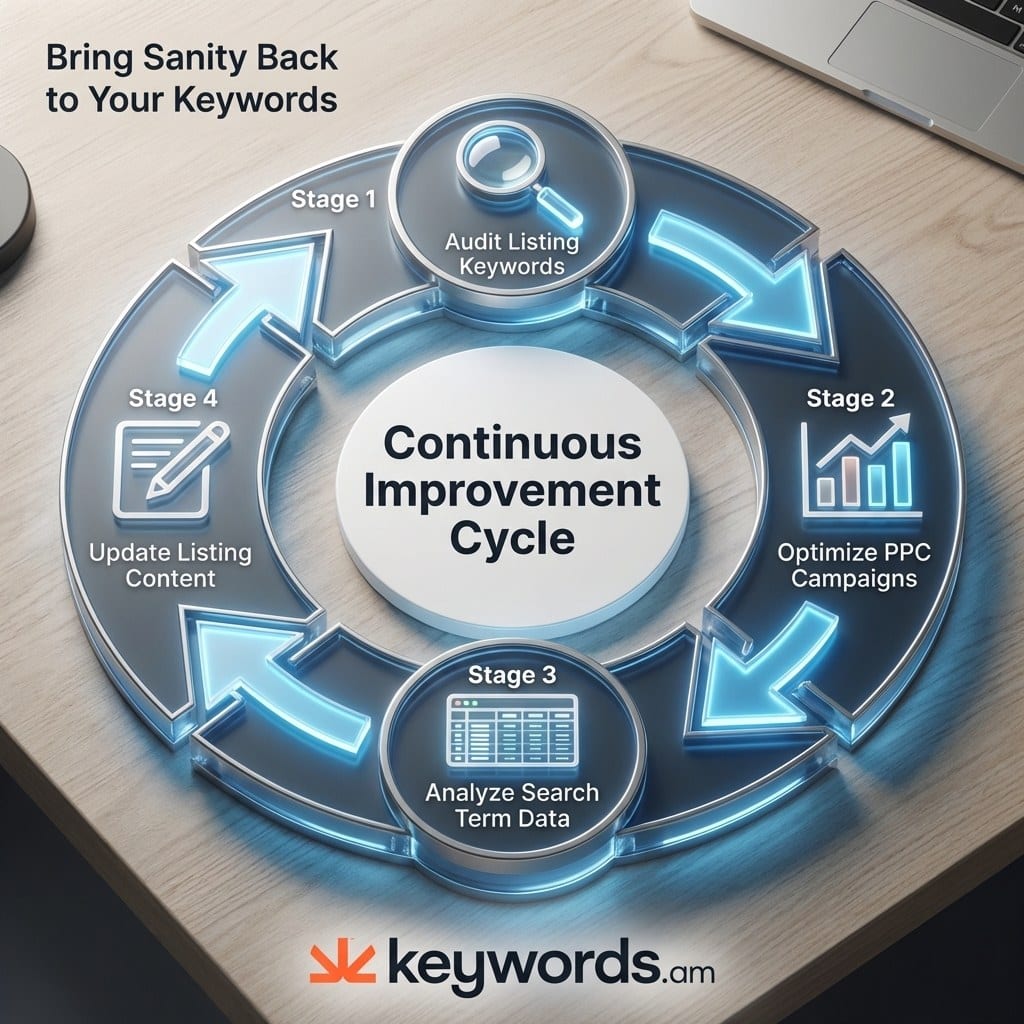
That’s what makes this a compounding cycle. Each quarterly audit fills listing gaps. The improved listing generates better auto campaign matches. Cleaner auto data feeds the next audit with tighter search term reports. Expect the first full audit to take a few hours. By the fourth quarter, it’s a 30-minute check-in. The flywheel effect kicks in because organic rank starts carrying more weight, reducing dependence on high bids over time.
Think of it this way: ad spend becomes market research. Every click generates data about what buyers search for. That data goes back into the listing. A better listing lowers the cost per click. Keywords.am offers one path for running Audit Step Zero. The reverse ASIN lookup and listing audit tool surface the keyword gaps competitors cover that the current listing misses, and the TFSD framework structures where each recovered keyword belongs.
Frequently Asked Questions About Amazon PPC Audits
These are the most common questions sellers ask about auditing their Amazon PPC campaigns.
> Run a full PPC account review quarterly. Review search term reports and negative keywords monthly. Check budget pacing and bid adjustments weekly. The quarterly cadence aligns with seasonal shifts and gives enough data to spot trends.
> ACOS (Advertising Cost of Sale), TACOS (Total ACOS including organic), conversion rate per search term, and budget utilization rate. ACOS shows campaign efficiency, but TACOS reveals whether PPC drives enough organic lift to justify the spend.
> Yes. Sellers with access to their Search Term Report and a reverse ASIN tool can run every step in this framework. An agency adds value through cross-account benchmarks and pattern recognition across hundreds of campaigns, but the audit methodology itself is straightforward.
> Listing quality directly controls auto campaign targeting. Auto campaigns read title, bullet points, description, and backend search terms to match search queries. A listing missing relevant keywords generates irrelevant auto matches and wastes ad budget on traffic that never converts.
> Break-even ACOS is the maximum ACOS where a campaign still generates profit. Formula: (Sale Price minus Cost of Goods minus FBA Fees) divided by Sale Price, multiplied by 100. A product selling at $29.99 with $8 COGS and $10.50 FBA fees has a break-even ACOS of approximately 38%.
Conclusion
The pattern across most PPC audits is clear: they skip the listing. And that’s where the biggest budget waste hides.
- Check the listing before the campaigns. If the listing doesn’t contain the keywords those campaigns target, no bid strategy in the world fixes the problem.
- Don’t skip Audit Step Zero. A reverse ASIN lookup and indexation check surface gaps that campaign tweaks can’t touch.
- Sort search terms into four buckets. Winners, Potential, Money Pits, and Low Data. It replaces gut feelings with a system that tells you exactly what to scale, cut, or wait on.
- Each audit builds on the last one. PPC data goes back into the listing, the listing gets stronger, and the next audit starts from a better baseline than the quarter before.
Run a reverse ASIN lookup against top competitors and check how many of their keywords are missing from the current listing. That specific gap serves as the starting point for the next amazon ppc audit. Use a listing audit tool to structure this data and start Audit Step Zero correctly.




