Amazon Fundamentals
Best Amazon product targeting strategy (and the research step every seller skips)
Amazon product targeting captures browse intent on competitor detail pages. Learn the reverse ASIN research step most PPC guides skip entirely.

Amazon product targeting is one of the fastest ways to capture competitor sales, yet most PPC guides skip the research step that decides whether the campaign profits or bleeds cash. Sellers who allocate ad budget to product targeting without a systematic ASIN discovery workflow tend to attack the wrong listings, competitor pages that are too strong, too irrelevant, or already saturated with defensive ads.
Search result pages have gotten more crowded, and CPC rates on broad terms keep climbing as of early 2026. Product targeting offers an alternative pathway: it puts your product in front of shoppers who are already on a competitor’s detail page, mid-decision. The catch is knowing which detail pages are worth the click cost.
This guide walks through what product targeting is, how to find the right ASINs using reverse ASIN data, how to structure campaigns Amazon’s algorithm can actually optimize, and how to bid without draining your budget in week one.
What is Amazon product targeting and when should sellers use it instead of keywords?
Amazon product targeting places ads on specific product detail pages and category browse pages, capturing shoppers who are browsing competitors rather than searching keywords.
Product targeting runs on a different trigger than standard search campaigns. These ads appear on competitor listings, category hub pages, and related-product carousels. They intercept the buyer during the comparison phase, when someone’s already looking at a product and evaluating it.
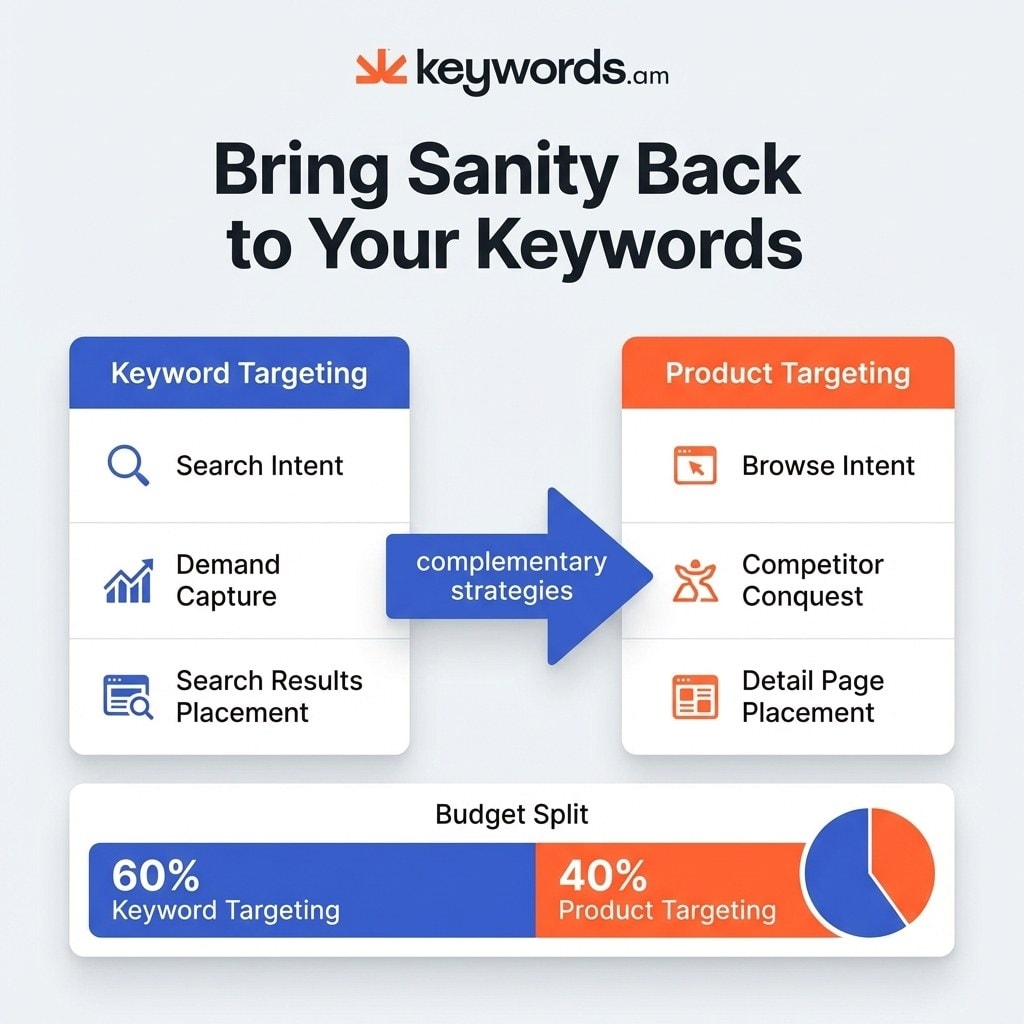
The core distinction between the two approaches is search intent versus browse intent. Keyword campaigns capture search intent, a buyer typing “stainless steel water bottle” wants to see all available options. Product targeting captures browse intent, the buyer is already viewing a specific brand’s listing and evaluating features, reviews, and price. Your ad appears as a relevant alternative.
Sellers should build a proper PPC keyword strategy to capture raw demand, then deploy product targeting for competitor conquest and cross-selling. The two methods work together. Keyword campaigns fill the top of the funnel, and product targeting steals the sale at the bottom.
| Factor | Keyword Targeting | Product Targeting |
|---|---|---|
| Intent Type | Search (active query) | Browse (viewing products) |
| Best For | Demand capture, new-to-brand | Competitor conquest, cross-sell |
| Ad Placement | Search results page | Detail pages, category pages |
| Typical CPC | Category baseline | Roughly 15 to 25% higher than keyword CPC |
| Conversion Signal | Keyword relevance | Product relevance plus price/review advantage |
| Budget Allocation | 60 to 70% of total PPC spend | 30 to 40% of total PPC spend |
Detail page placements sit next to a shopper who’s already picked a candidate product, which is why conversion rates often justify the CPC premium. A well-placed ad on a highly relevant competitor listing intercepts a motivated buyer at the moment of decision.
Product targeting works. But there are two distinct types, and using the wrong one wastes budget fast.
What are the two types of Amazon product targeting?
Amazon offers two product targeting types: ASIN targeting (ads on specific competitor listings) and category targeting (ads across entire product categories with optional refinements).
ASIN targeting is the precision instrument. Advertisers pick exact product identifiers to show ads against, which requires surgical planning and high-conviction data. You need to know exactly why your product will win the click over the specific item the shopper is viewing.
Consider a scenario. You sell a $29 stainless steel water bottle. You identify a competing brand selling a nearly identical bottle for $39 with a mediocre 3.8-star rating. That specific competitor becomes a prime target, and you direct Amazon to place your ad on that exact listing. The shopper sees a cheaper, potentially better-reviewed alternative right below the buy box.
Category targeting is the broader discovery tool. Instead of picking individual listings, you target an entire product classification, and ads appear across thousands of related products. This method generates broad reach but carries real risk of wasted spend if left unrefined.
Amazon provides refinement filters to control category targeting. Sellers can narrow by brand, price bracket, star rating, and Prime eligibility. You might target the broader “Water Bottles” category but refine it to only show ads on products priced $30 to $50 with 4-plus star ratings, so your $29 offering looks like an obvious bargain.
The decision rule is simple. If you have a researched list of ten or more highly vulnerable competitors, use ASIN targeting because the precision yields better conversion rates. If you need to explore a new segment or gather performance data quickly, launch category targeting with strict price and review refinements.
ASIN targeting is the precision instrument, but it requires knowing which ASINs to target. This is where most guides stop, and where the real strategy begins.
How do sellers find the right ASINs to target?
Sellers find high-converting ASIN targets by analyzing keyword overlap with competitors using reverse ASIN tools and mining auto campaign Search Term Reports for converting ASINs.
Every competing guide says to target competitor ASINs but never explains how to identify which competitors are actually worth targeting. Random selection guarantees wasted budget. Without a data-backed method, sellers end up targeting entrenched brand leaders with impenetrable customer loyalty, or irrelevant products with no true audience overlap.
The most effective approach is proactive discovery through a reverse ASIN lookup. This method reveals the exact search terms driving traffic to competing products.
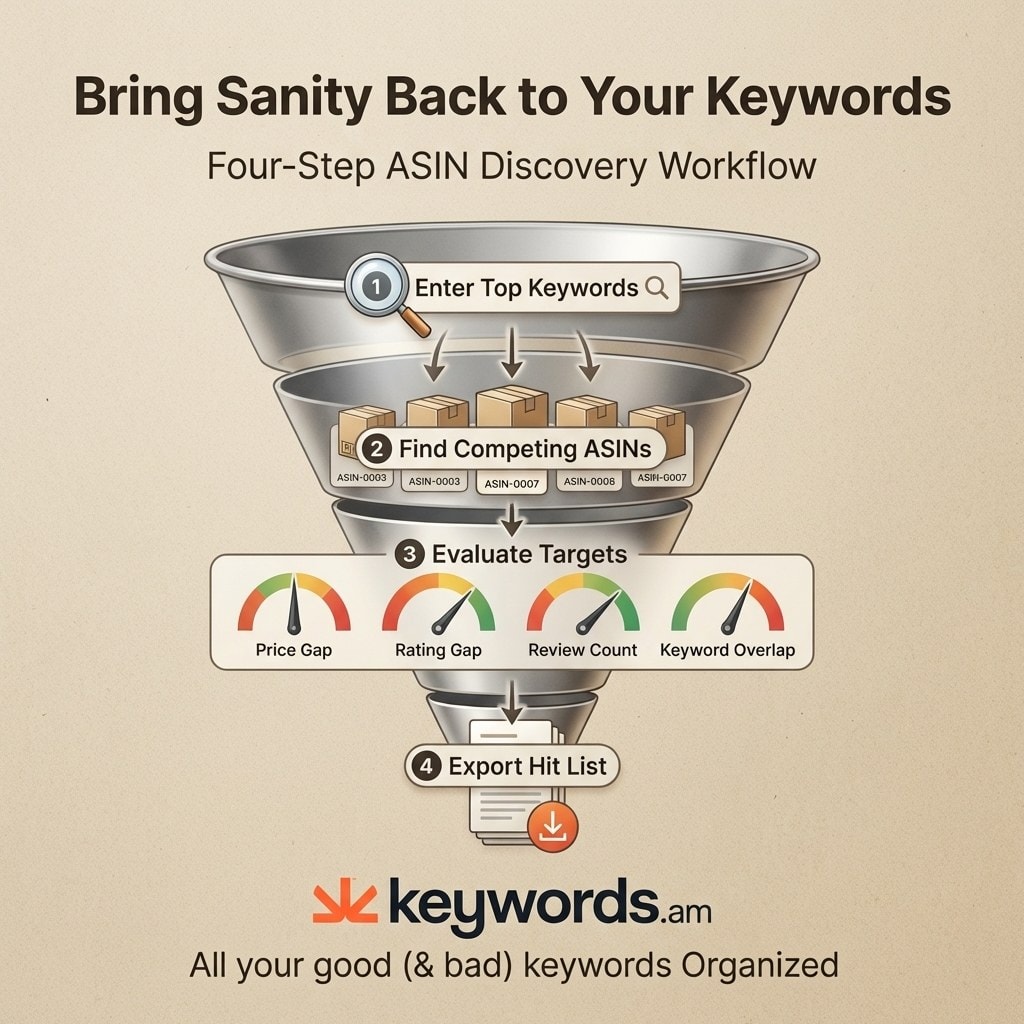
The workflow has four steps:
- Enter your highest-converting search terms into a reverse ASIN tool.
- Identify which specific competitors dominate those same keywords.
- Evaluate targets against four vulnerability filters (price gap, rating gap, review count, keyword overlap).
- Export the qualified list and build campaigns around it.
The evaluation filters separate profitable targets from vanity metrics. Look for a clear price gap where the competitor charges more, a rating gap where their reviews trail yours, low review counts indicating newer products without established social proof, and high keyword overlap indicating their shoppers want features you offer.
Imagine you sell stainless steel bottles. You run your top five keywords through a reverse ASIN tool and the tool identifies four competing products sharing more than 70% keyword overlap. Those competitors are priced 20 to 30% higher with average ratings below 4.2 stars. They immediately become your priority targets. Proper competitor analysis prevents you from attacking listings that are too strong to convert against.
Reactive discovery is a strong secondary method. Mine your automated campaigns regularly, filtering the Search Term Report for entries starting with “b0”. Those entries are ASINs where Amazon has already tested your product and found a match. Filter for any listing that generated at least one sale, and promote those proven winners into your manual campaigns.
This strategy covers both offensive and defensive positioning. Offensive campaigns attack competitor listings to capture their share. Defensive campaigns place ads on your own product pages to prevent rival brands from stealing your detail page real estate. Defensive targeting blocks that avenue of attack on your hero SKUs.
Once sellers have a qualified list, the next question is how to organize those targets into campaigns Amazon’s algorithm can optimize.
How should sellers structure Amazon product targeting campaigns?
Structure Amazon product targeting campaigns by separating offensive and defensive targets, using single-ASIN ad groups for high-value targets, and allocating 60% of budget to proven performers.
Campaign architecture dictates performance. Mixing strategies inside a single campaign confuses the algorithm and dilutes budget control. Sellers should separate offensive (conquest) campaigns from defensive (brand protection) campaigns because they have different goals and need different bidding structures.
Ad group organization demands precision. For your top 5 to 10 highest-value targets, use single-ASIN ad groups. This structure isolates the data, so when an ad group contains one target, you have absolute clarity on performance and granular control over the bid. Lower-priority targets and broad category tests can live in grouped ad groups to simplify management. Good PPC campaign structure prioritizes data visibility on top performers.
| Campaign Goal | Target Type | Ad Group Structure | Bid Strategy | Budget Split |
|---|---|---|---|---|
| Conquest | High-Value ASINs | Single-ASIN | Fixed Bids | 60% |
| Discovery | Broad Categories | Grouped (15 to 20) | Dynamic Down | 40% |
| Defense | Own Brand ASINs | Grouped | Fixed Bids | 10 to 15% |
Budget allocation follows a strict framework. Direct 60% of your product targeting budget to proven, high-confidence targets that have shown profitability. Assign the remaining 40% to testing and discovery campaigns. This ratio keeps reliable revenue drivers fully funded while maintaining a pipeline of new opportunities.
Negative targeting is the primary defense against wasted spend. Exclude products and categories that drain budget without generating sales. A reliable rule of thumb: any target accumulating 10 to 15 clicks without a conversion should be added as a negative. This mirrors the pruning process in a standard negative keywords guide.
These structural rules apply across ad formats. Product targeting works in Sponsored Products, Sponsored Brands, and Sponsored Display. Sponsored Products secure prime detail page placements below the buy box, Sponsored Brands raise awareness across category layouts, and Sponsored Display enables retargeting shoppers who viewed a target listing but didn’t buy.
Structure determines where ads appear. Bidding determines whether they’re profitable.
What bidding strategies work best for Amazon product targeting?
Start product targeting campaigns with “dynamic bids down only” for discovery, then switch to fixed bids for proven performers once conversion data confirms profitability.
The discovery phase calls for a conservative approach. When launching new targets, use dynamic down-only bidding so Amazon can reduce your bid in real time when a click seems unlikely to convert. This protects budget while you gather initial data. Run discovery campaigns for at least one to two weeks before making manual adjustments, since premature optimization kills data collection.
Proven performers need a different strategy. Once a target shows consistent conversion behavior and solid profitability, transition that ad group to fixed bids. Fixed bidding removes Amazon’s algorithmic adjustments and gives you granular control over what you pay per click. That’s how you scale your highest-performing conquest targets.
Profitability depends on knowing your break-even metrics. Here’s a worked example. You sell a product at $40. Your cost of goods, shipping, and Amazon fees total $25, leaving $15 gross profit per unit. Break-even ACOS is $15 divided by $40, which is 37.5%. To maintain actual profitability, you might set a target ACOS of 25%, leaving a margin of error so you retain cash profit on every advertised sale.
Product targeting CPC context requires an expectation shift. These campaigns typically carry CPC roughly 15 to 25% higher than standard keyword campaigns. The premium reflects placement value, since a shopper viewing a detail page is closer to a purchasing decision than someone scrolling search results. Conversion rates tend to be stronger because buyers are already in purchase-consideration mode.
Effective PPC optimization treats higher CPC as a necessary investment rather than a penalty. You’re paying a premium to intercept a buyer at the moment of decision. If your ASIN discovery research was thorough, the resulting conversion rate will absorb the higher click cost.
Frequently Asked Questions About Amazon Product Targeting
These are the most common questions sellers ask about Amazon product targeting campaigns.
What’s the difference between product targeting and keyword targeting on Amazon?
Keyword targeting shows ads when shoppers actively search a term, capturing intent at the top of the funnel. Product targeting shows ads on specific detail pages or category browse pages, reaching shoppers who are already evaluating a competing item. The two work together rather than as substitutes.
Can sellers use product targeting with Sponsored Brands and Sponsored Display?
Yes. Product targeting works across Sponsored Products, Sponsored Brands, and Sponsored Display. Each ad type places targeting on different surfaces, including detail pages, search results carousels, and off-Amazon retargeting through Sponsored Display.
What’s a good ACOS for Amazon product targeting campaigns?
A healthy ACOS depends on your product’s margin. Calculate break-even ACOS (gross profit divided by sale price), then target roughly 5 to 10 percentage points below that. Most sellers find 20 to 30 percent ACOS competitive for product targeting once campaigns mature.
How many ASINs should sellers target per campaign?
Use single-ASIN ad groups for the top 5 to 10 highest-value targets so each performer has clean, isolated data. Group lower-priority ASINs into broader ad groups of 15 to 20. Keeping total campaign targets under 50 ASINs makes optimization decisions easier.
Should sellers target their own products defensively?
Yes. Defensive targeting places ads on your own detail pages so competitor ads don’t intercept your shoppers. Most sellers allocate 10 to 15 percent of product targeting budget to defense, especially on hero SKUs that drive the majority of revenue.
Conclusion
- Product targeting captures browse intent on competitor detail pages, working as a direct complement to keyword campaigns rather than a replacement.
- The systematic ASIN discovery step, combining reverse ASIN research with Search Term Report mining, separates profitable campaigns from preventable waste.
- Campaign structure demands separation of offensive and defensive initiatives, single-ASIN ad groups for top targets, and a 60/40 split between proven and discovery spend.
- Bidding should start with dynamic down-only settings to protect discovery budgets, then graduate to fixed bids once conversion data confirms reliable profitability.
Run a reverse ASIN lookup on the top five keywords for any product and identify which competitors share the highest keyword overlap. That group is your first data-backed ASIN hit list, and acting on it prevents the random guessing that drains ad budgets across the platform.
Keywords.am’s free Amazon keyword tool and reverse ASIN lookup show exactly which competitor ASINs share keyword overlap with your product, turning product targeting from guesswork into a repeatable workflow. Sellers who want a structured setup can start a Keywords.am plan and build conquest campaigns grounded in real market data.