

📑 Table of Contents
- Why does Sponsored Products keyword strategy matter more than other ad types?
- How does Sponsored Products keyword targeting work?
- What is the keyword harvesting funnel from auto to manual?
- How should sellers choose match types for SP campaigns?
- How does TFSD keyword coverage improve SP ad relevance?
- How does negative keyword layering reduce SP waste?
- Frequently Asked Questions About Amazon Sponsored Products Keyword Strategy
- Conclusion
⚡ TL;DR
- 75% of ad spend: Sponsored Products consumes the lion’s share of Amazon advertising budgets with 9.5-10% conversion rates.
- Four auto modes: Close match, loose match, substitutes, and complements each discover different search behaviors.
- Harvesting funnel: Graduate winners (3+ conversions at target ACOS) from auto to manual, then negate them in auto.
- Match type ladder: Broad for discovery, phrase for refinement, exact for proven profit drivers.
- Listing gaps kill ads: Missing keywords in Title, Features, Search Terms, or Description blocks SP eligibility entirely.
- TFSD closes the gap: Coverage indicators pinpoint missing terms so listings qualify for more placements at lower CPCs.
- Negative layering: Campaign-level and ad-group-level negatives prevent auto/manual cannibalization.
Sponsored Products absorbs roughly 75% of every dollar Amazon sellers spend on advertising. Yet most campaigns bleed budget on keywords the listing was never indexed for in the first place.
Without a structured amazon sponsored products keyword strategy, sellers overpay for placements they could earn cheaper. They miss profitable placements they aren’t even eligible for. And the frustrating part? Those losses don’t show up in standard reports.
This guide breaks down the keyword harvesting funnel, match type decisions, and negative keyword layering. It also digs into how listing keyword coverage affects SP ad relevance — something no other guide bothers to explain.
Why does Sponsored Products keyword strategy matter more than other ad types?
Roughly 75% of all Amazon ad dollars flow through Sponsored Products, and it converts at 9.5-10%. That makes keyword targeting the single highest-ROI lever most sellers can pull.
Conversion rates average 9.5-10% compared to a 1.33% ecommerce average. Buyers click these ads because they appear directly in organic search results. Search results pages feature 14-16 sponsored positions, and product detail pages hide up to 40 pages of additional placements. Sellers need a tight strategy to capture the right clicks without exhausting the daily budget before noon.
Average Amazon CPC rose 12% year-over-year according to the Jungle Scout State of the Amazon Seller 2026 report. Keyword efficiency is now a survival metric, not just an advanced tactic. High click costs penalize unfocused campaign management. Sellers can fine-tune PPC campaigns to offset these rising ad costs. Read the complete guide to Amazon PPC optimization for broader account structuring tactics.
High conversion rates only matter if campaigns target the exact right keywords. But how does SP keyword targeting actually function under the hood?
How does Sponsored Products keyword targeting work?
Two big buckets here: automatic targeting (four modes — close match, loose match, substitutes, complements) and manual targeting where sellers pick keywords or products with broad, phrase, or exact match types.
Think of automatic targeting as Amazon’s built-in keyword discovery engine. It runs four separate modes, each hunting for a different type of shopper behavior. Close match picks up terms tightly related to the product. Loose match goes wider and finds tangentially related keywords. Substitutes puts the ad directly on competitor product pages. And complements shows up on frequently bought together items.
Real example: selling a stainless steel water bottle? Close match fires for “insulated water bottle.” Loose match might trigger on “hydration gear.” Substitutes shows the ad on rival bottle brands. Complements catches “bottle brush” shoppers. Four different angles, four different customer mindsets.
Manual keyword targeting is the opposite — sellers pick every keyword themselves. Broad match casts the widest net (misspellings, synonyms, and related variations all qualify). Phrase match is tighter: the exact keyword phrase has to appear in order, though words before and after it are fine. Exact match is the most restrictive — just that keyword, nothing extra. Mess up the match type selection and there goes the daily budget in minutes.
Amazon recommends 25+ keywords per ad group for sufficient reach, but quality matters more than raw quantity. Targeting 25 to 60 relevant keywords per ad group gives solid coverage without diluting the budget across junk terms. Stuff an ad group with hundreds of unproven keywords and the algorithm spreads the budget too thin. The best terms never gain enough traction to prove themselves.
Match Type |
Reach |
CPC Efficiency |
Best For |
|---|---|---|---|
Broad |
Widest |
Lowest (more waste) |
Discovery, new products |
Phrase |
Medium |
Medium |
Intent refinement, mid-funnel |
Exact |
Narrowest |
Highest (proven terms) |
Proven converters, efficiency |
Manual campaigns form the backbone of a profitable account. Review specific insights on proper Amazon PPC campaign structure to organize these targeting methods effectively.
Understanding the mechanics is step one. The real strategy involves building a systematic funnel that moves keywords from discovery to guaranteed conversion.
What is the keyword harvesting funnel from auto to manual?
The keyword harvesting funnel uses auto campaigns for discovery, mines Search Term Reports bi-weekly, graduates winners with multiple conversions to manual campaigns, and negates them in auto to prevent cannibalization.
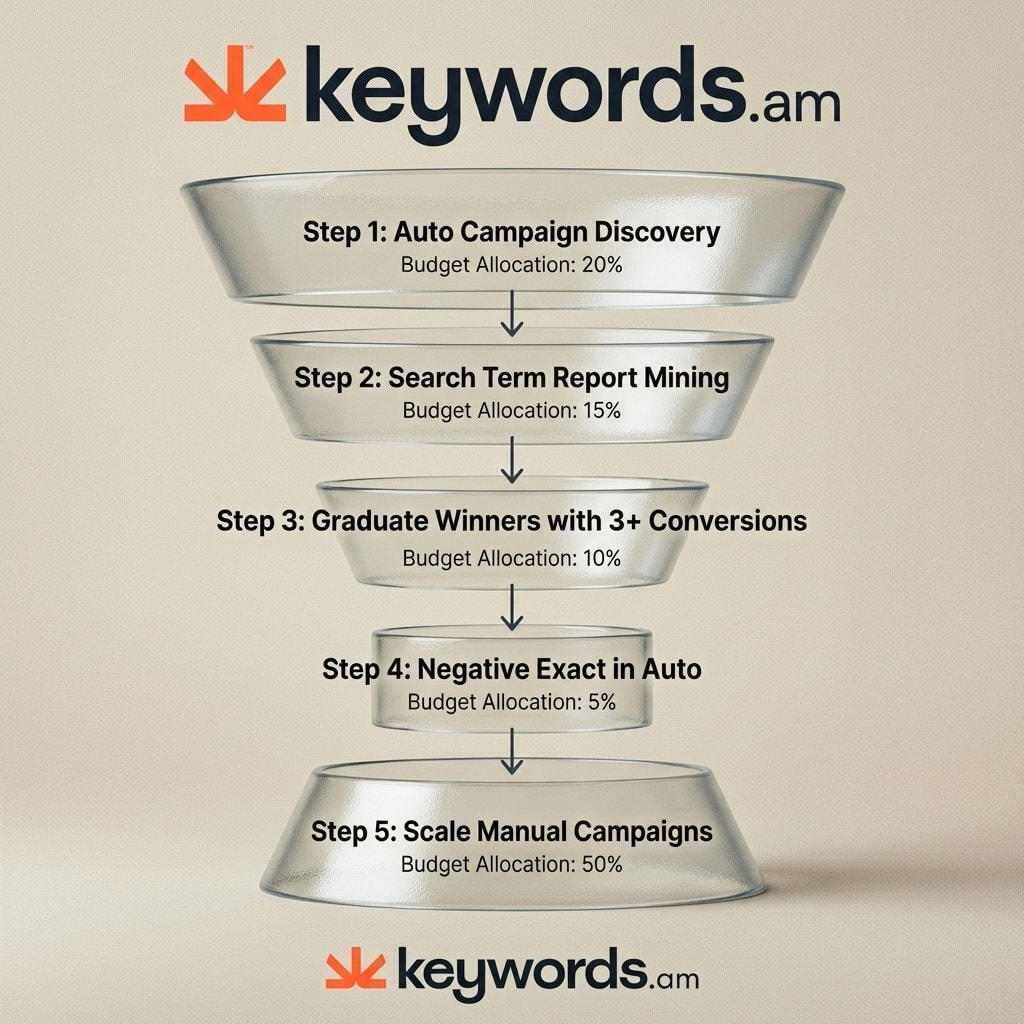
Step 1: Launch a dedicated auto campaign. Turn on all four automatic targeting modes right away. Set a conservative daily budget of $15-$25 for this discovery phase. Name it something clear like “Auto_Discovery_[ASIN]” so the dashboard doesn’t turn into a mess. Keep an eye on it during week one to make sure it’s gathering enough impressions.
Step 2: Mine Search Term Reports every two weeks. Download the report from Campaign Manager and sort by conversions descending. Focus on customer search terms, not targeted keywords. There’s a big difference. The Amazon Search Term Report guide breaks down the exact extraction process.
Step 3: Graduate the winners. Look for search terms with 3+ conversions at target ACOS. Move them directly into a manual exact match campaign. If the target ACOS is 25% and a term has 4 conversions at 22% ACOS, graduate it now. Don’t wait. Waiting leaves profitable terms stuck in an auto campaign where bids can’t be controlled at the keyword level.
Step 4: Negate graduated terms in auto. Add every graduated keyword as a negative exact match in the original auto campaign. This forces auto to keep hunting for new terms instead of bidding against manual. A proper negative keyword strategy seals these budget leaks. Skip this step and CPCs skyrocket as the campaigns fight each other in the auction.
Step 5: Scale manual campaigns. Bump bids on graduated exact match keywords by 10-15%. Add a 20-25% bid modifier for top-of-search placements. Monitor these terms daily and adjust bids based on how they perform in the exact match environment.
The funnel handles keyword discovery and graduation in a repeatable cycle. But which match types should manual campaigns actually deploy?
How should sellers choose match types for SP campaigns?
Use broad match for new product discovery at higher ACOS tolerance, phrase match for mid-funnel intent refinement, and exact match for proven converters where efficiency is the priority.
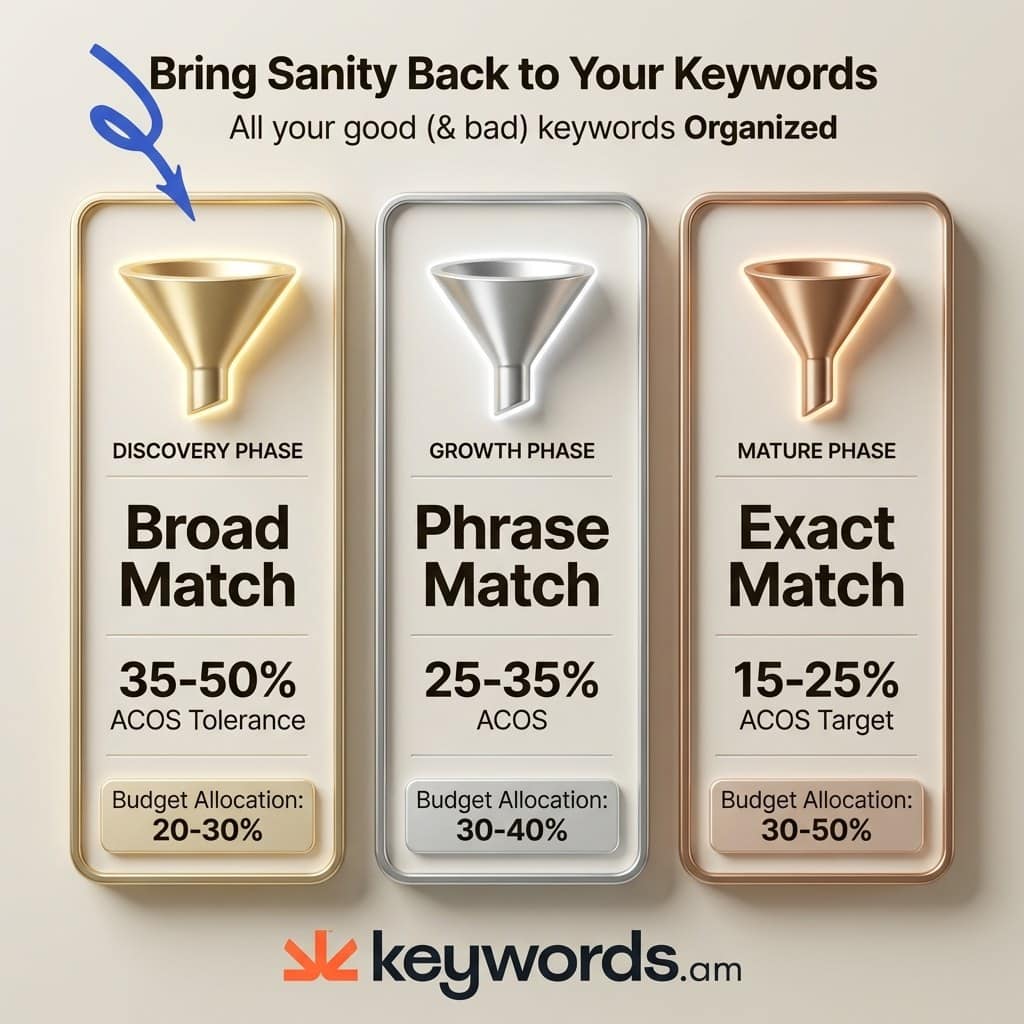
Broad match works best during launch phase and for new ASINs. Accept a 35-50% ACOS during the first 30 days — that’s the cost of data collection. Most sellers underuse broad match and miss valuable discovery opportunities. Leaning too hard on exact match during a launch prevents sellers from learning how customers actually search. Think of broad match as a net: it catches long-tail variations that exact match misses entirely.
Phrase match sits between broad and exact as a graduation step. Use it for keywords with 5-10 clicks and 1-2 conversions — promising but not yet proven. Move from phrase to exact once ACOS drops reliably below 25%. Phrase match secures placements for long-tail queries containing the core root keyword. It prevents ads from showing for irrelevant terms while still allowing slight variations.
Exact match is the final destination for proven keywords. Reserve it for terms with 3+ conversions at target ACOS — these are the profit drivers. One catch: Amazon changed exact match in 2024 to include close variants, so it’s not as laser-focused as the name implies. Run competitive keywords through Amazon keyword difficulty analysis before throwing big bids at them.
Here’s where most sellers get tripped up: budget allocation needs to shift as campaigns mature. The percentages look completely different at each stage.
Lifecycle Phase |
Auto & Broad |
Phrase Match |
Exact Match |
|---|---|---|---|
Launch Phase |
60% |
30% |
10% |
Growth Phase |
30% |
40% |
30% |
Mature Phase |
10% |
20% |
70% |
Match types dictate how broadly campaigns reach. But a deeper variable completely blocks campaigns from showing regardless of the selected match type.
How does TFSD keyword coverage improve SP ad relevance?
Amazon determines SP ad eligibility by scanning listing keyword signals across Title, Features, Search Terms, and Description. Missing a keyword in indexed fields prevents SP placement for that term.
Here’s what most sellers don’t realize: Amazon’s ad relevance engine doesn’t just match bids to queries. Before any auction happens, it checks whether the listing itself contains keyword signals that match the search term. If “stainless steel water bottle” doesn’t appear anywhere in the listing’s indexed fields, no SP ad will show for that query. Doesn’t matter if the bid is $50. Sellers pour money into bid increases on terms they’ll never win because the listing never qualified in the first place.
That’s where the TFSD Framework comes in. It maps keyword coverage across all four listing sections — Title, Features, Search Terms, and Description — and its coverage indicators highlight exactly which high-volume terms are absent from each field. Sellers run an audit, identify the missing terms, and insert them back into the listing. These updated listings immediately qualify for more SP placements. Explore the TFSD Framework to understand this mechanism completely. Filling these gaps is the most impactful action a seller can take to improve ad performance.
Once those listing gaps close, a compound effect kicks in. Complete keyword coverage produces higher ad relevance scores. Higher relevance qualifies the product for more SP placements. Amazon rewards relevant listings with better auction positions and lower CPCs. Lower CPCs generate higher ROAS. It’s a flywheel: the listing feeds the ad engine, and the ad engine feeds the listing with conversion data.
Reverse ASIN lookups reveal which keywords competitors rank for organically. The trick: always verify those keywords exist in the listing before adding them to SP campaigns. Use KPS scoring to prioritize bidding, then group terms with Amazon keyword clustering for clean ad group structure. This keeps the listing and the campaign aligned.
Qualifying for more placements handles the revenue side. Eliminating waste through systematic negative keyword management protects the profit margin.
How does negative keyword layering reduce SP waste?
Negative keyword layering uses campaign-level and ad-group-level negatives combined with the negative exact funnel to prevent auto and manual campaigns from competing, eliminating significant wasted spend.
Two levels of negative keywords exist, and mixing them up causes problems. Campaign-level negatives kill a term across every ad group in the campaign. Ad-group-level negatives are surgical — they block a term in one group while letting it run in others. Competitor brand names? Block those at the campaign level (loyal brand shoppers rarely convert). Product-specific irrelevant terms? That’s an ad-group-level job. Get the level wrong and sellers accidentally choke off traffic that was actually converting.
The negative exact funnel prevents internal competition cold. Every keyword graduated from auto to manual gets added as a negative exact in auto. It’s the most commonly missed step in campaign management, and the consequences are real: without it, auto and manual campaigns cannibalize each other and drive up CPCs. Amazon just charges the higher bid between the two campaigns.
Waste elimination comes down to strict thresholds:
- 20+ clicks, 0 conversions — negate immediately
- 15+ clicks, ACOS above 2x target — negate or slash the bid
Treat these as rules, not suggestions. Don’t let emotions dictate keyword management. The data tells sellers exactly what stays and what goes.
Review negatives strictly every two weeks alongside the Search Term Report review. Build a master negative keyword list for every product category to speed up future campaign launches. Read this Amazon negative keywords deep dive to refine this process further. A well-maintained negative keyword list acts as a protective shield around the ad budget.
With the harvesting funnel, match types, and negative layering in place, sellers can address final edge cases.
Frequently Asked Questions About Amazon Sponsored Products Keyword Strategy
These are the most common questions sellers ask about building and optimizing their Amazon sponsored products keyword strategy to maximize conversions and lower click costs.
Conclusion
A profitable amazon sponsored products keyword strategy isn’t one campaign setting — it’s a system. Treat keyword targeting as isolated from listing optimization and the budget bleeds.
Here’s how the pieces connect: listing optimization dictates ad relevance and eligibility. The keyword harvesting funnel moves terms from discovery into manual profit centers. Match type allocation shifts budget as products mature. Negative keyword layering stops internal cannibalization before it eats into margins.
The one thing to do right now: Open the highest-spend ASIN inside Keywords.am, check the TFSD coverage indicators, and add the missing keywords to the listing before the next Search Term Report review. Start with a free ASIN audit to see which listing gaps are currently holding back SP ad performance.




