

📑 Table of Contents
- What Is an Amazon Keyword Audit (and Why Isn’t a Listing Audit Enough)?
- When Do You Need an Amazon Keyword Audit?
- How Do You Run an Amazon Keyword Audit in 6 Steps?
- How Often Should You Audit Amazon Keywords?
- What Are the Most Common Amazon Keyword Audit Mistakes?
- Frequently Asked Questions About Amazon Keyword Audits
- Conclusion
⚡ TL;DR
- A keyword audit is NOT a listing audit — it isolates and measures keyword coverage across your listing’s text fields only.
- Six-step closed loop: pull footprint → find gaps → score coverage → fix TFSD placement → verify indexing → re-audit.
- Coverage Indicators (green/yellow/red) replace gut feeling with measurable scores.
- TFSD weight hierarchy: Title carries the most indexing weight, then Features, Search Terms, and Description.
- Always verify indexing — changes take 24 hours to 4 days, and skipping this step leaves you blind.
- Audit quarterly for stable niches, monthly for competitive categories, and immediately after rank drops or new competitors.
- Avoid common traps: chasing volume over relevance, duplicating keywords across fields, and treating the audit as a one-time event.
Most “listing audit” guides bury keywords in a checklist between images and pricing. That isn’t an audit — it’s a checkbox.
Without a dedicated Amazon keyword audit, sellers can’t tell whether they’re missing high-volume terms, covering the right fields, or even indexed for the keywords they added. That translates to lost rank, lost revenue, and invisible products.
This guide walks through a six-step keyword audit process — from pulling the current footprint to verifying indexing after fixes. Unlike general listing audits, this process focuses on keywords only, uses measurable coverage scoring, and closes the loop with a re-audit step.
What Is an Amazon Keyword Audit (and Why Isn’t a Listing Audit Enough)?
An Amazon keyword audit evaluates which keywords your listing targets, how well each field covers them, and where gaps exist compared to competitors.
A listing audit examines images, pricing, reviews, A+ content, and keywords. A keyword audit zooms in on keywords only — nothing else.
Feature |
Listing Audit Scope |
Keyword Audit Scope |
|---|---|---|
Focus |
Entire product detail page |
Text fields and backend terms |
Goal |
Conversion rate optimization |
Search visibility and ranking |
Metrics |
Click-through rate, sales velocity |
Keyword footprint, indexing status |
Complexity |
Broad and subjective |
Deep, data-driven, and structural |
Here’s what a thorough keyword audit actually measures:
- Keyword footprint — which terms you currently target
- Field coverage — which TFSD fields contain each keyword
- Gap analysis — what competitors target that you miss
- Indexing status — whether Amazon’s algorithm reads and ranks those terms
Why bother with a separate audit? Because keywords don’t sit still. Amazon adds millions of new products every year. Competitors enter the market. Seasonal shifts change how buyers search. Algorithm updates reshuffle ranking weights. Sit back and watch, and rankings decay.
Treating keywords as a single step in a broader listing audit leaves too much critical data unexamined. A dedicated best Amazon listing audit tools resource can provide broader context, but a targeted keyword process is mandatory. According to the Amazon Seller Central Help — Optimize your product discoverability, search relies heavily on accurate, relevant keyword mapping.
Knowing what a keyword audit measures leads to the next question: timing.
When Do You Need an Amazon Keyword Audit?
Run a keyword audit when organic rank drops, ACoS rises without bid changes, new competitors appear, seasonal shifts approach, or a product launch plateaus.
Declining organic rank on core keywords. You were on page one, now you’re on page three. Something shifted — either the algorithm or a competitor’s strategy. Ignoring this slide means permanent market share loss.
Rising ACoS with stable bids. PPC costs climbing even though bids haven’t changed? Organic keyword coverage has likely eroded. The result: paying for visibility that used to come free, squeezing profit margins.
New competitors entering your niche. A fresh competitor with better keyword coverage can push established listings down fast. Auditing your keywords builds a defense before the damage shows up.
Seasonal shift approaching. Pre-season is the time to audit, not during the rush. Buyers change their search queries around holidays, weather shifts, and annual events. If the listing doesn’t reflect those changes, sales go to competitors who prepared early.
Post-launch plateau after the honeymoon period. That initial algorithmic boost fades. Sales slow, organic rank stalls, and the launch keywords may not match how real buyers actually search. An audit realigns the listing with real-world data so growth continues past the honeymoon.
If any of these five warning signs apply, sellers must gather specific resources before starting the process.
How Do You Run an Amazon Keyword Audit in 6 Steps?
A complete keyword audit follows six steps: pull your keyword footprint, find competitor gaps, score coverage, fix placement with TFSD, verify indexing, and re-audit.
Before starting the process, gather these specific assets:
– Your target ASINs
– A reverse-ASIN tool or Keywords.am’s ASIN Audit feature
– Top three to five competitor ASINs
– Brand Analytics access
– Search Term Report from the last 30 to 60 days
Reviewing an Amazon search term report provides real customer search data to ground the audit in actual buyer behavior rather than hypothetical assumptions.
Step 1 — Pull Your Current Keyword Footprint
This step establishes your baseline metrics. Extract all keywords your ASIN currently covers across the Title, Features, Search Terms, and Description. Use Keywords.am’s ASIN Audit to generate a baseline coverage map, or compile this data manually directly from Seller Central.
The outcome is a complete list of every keyword your listing touches and which field it appears in. This baseline is what you measure improvement against. You can’t optimize what you haven’t mapped. Without this footprint, any subsequent changes amount to blind guessing.
Step 2 — Identify Keyword Gaps With Competitor Analysis
Knowing your own listing is half the picture. Run a reverse-ASIN lookup on your top three competitors. Their data reveals high-volume terms they rank for that your listing misses entirely — that’s the keyword gap. Reverse ASIN lookup explained details how to extract this competitor data efficiently and accurately.
Prioritize these gap keywords by search volume and relevance. High volume but irrelevant terms waste valuable character space. The goal of an amazon keyword gap analysis is finding highly relevant, high-traffic terms your listing ignores. Group these terms strategically using Amazon keyword clustering to organize the gaps before placing them into your listing fields. Proper clustering ensures semantic relevance across the entire listing, signaling authority to the ranking algorithm.
Step 3 — Score Your Keyword Coverage
Data without interpretation is just noise. Score your keyword coverage by mapping which keywords appear in which fields and whether that coverage is actually complete. Tools like Keywords.am use Coverage Indicators. Green indicates full coverage, yellow marks partial coverage, and red flags priority keywords missing from critical fields. Coverage Indicators explained provides a deeper look at this scoring model.
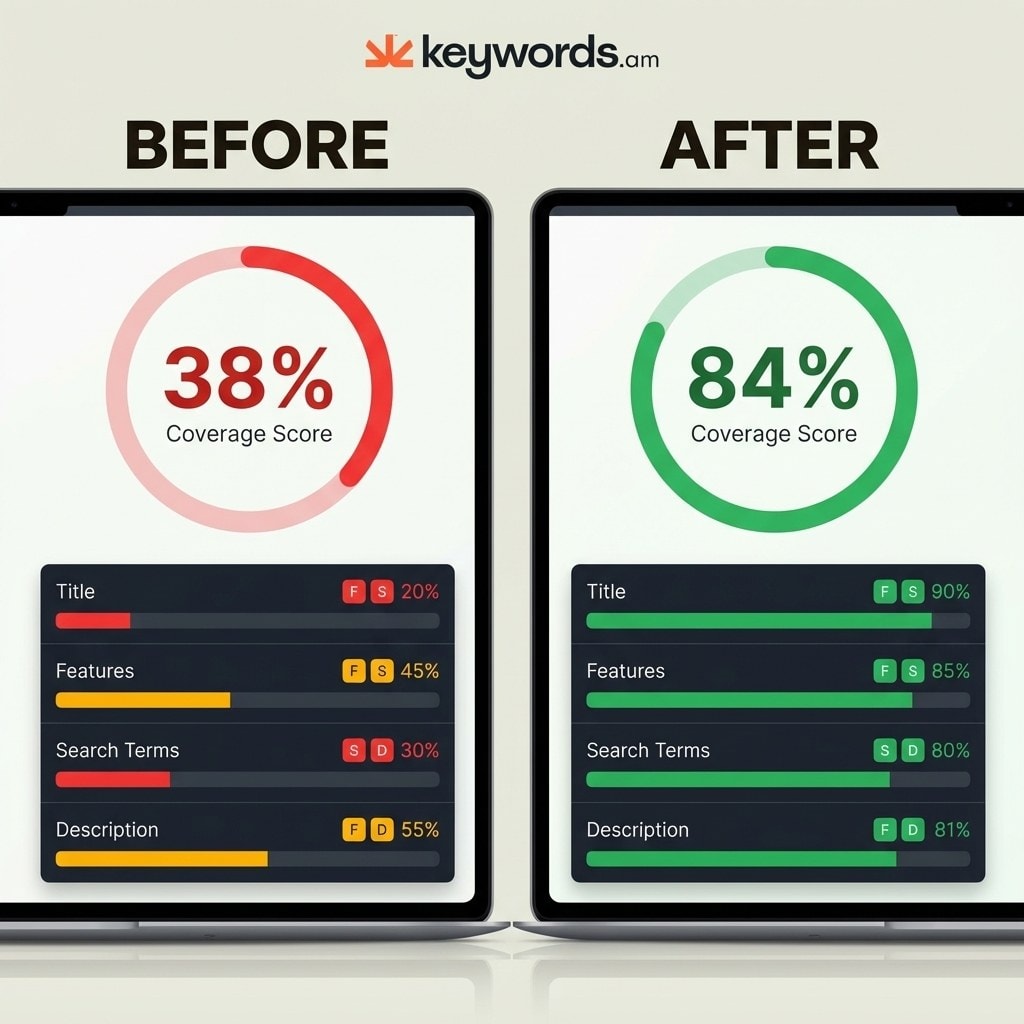
Read the TFSD coverage map to pinpoint under-optimized fields. For example, ASIN B0EXAMPLE might show the Title covering four of twelve priority keywords, the Backend covering six, and Features covering three. This results in a weak coverage score of 38%. Measurable scoring replaces guesswork. Without numbers, sellers rely on intuition — and intuition doesn’t scale across a catalog of 50 SKUs.
Step 4 — Fix the Gaps Using the TFSD Framework
Placement determines ranking success. The TFSD weight hierarchy dictates keyword placement. The Title carries the most indexing weight. Features follow behind. Search Terms hold the third tier. The Description carries the least weight. This TFSD Framework guide maps the exact weighting structure based on how the ranking algorithm processes text fields. Understanding this Amazon A10 Algorithm patent/documentation hierarchy is critical for maximizing organic visibility.
- Title: Place the absolute highest-priority keywords here. This field demands the highest relevance.
- Features: Insert secondary, highly relevant supporting terms across the five bullet points.
- Search Terms: Drop remaining gap keywords into the backend.
- Description: Use remaining long-tail variations naturally within the body text.
Avoid keyword stuffing at all costs. Every field has strict byte limits and readability directly impacts conversion rates. Review Amazon keyword stuffing guidelines to prevent penalization. Maximize the backend fields effectively using strategies from the Amazon backend keywords guide. This structural approach defines a proper amazon listing keyword audit.

Step 5 — Verify Indexing After Changes
Hitting publish doesn’t mean you’re done. After changes go live, confirm Amazon actually indexed the new keywords. Indexing takes anywhere from 24 hours to four days. Don’t assume it happens automatically.
Check indexing manually by searching the exact keyword on Amazon and verifying your ASIN appears in the results. If necessary, type the ASIN alongside the keyword in the search bar. If indexing fails, you must troubleshoot the listing immediately. Reference the Amazon keyword indexing guide for specific failure resolutions. Skipping this verification step leaves you blind to potential backend errors or algorithmic suppression.
Step 6 — Re-Audit to Measure Improvement
One audit isn’t enough — it’s a loop. Run the ASIN audit again one to two weeks after changes take effect and compare scores directly.
For example, that same ASIN B0EXAMPLE might see its coverage score improve from 38% to 84%. Red indicators might drop from eight down to one. Track rank movement on priority keywords closely over the next two to four weeks. This closed-loop system separates a professional audit from a basic, one-time cleanup. No other audit method enforces this mandatory verification step.
ASIN B0EXAMPLE Field |
Before Audit Coverage |
After Audit Coverage |
Status Change |
|---|---|---|---|
Title |
4 of 12 keywords |
10 of 12 keywords |
Poor to Excellent |
Features |
3 of 15 keywords |
12 of 15 keywords |
Poor to Good |
Search Terms |
6 of 20 keywords |
18 of 20 keywords |
Fair to Excellent |
Description |
2 of 10 keywords |
8 of 10 keywords |
Poor to Good |
Total Score |
38% |
84% |
Significant Improvement |
How Often Should You Audit Amazon Keywords?
Audit keywords quarterly as a baseline, monthly for competitive niches, and immediately after rank drops, new competitors, seasonal events, or listing content changes.
A single audit fixes today’s problems. Continuous auditing protects next quarter’s revenue.
Situation |
Audit Frequency |
|---|---|
Stable niche, established listing |
Quarterly |
Competitive or fast-moving niche |
Monthly |
Rank drop on core keywords |
Immediately |
New competitor enters top 10 |
Within 1 week |
Seasonal event approaching |
4-6 weeks before peak |
After any listing content change |
1-2 weeks after change |
Audit frequency should increase as niche competition grows. In saturated markets, competitors tweak their listings constantly — your coverage footprint must adapt. Knowing the schedule helps, but avoiding common implementation mistakes matters just as much.
What Are the Most Common Amazon Keyword Audit Mistakes?
The biggest keyword audit mistakes are chasing volume over relevance, duplicating keywords across TFSD fields, ignoring backend search terms, and skipping indexing verification.
Chasing volume over relevance wastes character space. A keyword with 50,000 monthly searches means nothing if it doesn’t match your product. Prioritize relevance before volume. Irrelevant traffic tanks conversion rates, which signals poor performance to the ranking algorithm.
Duplicating keywords across TFSD fields destroys potential coverage. Repeating the same keyword in Title, Features, and Backend wastes bytes. Each field should add new coverage. Amazon keyword cannibalization explains the negative impacts of internal duplication.
Ignoring backend search terms leaves money on the table. Many sellers focus on Title and Bullets but leave Backend Search Terms empty or stuffed with irrelevant terms. Those 250 bytes are prime real estate for long-tail variations and misspellings that won’t fit in customer-facing copy.
Changing titles too frequently triggers algorithm penalties. Amazon may suppress listings that change titles repeatedly in a short period. Batch all major edits together and deploy them simultaneously. Constant tinkering prevents the ranking algorithm from establishing a stable baseline for your product.
Not verifying indexing after edits renders the entire audit useless. Making strategic changes without confirming Amazon indexed them means the audit cycle remains incomplete. A keyword placed in a backend field only holds value if the search engine actively reads and indexes it.
Treating the audit as a one-time event guarantees long-term failure. Keywords, competitors, and buyer search behaviors change constantly. A single audit provides a temporary snapshot. A rigorous re-audit process builds a sustainable system. An amazon seo audit requires continuous refinement to defend high-value organic placements against aggressive market forces.
Frequently Asked Questions About Amazon Keyword Audits
These are the most common questions sellers ask about running a keyword audit on Amazon.
Conclusion
A keyword audit isn’t the same as a listing audit. It requires a highly focused, measurable process to evaluate text placement and search visibility. The six-step loop of pulling data, finding gaps, scoring coverage, fixing placement, verifying indexing, and re-auditing turns random optimization into a repeatable system.
Coverage scoring hands sellers a concrete number instead of a gut feeling. Regular audits prevent the slow ranking decay that competitive shifts and seasonal changes cause. This isn’t optional maintenance — it’s the difference between guessing and managing organic visibility.
Pull up one critical ASIN and run the first step right now. Extract your current keyword footprint to see exactly where your coverage stands. Run a complete analysis using the Keywords.am ASIN Audit tool to generate a baseline coverage map and start closing competitive gaps today.




