

Table of Contents
- What are Amazon negative keywords and how do the two match types work?
- How do you find amazon negative keywords using the Search Term Report?
- How do you build a proactive amazon negative keyword list before launching campaigns?
- When should you use campaign-level vs. ad-group-level negative keywords?
- What happens when you accidentally negate a profitable keyword?
- How do amazon negative keywords work across Sponsored Products, Brands, and Display?
- Frequently Asked Questions About Amazon Negative Keywords
- Conclusion
TL;DR
- Amazon negative keywords block specific search queries, preventing wasted ad spend on irrelevant clicks.
- The proactive method eliminates waste by building negative lists using keyword research data before campaigns launch.
- The reactive method relies on finding failed search terms in the Search Term Report after money is already spent.
- Negative exact limits one specific term, while negative phrase blocks any search containing that phrase.
- Campaign-level negatives handle brand-wide exclusions; ad-group-level negatives handle internal traffic routing.
- Accidental negates require immediate archiving and 7-14 days of patience while the algorithm restores ranking.
- Sponsored Display requires ASIN exclusions rather than keyword-level negatives.
You spent $847 last month on clicks from people searching for products you do not sell. Here is how to stop that before it starts. Amazon’s broad match and auto-targeting algorithms push ads toward marginally related searches. Sellers bleed ad budgets by letting these systems guess shopper intent. They discover the waste only after the damage is done.
Amazon PPC sellers typically waste 20% to 40% of their ad budget on irrelevant search terms. Quick math: if your target CPA is $15 and ten irrelevant amazon negative keywords each burn through $16 without a single conversion, that’s $160 gone in a month. Scale that across your whole catalog and the waste adds up fast. Most guides teach a reactive approach, telling sellers to wait for bad data and fix it later. This guarantees you always pay for mistakes first.
The proactive negative keyword method flips this model. You build exclusion lists using keyword research data before campaigns launch. This strategy eliminates wasted spend at the source. Combine this proactive foundation with standard reactive maintenance for maximum budget efficiency.
What are Amazon negative keywords and how do the two match types work?
Amazon negative keywords prevent your ads from showing for specific search terms. Negative exact blocks one specific term; negative phrase blocks any search containing that phrase.
Amazon gives you two match types for excluding traffic, and picking the wrong one is where most sellers trip up. Negative exact is the scalpel. It blocks only that one specific search term, nothing else. You get up to 10 words per negative exact keyword. So negative exact “garlic powder” stops only the search “garlic powder.” Someone searching “organic garlic powder” or “garlic powder bulk” still sees your ad.
Negative phrase works more like a net. It catches any search query that contains your phrase anywhere in it, and you’re limited to four words. Set negative phrase “garlic powder” and Amazon blocks “organic garlic powder,” “garlic powder bulk,” and every other query with those two words together. Doesn’t matter if the phrase sits at the start, middle, or end of what the shopper typed. That’s different from how Google Ads negative keywords work, where ordering rules are stricter.
Good Amazon PPC campaign structure depends on using these match types deliberately. You can add up to 10,000 amazon negative keywords per campaign and another 10,000 per ad group, so there’s no excuse for running lean on exclusions.
Feature |
Negative Exact |
Negative Phrase |
|---|---|---|
Blocks |
Only that exact term |
Any query containing the phrase |
Max words |
10 words |
4 words |
Precision |
High (surgical) |
Broad (wider net) |
Risk level |
Low (blocks one term) |
Higher (may block relevant terms) |
Best for |
Specific irrelevant terms you have confirmed |
Categories of irrelevant traffic |
Now that you understand the two match types, how do you actually find the terms worth negating?
How do you find amazon negative keywords using the Search Term Report?
Download your Search Term Report from Seller Central, filter by high spend with zero conversions, and negate terms that have spent at least 1x your target CPA without converting.
The traditional reactive method relies on historical data from active campaigns. You wait for Amazon to spend the budget, analyze the costly failures, and plug the leaks. Navigate to Campaign Manager in Seller Central. Go to Measurement & Reporting, select the Search Term Report, and download the data for the last 30 to 60 days. Open the file in Excel and sort by spend in descending order.
Look for statistical significance before negating. Do not negate a term after just two clicks. You need a minimum of 20 to 30 clicks to confirm a keyword is a loser. Alternatively, use a spend threshold equal to 1x your Target CPA. If your target CPA is $15, any term spending $16 with zero conversions qualifies for immediate negation.
You’ll spot the same offenders again and again. Queries with “free,” “recipe,” or “how to” almost never convert for physical products. Competitor brand names? Usually terrible conversion rates. And shoppers hunting for materials, sizes, or colors you don’t carry will click your ad and bounce without buying. Someone searching “wood cutting board” isn’t buying your plastic one.
Amazon PPC optimization demands checking these reports on a schedule. But here’s the problem with the reactive method: you always pay tuition before learning the lesson. What if you could build the amazon negative keyword list before spending a single dollar?
How do you build a proactive amazon negative keyword list before launching campaigns?
Build a pre-launch negative keyword list using three sources: semantic analysis of your target keywords, category-specific irrelevant terms, and competitor brand term decisions.
The proactive method prevents budget waste on day one. You use existing market data to anticipate irrelevant matches. The first source is semantic analysis of your primary target keywords. Type core keywords into a keyword research tool to see what related terms Amazon’s auto-targeting will trigger. If you sell a stainless steel garlic press, semantic associations include “garlic powder,” “garlic supplement,” “garlic bread recipe,” and “garlic cloves.” These are irrelevant to the actual product.
Keyword research tools like Keywords.am or Seller Central Brand Analytics surface these semantic associations before you spend. You grab these terms and add them to the negative list before launch.
The second source involves category-specific irrelevant terms. Every Amazon product category attracts predictable irrelevant matches. You can build a starter amazon negative keyword list for any new product based on its category.
- Electronics: repair, manual, parts, fixed, broken, replacement cable
- Supplements: side effects, recall, ingredients list, fda warning, overdose
- Beauty: dupe, diy, homemade, natural recipe, alternative
- Home Goods: rental, wholesale, bulk commercial, industrial supplier
The third source focuses on competitor brand term decisions. Decide upfront whether to target or negate competitor brand names. Check historical conversion rates on competitor terms using Amazon Brand Analytics search query performance data. If the conversion rate is below 5% on competitor traffic, negate those brands. If a competitor term proves profitable, route it to a dedicated campaign.
A strong Amazon keyword research methodology powers this entire process. With your amazon negative keywords list built, the next question is where to apply them: campaign level or ad group level?

When should you use campaign-level vs. ad-group-level negative keywords?
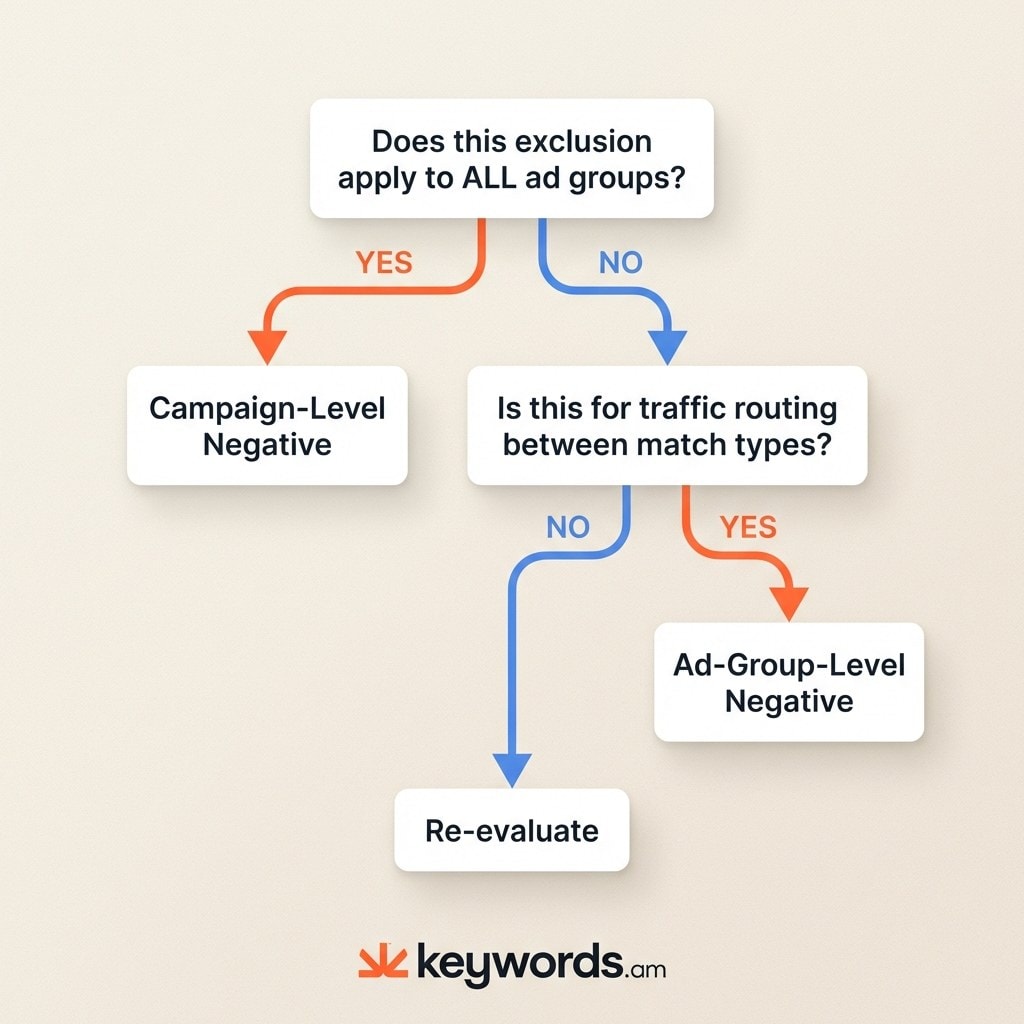
Use campaign-level negatives for brand-wide exclusions that apply everywhere. Use ad-group-level negatives to route traffic between ad groups and prevent cannibalization within a campaign.
Where you place negatives matters as much as which terms you choose. Campaign-level negatives are your blanket ban: they block a term across every ad group in that campaign. These are for competitor brands you’ll never target, product categories that don’t fit, or terms tied to products you don’t sell. Sell men’s shoes? Add “women’s” as a campaign-level negative phrase on day one.
Ad-group-level negatives serve a different structural purpose. Use them for routing traffic between match types within a single campaign. Imagine an exact-match keyword converting well in its own ad group. You want to bid on that specific term. However, the broad-match ad group will also try to bid on that same term, cannibalizing traffic and ruining exact bid control. Negate the exact-match keywords as negative exact inside the broad-match ad group.
Here’s the quick test. Ask yourself: does this exclusion apply to ALL ad groups in the campaign? Then it’s campaign-level. Is it only about routing traffic between specific ad groups? That’s ad-group-level.
Scenario |
Level |
Why |
|---|---|---|
Competitor brand you never want to target |
Campaign |
Applies to all ad groups |
Irrelevant product category |
Campaign |
No ad group needs this traffic |
Exact match term in your broad match ad group |
Ad Group |
Prevents cannibalization |
Keyword that converts in one ad group but not another |
Ad Group |
Keeps traffic flowing to the winning group |
Applying amazon negative keywords at the right level maintains your desired Amazon PPC campaign structure. Once negative lists are running, the biggest risk is not missing a term. It is accidentally negating the wrong profitable keyword.
What happens when you accidentally negate a profitable keyword?
Accidental negation causes sudden drops in impressions and sales. Fix it by finding and archiving the negative keyword in Seller Central, then monitoring recovery over 7-14 days.
Accidental negates happen to experienced Amazon sellers regularly. You add a negative phrase to block a bad search term, but it cuts off your highest-converting keyword. The impact hits fast. You see a sudden drop in daily impressions and sales on a specific product. Check if this drop correlates with the date you last added negative keywords.
Fixing the problem requires navigating the Seller Central interface. Amazon does not allow you to delete negative keywords from campaigns. You can only archive them. Go to the affected campaign or ad group. Find the negative keyword section, locate the offending term, and change its status to “Archived.” Archiving removes the restriction.
Do not expect instant results. After archiving the accidental negative, allow 7 to 14 days for impressions and conversions to return to normal. Amazon’s algorithm needs time to re-index the ad and restore ranking for that term. Many sellers panic during this period and change bids, which only confuses the algorithm further.
Prevention beats recovery every time. When you’re not sure, go with negative exact. It’s the safer bet. Negative phrase catches more terms, which also means it catches more accidents. The best Amazon PPC tools will warn you before you add a dangerous broad negative. And here’s something most guides miss: poor listing keyword coverage forces heavier reliance on amazon negative keywords because auto-targeting makes worse guesses when your listing doesn’t contain enough relevant terms.
How do amazon negative keywords work across Sponsored Products, Brands, and Display?
Sponsored Products and Sponsored Brands let you add keyword-level negatives. Sponsored Display doesn’t, and that trips up a lot of sellers.
Here’s how each ad type handles exclusions. Sponsored Products gives you the full toolkit: negative exact, negative phrase, at both campaign and ad group levels. Most of your negation work happens here.
Sponsored Brands functions similarly to Sponsored Products but adds another layer. It supports keyword-level negatives in keyword-targeted campaigns. In addition to standard keywords, it allows product-level targeting exclusions. You can exclude specific competitor ASINs from product targeting campaigns if those competitors convert poorly.
Sponsored Display is the odd one out. No keyword-level negatives at all. Instead, you exclude specific ASINs or broad categories through product targeting exclusions. If you’ve ever tried uploading a keyword negative list to an SD campaign and wondered why it got rejected, now you know why.
Your overall Amazon PPC keyword strategy must adapt to these differences. Applying the right exclusion method to the right ad type prevents wasted spend across your entire account.
Frequently Asked Questions About Amazon Negative Keywords
These are the most common questions sellers ask about amazon negative keywords and PPC budget optimization.
Conclusion
The proactive method saves more money than reactive negation because it prevents waste before it starts. By analyzing semantic associations and category patterns using keyword research data, you stop paying for clicks that never convert on day one.
- The proactive method prevents waste before it starts, saving more than reactive negation alone
- Default to negative exact over negative phrase when uncertain to minimize accidental keyword blocking
- Use campaign-level negatives for broad exclusions and ad-group-level for internal traffic routing
- Accidental negatives happen; verify the drop date, archive the keyword, and wait for algorithmic recovery
- Negative keywords function differently across ad types; Sponsored Display requires ASIN exclusions instead of keyword lists
Take action today. Download your last 60 days of Search Term Reports from Seller Central. Sort by spend descending. Identify the top 10 terms with spend above your target CPA and zero conversions. Add those as negative exact keywords. Before your next campaign launch, build a proactive amazon negative keyword list using keyword research data. Proactive negative keyword research starts with understanding semantic associations, and tools like Keywords.am surface those associations before you spend.




