PPC
The best Amazon Sponsored Display targeting strategy (data-driven guide)
Amazon sponsored display targeting: use reverse ASIN data and listing audits to build offensive and defensive SD campaigns that don't burn budget.

Amazon sponsored display targeting is the only Amazon ad format that can reach shoppers off Amazon: on third-party sites, apps, and Twitch. Most sellers set up these campaigns with no research behind their target choices, picking competitor ASINs by gut feel or dumping budget into broad categories.
That guesswork gets expensive. SD cost-per-click averages roughly $0.80 to $1.60 (as of early 2026), and the wrong targets convert nowhere near what tighter ones do.
This guide covers the keyword-to-SD pipeline: how to use reverse ASIN data, listing audits, and intent scoring to build SD targeting lists that actually convert. It’s built for sellers who already run Sponsored Products and want SD to earn its slot in the mix rather than drain it.
What is Amazon Sponsored Display targeting and how does it differ from SP and SB?
Amazon sponsored display targeting uses contextual signals (ASINs, categories) and audience segments (remarketing, in-market) instead of keywords, reaching shoppers both on and off Amazon.
Sponsored Products targets keywords on search results. Sponsored Brands targets keywords with top-of-search brand placements. Sponsored Display targets ASINs, categories, and audiences with no keyword bidding at all. Search-based tactics don’t transfer cleanly to display environments, which is why sellers who copy SP logic into SD tend to overspend.
SD placements span product detail pages, search results, the Amazon home page, Twitch, and third-party sites through Amazon Publisher Services. That off-Amazon reach is what makes SD unique. For search-based tactics, see the Amazon PPC optimization and Amazon PPC campaign structure guides.
SD offers both vCPM (viewable cost per thousand impressions) and CPC bidding. As of 2025, the minimum CPC is $0.02 and the daily budget floor is $1. Current specs live on the Amazon Ads Sponsored Display page.
| Feature | Sponsored Products | Sponsored Brands | Sponsored Display |
|---|---|---|---|
| Targeting | Keywords, ASINs | Keywords, categories | ASINs, categories, audiences |
| Placements | Search, product pages | Top of search, brand store | On and off Amazon |
| Bidding | CPC only | CPC only | CPC or vCPM |
| Funnel stage | Bottom | Mid | Full funnel |
| Typical CPC (as of 2025) | $0.50 to $1.20 | $0.70 to $1.50 | $0.80 to $1.60 |
SD doesn’t use keywords, so the whole game becomes choosing the right ASINs and audiences.
Why do most Sponsored Display campaigns waste budget?
Most SD campaigns fail because sellers pick competitor ASINs by feel, conquesting strong listings that convert visitors away from the ad instead of toward it.
The big-competitor trap
Sellers naturally target the market leaders: ASINs with 15,000 reviews, premium A+ content, and high conversion rates. Those are the hardest listings to conquest. A shopper who clicks your ad on that page tends to bounce right back to the stronger listing because the competitor’s social proof works against you.
Broad category targeting
Selecting a full “Dog Treats” category with no refinement means paying for clicks from every shopper in the aisle, from organic training rewards to bulk rawhide. Without price, star rating, or Prime filters, premium products end up in front of budget shoppers who won’t convert.
No research pipeline
The gap between “I want to run SD” and “here are my targets” is where most sellers get stuck. There’s no system connecting product research to targeting decisions. A deeper framework sits in Amazon competitor analysis.
The fix isn’t more budget. It’s a pipeline connecting keyword intelligence to targeting decisions.
How do you build an SD targeting list using keyword data?
Build SD targeting lists by running reverse ASIN lookups to find keyword-overlap competitors, then auditing those listings to spot weak targets worth conquesting.
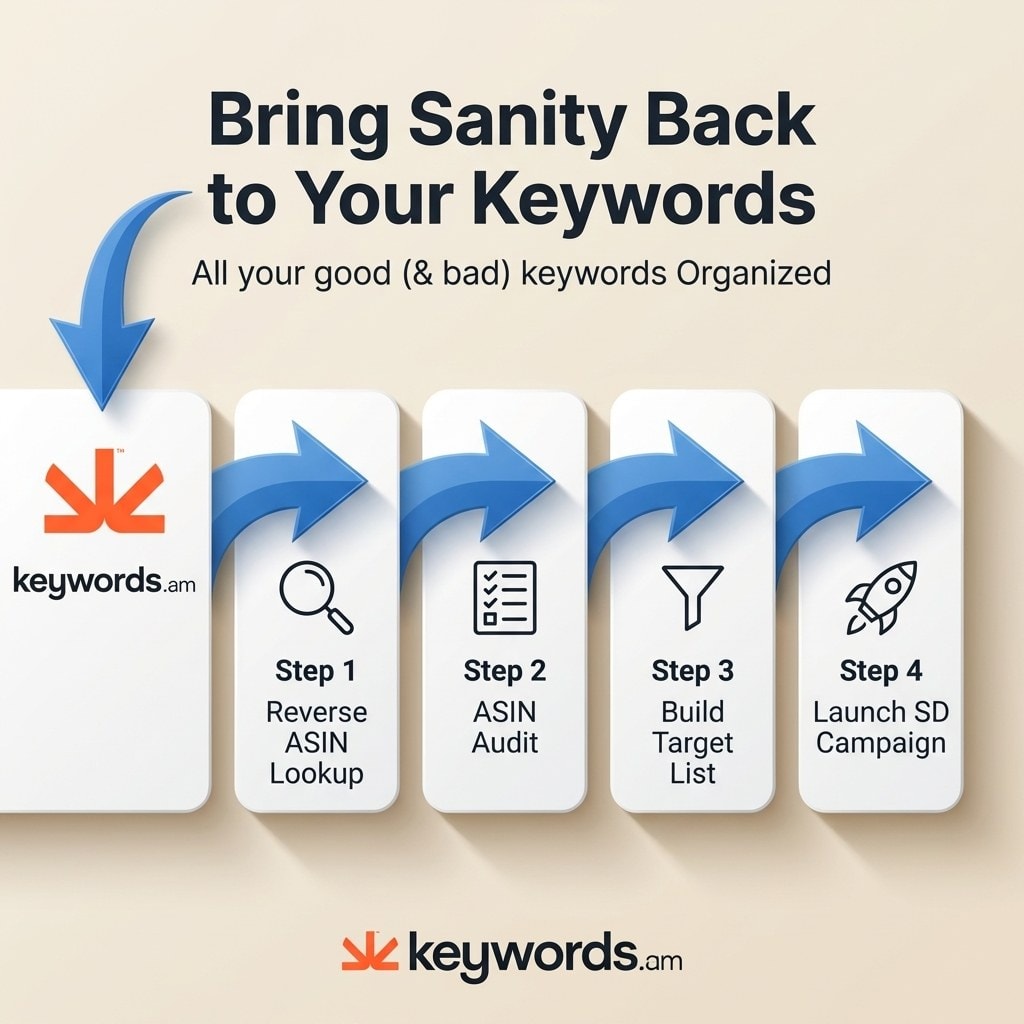
Step 1: Identify competitors via keyword overlap
Run reverse ASIN searches on the top-ranking ASINs for your priority keywords. Sellers sharing 60% or more keyword overlap are strong SD candidates because they’re pulling the same shoppers. Selling organic dog treats? A reverse ASIN pass might surface 8 to 10 competitors sharing the same keyword pool. Keywords.am’s reverse ASIN lookup surfaces shared keyword profiles between ASINs in one report instead of manual scraping.
Step 2: Audit competitor listing quality
Run a listing audit on each competitor to find the weak ones. Look for poor titles, missing backend keywords, thin bullets, and no A+ content. Weak listings mean shoppers on those pages are already dissatisfied, so a conquest ad has room to convert. The Amazon listing optimization guide walks through what a weak listing looks like in detail.
Step 3: Build the targeting list
Split targets into two groups:
- Offensive: weak competitor ASINs identified through the audit.
- Defensive: your own ASINs and close substitutes.
Prioritize the weakest listings with the highest keyword overlap. From the dog treats example, 10 initial competitors might filter down to four vulnerable targets worth funding.
Step 4: Mine search term reports for ASIN targets
Pull your Sponsored Products search term reports and filter for entries starting with “b0”. Those are ASINs Amazon already associates with your product algorithmically. Audit them and add the qualified ones to your SD list. More on this method in reverse ASIN lookup explained and the keyword research methodology.
ASIN targeting handles individual products. Category targeting handles broader reach, but only with the right filters.
How should sellers set up contextual and audience targeting campaigns?
Set up contextual campaigns for ASIN and category conquest, then layer audience campaigns for remarketing and in-market reach with lookback windows matched to purchase cycles.
Contextual targeting: ASIN level
Use the targeting list from Step 3. Create separate ad groups for offensive competitor ASINs and defensive own-ASINs. Defensive targeting means running SD on your own detail pages to block competitors from conquesting you. Occupying your own ad inventory keeps competitor ads out.
Contextual targeting: category level
Narrow every category with refinement filters: specific brands, price ranges, minimum star ratings (3+), and Prime eligibility. Without filters, category targeting is essentially throwing spend at the wall.
Audience targeting: views remarketing
Target shoppers who viewed your listing or similar products within a lookback window. Shorter windows mean higher intent:
- 7 days: impulse products (snacks, small accessories under $20)
- 14 to 30 days: considered purchases (supplements, tools, mid-range electronics)
- 60 to 90 days: high-ticket items (furniture, premium electronics)
Audience targeting: purchases remarketing
Target past buyers for replenishment and cross-sell. A 365-day lookback is standard for consumables. This is usually the highest-ROAS segment across Amazon advertising.
Amazon Audiences
In-Market, Lifestyle, Interests, and Life Events segments offer broader reach for awareness. In-Market tends to perform best because those shoppers are actively browsing. Keep tight daily caps on Lifestyle segments until conversion data confirms they earn the spend.
How should you structure SD campaigns and allocate budget?
Structure SD into offensive and defensive groups with a 60/30/10 budget split across high-confidence targets, testing targets, and audience campaigns.
Offensive campaigns target competitor ASINs and refined categories. Defensive campaigns target your own ASINs to block conquest on your detail pages. Keeping them separate keeps performance data clean. The Amazon PPC campaign structure guide covers the organizing principles.
Use CPC for contextual targeting (conversion goal). Use vCPM for audience targeting (awareness and remarketing). Start contextual bids at $0.50 to $0.80 and adjust based on placement data.
| Segment | Budget % | Targeting type | Goal | Starting bid (as of 2025) |
|---|---|---|---|---|
| High-confidence ASINs | 60% | Contextual (ASIN) | Conquest | $0.50 to $0.80 CPC |
| Category and testing | 30% | Contextual (category) | Discovery | $0.30 to $0.60 CPC |
| Audience remarketing | 10% | Views/Purchases | Retention | $2 to $5 vCPM |
Amazon’s SD Matched Target Report shows which ASINs your ads appeared against. Review it weekly, negate poor placements, and raise bids on converting targets. SD reporting is less granular than SP, so the Matched Target Report is the closest equivalent to a search term report. Track ACOS and TACOS with the Amazon ACOS and Amazon TACOS guides.
How does Sponsored Display fit a full-funnel Amazon PPC strategy?
Sponsored Display completes a full-funnel PPC strategy by adding retargeting and off-Amazon reach to SP’s purchase-intent targeting and SB’s brand awareness placements.
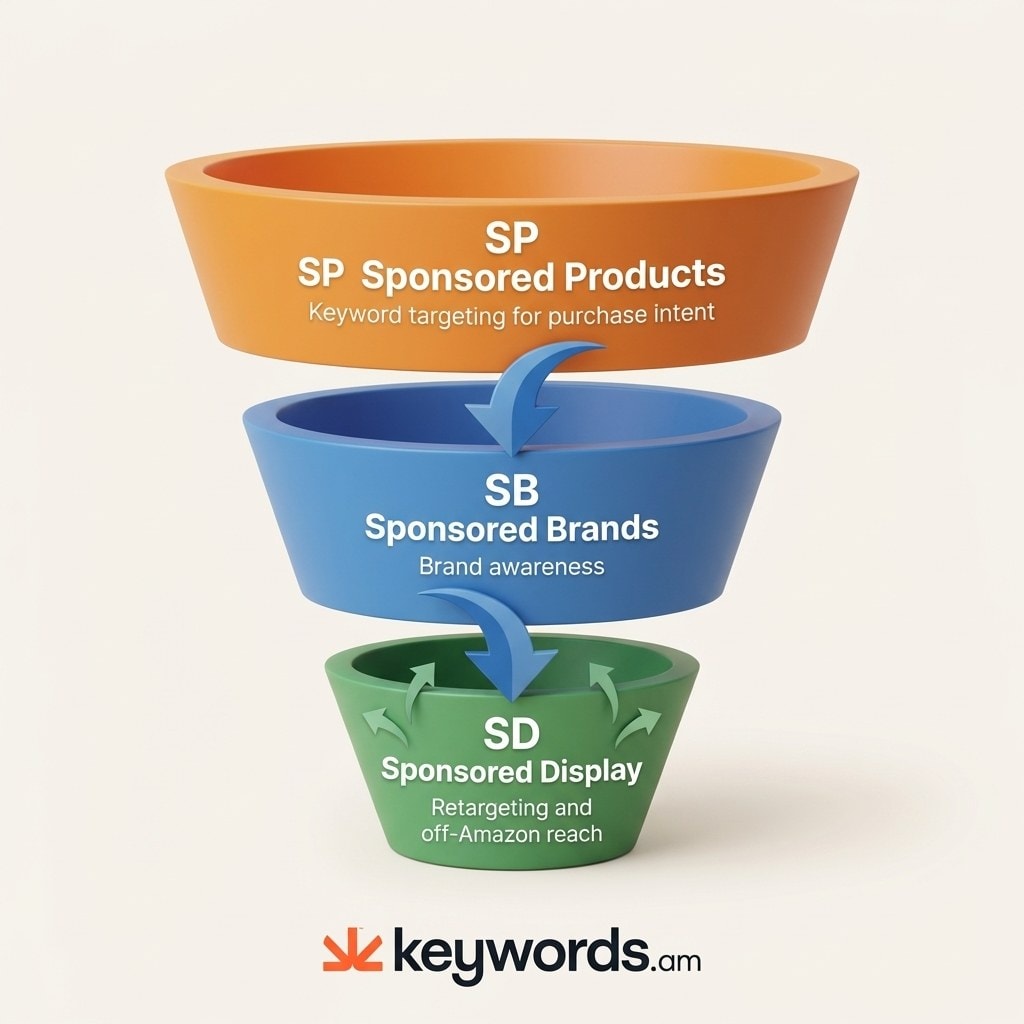
Sponsored Products handles the bottom of the funnel. Keyword-targeted search ads capture shoppers actively looking for specific items, at the highest conversion rates and the most competitive bids. SP owns the final click before purchase.
Sponsored Brands handles the middle. Headline ads and product collections build awareness, funnel qualified traffic to a brand store, and introduce a product line to new audiences. Brand Registry unlocks these; see Amazon Brand Registry.
Sponsored Display completes the funnel. Retargeting brings back visitors who didn’t convert. Conquest captures competitor shoppers on detail pages. Off-Amazon placements extend reach beyond Amazon’s walls. SD is the only ad type designed to re-engage shoppers after they leave the site.
A reasonable starting split is 60% SP, 25% SB, 15% SD. As SD data matures over 2 to 4 weeks, shift budget toward high-performing audience segments. And remember: SD auto-generates ad creative from your listing (title, main image, star rating, price, deal badges), so an optimized listing produces better SD ads without touching ad settings. The TFSD framework shows how listing quality feeds ad creative quality directly.
Frequently Asked Questions About Amazon Sponsored Display Targeting
Can you use keywords in Sponsored Display campaigns?
No. Sponsored Display uses contextual targeting (ASINs, categories) and audience targeting (remarketing, in-market segments), not keyword bidding. Keyword research still informs which ASINs and categories to target, but there’s no keyword field in the campaign builder itself.
What is the difference between Sponsored Display and Amazon DSP?
SD is self-service with a $1 daily minimum and is open to any brand-registered seller. Amazon DSP requires a much larger minimum spend (historically around $35,000, though managed thresholds vary) and adds programmatic buying, video, and cross-device targeting. SD is the accessible entry point; DSP suits larger brands or agency-managed accounts.
What is a good ACOS for Sponsored Display campaigns?
ACOS varies by targeting type. Contextual ASIN targeting typically runs 25-40% ACOS, while audience remarketing often lands closer to 15-25% because those shoppers already engaged with the brand. Compare SD ACOS against your break-even, not against SP benchmarks.
What is the minimum budget for Sponsored Display?
Amazon requires a $1 daily minimum and a $0.02 minimum CPC bid (as of 2025). Most sellers start at $10 to $25 per day per campaign so they gather enough clicks to make optimization decisions within two weeks.
How long before SD campaigns show results?
Plan for 2 to 4 weeks before optimization decisions become reliable. Audience remarketing usually converts faster than contextual conquest because those shoppers already showed intent. Layer in negative ASINs as data comes in (see Amazon negative keywords) to speed up the cleanup.
Conclusion
Amazon sponsored display targeting works when research drives the choices. Random ASIN selection and unfiltered category targeting are the two biggest drains in SD.
- A data pipeline from keyword research to targeting beats guesswork every time.
- Auditing competitor listings before spending identifies which ASINs are actually worth conquesting.
- Defensive campaigns on your own ASINs protect against being conquested.
- The 60/30/10 split keeps testing budget contained while high-confidence targets carry the volume.
- SD completes the full-funnel picture alongside SP and SB.
Start this week: run reverse ASIN lookups on five top competitors, audit their listings for weak spots, and build an initial SD targeting list. Try the free Amazon keyword tool to pull that first competitor set, or sign up for a yearly plan to run the full reverse ASIN and audit workflow on repeat.